What’s actually slowing this PC down?
Pick the symptom - the matching free tool is one click away.
You can make a small desk work by planning around the player’s position, not the gear: measure the usable surface and legroom, set the monitor directly ahead at a readable distance, then fit the keyboard, mouse, and chair around that position. Make changes one at a time and check the setup during actual play.
Measure the space before arranging or buying anything
Measure the desk’s usable width and depth, not just its outside dimensions. Account for the monitor stand, speakers, a console or PC, and the area your mouse needs to move. Also check the open space beneath the desk and the room needed for your chair to approach it.
These measurements reveal whether the main constraint is desktop depth, surface width, or legroom. Keep frequently used controls within easy reach, and move items that do not need to be on the active playing surface. Avoid a layout that makes you reach continuously or turn your head to see a screen.
Place the monitor for clear, straightforward viewing
Put the monitor directly in front of you, then adjust its height so the top is at or slightly below eye level. OSHA’s general computer-workstation guidance recommends a preferred viewing distance of 20 to 40 inches (about 50 to 100 cm) from the eyes to the front of the screen. It also recommends positioning the screen center 15 to 20 degrees below horizontal eye level and keeping the monitor no more than 35 degrees to either side. These are workstation recommendations, not a universal gaming-monitor prescription; prioritize a readable image that does not make you lean forward.
#1 Best Overall
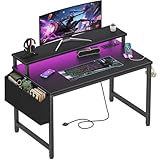
- Safety Multi-functional Power Strip: The computer desk includes a built-in power strip with 2 power outlets & 2 USB charging ports for your computer, monitor, gaming gear, pad, phone and other electronic devices
- Gaming Desk With LED Lights: Equipped with a built-in RGB LED lights strips, the led gaming desk provides 7 adjustable colors, 4 dynamic modes, 16 static types, create different lights ambiance which provide different work or game scenarios
- Modern Simple Style Design: Desk is made of thick particle board with scratch-resistant, anti-collision and waterproof, protect home office desk surface from daily wear and tear, with storage bag and 2 headphone hook(Both removable)
- Sturdy Structure With Monitor Stand: The monitor stand can meet your requirements for placing monitor or laplops. It can keep your computer at eye-level, which helps you maintain the right posture for your neck and spinal health
- Easy Assemble And After-sale Service: A detailed instruction manual and tool are provided, no other tools required, quick and easy to assemble. Provides professional customer service, easy and fast replacement is guaranteed if have quality problem of the desk
OSHA advises choosing a monitor and placing it in conjunction with the keyboard, desk, and chair. Its guidance identifies a flat-panel display as a way to use less desk depth than a conventional monitor, and says corner placement may provide more depth. Either option still needs to leave a usable viewing distance and room for your controls. OSHA monitor guidance also discusses adjustable monitor positioning, but does not endorse a particular stand or arm.
Keep the keyboard and mouse together within comfortable reach
Place the keyboard directly in front of you, with the mouse beside it. Aim for relaxed shoulders, elbows close to your body, and wrists straight and aligned with your forearms. Leave enough surface area for the mouse to move the way you play; a layout that fits the keyboard but crowds the mouse is not a useful fit.
Rank #2

- [ All-in-One Compact Gaming Desk ]: 33.5 inch space-saving gaming desk integrates 6 essential features: ✅ Remote RGB LED lights (256 colors) ✅ 3-in-1 power hub (2 AC + USB/Type-C) ✅ Ergonomic monitor stand (used as monitor stand or storage shelf) ✅ Fabric storage drawer (hidden compartment) ✅ Reversible CPU stand (fits PC case, books) ✅ Headphone hooks. Perfect as a small desk for home office or gaming desk for bedroom corners.
- [ Pro-Level LED Lighting System ]: The Gaming Table Dominate the game atmosphere with: ✨ 22 dynamic modes (pulse/starlight/wave) ✨ 20 static colors + 256 PWM fine-tuning ✨ 5 brightness levels & 10 speed controls. Create immersive RGB gaming desks ambiance while reducing eye strain during marathon sessions.
- [ Smart Power Outlets for Multi-Device Charging ]: The Gamer Desk come up with Power Outlets: 🔌 2 AC outlets (laptop/monitor) 🔌 1 USB port (phone/controller) 🔌 1 Type-C port (fast-charge devices) 🔌 1.5M extended cord for flexible placement. Ideal computer desk with power outlet for gaming setups or home office desks
- [ Health-Focused Monitor Stand ]: The Gaming desk with monitor stand meets ergonomics 📏 Lifts screens to eye level to prevent neck pain 📏 Frees 30% desktop space for keyboard/mouse. A must-have computer desk with monitor stand for long work/gaming sessions in small spaces.
- [ Maximized Storage Solutions ]: Organize the clutter in tight spaces: 🗄️ Fabric drawer – anti-scratch & private (documents/accessories) 🖥️ Reversible metal shelf – use as CPU stand or book organizer 🎧 Side hooks – hang headsets or small bags. The ultimate desk with shelves and drawers for compact computer desk users.
If the desktop or chair cannot be adjusted to put the keyboard at a comfortable height, an adjustable keyboard tray may help. Before choosing one, measure its usable surface to confirm the keyboard and mouse both fit, and check that the tray leaves enough room for your thighs, knees, and feet. OSHA describes trays as an option when desk or chair adjustments cannot achieve a suitable keyboard position; it does not recommend a specific product. See its keyboard placement and tray guidance.
Fit the chair to the desk and the player
Choose and adjust the chair so it supports your back and legs, and your feet can rest on the floor or a footrest. Check that the seat depth suits you and that you can get close enough to reach the controls without leaning. A chair’s “gaming” label does not establish that it will fit your body or clear the underside of your desk.
Crashes, No Sound, or Screen Glitches?
Random freezes, missing sound and display glitches usually trace back to one bad driver. Find and replace yours safely.Free scan · under a minuteWindows Errors? Fix Them Before They Spread
Repair common Windows errors and clear accumulated junk for a smoother, more stable PC - no reinstall needed.Free scan · no reinstallRank #3

- Carbon fibre texture: Our PC gaming desk is made from MDF with a carbon fibre textured finish, giving a smooth, scratch-resistant surface that feels great to the touch and is easy to clean
- Reversible design: The L-shaped gaming desk can be flipped left or right to suit different room corners, and 2 can be combined into a U-shaped table for double play, making it a great gift option for gaming enthusiasts, children or friends
- Gaming desk with LED lights: Coming with an RGB LED light strip with APP control, this black gaming desk looks great when illuminated by the light strip and will enhance your gaming atmosphere
- Gaming desk with power outlets: This gaming table comes with 3 AC sockets and 2 USB charging ports so you can charge devices such as mobile phones and laptops at the same time without interruption while you play
- Multi-functional desk: This functional gaming table comes with a cup holder, headphone holder and a long monitor stand that easily holds two 24" monitors or a large monitor to save space on your desk. It also helps you maintain proper view angles
Armrests should not push your shoulders upward or prevent the chair from approaching the desk. If they interfere, adjust them, remove them if the chair allows it, or leave them unused. Check the chair’s fit in the actual space, including legroom beneath the desk. OSHA’s chair guidance covers back support, feet, seat fit, and armrest positioning.
Choose space-saving changes by the problem they solve
There is no single best layout for every small desk. Use the constraint you measured to decide what to change, and check that each change preserves comfortable viewing, control access, and clearance.
Rank #4

- X-Shaped Reinforcement Structure: Unlike flimsy desks, DUMOS computer desk uses a smart X-brace design. This stops annoying wobbling during typing or writing and keeps your desk perfectly flat for years without loosening over time
- Premium Material: Our home office desk features a scratch-resistant, water-resistant tabletop that withstands coffee spills. Supported by a sturdy steel frame, it’s designed to handle your busiest workdays
- Thick Square Tube Support: Rest easy knowing our heavy-duty square tube legs support up to 265 lbs. Perfect for projects, storage, or even doubling as a writing study desk, giving you strong, dependable support for any heavy load
- Multiple Attributes to Choose from: Find your perfect desk for bedroom. Choose from 6 handy sizes and 3 stylish colors to match your space and taste, ensuring the right fit for any room layout or décor preference
- Easy Installation: You’ll be set up in minutes. We include every tools & parts you need. Enjoy your new sturdy writing table right out of the box with clear, simple instructions and no extra tools required
- Not enough depth: Consider a flat-panel display or a corner placement. Confirm that the screen remains at a readable distance and the keyboard and mouse still have usable space.
- The monitor is too low or its stand takes up useful area: An adjustable monitor support may offer positioning flexibility. Check height, tilt, desk footprint, and compatibility with your monitor; OSHA supports adjustable positioning but does not endorse a particular support.
- The keyboard cannot sit at a suitable height on the desktop: Consider an adjustable keyboard tray only if it fits both keyboard and mouse and leaves adequate leg and foot clearance.
- The chair cannot approach the desk or support your posture: Reassess seat depth, foot support, and armrest clearance. If replacing the chair, compare actual fit and adjustability rather than relying on a gaming label.
Check the layout during play and adjust
Once the equipment is arranged, sit in your normal playing position and check whether you can see the screen without leaning, reach the keyboard and mouse without raising your shoulders, and keep your wrists aligned with your forearms. Notice whether the chair can approach the desk and whether your legs have room. Adjust the furniture or move an item that forces an awkward reach, then check again.
Workstation guidance supports arranging components to maintain neutral postures and using adjustable furniture to vary position; it does not establish that a particular gaming layout prevents injury or guarantees comfort. This is general workstation advice, not individualized medical guidance. If you have persistent pain, numbness, or other symptoms, seek advice suited to your situation.
Quick Recap
Best Value

- SPACIOUS GAMING DESK SURFACE: This gaming desk offers a wide desktop with ample room for multiple monitors, keyboard, mouse, and essentials, keeping setups neat, organized, and immersive.
- DURABLE BUILD QUALITY: Built with a sturdy R-shaped steel frame and a premium MDF board, this desk offers strong stability and long-lasting durability, ensuring reliable performance for years.
- CONVENIENT BUILT-IN FEATURES: Designed with a cup holder, headphone hook, and dual wire holes, this desk keeps your drinks, headset, and cables neatly organized for a clutter-free setup.
- ADAPTABLE COMPUTER DESK: Sleek carbon fiber texture and sturdy design make this desk ideal as a gaming table, study desk, or office desk, blending strength and style for modern home office
- EASY ASSEMBLY DESIGN: This desk includes clear instructions and all required hardware, making setup quick and hassle-free. Its user-friendly design ensures smooth assembly without complications
Product prices and availability are accurate as of the date/time indicated and are subject to change. Any price and availability information displayed on Amazon at the time of purchase will apply.



