For a Windows, macOS, or Linux computer, PCSX2 is the best-supported starting point for PlayStation 2 emulation. It is free and open source, but you will need a BIOS dump from a PS2 console you own before you can complete setup. If you want to emulate PS2 games on a phone, this desktop recommendation does not answer which mobile emulator is best.
Why PCSX2 is the desktop pick
PCSX2 supports Windows, Linux, and macOS. The project says its compatibility list includes more than 2,500 tested titles; that is a project-reported count, not a guarantee that every game runs flawlessly. Check the live compatibility entry for the particular game you want to play.
For choosing a desktop emulator, the practical questions are whether your operating system and hardware are supported, how well your game works, whether you want higher-resolution rendering, and whether you can provide a BIOS dump. The available evidence supports PCSX2 as the desktop recommendation; it does not establish a comparable, game-by-game case for ranking alternatives.
What you need before setting it up
- A supported computer: PCSX2’s requirements are divided into minimum, moderate, and heavy tiers. The minimum tier lists an x86-64 processor with SSE4.1, a PassMark single-thread rating of at least 1500, two physical cores with SMT, and Vulkan 1.1 support. The project’s current requirements page lists supported operating-system versions and the higher tiers; check it against your hardware, especially for demanding games or higher rendering resolutions.
- A PS2 BIOS dump: The emulator requires a BIOS dumped from a PlayStation 2 console you legitimately own. PCSX2’s setup FAQ explains how to dump and add it. The emulator is not ready to play games until this step is complete.
- Your games: PCSX2 can use personal PS2 discs directly. Its FAQ recommends dumping your own discs to ISO images because playing from an optical disc can run into speed problems.
- An input device: A new controller is optional. On Windows, PCSX2 includes preconfigured XInput bindings and supports configuring DirectInput or XInput controllers.
How to install PCSX2
- Open the official download page and choose the build for Windows, macOS, or Linux.
- Follow the project’s installation and first-time setup guide. Linux users can choose an AppImage or Flatpak; the guide notes that Flatpak can occasionally have file-access issues.
- Dump the BIOS from your own PS2 and add it when prompted during setup.
- Connect or configure your controller if you plan to use one, then load a personal disc or an ISO made from your own game disc.
- Look up your specific game in PCSX2’s compatibility list if it does not launch or behaves unexpectedly.
Is PCSX2 the best PS2 emulator for Android?
This recommendation is for desktop and laptop computers, not Android phones. The available evidence does not establish a current Android winner based on comparable compatibility, performance, maintenance, and device requirements. Choose a separate, up-to-date Android comparison before settling on a mobile emulator.
The Tool Desk
Outbyte PC Repair FREEClear out junk files and repair common Windows errorsFree Scan →Outbyte Driver Updater FREEScan for outdated or missing drivers - takes under a minuteDriver Scan →Quick Recap
Best Value

- Work with wired controllers for Sony Playstation 1, Playstation 2, PS One, PSX.
- Not support real vibration function for Dual Shock and Dual Shock 2.
- Switch digital / analog mode by pressing ‘analog’ button.
- Easy and convenient to use, simply hot-plug the USB socket of PC / laptop and install the driver, then it works perfect!
- Note: driver must be installed before using the adapter, buttons mapping must be set up before playing the games.
Rank #4

- 【Product Compatibility】: Compatibility with Sony Playstation 1,PSX and Playstation 2 controllers to PS3/PC Controller. support Win98, Win98SE, Win Me, Win2000 & the newly announced Win XP, Win 7 together with the direct X 7.0a or above.
- 【Easy to Use】: Just connect PS2 controller Converter, then plug the USB cable into an available port on your PS3 or PC, Uses this with a guitar hero device for the PS2 and it works flawlessly. Windows 10 recognizes the adapter and will automatically set it up, Didn’t need to install any drivers , Compatible with only original PS2 Controllers, PS3 console, and desktops/laptops with an USB Port.
- 【Enhance Game Experience】:Supports Double shock real vibration function on supported games and digital/analog mode.Supports most of PC games,can be directly used with PC computer.
- 【Perfect Design】:USB Controller adapter Converter Cable for Saved you lots of cash being able to use a PS2 controller instead of buying a new PS3 controller or Wireless controller
- 【After Sales Support】:Our product 100% extremely strictly before selling, You can give it as a gift to your family, friends, classmates and anyone, especially your children.If you have any issues for this product, please contact us by Amazon message, we will provide you satisfied solution at first time.
Rank #3
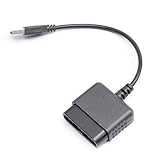
- ★Controller adapter allows PlayStation 2 controllers to be used with the PlayStation 3 consoles or PC | Vibration function supported in compatible games
- ★Easy to use, just connect PS2 controller to the adapter then plug the USB cable into an available port on your PS3 or PC | For best results plug directly in device and not in to USB hub
- ★Does not provide the motion sensing capability featured on PS3's wireless controller | Games requiring motion sensing abilities will not be compatible with adapter
- ★ Compatible with only original PS2 Controllers, PS3 console, and desktops/laptops with an USB Port
- ★Package Contents: 1x Controller Adapter
Rank #2

- Type: PS2 To PS3/PC Controller Converter, connect to your PS3 or PC USB Ports.
- Function: Adapter to use your PS2 controller on PS3 console or PC/Laptop, fully compatible with the console and control.
- Use: Converts PS2 or PS1 vibration controller to play with PS3 games on PS3 system, without requiring any external power or driver to operate. Easy to set up and use.
- Compatible With: All original and third party for PS2 Controller (wired and wireless), supports most of for P3 games and for P2 or P1 vibration controllers, can be directly used with PC computer.
- Application: Support wired For PS1/For PS2 hand lever and wireless For PS1/For PS2 hand lever. Applied on PC/For PS3.
#1 Best Overall

- Product Compatibility : Compatibility with Sony Playstation 1,PSX and Playstation 2 controllers to PS3/PC Controller. support Win98, Win98SE, Win Me, Win2000 & the newly announced Win XP, Win 7 together with the direct X 7.0a or above
- Easy to Use: Connect your original PS2 controller to the converter, then plug the USB into a PS3 or PC. Works perfectly with PS2 Guitar Hero devices. Windows 10 auto-installs the adapter—no drivers are needed. Compatible only with original PS2 controllers, PS3 consoles, and USB-enabled PCs/laptops. Ensure the controller is securely connected and the USB port functions properly. If issues occur, try another port or restart the system
- Enhance Game Experience : Supports Double shock real vibration function on supported games and digital/analog mode. Supports most of PC games,can be directly used with PC computer
- Perfect Design : USB Controller adapter Converter Cable for Saved you lots of cash being able to use a PS2 controller instead of buying a new PS3 controller or Wireless controller
- After Sales Support : Our product 100% extremely strictly before selling, You can give it as a gift to your family, friends, classmates and anyone, especially your children. If you have any issues for this product, please contact us by Amazon message, we will provide you satisfied solution at first time
Product prices and availability are accurate as of the date/time indicated and are subject to change. Any price and availability information displayed on Amazon at the time of purchase will apply.
Independent reader supportYour contribution helps us test, update, and keep practical guides available for everyone.



