Do these 3 things before closing this tab:
1Fix the driver behind crashes, sound loss and screen glitches2Repair Windows errors before they cause bigger problems3Scan for outdated or missing drivers - takes under a minuteThere is no single best Battlefield 6 controller setup for every player, but EA’s published settings make a practical starting point: Infantry Aim Sensitivity 30–40, Zoom Sensitivity Coefficient 178, Aiming Left/Right Acceleration 50–70, Vertical Aim Ratio 56, and FOV 110. Use these as baselines, then tune in the Firing Range; set deadzones as low as your sticks allow without unwanted drift.
EA’s recommended Battlefield 6 controller baseline
These are EA’s published starting values, not independently tested results or proof of a universal competitive meta. EA recommends testing changes in the Firing Range and adjusting for your own controller and preferences. Its guide does not state a publication date for these values.
| Setting | EA starting point | What it affects |
|---|---|---|
| Infantry Aim Sensitivity | 30–40 | General, unzoomed aiming speed. |
| Zoom Sensitivity Coefficient | 178 | Sensitivity while aiming zoomed. |
| Aiming Left/Right Acceleration | 50–70 | Horizontal acceleration while aiming. |
| Vertical Aim Ratio | 56 | Vertical aim speed relative to horizontal aim speed. |
| Infantry Aim Assist | 100 | Aim-assist behavior around targets. |
| Aim Assist Slowdown | 100 | How much aiming slows around targets. |
| Zoom Snap | 100 | Snap behavior when aiming at targets while zoomed. |
| Field of View (FOV) | 110 | How much of the surroundings are visible. |
| Weapon Field of View | Wide | How much of the view around the weapon is shown. |
| Stick deadzones | 0–5 for sticks with no or little drift | How far a stick must move before the game registers input. |
EA’s controller settings guide describes these values as a place to start. If a setting makes your aim feel less controlled, revert it and test another change rather than treating the numbers as mandatory.
How to tune sensitivity without making aim feel inconsistent
Change one or two controls at a time
Infantry Aim Sensitivity affects how quickly the crosshair moves before zooming; Zoom Sensitivity Coefficient applies while zoomed. Aiming Left/Right Acceleration and Vertical Aim Ratio can also shape how your aim responds, so a change to sensitivity alone may not address a floaty or uneven feel.
The Tool Desk
Outbyte Driver Updater FREEFix the driver behind crashes, sound loss and screen glitchesFind Drivers →Outbyte PC Repair FREEClear out junk files and repair common Windows errorsFree Scan →#1 Best Overall

- THE NEW STANDARD OF FPS COMBAT: With overhauled gunplay and tactical movement, from crouch sprint to drag and revive, every shot and movement is more instinctual and precise.The ultimate all-out warfare experience.This is Battlefield 6.
- MULTIPLAYER Victory, however you envision it. Battlefield 6 has more ways to win than ever before.
- GLOBAL SCALE CAMPAIGN Join an elite squad of Marine Raiders fighting relentlessly to save a world on the edge of collapse.
- PORTAL Battlefield Portal is a massive sandbox where creators and players can push Battlefield to the limit. Take unprecedented control of your environment by moving, scaling, and duplicating objects.
- Get Battlefield 6 Phantom Edition and receive: Full Game Download Battlefield Pro Token 1 Token redeemable against the season of first play Includes the season’s Battle Pass, 25 Tier Skips, exclusive rewards, and more …
- Choose EA’s baseline or a controller preset, then enter a Firing Range session.
- Adjust one or two related values by small increments.
- Test target tracking and fine corrections in the same conditions.
- Keep a note of the previous values so you can undo a change that hurts control.
EA recommends testing in the Firing Range, but does not prescribe a universal increment size or sensitivity test. Use a change small enough to tell whether it helped, and avoid changing several unrelated settings at once.
Understand the aim-assist controls
EA lists Infantry Aim Assist, Aim Assist Slowdown, and Zoom Snap at 100 as starting values. These controls affect how assistance behaves around targets; they are not a guarantee that every player will prefer the same feel. If tracking seems too assisted or not assisted enough, change a relevant control and test it rather than assuming the whole sensitivity setup is wrong.
Choose deadzones based on stick drift
Lower deadzones can make a stick respond with less movement, but a setting that is too low for a drifting stick can cause unwanted movement. EA recommends 0–5 only when the sticks have no or little drift. If the reticle or soldier moves without you touching the stick, raise the deadzone for the affected stick until the unwanted input stops. EA does not specify a universal threshold for drift beyond that starting range.
Rank #2
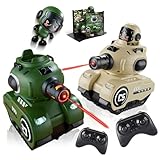
- 【Safe Infrared Toy Battle】 Say goodbye to wet clothes and water marks! Our mini rc tank set uses 100% safe invisible IR beams for clean, mess-free indoor and outdoor play. Enjoy pure strategic fun in 2-player toy battle games right in your living room or backyard
- 【Pro-Grade Dual-Weapon Firing】 Dominate combat with realistic dual-weapon shooting! This remote control tank that shoots features a main cannon dealing 2 damage (5s cooldown) and a sub-weapon dealing 1 damage (2s cooldown). The glowing barrel changes color with each shot for instant visual feedback
- 【Smart Recharge Station & Ejection】 Your remote control tank is never out of the game! Drive over the magnetic Health Recharge Station to restore HP with a 10s cooldown. When life hits zero, the driver pops out for hilarious rc battle tanks victory drama
- 【2.4GHz RC Cars & Tank Battles】 Equipped with 2.4GHz anti-interference technology, allowing multiple RC cars and tanks to play simultaneously without crosstalk. Each military tank toy for boys features 5 LED life indicator lights, taking 3-5 hits for a total knockout
- 【Rechargeable Batteries & Ideal Gift】 Features rechargeable batteries providing 30 minutes of play time per charge (1-2 hours charge time). Whether for remote control tanks or battle bots style toys, this tank toy set makes the perfect birthday or holiday gift for kids ages 6-12
To adjust the setting, open Controller settings, select Edit Settings, then find Controller Tuning under Other. EA provides Default, Alternate, and Lefty presets, with custom changes available after choosing a preset.
EA also describes a stick debug overlay toggle in the options menu near the deadzone controls. It provides real-time controller information that can help diagnose settings-based or double-deadzone issues. If input still feels inconsistent, EA notes that server issues or network jitter can affect perceived responsiveness too, so sensitivity is not necessarily the cause.
Independent reader supportYour contribution helps us test, update, and keep practical guides available for everyone.Set FOV for the screen and targets you need to see
EA suggests starting at FOV 110. A wider field of view shows more of the surroundings, but distant enemies and objects appear smaller. That makes FOV a trade-off between peripheral awareness and target size, not an automatic performance upgrade. EA recommends trying Weapon Field of View set to Wide; compare both settings in the same environment and choose what lets you spot threats without making targets uncomfortably small.
Rank #3

- Enhanced Aim & Accuracy Upgrade your gameplay with precision rings designed for PS5, for PS4, and Compatible with Xbox controllers. These rings improve thumbstick control, giving you better aim, especially in FPS games like Fortnite.
- Comfortable & Durable Material Made from soft, durable silicone material, these rings provide just the right amount of resistance for enhanced precision without compromising comfort during long gaming sessions.
- Ideal for Competitive Gaming Whether you're grinding ranked matches or playing casually, these aim assist rings help reduce over-aiming and improve shot accuracy, making them a must-have for serious gamers.
- Universal Fit & Easy to Install Compatible with PlayStation and Compatible with Xbox controllers, the rings are easy to install and remove. Just slide them onto your thumbsticks and you're ready to game with improved control.
- Great Value 6 Pack Each set includes 6 precision rings in varying, allowing you to customize your setup based on your preferred gameplay style and control sensitivity.
Where the settings stand in the current update cycle
EA’s Update 1.4.3.0 article, dated September 14, 2026, says the update deployed September 15 alongside Season 4: Tidal Strike. It does not provide a new set of controller sensitivity or deadzone values, so the baseline above should not be attributed to that patch.
In its October 1, 2026 Season 5 outlook, EA said aim-assist tuning over the prior year was intended to bring it closer to the Open Beta feel. The article also described some Season 5 changes as explorations that could change. Aim behavior can therefore shift with future updates; check EA’s latest update notes if the same settings begin to feel different after a patch.
Recommended Free Tools
Quick Recap
Product prices and availability are accurate as of the date/time indicated and are subject to change. Any price and availability information displayed on Amazon at the time of purchase will apply.



