Recommended Free Tools
No. A wired Xbox 360 controller is not made for use with Xbox One, and a USB plug does not make it compatible. Use a controller whose exact model is listed as supporting Xbox One.
Why a USB connection does not make it compatible
A USB connector describes the physical connection; it does not establish that a console supports the controller. Microsoft’s Xbox 360 controller manual identifies the Xbox 360 Wireless Controller as intended exclusively for the Xbox 360 system. That is the platform distinction to keep in mind when considering an Xbox 360 controller on Xbox One.
Xbox One backward compatibility applies to games, not automatically to controllers
Xbox One backward compatibility lets players use supported Xbox 360 games on the console. Microsoft’s backward-compatible games guidance describes game support; it does not say that Xbox 360 controllers are supported. Game compatibility and accessory compatibility are separate questions.
What to use for wired play on Xbox One
Choose a controller whose product listing explicitly names Xbox One support. A USB-connected Xbox One-compatible controller is an option if you want to play with a cable. For a third-party wired controller, check the exact model’s compatibility information before buying; the word “wired” alone does not establish console support.
Quick wins for a faster PC:
Scan for outdated or missing drivers - takes under a minuteDriver Scan →Repair Windows errors before they cause bigger problemsFix Now →Fix the driver behind crashes, sound loss and screen glitchesFind Drivers →#1 Best Overall

- Wide Compatibility: VOYEE wired 360 controller compatible with Microsoft Xbox 360 & Slim/ PC (Windows 11/10/8.1/8/7). Just plug and play, not for FPS games
- Enhanced Game Controller: Upgraded PC 360 controller with new left and right trigger buttons and more sensitive joysticks and buttons - Respond quickly to player commands without delay
- Astonishing Gaming Experience: VOYEE wired pc controller provides rumble control and according to the game automatic vibration feedback to enhanced game experience and match your personal preference
- Ergonomic Design: Grips's contours have been designed to fit your hands more comfortably to hold for a long time and 7.2ft cord allows greater
- What You Get: VOYEE wired 360/PC Controller, 45 Days Money Back, 365 Days Guarantee Against quality defect and 24 Hours Friendly Customer Support
One reported example is Hyperkin’s DuchesS. Windows Central reports compatibility with Xbox One, Xbox Series X|S, and Windows 11. Availability and product details can vary, so verify the current listing for your region and confirm that it names Xbox One.
Will an adapter make an Xbox 360 controller work?
Do not assume a passive cable, an Xbox 360 wireless receiver, or a generic adapter will solve the compatibility issue. The available evidence does not verify that these options make an Xbox 360 controller usable on Xbox One. A controller explicitly listed for Xbox One is the dependable choice.
Quick Recap
Best Value
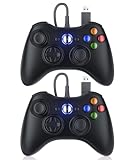
- 【Wide Compatibility】Perfectly compatible with Microsoft Xbox 360 & Slim, PC Windows 11/10/8/7. (Note! This controller is not compatible with Xbox One). A wired connection allows you to operate with zero latency.
- 【Upgraded Version】Supports acceleration/gravity sensors, a 2.5mm audio jack, dual vibration, and an upgraded joystick. Same joystick as the official Microsoft 360 wireless joystick. Spend less money to enjoy the same sensitivity.
- 【Astonishing Gaming Experience】The Dinosoo wired controller offers rumble control and automatic vibration feedback based on gameplay to enhance the gaming experience and match your personal preferences.
- 【Ergonomic Design】The 1:1 palm arc fit keeps your palms dry and reduces arm fatigue for the most enjoyable gaming experience.
- 【What You Get?】Dinosoo 10ft wired 360/PC Controller, 45 Days Money Back, 365 Days Guarantee Against Quality Defect and 24 Hours Friendly Customer Support.
Rank #4

- 【Wide Compatibility & Plug & Play】Designed for Xbox 360 / 360 S / 360 E and PC (Windows 11/10/8/7). Simply connect the 6ft USB cable to start playing—no driver or software required. Wired connection ensures zero-latency operation for instant response. (Note: Not compatible with Xbox One, Xbox Series X/S.)
- 【Upgraded Components for Precise Control】Features an upgraded joystick that delivers the same sensitivity as the official 360 controller at a more affordable price. Built-in 2.5mm audio jack allows you to plug in your headset for immersive sound. Acceleration/gravity sensors (where applicable) provide an extra dimension of control for compatible games.
- 【Immersive Dual-Vibration Feedback】Equipped with dual vibration motors that deliver real-time, game-responsive rumble effects—from collisions and gunfire to engine roars. This tactile feedback deepens immersion and puts you right in the middle of the action.
- 【Ergonomic Design for Marathon Gaming】The contoured shape follows the natural curve of your palm, reducing hand fatigue and sweat during extended play. Optimized shoulder buttons and streamlined grips ensure a comfortable, secure hold, so you can stay focused on the game for hours.
- 【Multiplayer Ready & Reliable Support】Supports up to 4 controllers on a single console—perfect for local multiplayer fun with friends and family. Backed by 45-day money-back guarantee, 365-day quality defect warranty, and 24/7 friendly customer support for complete peace of mind.
Rank #3

- 🎮【Wired Controller Compatible with 360】: Wired USB Game Pad Controller Compatible with xbox 360 controller systems and PC Windows 7/8/10. Improved grip and contour design make it more ergonomic, fitting your hands comfortably for a consistent, comfortable gaming experience.
- 🎮【Easy Operate】: This Wired Controller Comes with a 7.2 ft USB cable for flexible movement. Just plug this 360 controller into your console or computer (no driver needed). A reliable xbox 360 controllers alternative for quick setup.
- 🎮【Great Performance】: Features dual vibration motors, pressure-point triggers, and an 8-way arrow button for full game control. Whether you use it as a xbox 360 controller for pc or console, you’ll get immersive, responsive feedback.
- 🎮【Ergonomics Design】: Asymmetrical grip and contour design fits your hands perfectly. All buttons are easy to press with instant response, giving you a smooth, fatigue-free experience ideal for long controller for 360 sessions.
- 🎮【Use up to 4 Controller】: YAEYE wired controller, Connect up to 4 controllers at once for multiplayer games. This xbox 360 controller wired design works great with friends, making it a solid choice for shared gaming moments.
Rank #2

- 【Wide Compatibility】Compatible with Microsoft Xbox 360/360 S/360 E and PC Windows 11/10/8/7. (Not for Xbox One,Xbox S or Xbox x) The wired connection enables latency - free operation.
- 【Upgraded Version】A 2.5mm audio jack, dual vibration, and an upgraded joystick identical Get the same sensitivity at a lower cost. Not suitable for games that require precise joystick operation
- 【Astonishing Gaming Experience】 Provides rumble control and automatic vibration feedback according to gameplay. This not only boosts the gaming experience but also caters to your personal preferences.
- 【Ergonomic Design】Designed to perfectly match the natural arc of your palm, it effectively prevents sweating and minimizes arm strain during long - term use. This allows you to fully immerse yourself in the game and enjoy the most pleasant gaming experience.
- 【Come with Two Packs】You can share the joy of playing games with friends
How to check a controller before you buy
- Find the exact model name and version on the product listing.
- Check that the listing explicitly names Xbox One as a supported platform.
- If you want a cable-connected setup, confirm that the listed model is wired or supports USB play.
- For third-party products, check the current regional listing rather than relying on a general claim about the brand or controller family.
Product prices and availability are accurate as of the date/time indicated and are subject to change. Any price and availability information displayed on Amazon at the time of purchase will apply.



