What’s actually slowing this PC down?
Pick the symptom - the matching free tool is one click away.
You can’t transfer digital content directly between two Wii consoles. Nintendo says, “It is not possible to transfer digital content between two Wii consoles.” The limited exception is eligible individual game saves, which you may be able to move using an SD Card. That does not move downloaded games, channels, or all console data. Nintendo Support: Can I Transfer Data from One Wii Console to Another Wii Console?
What can you move between two Wii consoles?
| Data | Wii-to-Wii option |
|---|---|
| Eligible game save files | Some can be moved with an SD Card, if the game permits it. Some saves are blocked or only partly transferable. Nintendo Support: How to Move Data From the Wii to an SD Card. |
| Downloaded games and channels | Not transferable to another Wii by copying them to an SD Card. Nintendo says Wii Shop downloads stored on a card cannot be played on another Wii. Nintendo Support: Can I Transfer Game Content from an SD Card to Another Wii Console or Person? |
| All console data or a complete system migration | No supported Wii-to-Wii transfer process is available. Nintendo Support. |
How to move an eligible save with an SD Card
This procedure moves an individual save file; it does not migrate games, channels, settings, or the full contents of one Wii to another. The steps below use Nintendo’s US/English menu wording, which may differ by system language or region.
Before you start
- Both consoles need to support SD Cards. Wii mini does not support SD Cards.
- The game must permit its save data to be copied or moved. Game developers can block SD Card transfers, and some games transfer only part of a save.
- If the target Wii already has a save for that game, Nintendo’s instructions say to delete the existing save before moving the card’s save onto the console.
Nintendo’s instructions do not provide a universal list of which games allow copying, so check the menus for the specific save you want to move. Nintendo’s save-to-SD instructions and SD Card-to-Wii instructions describe the restrictions.
Move the save from the source Wii to the card
- Insert a compatible SD Card into the source Wii.
- Open the Wii button, then go to Data Management → Save Data → Wii.
- Select the save you want to move and choose Move. If the game blocks copying or moving, the console will not offer the supported transfer for that save.
Move the save from the card to the target Wii
- Insert the SD Card into the target Wii.
- Open Data Management → Save Data → Wii, then select the SD Card tab.
- Select the save and choose Move. If a save for the same game already exists on the target Wii, delete it first if you want to proceed as Nintendo’s instructions require.
- Start the game and check whether it recognizes the save. A successful card move does not guarantee that every game will accept the copied data.
Why copying a downloaded game to an SD Card does not work
An SD Card can store certain Wii Shop downloads, but that does not make the software portable to another Wii. Nintendo says those downloads cannot be played on a different console through this method. The save-file workaround is separate: moving a save does not transfer the game it belongs to or grant access to a digital purchase on the target Wii. Nintendo Support explains the distinction.
#1 Best Overall
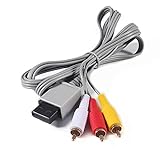
- Compatible: premium quality AV Cable for Nintendo Wii and Wii U Consoles
- Feature: the AV cable length is about 1.8 meter/6 feet, with standard AV composite lead, red, white, and yellow connectors on one end, input for Nintendo Wii and Wii U on the other
- Multiple uses: let you connect for Nintendo Wii/Wii U console with TV or monitors by the AV IN socket, provides composite video and audio output for viewing on a TV
- Applicable TV model: the AV cable can work well with modern HD LCD LED televisions, Please make sure your display has composite video and audio inputs
- If you have any issues with Audio Video Cable for Wii/Wii U, please contact us by Amazon message, we will provide you a satisfied solution at the first time
If you meant transferring from a Wii to a Wii U
A Wii-to-Wii-U transfer is a separate process, not a way to migrate between two Wii consoles. Nintendo’s instructions call for transfer tools on both systems, an SD or SDHC card with at least 512 MB free, and an internet connection. The process is one-way: transferred data is deleted from the Wii and cannot be returned to a Wii. Nintendo Support: How to Transfer Content from a Wii to a Wii U.
Nintendo lists eligible Wii software save data, WiiWare and Virtual Console titles and save data, add-on content, Wii Shop account activity, Mii characters, and Nintendo Wi-Fi Connection data among the transferable categories. Exclusions include GameCube disc save data, system settings, pre-installed WiiWare and Virtual Console titles, some restricted software, and specified channels. Eligibility depends on the content; this transfer does not change the Wii-to-Wii answer above. Nintendo’s full transfer eligibility list.
Rank #2
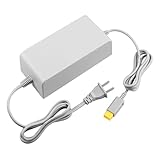
- 【POWER SPECIFICATION】:Input: 110V-240V; Output DC: 15V/5A; Cable Length: 6.5 feet. flame resistance shell
- 【HIGH QUALITY】: Made from durable material for a long time use. With a sophisticated circuit design with over-heated, over-current, over-charging protection.
- 【PRODUCT COMPATIBLE】:Specially Made for Nintendo Wii U Console. Ideal quality replacement or backup power AC adapter for your Wii U Console.
- 【EASY TO USE】:Simple plug and play setup, allow you to charge and play at the same time from up to 6.5ft away.
- After Sales Support】:Our product 100% extremely strictly before selling, You can give it as a gift to your family, friends, classmates and anyone, especially your children.If you have any issues for this product, please contact us by Amazon message, we will provide you satisfied solution at first time.Content:1 X Charger.
Wii Shop and transfer-service status
The Wii Shop Channel stopped selling new content on January 30, 2019. Nintendo’s discontinuation page says redownloads of previously purchased content and the Wii-to-Wii-U System Transfer Tool will end at a future date, but does not specify that date. Check Nintendo’s current support instructions before attempting a Wii-to-Wii-U transfer; the cited page does not establish that these services will remain available indefinitely. Nintendo Support: Wii Shop Channel Discontinuation.
Quick Recap
Best Value
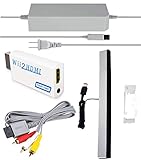
- Upgraded Version Sensor Bar: Compatible with all Wii controllers, motion plus controllers and other Wii controller addons. Comes with a clear stand, it with adhesive for easy attachment to tv, monitor or any smooth surface. Quick and easy install, just like the original sensor bar with simple plug and play installation. More than 7ft cable ensures convenient placement of sensor bar.
- Composite AV Cable: Composite cable with 3 RCA plugs connect your Nintendo Wii console with TV or monitors via the AV in socket, high end gold-plated connectors give you a secure interference and distortion free connection supports up to 480i standard resolution using an analog signal. Lets you enjoy quality audio and video from your Nintendo Wii.
- Reliable and Multi-protection AC Adapter for Nintendo Wii: Equipped with 56kΩ pull-up resistor and 22 wire core. To ensure safe use with your Nintendo Wii system, the charger built-in "smart PD (Power Delivery) IC" & the thermal material design protect your devices against overcurrent, overvoltage and overcharge. The combination of safety features offers reliable performance and promotes ultimate peace of mind.
- Upgraded Version Wii to HDMI Converter: With built-in American chip, advanced signal processing with great precision, colors and resolution will be provided. Full digital HDMI format, no transmission loss, the picture is exquisite and stable with no blurring, no fuzzy lines or lag, which ensures you do better in the game.
- What You Wii Get - 1 x AC Power Adapter for Wii; 1 x AV Cord for Wii; 1 x wii to hdmi converter; 1 x Wired Sensor Bar for Wii. This is truly a necessity for a games master.
Rank #4

- This component cable is specifically designed to provide the sharpest video and sound for your Nintendo Wii / Wii U gaming system
- Connect to your HDTV (high-definition TV) or edit (enhanced-definition TV) and enjoy the most stunning graphics available from your Nintendo Wii via 480p resolution
- Component-video Connection from Wii to TVs or receivers with compatible inputs
- Gold Plated connectors for best signal transfer - AV cable Type: Audio/video cable
- Connector: Wii AV Plug to component Y/PR/Pub, l-channel, r-channel (Male).length: Approx. 56" in / 142 cm. Color: Gray
Rank #3

- 【Product Specifications】: AV Cable for Wii, Length: 1.8M/6FT. Standard AV composite lead, one end is RCA AV(Yellow, Red & White connectors ), and input for Nintendo Wii and Wii U on the other.
- 【Product Compatibility】: Replacement stereo audio video AV RCA composite cable compatible with Nintendo Wii, Wii U. Suitable for many TV games(Support TV with RCA input only), bring you extraordinary experience when you play games on TV.
- 【Plug and Play】: Wii AV cables with color-coded connectors that can easily identify where to plug into the back of the game console and TV. It’s designed to provide you with super clear video and sound when you play games.
- 【Safe and Secure】: The cable is made of high-quality copper and shield, which will not be easily bent or wear and tear, is durable and reusable, improve signal passage, and play games without delay. Compact design and slim enough to carry anywhere.
- 【What You Get】: Content: 1 x AV Cable. You can give it as a gift to your family, friends, classmates and anyone. If there are any problems, please feel free to contact us. We offer 18-month quality assurance for all products, providing lifelong technical support.
Product prices and availability are accurate as of the date/time indicated and are subject to change. Any price and availability information displayed on Amazon at the time of purchase will apply.
Free tools Windows power users keep installed
One-click scans. No signup required.



