If Hogwarts Legacy appears stuck, first check whether your platform is still writing files to disk: a paused download meter does not always mean the network transfer has failed. The right next step depends on whether you’re using Steam, Epic Games Launcher, PS5, or PS4, so follow the matching steps below rather than applying one launcher’s behavior to another.
First, tell a real stall from disk activity
Note your platform and storefront, the exact status text or error code, how long it has been unchanged, and whether the drive is active. If the launcher shows ongoing reads or writes, give it time before cancelling or restarting.
Epic Games Store Support explains that “After you download some files, the Epic Games Launcher can stop downloading depending on your disk speed because it is installing the downloaded files to the disk.” That explanation is specific to Epic Games Launcher; it does not establish what Steam’s “Unpacking” status means in every case.
Fix a Steam download or installation on PC
Steam’s general guidance for installation and update problems includes restarting, clearing the download cache, repairing the library folder, verifying local files, and changing the download region. Try the lower-disruption checks first.
Crashes, No Sound, or Screen Glitches?
Random freezes, missing sound and display glitches usually trace back to one bad driver. Find and replace yours safely.Free scan · under a minutePC Slower Than It Used to Be?
A free scan shows the junk files, broken settings and background clutter dragging Windows down - then fixes them in one click.Free scan · Windows 10 & 11#1 Best Overall

- EXPLORE AN OPEN WORLD. The wizarding world awaits you. Freely roam Hogwarts, Hogsmeade, the Forbidden Forest, and the surrounding Overland area.
- BE THE WITCH OR WIZARD YOU WANT TO BE. Learn spells, brew potions, grow plants, and tend to magical beasts along your journey. Get sorted into your house, forge relationships, and master skills to become the witch or wizard you want to be.
- EXPERIENCE A NEW WIZARDING WORLD ADVENTURE. Experience the wizarding world in an unexplored era to uncover a hidden truth from its past. Battle against trolls, Dark Wizards, goblins, and more as you face a dangerous villain threatening the fate of the wizarding world.
- Import Region Free PEGI Version
- Restart Steam and your computer. Check that the library drive has free space and is writable.
- In Steam, open Settings > Downloads > Clear Download Cache. Steam will ask you to sign in again.
- Open Settings > Storage, select the library drive, open its menu, and choose Repair Folder if available. Steam’s support guidance describes repairing the library folder as a general installation fix; labels can vary by client version.
- If the game is installed or partially installed, open Hogwarts Legacy in your Library, select its gear icon, then Properties > Installed Files > Verify integrity of game files.
- If the download still fails, try another download region under Settings > Downloads.
- If you already have another compatible drive, try installing there to check whether the original library drive is involved. Steam warns that uninstalling Steam deletes game content, so do not use a full Steam uninstall as an early troubleshooting step.
The Steam listing specifies 85 GB of available storage for the PC version and marks SSD as preferred while listing HDD as supported. Check the listing for your edition and platform; those specifications are not evidence that buying an SSD will fix a launcher problem. Steam’s Hogwarts Legacy listing identifies Avalanche Software as developer and Warner Bros. Games as publisher.
Fix an Epic Games Launcher download or install
Check for file writing before restarting
Open the launcher’s download view and inspect its read/write activity. If the network rate is zero but the disk is actively writing, wait for that operation to finish; Epic says downloading can resume after the files have been written.
Rank #2

- EXPLORE AN OPEN WORLD. The wizarding world awaits you. Freely roam Hogwarts, Hogsmeade, the Forbidden Forest, and the surrounding Overland area.
- BE THE WITCH OR WIZARD YOU WANT TO BE. Learn spells, brew potions, grow plants, and tend to magical beasts along your journey. Get sorted into your house, forge relationships, and master skills to become the witch or wizard you want to be.
- EXPERIENCE A NEW WIZARDING WORLD ADVENTURE. Experience the wizarding world in an unexplored era to uncover a hidden truth from its past. Battle against trolls, Dark Wizards, goblins, and more as you face a dangerous villain threatening the fate of the wizarding world.
- The Hogwarts Legacy Deluxe Edition includes Thestral Mount, Dark Arts Battle Arena, Dark Arts Cosmetic Set, and 72 Hours Early Access.
- Preorder Hogwarts Legacy Deluxe Edition and receive the Onyx Hippogriff Mount. Content will be delivered as a packed in code with game.
Use Epic’s stuck-download recovery procedure
If the download remains stuck rather than actively writing, Epic’s support procedure is to sign out of the launcher, close any remaining Epic tasks in Task Manager, enable debug logging in launcher settings, and sign in again through the download flow. Follow the current instructions on Epic’s stuck-download support page.
Verify the game or clear the launcher cache
For an installed or partially installed copy, open Library > game menu (…) > Manage > Verify. Epic says this checks for damaged or corrupted files and replaces files that differ; it does not affect saved data. If the launcher itself seems to be behaving incorrectly, Epic also documents how to clear its web cache. Close the launcher fully before deleting cache files, then reopen it. See Epic’s verification and cache instructions.
The Tool Desk
Outbyte Driver Updater FREEScan for outdated or missing drivers - takes under a minuteDriver Scan →Outbyte PC Repair FREEClear out junk files and repair common Windows errorsFree Scan →Rank #3

- Fight to save your world. Save your sister. Save your soul.
- Fight for everything. Legends are born from trials.
- Epic weaponry, collect a diverse array of melee weapons and define your playstyle with stylish, effective combat.
- Stunning worlds to explore. Prepare to adventure far and wide across dangerous dimensions, majestic lands and strange new worlds.
Fix a stuck download on PS5 or PS4
Sony’s recommended checks are to confirm PlayStation services are available, test the console’s internet connection, and check free storage. If those basic checks do not help, use the recovery option for your console:
- PS5: Start the console in Safe Mode, then choose Clear Cache and Rebuild Database.
- PS4: Start the console in Safe Mode, then choose Rebuild Database.
Use Sony’s download troubleshooting guide for its current directions. If the problem continues, Sony advises contacting PlayStation Support with the error code, a description and steps to reproduce the issue, the date and time of an attempt, and a screenshot or video if possible.
Rank #4

- Play as your favorite character to defend the wizarding world from evil forces: Harry Potter, Hermione Granger, Ron Weasley and Neville Longbottom
- Gain influence to master powerful spells, recruit allies, and uncover magical items
- Enhance your abilities with over 140 cards
- 7 successive game adventures offer increasing difficulty: as you advance through games 1-7 of Harry Potter Hogwarts Battle, you will reveal progressively more challenging adventures and unlock new secrets on your journey to save Hogwarts from the Dark Lord!
- Includes: 252 cards, 4 dice, 7 game boxes, 7 game rules, 4 player boards, 8 villain control tokens, and 70 chip pieces.Perfect for 2-4 players
If none of these steps works
Share the platform and storefront, the exact status or error code, how long it has been unchanged, free space on the install drive, and whether disk activity continues. Those details help separate a network problem from a storage, launcher, or console issue. The steps above cover official guidance for Steam, Epic Games Launcher, PS5, and PS4; they do not establish an Xbox-specific fix.
Quick Recap
Best Value
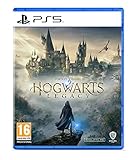
- EXPLORE AN OPEN WORLD. The wizarding world awaits you. Freely roam Hogwarts, Hogsmeade, the Forbidden Forest, and the surrounding Overland area.
- BE THE WITCH OR WIZARD YOU WANT TO BE. Learn spells, brew potions, grow plants, and tend to magical beasts along your journey. Get sorted into your house, forge relationships, and master skills to become the witch or wizard you want to be.
- EXPERIENCE A NEW WIZARDING WORLD ADVENTURE. Experience the wizarding world in an unexplored era to uncover a hidden truth from its past. Battle against trolls, Dark Wizards, goblins, and more as you face a dangerous villain threatening the fate of the wizarding world.
- Please note that although this game is Region Free or Region Unlocked and will work on all systems, this is the international version and may differ from the local version in age rating, labeling or instructions. DLC content may not work unless using an EU Playstation account as stated this is an EU Import Region Free Version
Product prices and availability are accurate as of the date/time indicated and are subject to change. Any price and availability information displayed on Amazon at the time of purchase will apply.
Recommended Free Tools



