Do these 3 things before closing this tab:
1Repair Windows errors before they cause bigger problems2Scan for outdated or missing drivers - takes under a minute3Clear out junk files and repair common Windows errorsFind blue-glowing blueprint containers at abandoned bases and outposts, then take each schematic to a Recipe Station and provide its listed materials and Data Points to unlock the recipe. For an early start, head northwest of the Lander to Purple Haze, where guides report the Rotor and Tube blueprints. The outpost is hostile, so bring a weapon and ammunition.
How blueprint unlocking works
Blueprints are found through exploration in blue-glowing loot containers at abandoned bases, ruins, and other sites on Arcadia-7. Finding a schematic does not by itself unlock its recipe: return to a Recipe Station and submit the blueprint with the materials and Data Points shown there. The PC Gamer walkthrough covers this process for the Rotor and Tube blueprints (PC Gamer, January 7, 2026).

Get the early Rotor and Tube blueprints at Purple Haze
Reach the outpost
Purple Haze, also called the Selenian Mining Base, is northwest of the Lander. It is a useful early target because the Rotor and Tube blueprints are reported there. Enemies spawn at the base; the walkthrough recommends bringing a pistol and ammunition.
Enter the rear building
The blue chest is in the two-storey building at the back of the outpost. The front door is locked, so the walkthrough describes going around the right rear, climbing the rocks, and entering from the upper floor. Clear the area, collect the blueprints, and leave room in your inventory for loot.
#1 Best Overall
Unlock each recipe
- Return to your Recipe Station with the Rotor and Tube schematics.
- Select each blueprint and provide the materials and Data Points listed by the station.
- Check that each recipe is unlocked before setting out to gather ingredients for production.
A third-party database suggests roughly 300 bullets for hostile encounters. Treat that as a rough community recommendation, not a fixed requirement; the game’s actual threat and your equipment may vary.
Where other blueprint guides send you
Community route lists do not agree on every location or order. Use them to plan possible stops, then verify a destination before committing to a long trip. The Steam guide is explicitly marked work in progress, and the separate StarRupture Wiki list was published March 31, 2026.
Rank #2

- Star Wars meets Five Crowns: play the award-winning rummy-style card game with an epic galactic theme and a fifth suit of stars for endless excitement
- Intergalactic themed decks: two 58-card decks featuring iconic Star Wars characters and imagery
- Strategize like a Jedi: arrange your cards into books and runs to outplay your opponents. Lowest score at the end wins
- Cosmic shifts: the wild card changes every round—adapt your strategy at lightspeed to stay ahead
- Out-of-this-world fun for all: exciting and interactive for the whole family, perfect for 1–7 players ages 8+
| Blueprints | Steam community route | StarRupture Wiki route |
|---|---|---|
| Rotor and Tube | Purple Haze | Purple Haze |
| Stator | Lemon Souls | Lemon Souls |
| Stabilizer | Mythic Cry | Grey Owl |
| Synthetic Silicon | Mythic Cry | Mythic Cry |
| Electronics | Starry Night | Starry Night or Copperfield |
| Chemicals | Liquid Luck | Spored Rock |
| Hardening Agent | Redleaf | Next Step |
| Valve, Turbine, and Electromagnetic Coil | Redleaf | Redleaf |
The route lists are player-maintained rather than definitive maps: the Steam author labels the guide WIP, and the two sources differ on several destinations. See the Steam community blueprint guide and the StarRupture Wiki location guide for their respective lists.
Data Points and additional progression
Data Points are described by a third-party FAQ as research currency earned by analyzing items at the Research Station or exporting items to corporations at the Launch Pad. The FAQ also says corporation reputation can unlock exclusive blueprints. Confirm costs and requirements in the in-game interface, since this is wiki guidance rather than official documentation. See the StarRupture Tools FAQ.
Recommended Free Tools
Rank #3

- "Startups" is the updated version of an older Oink Game which came out in 2015 and won the second prize at Game Market Tokyo: "Rights". We upgraded the rules, the design and it is even possible to play with more players now!
- Every player takes the role of an investor and needs to try to invest in at least one of six startup companies to get the biggest shares. Only the player with the most cards of one company can get money in the end, which is why you need to carefully watch the moves of your rival players and thus become the top investor.
- To make the original game even more interesting, we added "the market", the "Anti-Monopoly-Chip" and more. The rules are still as simple as they were, but if you have played "Rights" before you should notice a new depth to it.
- The logos of the six startup companies were designed by Kentaro "ANI" Fujimoto who is a famous typographer in Japan. We recommend talking about the different logos and about what kind of company stands behind it - it's fun!
Check locations against your game version
StarRupture is in Early Access, and location guides may fall out of date as the game changes. The Steam community page’s update listing showed Hotfix 0.3.5 dated October 5, 2026; that was its latest listed update when checked on October 8, 2026, not confirmation that no other official announcement existed elsewhere. Before a long expedition, compare the destination with a current in-game map or recently updated guide.
Quick Recap
Rank #4
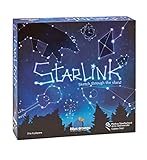
- CREATIVE DRAWING GAME: Starlink is a cosmic themed party game perfect for developing fine motor and drawing skills for both children and adults! This new party game has an amazing table presence with beautiful and high-quality cardboard pieces
- FAMILY OR ADULT GAME: This 3 to 6 players cosmic game can be enjoyed by children, parents, or the whole family! Best recommended for ages 8 & Up
- HOW TO PLAY: Each turn you will be given a new concept that you must represent by drawing lines between the available stars on the board. But watch out! Once a star has been used in one constellation, it can no longer be used for the rest of the game! The player who creates the best constellations is the winner!
- INCLUDES 100 Constellations cards, 1 Dry Erase game board, 2 Dry Erase Markers, 1 Telescope card, 1 Sand timer, Rules
Product prices and availability are accurate as of the date/time indicated and are subject to change. Any price and availability information displayed on Amazon at the time of purchase will apply.



