Start with the reversible fixes: update the controller in Xbox Accessories, use the recalibration option if your console offers it, clean around the stick without applying liquid, then reset and test. If the stick still moves when untouched, the cause may be a worn joystick module or another hardware fault; repair options depend on the controller’s exact model and revision.
First check whether the controller is the cause
Connect another controller to the same game or console, or test the suspect controller in another compatible game. If unwanted movement follows one controller, troubleshoot that controller. If it happens with more than one, check the game’s control settings as well; symptoms alone do not identify a specific fault.
Update and recalibrate the controller
- On the Xbox console, press the Xbox button and go to Profile & system > Settings > Devices & connections > Controllers & headsets.
- Select the three-dot menu under the controller and install a firmware update if one is available.
- Return to the controller options and use the native recalibration or live-tracker feature if it appears. Watch whether the stick registers movement while untouched.
These menu names and options can change or vary by console and controller; follow the options actually shown. Microsoft’s Xbox Series X Digital Console Safety & Repair Instructions advise checking for updates before hardware troubleshooting.
Clean around the thumbstick safely
- Turn the controller off and remove its batteries, or disconnect it from power.
- Wipe around the base of the thumbstick with a microfiber cloth.
- Use compressed air to clear debris around the stick, then move the stick through its range of motion.
- Reconnect the controller and test it again.
Microsoft says not to apply liquids directly to controllers. Cleaning may help if debris is interfering with movement, but it will not repair a worn sensor or joystick module. See Microsoft’s Xbox controller cleaning guidance.
#1 Best Overall

- Upgraded Anti-Drift TMR Joystick Technology – Evolved from GuliKit's patented Hall Effect joystick, the more advanced TMR (Tunnel Magnetoresistance) thumb stick same works with contact-less magnetic field sensing mechanism to eliminate stick drift cause,while offers ultra-low power consumption, enhanced stability, drift-free long lasting durability, high-precision and silk-like smoothness.
- No Circuit Changes Required (Soldering Required) – Install the enhanced TMR stick module kit directly on Xbox Series X|S/Elite Series 2 Controller(not for Xbox 360/One & Elite Series 1 ) to fix the stick issue ultimately. Save the hassles and your money. Important Note for Elite Series 2 Users: After installation, only the thumbstick caps included in this kit can be used. The original caps are not compatible due to a different installation structure — the original uses a screw-on design.
- Anti-Interference Structure –Unique structural design prevents interference from magnetic triggers on the joysticks.
- Premium Stick Caps – Includes 2 GuliKit KK Ring anti-friction stick knobs designed for enhanced gripping and comfort during extended play.
- Note: The analog joystick replacement work requires professional tool kit/repair devices(not included in our package) and good skills in desoldering and soldering. If you are not experienced with soldering, we recommend seeking professional assistance to ensure proper installation. After replacing the joysticks, you can go to the X BOX console or download the "X BOX Accessories" software from the Microsoft Store on PC, then find the "Recalibrate" option and follow the instructions to calibrate the joysticks.
Reset the controller and retest
Asurion’s troubleshooting guidance describes a soft reset: hold the Xbox button for 10 seconds to turn the controller off, wait briefly, then turn it back on and test the stick. A reset is a diagnostic step, not proof that a hardware fault has been repaired. Asurion’s Xbox Series X/S drift guidance also covers updating, recalibration and cleaning.
Choose a repair path based on the controller model
Check the exact model and revision before buying parts or following a teardown guide. The documented procedures below are not interchangeable: one services internal sensor wheels on a specific controller, while the other replaces the joystick module.
Rank #2

- Custom designed joysticks to perfectly fit for Xbox Series X/S, for Xbox Core controller (Model 1914) , for Xbox One standard (Model 1537/1697), for Xbox One X/S (Model 1708), for Xbox One Elite V1 (Model 1698) controller; Not compatible with Xbox Elite Series 2 and other controllers. Work exactly like the original thumbsticks
- Unique replacement to add much more personality to your controller. The replacement thumb sticks will make your controller distinct when playing with friends, no more boring standard color
- Made of premium PC & TPE plastic material, durable and practical. Ideal replacement for your broken or cracked controller thumbsticks
- The black color looks great; Would be awesome if you combine it with the custom shell from eXtremeRate (You can find these shells in our store.)
- Easy to install, requires internal fitting, the screwdriver tool included can help you easily open the shell and install the gaming parts
| Option | What it addresses | Model and skill considerations |
|---|---|---|
| Clean and troubleshoot | May help with debris, firmware or calibration problems. | Start here before opening the controller; no internal repair is required. |
| Sensor-wheel service | Services the internal sensor wheels without soldering. | iFixit’s guide is specifically for Xbox Series controller model 1914. It calls for TR8 and T6 Torx drivers and tweezers, and warns against excessive force when opening the sensor housing. Read the model 1914 guide. |
| Joystick-module replacement | Replaces the module if it is worn and drift persists. | iFixit’s Xbox Series X/S wireless-controller guide describes an advanced repair requiring intermediate soldering skill; removing the module is difficult. Read the joystick replacement guide. |
| Professional repair or replacement | Moves the repair to a service provider or replaces the controller. | Availability, price and eligibility depend on region and provider; confirm service for your exact controller before proceeding. |
Check warranty and your repair options before opening it
Look up the controller’s warranty status through Xbox Support before opening it or ordering parts. Coverage varies, so confirm the terms that apply to your controller. If you do not have the tools or skill for the model-specific procedure, contact a repair provider and ask whether it handles your controller model. Asurion lists uBreakiFix as an option, but that does not establish service availability, price or turnaround at every location.
Independent reader supportYour contribution helps us test, update, and keep practical guides available for everyone.When DIY repair is not the right choice
- You cannot confirm that a guide or replacement part matches your controller’s exact model and revision.
- The repair requires soldering and you do not have the relevant experience or equipment.
- You would rather preserve the option of warranty service before opening the controller.
- A local provider can confirm it repairs your model and give you current terms before you commit.
The available sources do not establish a typical repair cost or success rate. Check parts, service coverage and total cost for your region before deciding whether to repair or replace the controller.
Quick Recap
Best Value
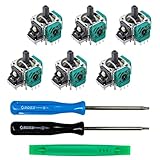
- MONEY SAVER: Have a non-properly working joystick? Don't worry! This kit is the perfect solution to make your controller working like new again. No need to shell out $60-$180 or more for a brand new controller. Please Note: You will need basic soldering skills along with soldering tools and other basic tools.
- WHAT THIS FIXES: Stick drift, creeping, stuttering, blind spots, dead zones, no click, non-centered, broken, and loose joysticks.
- COMPATIBILITY: All Xbox One Controllers! (Excluding Elite Series 2)
- HIGH QUALITY PARTS: These joysticks are 100% of the highest quality. As such, you can be sure to be getting the best quality replacement.
- GUIDED INSTALLATION: On the package includes a link to a complete tutorial video on how to do the repair!
Rank #4

- 【Compatible With】 These thumbstick compatible for Xbox one, For Xbox one S, For Xbox one X, For Xbox series S, For Xbox series X, For Xbox one Elite, For Xbox core controller.
- 【Good Material】High quality ABS plastic material, Durable long time use,Perfect replace your broken or old joystick thumbstick.
- 【Multi Colors】Thumbstick can select from Black,White, Red, Green,Blue,Red,Grey blue, Grey Green, Grey Red 9 Colors, you can choose you like colors.
- 【Perfect Fit】Perfect fit your controller, replace your broken or worn-Out thumbstick, good touch feeling like brand new, Match colorful thumbstick, will make your controller have a different amazing looking.
- 【Package included】8*thumbsticks, and let you save money, and don't need buy tools extra, we also send 1*screwdriver, 1*Open tool,1*Tweezer.
Rank #3

- 【Compatible with Xbox One S/X Controller】Replacement analog joystick compatiable with Xbox One S/X Controller. Please Note: You will need basic soldering skills along with soldering tools and other basic tools.
- 【Premium Quality】High Quality joystick replacement helps to fix your drifting, worn-out, damaged, blind spots, dead zones, no click, non-centered issues, bring back new life for your controller.
- 【Easy to install】Requires some soldering to install, otherwise it is easy to repair, It's recommended for you to find some video on Youtube about how to fix the Controllers.
- 【Packge includes】4 x 3D Analog Joystick, 4 x Thumbstick Cap, 3 x Screwdrivers of T6 T8 T10, 1 x Tweezer, 1 x Pry tool, 1 x Pry bar, 1 x Brush.
- 【Perfect Repair】A economical way to repair your drift joystick, make it look like the new one. If you have any questions or requirements regarding the product, please feel free to contact us.
Product prices and availability are accurate as of the date/time indicated and are subject to change. Any price and availability information displayed on Amazon at the time of purchase will apply.



