If you’re playing Roblox, first open the in-game menu, go to Settings, turn off Graphics Quality – Auto, and lower the graphics level. If that does not help, close other high-resource apps. These steps can ease the workload on your device, but Roblox does not promise that they will reduce the Roblox client’s own memory allocation.
First, identify what “memory usage” means
Roblox Player and Roblox Studio have different memory profiles. A high number by itself does not prove a problem: the reviewed Roblox guidance does not give a universal normal-memory range for every experience and device. Crashes on a device the creator intends to support, or a rising crash rate, are stronger reasons to investigate.
Also separate memory concerns from lag. Roblox distinguishes network lag, graphics lag, and system lag. Warping players or delayed actions can point to network problems; choppy visuals can point to graphics performance; other demanding applications can contribute to system lag. Lowering graphics is not a universal fix for each type.
What players can do
Lower graphics quality
- While in an experience, press Esc to open the menu.
- Choose Settings.
- Turn Graphics Quality – Auto off.
- Lower the graphics level and see whether performance improves.
Roblox says lower graphics quality reduces some visual quality while making the device work less to run Roblox, which may improve the experience. It does not specify a memory reduction amount.
Recommended Free Tools
#1 Best Overall

- READY FOR ANYTHING – Dive headfirst into gaming on Windows 11 powered by the Intel Core i5 Processor 13450HX and an NVIDIA GeForce RTX 5050 Laptop GPU with a Max TGP of 115W and NVIDIA Advanced Optimus.
- SUBTLE STYLING – The TUF Gaming F16 maintains its classic design, boasting a subtle embossed TUF logo on its sleek cover.
- IMMERSIVE VISUALS – The TUF Gaming F16’s FHD+ 165Hz display with 100% sRGB color draws you into the action. Adaptive-Sync technology reduces lag, minimizes stuttering, and eliminates visual tearing for ultra-smooth gameplay.
- MILITARY GRADE DURABILITY – As a TUF gaming machine, the F16 has been rigorously tested to meet Military Grade testing standards, MIL-STD-810H. Rest easy knowing this laptop will operate at peak performance in harsh conditions.
- EFFICIENT COOLING – Equipped with 2nd Gen Arc Flow Fans, full-width heatsink, and full-width vent, the TUF Gaming F16 optimizes cooling performance without extra noise.
Close competing applications
If lowering graphics does not help, close unwanted apps that are using substantial system resources. This can free resources for the device overall; it does not establish that Roblox’s own memory allocation has shrunk.
Inspect memory and document crashes
When the Developer Console’s Memory view is available, use it to inspect memory categories and watch whether usage grows over time. If crashes continue, note the experience and device and contact Roblox Support. Roblox’s player guidance says a more powerful device may be needed for continuing lag, but it does not define a safe memory threshold or quantify the expected benefit of an upgrade.
Rank #2

- Beyond Performance: The Intel Core i5-13420H processor goes beyond performance to let your PC do even more at once. With a first-of-its-kind design, you get the performance you need to play, record and stream games with high FPS and effortlessly switch to heavy multitasking workloads like video, music and photo editing.
- AI-Powered Graphics: The state-of-the-art GeForce RTX 4050 graphics (194 AI TOPS) provide stunning visuals and exceptional performance. DLSS 3.5 enhances ray tracing quality using AI, elevating your gaming experience with increased beauty, immersion, and realism.
- Visual Excellence: See your digital conquests unfold in vibrant Full HD on a 15.6" screen, perfectly timed at a quick 165Hz refresh rate and a wide 16:9 aspect ratio providing 82.64% screen-to-body ratio. Now you can land those reflexive shots with pinpoint accuracy and minimal ghosting. It's like having a portal to the gaming universe right on your lap.
- Internal Specifications: 8GB DDR5 Memory (2 DDR5 Slots Total, Maximum 32GB); 512GB PCIe Gen 4 SSD
- Stay Connected: Your gaming sanctuary is wherever you are. On the couch? Settle in with fast and stable Wi-Fi 6. Gaming cafe? Get an edge online with Killer Ethernet E2600 Gigabit Ethernet. No matter your location, Nitro V 15 ensures you're always in the driver's seat. With the powerful Thunderbolt 4 port, you have the trifecta of power charging and data transfer with bidirectional movement and video display in one interface.
If you create the Roblox experience
Players cannot change an experience’s content or scripts; its creator has to make those changes. Use the Developer Console’s Memory tool to inspect real-time usage by category, then compare Luau heap snapshots to track script memory over time. Roblox’s categories include engine processes, place content, scripts, physics, graphics, and audio; PlaceMemory and PlaceScriptMemory help identify contributions from the place and its scripts.
Stream large worlds selectively
Roblox identifies instance streaming as the highest-impact mechanism available to creators for reducing client memory. It selectively loads and unloads parts of the data model that are not needed, making it a natural option for large worlds. If streaming is already enabled, consider whether persistent models can be reduced and whether streaming radii can be more aggressive.
Do these 3 things before closing this tab:
1Clear out junk files and repair common Windows errors2Fix the driver behind crashes, sound loss and screen glitches3Repair Windows errors before they cause bigger problemsRank #3
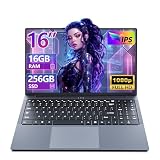
- 【Reliable Performance for Everyday Tasks】laptop computer with the i5-8210Y (Up to 3.60 GH), this device handles multitasking with ease. Whether you're browsing the web, editing documents, or streaming media, enjoy a fluid and lag-free experience that keeps up with your pace.
- 【Stay Responsive & Store More】Laptop Featuring high-efficiency DDR3 16GB RAM for seamless multitasking (student docs, business ) plus a massive 256GB SSD. Experience quick data access .
- 【Immersive 16" IPS FHD Screen】Featuring a 16-inch Full HD (1920x1200) anti-glare screen with a 16:10 widescreen aspect ratio. The anti-glare coating minimizes reflections, helping to reduce eye strain during long online classes, video conferences, or movie.
- 【All-Day Power, Portable Design】Lap top Equipped with a 44Wh (5800mAh) battery, this laptop keeps you powered for extended use in any setting—whether at home, in the library, or on the go. Its compact frame measures just 14.1" x 9.6", easily sliding into any backpack for effortless portability.
- 【Rich Features & Ports】The YOZISUAN Laptop comes with a webcam equipped with a physical privacy shutter for enhanced security. Stay connected and productive with a full range of ports: USB-A 3.0 x3, HDMI x1, Type-C x1, and a 3.5mm headphone jack. The backlit keyboard allows you to work comfortably even in low-light environments.
Reduce duplicated and oversized assets
- Reuse assets rather than uploading duplicate copies.
- Remove duplicate meshes or textures.
- Use texture resolution appropriate to how the texture appears on screen.
Roblox gives this example: a 1024×1024 texture consumes four times the graphics memory of a 512×512 texture. That is Roblox’s published comparison, not an independent benchmark.
Measure the client, not Studio’s combined total
For a player-focused reading, measure in a live or client testing context. Studio runs both a server and a client, so its total memory use is significantly higher and is not a direct proxy for a player’s client. The operating system and other applications also need a share of the device’s memory.
Rank #4

- 【Reliable Performance for Everyday Tasks】laptop gamer with the Core processor (up to 3.40 GHz), this device handles multitasking with ease. Whether you're browsing the web, editing documents, or streaming media, enjoy a fluid and lag-free experience that keeps up with your pace.
- 【Stay Responsive & Store More】Gaming laptop featuring high-efficiency 16G RAM for seamless multitasking (student docs, business apps) plus a massive 512GB SSD. Experience quick data access.
- 【Immersive 15.6" Full HD Display】Featuring a 15.6-inch Full HD (1920x1080) anti-glare screen with a 16:9 widescreen aspect ratio. The anti-glare coating minimizes reflections, helping to reduce eye strain during long online classes, video conferences, or movie.
- 【All-Day Power, Portable Design】Lap top Equipped with a 38Wh (5000mAh) battery, this cheap gaming laptop keeps you powered for extended use in any setting—whether at home, in the library, or on the go. Its compact frame measures just 14.1" x 9.1", easily sliding into any backpack for effortless portability.
- 【24/7 Customer Support – We're Here for You】Your satisfaction is our top priority. This laptop comes with a 2-year manufacturer warranty and a 90-day return/exchange policy. If you have any questions or concerns about your purchase, please don't hesitate to reach out. Our dedicated customer support team is available 24 hours a day, 7 days a week to assist you.
Player actions versus creator changes
| Action | Who can do it | What it addresses | Trade-off or limit |
|---|---|---|---|
| Lower in-experience graphics | Player | Device workload and graphics performance | Visual quality is reduced; a specific Roblox memory reduction is not established. |
| Close high-resource apps | Player | Competing use of system resources | Does not establish a smaller Roblox allocation. |
| Use Memory and Luau heap diagnostics | Creator | Identifying experience and script memory use | Requires interpreting client data rather than treating Studio’s combined total as player usage. |
| Enable or tune instance streaming; optimize assets | Creator | The experience’s client memory footprint | Requires changes to the experience. |
What not to infer from a memory number
Roblox’s Creator Hub advises creators to try to keep server memory usage below 50%, with a formula of 6.25 GiB + 100 MiB × the largest number of connected players. This is a server guideline, not a target for a player’s client memory. The reviewed documentation does not establish a numeric normal range for a particular client, or how much lowering graphics saves.
Quick Recap
Product prices and availability are accurate as of the date/time indicated and are subject to change. Any price and availability information displayed on Amazon at the time of purchase will apply.
Quick wins for a faster PC:
Repair Windows errors before they cause bigger problemsFix Now →Scan for outdated or missing drivers - takes under a minuteDriver Scan →



