The Tool Desk
Outbyte Driver Updater FREEFix the driver behind crashes, sound loss and screen glitchesFind Drivers →Outbyte PC Repair FREEClear out junk files and repair common Windows errorsFree Scan →Poké Ball Plus is a motion-control accessory for Pokémon: Let’s Go, Pikachu! and Pokémon: Let’s Go, Eevee!, and it can also connect to Pokémon GO as a Pokémon GO Plus. It does not connect Pokémon GO to Pokémon Scarlet or Pokémon Violet; that feature links the app directly to a Nintendo Switch console.
What does Poké Ball Plus do?
In the two Let’s Go games, the Poké Ball Plus acts as a controller. Its control stick and top button handle inputs, while motion controls let you make a throwing gesture during encounters. It also provides light, vibration, and sound feedback. Nintendo describes those functions in its Poké Ball Plus overview.

It also works with Pokémon Sword and Pokémon Shield to take a Pokémon along for a stroll. Nintendo describes controller use for the Let’s Go titles; do not expect Poké Ball Plus to serve as a full controller in Sword or Shield.
How does the stroll feature work?
In a compatible Let’s Go game, you can send one Pokémon at a time into the accessory for a real-world stroll. The Pokémon is a copy, so it remains available in the game while away. Experience or rewards earned during the stroll are added to the original Pokémon when it returns. The option becomes available after you have battled your rival for the first time. See Nintendo’s Poké Ball Plus FAQ for details.
#1 Best Overall

- Poké Ball Plus lights up, vibrates, and plays sounds based on what you do in Pokémon: Let’s Go, Pikachu; or Pokémon: Let’s Go, Eevee; If a friend has a Poké Ball Plus of their own, they can help you catch and battle alongside you to make it a 2 player adventure; When you take your favorite Pokémon out with you in the Poké Ball Plus accessory, you can also gently shake it to hear the Pokémon inside; Connect Poké Ball Plus to the Pokémon GO; app and it will light up and vibrate when you’re near a Pokémon or Poké Stop
- Games, system and Poké Ball Plus sold separately
- Using as a Pokémon GO Plus requires installation of the Pokémon GO application on a compatible smartphone
How to connect Poké Ball Plus to Pokémon GO
- Open Pokémon GO and go to Settings.
- Choose Poké Ball Plus.
- Press the top button on the accessory so it appears among available devices.
- Select Poké Ball Plus in the app to pair it over Bluetooth.
Once connected, Nintendo says it functions exactly like a Pokémon GO Plus. The Nintendo pairing instructions cover the connection process.
If pairing fails
- Confirm your phone or smart device and operating system are supported, Bluetooth is enabled, and the accessory has charge.
- Reset the accessory and make sure it is not actively connected to a Switch game.
- In Pokémon GO, remove or eject the accessory, then try pairing it again.
- If it still will not connect, restart the app or smart device, unpair the accessory in the phone’s Bluetooth settings, or try another supported smart device.
- If the problem persists, Nintendo recommends contacting support for service.
Nintendo’s support article includes an app-version minimum, but it is an older, version-specific requirement and may not reflect the app’s current policy.
Does Poké Ball Plus connect Pokémon GO to Scarlet or Violet?
No. The Poké Ball Plus is not used to link Pokémon GO with Pokémon Scarlet or Pokémon Violet. Nintendo’s connection instructions describe a direct connection between the app and the Switch console.
Does every Poké Ball Plus include Mew?
Nintendo says each Poké Ball Plus contains Mew as a special bonus and documents transferring it to a game in its Poké Ball Plus FAQ. For a used unit, whether that bonus has already been claimed is specific to that unit. Nintendo’s general instructions do not say that a redeemed Mew can be claimed again, so confirm the redemption history with the seller rather than assuming Mew is still available.
Free tools Windows power users keep installed
One-click scans. No signup required.
Rank #3

- Wireless freedom using Bluetooth 5.0
- Features motion controls and mappable advanced gaming Buttons
- Leds for player number, button mapping, and low battery warning
- Includes two AA batteries for up to 30 hours of gameplay
Specifications, charging, and safe use
| Specification | Nintendo’s published information |
|---|---|
| Diameter | 48 mm, excluding protruding parts |
| Weight | Approximately 65 g |
| Battery | Non-removable 220 mAh lithium-ion battery |
| Charging time | Approximately three hours |
| Sensors | Accelerometer and gyro sensor |
| In the package | Poké Ball Plus and USB charging cable |
These are Nintendo’s published specifications on its Poké Ball Plus specifications page; the charging time is approximate. Nintendo’s instruction manual says to recharge using the included cable, a Nintendo Switch AC Adapter, or a Nintendo USB AC Adapter. Because the battery is non-removable, battery replacement is not a normal owner task. The manual also warns against disassembling or trying to repair the accessory.
Before making a throwing motion, secure the wrist strap and support ring, hold the accessory firmly, and do not let go, as Nintendo instructs in its safety guidance.
Rank #4
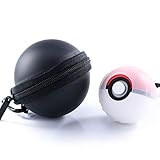
- Accessories for Poke Ball Plus Controller - Pokeball plus pouch and pokeball plus protector for pokeball plus owner or Pokemon fan. If you have nintendo switch pokemon lets go pikachu and lets go eevee, you may need it.
- The case providing sufficient protection from dust, shock, drop and scratch. Hard-shell eva exterior and soft scratch interior perfect protect your ball. Moisture and dust proof. High quality protective case offer your ball the greatest sense of security.
- The carabiner extremely convenient for you to bring, you can attach to your backpack, belt loop, pants and key chains with you anywhere anytime for quick getting your Pokémon ball.
- This soft rubber cover case makes it a little bigger around the palm and makes it much more comfortable.
- The Poké Ball Plus case was designed with precise cutouts for functional buttons and ports, it’s easy to control the button. Gamer can operate the controller perfectly.Let you enjoy a good Pokémon Game Time.
Should you use Poké Ball Plus or Joy-Con?
For the Let’s Go games, standard Joy-Con controls are the practical alternative. Poké Ball Plus is the option for players who want the Poké Ball-shaped motion-control experience and may also use a Pokémon GO accessory. Before buying a used one, weigh those functions against the condition and battery life of that specific unit, along with its price and availability. Nintendo’s specifications do not establish a used unit’s remaining battery health, current resale price, stock, or seller reliability.
Quick Recap
Best Value

- 3 iconic colors
- Precision cut to access all features and indications
- Helps keep your Plus safe from drops and moisture
Product prices and availability are accurate as of the date/time indicated and are subject to change. Any price and availability information displayed on Amazon at the time of purchase will apply.



