Quick wins for a faster PC:
Clear out junk files and repair common Windows errorsFree Scan →Fix the driver behind crashes, sound loss and screen glitchesFind Drivers →Dolphin is the clear GameCube emulator recommendation for both PC and Android. The project documents support for Windows, Linux, macOS, and recent Android devices, but the available official evidence does not substantiate eight current, comparable emulators for both platforms. Rather than pad a “top 8” list with outdated projects or unrelated front ends, this guide explains what Dolphin supports, how to choose the right build, and what your device needs.
What is the best GameCube emulator for PC and Android?
Dolphin is the strongest verified cross-platform choice: its project describes it as a GameCube and Wii emulator for Windows, Linux, macOS, and recent Android devices. The official project repository documents those platforms and publishes system requirements at github.com/dolphin-emu/dolphin.
The “top 8” framing is not supported by the available official evidence. It establishes one clear option across PC and Android, not eight distinct, current emulators that support both. A list built by mixing forks, front ends, obsolete projects, or software for other platforms would not give readers a reliable comparison.
Can you play GameCube games on Android?
Yes, Dolphin supports recent Android devices, provided they meet the project’s published requirements. Those requirements are a starting point, not a guarantee that every game will run at full speed. Dolphin specifically notes that Android performance can vary considerably with graphics driver quality.
#1 Best Overall

- 【Wide Compatibility & Plug and Play】Fiotok GameCube controllers are compatible with GameCube and Nintendo Wii. Note: Wii support is limited to GameCube games only, and plug and play requires a built-in GameCube port on your Wii console. Just plug in and play, no extra drivers or complicated setup required
- 【Upgraded Analog Stick & Rumble Feedback】Fiotok wired gamecube controller retains smooth performance of original controller. It features refined analog joystick design that minimizes stick drift and button sticking, paired with upgraded dual analog joysticks and responsive D-pad. Built-in vibration feedback provides automatic vibration adjusted according to games to enhance your gaming experience. Perfect for Melee and Smash series games
- 【4-Player Multiplayer Ready】GameCube controllers are designed for Nintendo GameCube/Wii and fully support Super Smash Bros. Equipped with fully analog pressure-sensitive action buttons & D-Pad for precise in-game inputs. With a controller adapter, Fiotok game cube wired controllers work with Switch, PC and Wii U. Up to 4 controllers can be connected to the console at once, ideal for multiplayer party games to enjoy game time with your friends (Note: Adapter is not included)
- 【Christmas Gift For Family】The gamecube controller is a nice holiday gift for kids to boost parent-child interaction. This game cubes controller fits all ages to unwind and escape daily pressure, bringing relaxing and joyful gaming time for family and friends
- 【Durability Support】We've worked hard to improve product quality and customer service. If you have any questions about our Fiotok brand products, please let us know. We will reply to you within 24 hours and provide support for you.
Published Android requirements
- Android 7.0 or later.
- A 64-bit ARMv8 or x86-64 processor.
- Graphics support for OpenGL ES 3.0 or higher.
Before installing, check your device’s Android version and processor architecture. Meeting the listed graphics API requirement alone does not establish how well a particular game will perform.
Will Dolphin run on your PC?
Dolphin publishes separate desktop operating-system requirements. The project lists Windows 10 version 1903 or later, Linux, and macOS 11.0 or later. It calls for SSE2 CPU support and recommends a modern dual-core processor around 3 GHz or better. These are project-published requirements and guidance, not a promise of full-speed play for every game.
Rank #2
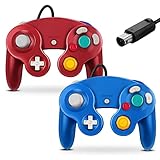
- 【Wide Compatibility & Plug and Play】Fiotok GameCube controllers are compatible with GameCube and Nintendo Wii. Note: Wii support is limited to GameCube games only, and plug and play requires a built-in GameCube port on your Wii console. Just plug in and play, no extra drivers or complicated setup required
- 【Upgraded Analog Stick & Rumble Feedback】Fiotok wired gamecube controller retains smooth performance of original controller. It features refined analog joystick design that minimizes stick drift and button sticking, paired with upgraded dual analog joysticks and responsive D-pad. Built-in vibration feedback provides automatic vibration adjusted according to games to enhance your gaming experience. Perfect for Melee and Smash series games
- 【4-Player Multiplayer Ready】GameCube controllers are designed for Nintendo GameCube/Wii and fully support Super Smash Bros. Equipped with fully analog pressure-sensitive action buttons & D-Pad for precise in-game inputs. With a controller adapter, Fiotok game cube wired controllers work with Switch, PC and Wii U. Up to 4 controllers can be connected to the console at once, ideal for multiplayer party games to enjoy game time with your friends (Note: Adapter is not included)
- 【Christmas Gift For Family】The gamecube controller is a nice holiday gift for kids to boost parent-child interaction. This game cubes controller fits all ages to unwind and escape daily pressure, bringing relaxing and joyful gaming time for family and friends
- 【Durability Support】We've worked hard to improve product quality and customer service. If you have any questions about our Fiotok brand products, please let us know. We will reply to you within 24 hours and provide support for you.
| Platform | Published operating-system requirement | Processor and graphics guidance |
|---|---|---|
| Windows | Windows 10 version 1903 or later | SSE2 CPU support; modern dual-core CPU around 3 GHz or better recommended |
| Linux | Linux | SSE2 CPU support; modern dual-core CPU around 3 GHz or better recommended |
| macOS | macOS 11.0 or later | SSE2 CPU support; modern dual-core CPU around 3 GHz or better recommended |
Dolphin’s repository does not state a separate minimum desktop graphics specification in the evidence cited here. For Android, the project specifies OpenGL ES 3.0 or higher and warns that driver quality affects performance.
Where should you download Dolphin safely?
Download Dolphin from the project’s official page: dolphin-emu.org/download/?lang=en. It lists packages for Windows x64, Windows ARM64, universal macOS, Android, and Linux Flatpak. The page’s release information changes, so check it for the current version rather than relying on an old version number in an article.
Rank #3

- Features intuitive Play Control
- Analog C Stick
- Control Stick and Shoulder Buttons
- Plus A built-in Rumble Feature
Choose stable or development
The download page recommends stable releases for users who prioritize stability and describes development builds as less tested. At the time reflected by the cited page, it listed release 2609, dated September 2026, and a 2609a hotfix; those identifiers may change. Windows releases require the 64-bit Visual C++ v14 redistributable, and the page provides an official Flatpak repository for Linux.
- Open the official Dolphin download page.
- Select the package matching your device: Windows x64 or ARM64, universal macOS, Android, or Linux Flatpak.
- If stability is your priority, choose the latest stable release listed there; use a development build only if you accept that it is less tested.
- For Windows, install the required 64-bit Visual C++ v14 redistributable if it is not already present.
What about the games?
Dolphin is an emulator, not a source of GameCube game files. Compatibility can depend on the specific game and device; the evidence cited here does not establish a game-by-game compatibility list or guarantee. Follow applicable local law when obtaining or using game copies. Rules vary by jurisdiction, so do not assume that owning a disc makes downloading a game image lawful everywhere.
Quick Recap
Best Value

- ✔ ERGONOMIC - Dual Analog Joysticks, Analog pressure sensitive action buttons & D-Pads, comfort feel & hold operation during long hours of game play.
- ✔ CLASSIC NGC - Relive your favorite GameCube games and experience that feeling on today's games.
- ✔ PERFECT REPLACEMENT - Replace your broken or worn controllers, compatible with the Nintendo Wii and Nintendo GameCube consoles.
- ✔ NOTE - UN-official Third party product, not manufactured or licensed by Nintendo. Compatible with all versions of Wii, GameCube consoles. Works exactly as the Nintendo Gamecube controller.
- ✔ PACKAGE INCLUDES - 2x Gamecube Controllers Compatible for Wii Nintendo GameCube.
Rank #4

- Dual analog joysticks
- Fully analog pressure-sensitive action buttons & D-Pad
- Vibration feedback
- Compatible with Wii and GameCube
- Wii support limited to GameCube games
Product prices and availability are accurate as of the date/time indicated and are subject to change. Any price and availability information displayed on Amazon at the time of purchase will apply.



