On a real PSP running compatible custom firmware, put the ISO file in a folder named ISO at the root of the Memory Stick or other PSP storage. The path looks like X:/ISO/game-name.iso; the ISO folder sits beside PSP, not inside PSP/GAME. Stock Sony firmware does not load ISO files from this folder.
Where does the PSP ISO folder go?
Open the top-level directory of the PSP storage—the directory where you can see the existing PSP folder. Create a folder named ISO there if it is missing, then copy the ISO file directly into it.
For example, if the computer shows the storage as drive X:, use X:/ISO/game-name.iso. The drive letter is only an example; use the volume name or path shown on your own computer. The root-level ISO location is the customary convention for compatible custom firmware, not a folder location specified in Sony’s PSP-E1002/E1003 manual.
How to copy an ISO to a real PSP
- Connect the PSP storage to a computer, using the PSP’s USB connection or a card reader.
- Open the storage’s top-level directory. It is the directory containing the
PSPfolder. - Create a folder named
ISOin that directory if one does not already exist. - Copy the ISO file directly into
ISO, not intoPSPorPSP/GAME. - Safely disconnect the storage and check the PSP’s Game menu in the interface provided by compatible custom firmware.
Use files you are entitled to use, such as a personal game dump where lawful. PPSSPP’s official guide to dumping UMD games identifies a PSP with custom firmware as a prerequisite for that workflow: PPSSPP’s UMD dumping guide.
The Tool Desk
Outbyte Driver Updater FREEFix the driver behind crashes, sound loss and screen glitchesFind Drivers →Outbyte PC Repair FREERepair Windows errors before they cause bigger problemsFix Now →#1 Best Overall

- Compatible with MagicGate copyright protection technology
- Can be used to perfect on the PSP adn digital camera
- Memory Stick PRO-HG Duo is ideal for high-speed data transfer and for continuous shooting
- 16GB capacity Flash memory Ideal for burst shooting with DSLR Up to 30MB/s read/write speed
- Can be used to perfect on the PSP(PSP1000/2000/3000/3000) and digital camera.
Why not put an ISO in PSP/GAME?
PSP/GAME is used for other PSP software conventions; it is not the customary location for disc-image ISO files. Keep an ISO directly inside the root-level ISO folder rather than nesting it under PSP/GAME.
Does the PSP need custom firmware?
Yes. Folder placement alone does not make an ISO loadable on stock Sony firmware. The ISO directory convention applies when compatible custom firmware is active; PPSSPP’s documentation likewise specifies custom firmware as a prerequisite for its described UMD-dumping process.
Rank #2
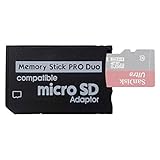
- 2026 Latest Version - Funturbo Micro SD to MS Pro Duo Adapter
- Replace your Memory Stick PRO Duo with any microSD card (MicroSD Card NOT included)
- Up to 128GB Micro SD/SDHC/SDXC Card Compatible
- Compatibility Tested – Fully compatible with MagicGate Memory Stick DUO and Memory Stick PRO Duo, all known issues fixed
- Works perfectly on PSP 1000/2000/3000, Sony camera and handycam, format your card in your device for first time use
Real PSP storage is different from PPSSPP storage
PPSSPP does not use the original PSP firmware menu. It simulates Memory Stick storage with a directory on the device running the emulator, and that directory’s location varies with operating system, app version, and configuration. PPSSPP’s official FAQ covers the emulator; do not assume that a real PSP’s drive-root path is the location of PPSSPP’s simulated storage.
Independent reader supportYour contribution helps us test, update, and keep practical guides available for everyone.If the PSP does not recognize the storage
Storage compatibility can depend on the PSP model and media. Sony’s PSP-E1002/E1003 User’s Guide lists Memory Stick PRO Duo as compatible media for those models, but cautions that performance of all Memory Stick media is not guaranteed. It also warns that media formatted on a PC may not be recognized; if that happens, the guide directs users to format it through the PSP’s System Settings. Formatting erases the card’s contents, so back up files you want to keep first.
Quick Recap
Best Value

- Featuring extensive compatibility design, the system enables seamless interconnection between your rare PSP (full series 1000/2000/3000 models), everyday Cyber-Shot cameras, professional DSLRs, and Handycam recorders. As a multifunctional content nexus, it systematically manages diverse digital content including game storage, photographic works, and video documentation.
- High-Speed Large Capacity Storage: Utilizes a 128GB Memory Stick PRO Duo flash memory card, providing reliable storage support for DSLR high-speed continuous shooting. With read/write speeds up to 30MB/s, it rapidly completes the writing of high-resolution footage, effectively improving shooting efficiency and workflow smoothness.
- Benefit from blazing-fast transfers with remarkable performance. When working with huge high-resolution photo sets or transferring large video and game data, it enables instant access and seamless sharing, maintaining your creative workflow without interruption.
- Compact Design: Engineered with a miniature footprint, this memory card maintains exceptional capacity within an ultra-compact form, offering ample space to effortlessly and joyfully preserve every special moment.
- Featuring MagicGate copyright protection compatibility, it provides a secure and protected download environment.
Rank #4

- Massive Storage Capacity: Features a 64GB Memory Stick PRO Duo flash memory card, engineered to support continuous high-speed shooting on DSLR cameras. With read/write speeds up to 30MB/s, it ensures rapid saving of high-resolution images and videos, preventing workflow interruptions and enhancing professional productivity.
- Designed for broad compatibility, the system easily connects your cherished PSP (all models: 1000, 2000, 3000), everyday Cyber-Shot digital cameras, professional DSLRs, and life-recording Handycam camcorders. It serves as a hub for managing your diverse content, from game saves and photos to video footage.
- Swift Data Transfer: Experience superior transfer performance with this Memory Stick PRO Duo when handling vast libraries of high-resolution images or moving large-scale video and gaming data.
- Compact Design: The Memory Stick PRO Duo card features a highly compact form factor that minimizes physical space usage without compromising storage performance. Its generous capacity allows you to effortlessly capture vast amounts of high-definition footage and precious moments, perfectly blending portability with substantial storage.
- With MagicGate copyright protection compatibility, it ensures a safe and secure download environment.
Rank #3

- Featuring extensive compatibility design, the system enables seamless interconnection between your rare PSP (full series 1000/2000/3000 models), everyday Cyber-Shot cameras, professional DSLRs, and Handycam recorders. As a multifunctional content nexus, it systematically manages diverse digital content including game storage, photographic works, and video documentation.
- Features a 32GB Memory Stick PRO Duo memory card, providing consistent storage capacity for DSLR continuous high-speed capture. With 30MB/s read/write performance, it expedites the recording of high-resolution footage, optimizing shooting efficiency and ensuring smoother workflow operation.
- Experience remarkable speed with accelerated transfers. When handling extensive high-resolution photo collections or moving large video and game files, it delivers instant accessibility and smooth sharing, keeping your creative workflow consistently uninterrupted.
- Compact Design: The Memory Stick PRO Duo card features a space-saving, compact form that maintains full storage capability, with ample capacity to effortlessly and joyfully capture every wonderful moment.
- Delivers consistent performance alongside copyright protection technology support.
If the game does not appear
- Confirm that
ISOis at the storage root, besidePSP. - Check that the file is an ISO or other image format supported by the active custom firmware, and that it is copied directly inside
ISO. - Confirm that compatible custom firmware is active; the folder alone cannot enable ISO loading on stock firmware.
- If the storage itself is not recognized, check the model-specific media guidance and formatting caveat in Sony’s manual.
Product prices and availability are accurate as of the date/time indicated and are subject to change. Any price and availability information displayed on Amazon at the time of purchase will apply.



