“363293” is a compact way of writing the PS4 error code CE-36329-3. PlayStation describes it as: “An error has occurred with system software.” Sony’s recommended sequence is to update the system software, use Safe Mode if you cannot reach Settings, and—if the error returns—back up saved data before initializing the console.
What does PS4 error CE-36329-3 mean?
CE-36329-3 indicates a system software error, according to PlayStation Support. The shorter string “363293” leaves out the hyphens and prefix; use the full code when looking up support instructions.
The code alone does not establish that a particular game caused the problem or that the PS4’s hard drive or another component has failed. Sony’s published description does not identify a more specific cause.
How to fix PS4 error CE-36329-3
Follow Sony’s troubleshooting steps in order. Initialization is a later step, not the first thing to try.
Do these 3 things before closing this tab:
1Repair Windows errors before they cause bigger problems2Fix the driver behind crashes, sound loss and screen glitches3Clear out junk files and repair common Windows errors#1 Best Overall

- Easily store and access 2TB to content on the go with the Seagate Portable Drive, a USB external hard drive
- Designed to work with Windows or Mac computers, this external hard drive makes backup a snap just drag and drop
- To get set up, connect the portable hard drive to a computer for automatic recognition no software required
- This USB drive provides plug and play simplicity with the included 18 inch USB 3.0 cable
- The available storage capacity may vary.
- Update the system software. On the PS4, open Settings > System Software Update and install the latest available update. Sony says the console will restart after the update.
- If you cannot open Settings, update through Safe Mode. Start the console in Safe Mode and choose option 3: Update System Software, as directed by Sony.
- If the error happens again, back up saved data before initializing. Sony lists either Settings > Initialization > Initialize PS4 or Safe Mode option 6 for initialization. Back up your saved data before proceeding; initialization can erase console data.
- If the error continues, contact PlayStation Support. Use Sony’s CE-36329-3 support page for the current escalation route.
What to know before initializing
Initialization is a destructive troubleshooting step, so protect saved data first. Sony’s CE-36329-3 instructions call for a backup but do not specify a backup device or method. Choose a method appropriate to your console and account, and confirm that the data you need is backed up before selecting Initialize PS4 or Safe Mode option 6.
Quick Recap
Rank #4
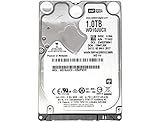
- 1TB Capacity, 9.5mm High, Rotation Speed of 5400RPM
- 16MB Buffer, SATA 6.0Gb/s Interface, 2.5inch Hard Drive
- Works for PS4 (Pro, Slim, Original) Game Console HDD replacement / upgrade (835GB available storage space on PS4, rest capacity is used for System)
- PS4 Hard Drive installation & Playstation firmware download instruction included
- Backed by a 3-year warranty from Reseller
Rank #3

- 2.5inch Notebook HDD, 7mm Height (Slim)
- 1TB Capacity, 5400RPM, 64MB Cache, SATA 6.0Gb/s
- Works for PlayStation gaming systems (PS3 / PS4 Original, PS4 Slim, PS4 Pro)
- Massive 1TB capacity can store up to 80 × 25GB games.
- 2 Years Warranty from Reseller
Rank #2

- 1TB Capacity, 9.5mm High, Rotation Speed of 5400RPM
- 8MB Buffer, SATA 3.0Gb/s Interface, 2.5inch Hard Drive
- Works for PS3 / PS4 Game Console HDD replacement / upgrade
- PS3 / PS4 Hard Drive installation & Playstation firmware download instruction included
- Backed by a 3-year warranty from Reseller
Product prices and availability are accurate as of the date/time indicated and are subject to change. Any price and availability information displayed on Amazon at the time of purchase will apply.



