The Tool Desk
Outbyte Driver Updater FREEFix the driver behind crashes, sound loss and screen glitchesFind Drivers →Outbyte PC Repair FREEClear out junk files and repair common Windows errorsFree Scan →For Minecraft: Java Edition, Minecraft’s current recommended baseline is an Intel Core i5-12400 or AMD Ryzen 5 5600 paired with an NVIDIA GeForce RTX 2060, AMD Radeon RX 5600 XT, or Intel Arc A580. The target is 1080p at 60 FPS on the Fancy preset, and the listed discrete graphics examples have 6 GB of VRAM. These are official examples, not a guarantee for every world, mod, graphics setting, or PC. Bedrock Edition has separate, lower PC requirements, so choose parts for the edition you play.
Official Java Edition baseline: CPU and GPU
Minecraft’s Java Edition requirements, updated July 21, 2026, list these recommended examples for a target of 1080p at 60 FPS using the Fancy preset:
| Component | Recommended examples |
|---|---|
| CPU | Intel Core i5-12400 or AMD Ryzen 5 5600 |
| GPU | NVIDIA GeForce RTX 2060, AMD Radeon RX 5600 XT, or Intel Arc A580 |
| Graphics memory | 6 GB VRAM for the listed discrete graphics examples |
Apple’s equivalent listed recommendation is an M2 Pro, which combines CPU and graphics hardware in one system-on-a-chip. The official list does not provide benchmark comparisons between these examples, so it does not establish that one is faster than another. See Minecraft’s Java Edition system requirements.
Why the CPU matters—and when the GPU matters
Minecraft’s official PC listing says, “Minecraft is more CPU-intensive than GPU-intensive.” That makes the processor an important part of a Java PC, but it does not mean the graphics card is irrelevant: Minecraft’s recommended 1080p/60 FPS Fancy target names specific graphics hardware too. A strong CPU paired with graphics below the recommended examples is not the same configuration as the official recommendation.
Windows Errors? Fix Them Before They Spread
Repair common Windows errors and clear accumulated junk for a smoother, more stable PC - no reinstall needed.Free scan · no reinstallCrashes, No Sound, or Screen Glitches?
Random freezes, missing sound and display glitches usually trace back to one bad driver. Find and replace yours safely.Free scan · under a minute#1 Best Overall

- Build and Support in USA
- Experience elite performance with the Intel processor Core i9-11900KF processor, delivering turbo speeds up to 5.3 GHz for intense gaming, streaming, and multitasking. Paired with the NVIDIA GeForce RTX 5060 Ti 8GB GDDR7 GPU, this build ensures next-gen graphics with real-time ray tracing and DLSS support for ultra-smooth gameplay and realistic visuals.
- 32GB DDR4 high-speed dual-channel RAM and 1 TB NVMe M.2 SSD storage
- Stay cool under heavy loads with a 360mm liquid cooler and ARGB fans that combine performance with customizable lighting. All housed in the stylish Cooler Master TD500 Mesh White case, optimized for airflow and aesthetics.
- 850W Gold Rated PSU ; KB and Mouse are included
The requirements are a baseline rather than a promise of identical performance everywhere. They do not specify frame rates for particular worlds, mods, shaders, or system configurations.
What the Java minimum supports
Minecraft’s listed Java minimum targets 1080p at 30 FPS using the Fast preset—not the recommended 60 FPS Fancy target. Minimum hardware includes:
Rank #2

- AMD Ryzen 5 8400F, NVIDIA GeForce RTX 3050 6GB, 16GB DDR5 4800MHz 16x1 1TB NVMe SSD, WIFI Ready, Windows 11 Home
- Connectivity: 6 x USB 3.1 | 1x RJ-45 Network Ethernet 10/100/1000 | Audio: On board audio
- Special Add-Ons: Tempered Glass RGB Gaming Case | 802.11AC Wi-Fi Included | 16 Color RGB Lighting Case | Free iBuyPower Gaming Keyboard & RGB Gaming Mouse | No Bloatware
- A 4-core processor.
- A GPU capable of Vulkan 1.3, with at least 2 GB of VRAM.
- 8 GB of system memory with discrete graphics, or 12 GB with integrated graphics.
Minecraft warns that performance and visual quality are no longer guaranteed below these new minimums. Meeting minimum specifications therefore should not be treated as meeting the recommended experience.
Independent reader supportYour contribution helps us test, update, and keep practical guides available for everyone.Bedrock Edition has different PC requirements
Do not apply the Java recommendation automatically to Bedrock. Minecraft publishes separate Bedrock PC requirements, including lower processor and graphics examples:
Rank #3

- AMD Ryzen 7 9800X3D, NVIDIA GeForce RTX 5070 12GB, 32GB DDR5 5200MHz 16x2 1TB NVMe SSD, WIFI Ready, Windows 11 Home
- Connectivity: 6 x USB 3.1 | 1x RJ-45 Network Ethernet 10/100/1000 | Audio: On board audio
- Special Add-Ons: Tempered Glass RGB Gaming Case | 802.11AC Wi-Fi Included | 16 Color RGB Lighting Case | Free iBuyPower Gaming Keyboard & RGB Gaming Mouse | No Bloatware
| Bedrock PC tier | Processor examples | Graphics examples | Memory |
|---|---|---|---|
| Minimum | Intel Celeron J4105 or AMD FX-4100 | Intel HD Graphics 4000 or AMD Radeon R5 | 4 GB minimum |
| Recommended | Intel i7-6500U or AMD A8-6600K | NVIDIA GeForce 940M or AMD Radeon HD 8570D | 8 GB recommended |
These are Bedrock-specific PC figures; they are not a replacement for the Java Edition target above. The official listing does not state the same resolution-and-frame-rate target alongside these Bedrock figures. See Minecraft’s PC listing for Java and Bedrock requirements.
Quick Recap
Best Value

- 【POWERFUL RYZEN 7 & RTX 4050 PERFORMANCE】 Powered by the AMD Ryzen 7 7445HS processor with 6 cores, 12 threads, and speeds up to 4.7GHz, paired with NVIDIA GeForce RTX 4050 Laptop Graphics with 6GB GDDR6 dedicated memory. Enjoy responsive gaming, smooth multitasking, streaming, content creation, and GPU-accelerated applications.
- 【144HZ FHD GAMING DISPLAY】 The 15.6-inch Full HD IPS display features a 1920 x 1080 resolution, fast 144Hz refresh rate, anti-glare coating, micro-edge design, 300-nit brightness, and AMD FreeSync Premium for smooth, responsive visuals during fast-paced gaming and everyday entertainment.
- 【MEMORY & STORAGE】 The Victus gaming laptop installed memory with up to 64GB DDR5 RAM for smooth multitasking and demanding applications, plus up to 4TB PCIe NVMe M.2 SSD storage for fast boot times, responsive performance, and plenty of room for games, projects, videos, and large files.
- 【VERSATILE CONNECTIVITY】 Stay connected with Wi-Fi 6E, Bluetooth 5.3, Gigabit Ethernet, 2 USB-A ports, USB-C with DisplayPort support and Power Delivery support, HDMI 2.1, and a headphone/microphone combo jack. HDMI supports up to 4K at 60Hz for convenient external display connectivity.
- 【BUILT FOR GAMING & EVERYDAY USE】 A full-size backlit keyboard with numeric keypad, DTS:X Ultra spatial audio, 720p HD camera, dual-array microphones, OMEN Gaming Hub, and Windows 11 Home make the Victus ready for gaming, school, work, streaming, entertainment, and everyday productivity.
Rank #4
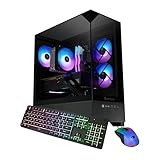
- AMD Ryzen 7 8700F, NVIDIA GeForce RTX 5060Ti 8GB, 32GB DDR5 RGB 5200MHz 16x2 1TB NVMe SSD, WIFI Ready, Windows 11 Home
- Connectivity: 6 x USB 3.1 | 1x RJ-45 Network Ethernet 10/100/1000 | Audio: On board audio
- Special Add-Ons: Tempered Glass RGB Gaming Case | 802.11AC Wi-Fi Included | 16 Color RGB Lighting Case | Free iBuyPower Gaming Keyboard & RGB Gaming Mouse | No Bloatware
How to choose parts for your Minecraft PC
- Confirm your edition and platform. Use the Java requirements for Java Edition on PC and the separate Bedrock figures for Bedrock on PC. The listed requirements do not imply that every named processor or GPU is compatible with every platform.
- Set the target. For Java, use Minecraft’s 1080p/60 FPS Fancy recommendation as the reference point; its minimum is a distinct 1080p/30 FPS Fast target.
- Compare the actual CPU and GPU models. Match your intended build against the examples for your edition. The official sources provide examples, not a head-to-head performance ranking.
- Check graphics memory and system memory separately. Java’s recommendation lists 6 GB VRAM for its discrete graphics examples, while system memory is a separate requirement. For Bedrock PC, the listing gives 4 GB minimum and 8 GB recommended system memory.
Product prices and availability are accurate as of the date/time indicated and are subject to change. Any price and availability information displayed on Amazon at the time of purchase will apply.



