Recommended Free Tools
The PS3 models that can play most PlayStation 2 discs are identified by their exact model code, and which codes qualify depends on the sales region. Sony’s official PS3 user guide lists them. The same guide warns that “most” is not “all,” so a listed model code is a starting point, not a guarantee for every disc.
The PS3 model codes Sony lists for PS2 discs
Sony’s official guide says the table it provides “lists the PS3™ system models that can play most PlayStation®2 format discs, as well as all Super Audio CDs.” The PS2-disc codes are grouped by sales region:


| Sales region | Model codes Sony lists |
|---|---|
| Japan | CECHA00, CECHB00 |
| U.S. / Canada | CECHA01, CECHB01, CECHE01 |
| Latin America | CECHE11 |
| Europe / Australia / New Zealand | CECHC02, CECHC03, CECHC04, CECHC08 |
| Korea | CECHE05 |
| Hong Kong / Taiwan / Southeast Asia | CECHA12, CECHB12, CECHE12, CECHA07, CECHB07, CECHA06, CECHE06 |
A code that does not appear here is not one Sony’s guide identifies as PS2-disc capable. The guide does not give a separate table for every production run, so treat the list as the authoritative reference for these exact codes.
Why “most discs” is not “all discs”
Sony chose the word “most” on purpose. Its guide notes that PS2 and original PlayStation discs may behave differently from the original hardware, and it states that “in some cases, the discs may not work at all.” Sony’s documentation does not provide a game-by-game compatibility list, and it does not publish a compatibility percentage. Any figure circulating online should not be attributed to Sony.
#1 Best Overall
![Sony Playstation 3 320GB PS3 Console Only (Renewed) [video game]](https://m.media-amazon.com/images/I/31vLAVLBc+L._SL160_.jpg)
- New slimmer, lighter PS3 system
- HDD for storing games, music, videos, and photos
- Streams thousands of movies and TV shows instantly from Netflix
- Built-in Blu-ray player with 3D capabilities. HDMI output for 1080p resolution
How to check your console before you rely on it
- Find the model code on the console’s identification label. Record the full code, including the final two digits. CECHA01 and CECHA00 share the same letters but are listed for different regions.
- Confirm the sales region the console was sold in, then match the code only against that region’s row in the table above.
- If the code is not listed, treat PS2 disc playback as unconfirmed for that console.
- If a specific PS2 disc matters to you, test that disc on the console before assuming it will run.
When buying a used PS3, check listing photos for the full model code. Do not assume that a listing called “PS3” supports PS2 discs.
Later PS3 models that cannot play PS2 discs
Not every PS3 supports PS2 playback. Sony’s manuals for the CECH-2101A and CECH-2101B, and for the CECH-2501B, state that these systems cannot play PS2-format software. These examples show why the model code matters more than the console’s name, its appearance, or its place in the PS3 release timeline. A later-looking unit can still fall outside the list.
Rank #2
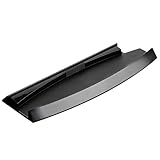
- It is used for placing the PS3 Slim console vertically or erectly placed in Stable, easy to use, elegant appearance
- Specifically designed for PS3 slim console to stand stably
- Simple and modern design brings nice looking
- Soft lint in one side of stand to prevent your console scratched
- Four rubber feet on the bottom prevent sliding
What this answer covers
This article addresses PS2 disc playback on PS3 hardware only. Sony’s guide lists supported media separately, and the Super Audio CD line in the official wording is a different category from PS2 games. Original PlayStation discs may also behave differently from the original hardware, so PS2 eligibility should not be assumed to carry over to PS1 titles.
If you own a listed model code, you have Sony’s stated answer for PS2 disc playback. If your code is missing from the list, or your region does not match the row where your code appears, PS2 disc playback is not confirmed by Sony’s guidance.
PC Slower Than It Used to Be?
A free scan shows the junk files, broken settings and background clutter dragging Windows down - then fixes them in one click.Free scan · Windows 10 & 11Crashes, No Sound, or Screen Glitches?
Random freezes, missing sound and display glitches usually trace back to one bad driver. Find and replace yours safely.Free scan · under a minuteQuick Recap
Best Value
Rank #4

- Multi Port Layout: Five Port Usb Hub, Permit Charging Much Five Devices Concurrently
- Ps3 4 Port Hub, Exclusively For: This Port Usb Hub Is Expertly Manufactured For Compatibility With Your 4 Console. It Boasts That Perfectly Matches Your Game System, Ensuring It Integrates Seamlessly Into Your Outdoor Entertainment Setup
- High Usb 2. 0 3. 0 Support: From High Data Transfer And Charging With This Usb 3. 0 High Hub. It Also Supports Usb 2. 0, Expanding Its Compatibility With Wide Range Of Devices
- Easy Installation The Installation Process For Our Usb Hub Couldn Be Simpler. Just Insert It Into Your Console And Connect Your Game Controller Using Usb Cable Not Included. This Easy Approach Lets You Enjoy The Of Our Usb Adapter Without Any Complicated Procedures
- Special This Usb Hub Is Specially For Game Console. When You Find That The Ports Are Not Enough When Using Game Console, You Use This
Product prices and availability are accurate as of the date/time indicated and are subject to change. Any price and availability information displayed on Amazon at the time of purchase will apply.



