Free tools Windows power users keep installed
One-click scans. No signup required.
For most new gaming PCs and primary computers, get 16GB of RAM. Choose 8GB only when the machine is inexpensive, your games and everyday tasks are modest, and keeping the purchase price low matters more than multitasking or future headroom. Choose 32GB or more for demanding games alongside streaming, heavy browser use, video editing, multiple virtual machines, or serious development work.
RAM capacity is not a direct measure of gaming speed. Moving from 8GB to 16GB will not automatically double your frame rate. It gives Windows, the game, browsers, voice chat, launchers, recording tools, and other background software more room to run without forcing you to close applications or rely as heavily on slower storage-backed virtual memory.
The short answer
| RAM | Best for | Verdict |
|---|---|---|
| 8GB | Budget PCs, older or less demanding games, schoolwork, email, light browsing, and secondary computers | Usable, but increasingly restrictive for a new primary gaming PC |
| 16GB | Most new gaming PCs, everyday multitasking, modern games, Photoshop, and ordinary development | The best default for most buyers |
| 32GB or more | High-end gaming with background applications, video editing, virtual machines, multiple emulators, large projects, and professional workloads | Worth paying for when your workload can use it |
For a computer you expect to keep for several years, 16GB is usually the sensible minimum target. For a cheap temporary or secondary system, 8GB can still be adequate. The right choice depends on the whole workload—not just the game.
Why Windows’ minimum is not a comfortable target
Microsoft lists 4GB of RAM as the minimum for installing Windows 11. That is an installation threshold, not a recommendation for comfortable gaming or multitasking. Windows itself, security software, cloud-sync utilities, drivers, launchers, and background services consume part of the available memory before a game starts. Microsoft also notes that some applications require more than the operating-system minimum.
#1 Best Overall

- [Color] PCB color may vary (black or green) depending on production batch. Quality and performance remain consistent across all Timetec products.
- DDR3L / DDR3 1600MHz PC3L-12800 / PC3-12800 240-Pin Unbuffered Non-ECC 1.35V / 1.5V CL11 Dual Rank 2Rx8 based 512x8
- Module Size: 16GB KIT(2x8GB Modules) Package: 2x8GB ; JEDEC standard 1.35V, this is a dual voltage piece and can operate at 1.35V or 1.5V
- For DDR3 Desktop Compatible with Intel and AMD CPU, Not for Laptop
- Guaranteed Lifetime warranty from Purchase Date and Free technical support based on United States
That is why an 8GB PC does not give a game a full, untouched 8GB. Once Windows and background programs are active, the game has less working room. If the combined demand exceeds available RAM, the system can move data to storage. This may prevent a crash, but storage is much slower than RAM and the result can be more application management, pauses, or inconsistent responsiveness.
16GB does not make every computer fast. A weak processor, slow storage, thermal throttling, or an unsuitable graphics card can remain the main bottleneck. More RAM helps primarily when insufficient capacity is the problem.
Gaming: is 8GB enough?
Some games can run with 8GB, particularly older, less demanding, or well-optimized titles. It may also be acceptable in a system used almost exclusively for gaming, with few browser tabs and no recording, streaming, or large background applications.
The limitation is the space left for everything around the game. A typical gaming session may include Windows, a game launcher, Discord or another voice application, a browser, an anti-malware tool, RGB or peripheral software, music, and perhaps screen-recording software. On an 8GB machine, those extras can turn an otherwise playable setup into one that requires closing programs or accepting more memory pressure.
16GB is the safer general-purpose gaming target. It leaves more room for the operating system and background applications, and it is less likely to become an early limitation as games and supporting software grow. Do not interpret that as a promise of a specific frame-rate increase: actual results depend on the game, CPU, GPU, resolution, settings, and memory configuration.
Rank #2
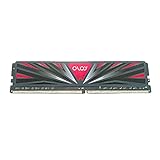
- DDR4 1x8GB UDIMM, total 8 GB
- Frequency : 3000 MHz CL16-18-18-36
- 1.35V UDIMM (Intel XMP 2.0 Automated Overclocking Technology)
- Lifetime Warranty
- Compatible with Intel and AMD
If you are buying a high-end gaming PC and intend to stream, record gameplay, keep many browser tabs open, or run demanding creative tools at the same time, 32GB can be a reasonable step up. Capacity alone will not compensate for a weak GPU or CPU, so do not sacrifice those components merely to obtain an unnecessarily large RAM number.
How much RAM do common workloads need?
| Workload | 8GB | 16GB | 32GB+ |
|---|---|---|---|
| Documents, email, and light browsing | Adequate | More comfortable for multitasking | Usually unnecessary |
| Many tabs, office apps, cloud tools, and video calls | Can require management | Preferred | Useful only for unusually heavy multitasking |
| Streaming video | Normally sufficient by itself | Better when combined with other applications | Not needed for streaming alone |
| Gaming | Works for some games and older systems | Safer mainstream target | Useful for gaming plus demanding background workloads |
| Regular Photoshop use | Minimum listed by Adobe for current desktop releases | Adobe’s recommended level | Helpful for large images and complex projects |
| Video editing | Often limiting | Better starting point | Sensible for high-resolution or complex timelines |
| Basic programming | Possible | Preferred for modern IDEs and local services | Useful for containers, virtual machines, and large projects |
| Multiple emulators or virtual machines | Generally too restrictive | Entry point for lighter setups | Recommended for multiple instances and professional projects |
Photo and video editing
Adobe lists 8GB as the minimum and 16GB or more as recommended for current Photoshop desktop releases on both Windows and macOS configurations. That makes 16GB the more appropriate choice if photo editing is a regular activity rather than an occasional crop or adjustment. Image dimensions, layer count, filters, scratch-disk speed, processor, and graphics hardware still affect performance.
Video editing varies even more. The application, version, codec, resolution, effects, number of tracks, and project complexity all matter. 16GB is a more sensible starting point than 8GB for regular editing, while 32GB or more can be justified for high-resolution footage, complex timelines, and professional projects. There is no single RAM requirement that applies to every video editor.
The Tool Desk
Outbyte PC Repair FREEClear out junk files and repair common Windows errorsFree Scan →Outbyte Driver Updater FREEFix the driver behind crashes, sound loss and screen glitchesFind Drivers →Programming, Android Studio, and virtual machines
Basic coding is possible with 8GB, but modern development environments rarely operate in isolation. An IDE may run alongside a browser, compiler, local database, containers, device tools, and communication applications.
Android Studio provides a useful concrete boundary. Google lists 8GB for the IDE alone, 16GB for Android Studio plus the Android Emulator on Windows, and 32GB as the recommended Windows configuration for larger professional projects and multiple virtual devices. Google also describes 16GB as the minimum for the best Android Emulator experience. Its guidance indicates that multiple Android Virtual Devices can require approximately 4GB per AVD, although actual needs vary by system and configuration.
Rank #3

- Compatible with MagicGate copyright protection technology
- Can be used to perfect on the PSP adn digital camera
- Memory Stick PRO-HG Duo is ideal for high-speed data transfer and for continuous shooting
- 16GB capacity Flash memory Ideal for burst shooting with DSLR Up to 30MB/s read/write speed
- Can be used to perfect on the PSP(PSP1000/2000/3000/3000) and digital camera.
In practical terms, choose 16GB for serious development and 32GB if you expect to run multiple emulators, virtual machines, containers, or large codebases. A single lightweight project does not automatically justify 32GB.
8GB versus 16GB when buying a laptop or desktop
Capacity is only half of the purchasing decision. You also need to know whether the memory can be replaced or expanded.
Windows Errors? Fix Them Before They Spread
Repair common Windows errors and clear accumulated junk for a smoother, more stable PC - no reinstall needed.Free scan · no reinstallOutdated Drivers Are Slowing You Down
One free scan finds every outdated or missing driver and matches the right update for your exact hardware.Free scan · exact hardware match- Laptops: memory may use replaceable SODIMM modules, be completely soldered to the motherboard, or combine soldered memory with one or more upgradeable slots.
- Desktops: memory generally uses DIMMs, but the motherboard still imposes limits on generation, speed, capacity, and slot configuration.
If you are buying a new laptop with soldered or difficult-to-upgrade memory, 16GB installed is preferable to 8GB. Do not assume that a future upgrade will be possible just because a listing uses the word “laptop.” Check the manufacturer’s specifications and service manual.
For a desktop, upgradeability is usually easier, but the correct motherboard-supported memory still matters. A matched kit or manufacturer-approved configuration is preferable to an arbitrary single module when the system supports it.
DDR4 and DDR5 are not interchangeable
DDR3, DDR4, and DDR5 are different memory generations. A DDR5 module will not work in a DDR4 or DDR3 system, and a motherboard normally supports one generation rather than allowing the generations to be mixed. Physical similarity is not proof of compatibility.
Rank #4

- Simple design to perfectly protect the cooling module
- High thermal conductive adhesive
- Supports Intel & AMD motherboards
- Selected high-quality IC, Supports XMP2.0
- Lifetime warranty
Before buying an upgrade, identify the exact computer or motherboard model, memory generation, form factor, supported speed, maximum capacity, number of slots, and current arrangement. After that check, a buyer may compare a 16GB RAM upgrade—but “16GB” by itself is not enough information. A laptop may need 16GB DDR4 SODIMM or 16GB DDR5 SODIMM; a desktop may need DDR4 DIMM or DDR5 DIMM, potentially as a matched kit.
Quick wins for a faster PC:
Scan for outdated or missing drivers - takes under a minuteDriver Scan →Clear out junk files and repair common Windows errorsFree Scan →Should you upgrade from 8GB or replace the computer?
An upgrade is attractive when the computer has accessible slots and the processor, storage, graphics hardware, cooling, and overall system remain suitable for your games. It can be a cost-effective way to reduce memory pressure.
Replacement is more attractive when memory is soldered, the device uses a low-end processor, storage is also inadequate, the graphics hardware cannot handle the games you want to play, or the upgrade cost approaches that of a newer computer. Adding RAM cannot fix a CPU or GPU bottleneck.
Check these details before ordering
- Find the exact laptop model or desktop motherboard model.
- Read the manufacturer’s service manual or memory specifications.
- Confirm the current RAM amount and whether it is soldered.
- Check how many slots are available and whether one or two are occupied.
- Identify the DDR generation: DDR4 and DDR5 are not interchangeable.
- Confirm the SODIMM or DIMM form factor.
- Check the maximum supported capacity and supported speed.
- Prefer a matched kit or approved configuration where appropriate.
- Back up important data and follow the manufacturer’s installation procedure.
Crucial’s compatibility tools and installation guidance can help narrow the options, but they do not remove the need to verify the exact system. Compatibility tools and retailer listings should be treated as aids, not permission to buy any physically similar module.
Choosing 8GB, 16GB, or 32GB
Choose 8GB when:
- The computer is inexpensive and your work is mostly documents, email, light browsing, and streaming.
- You play less demanding games or use the machine as a secondary or temporary computer.
- The system is upgradeable and you accept the possibility of adding memory later.
- The price difference is substantial and the rest of the configuration is more important to your immediate needs.
Choose 16GB when:
- You are buying a primary computer in 2026.
- You routinely combine games with browsers, voice chat, launchers, recording, or office applications.
- You use Photoshop or similar creative software regularly.
- You are developing software with an IDE, emulator, containers, or local services.
- You want to keep the computer for several years without managing memory aggressively.
- The laptop’s RAM is soldered or difficult to upgrade.
Choose 32GB or more when:
- You run multiple virtual machines, Android emulators, or containers.
- You edit high-resolution video or very large photographic projects.
- You work with large datasets, complex codebases, or many simultaneous development services.
- You use a professional workstation where downtime is costly.
- You want substantial headroom for gaming plus demanding background applications—and the CPU, GPU, storage, and cooling are already appropriate.
Common mistakes to avoid
- Using Windows 11’s 4GB minimum as a buying recommendation: minimum means the system can meet the installation threshold, not that it will multitask comfortably.
- Expecting 16GB to double performance: the upgrade helps when RAM capacity is the constraint; it does not automatically improve every application or game.
- Buying the wrong generation: DDR4 and DDR5 cannot be mixed or casually substituted.
- Assuming every laptop is upgradeable: many systems use soldered memory or have limited expansion.
- Comparing capacity alone: memory channels, speed support, form factor, soldering, slot availability, and maximum capacity also matter.
- Applying one application’s requirement to everything: Photoshop and Android Studio illustrate particular workloads, not a universal rule for every program.
- Ignoring other bottlenecks: RAM cannot replace a stronger GPU, CPU, SSD, or cooling system.
Frequently Asked Questions
Is 8GB RAM enough for gaming in 2026?
It can be enough for some games, especially on a budget or secondary PC, but 8GB leaves less room for Windows and background applications. For a new primary gaming PC, 16GB is the safer default.
Do these 3 things before closing this tab:
1Clear out junk files and repair common Windows errors2Scan for outdated or missing drivers - takes under a minute3Repair Windows errors before they cause bigger problemsDoes 16GB RAM increase FPS?
Not necessarily. More RAM mainly reduces memory pressure and the need to close applications or use storage-backed virtual memory. Frame rates still depend heavily on the game, CPU, GPU, resolution, settings, and memory configuration.
Best Value

- Boosts System Performance:16GB DDR4 laptop memory that operates at 3200MHz to improve multitasking and system responsiveness for smoother performance
- Easy Installation: Upgrade your laptop RAM with ease—no computer skills required Follow step-by-step how-to guides available at Crucial for a smooth, worry-free installation
- Compatibility Guaranteed: Ensure seamless compatibility with your laptop by using the Crucial System Scanner or Crucial Upgrade Selector—get accurate recommendations for your specific device
- Trusted Micron Quality: Backed by 42 years of memory expertise, this DDR4 RAM is rigorously tested at both component and module levels, ensuring top performance and reliability for your Mac system
- ECC Type = Non-ECC, Form Factor = SODIMM, Pin Count = 260-pin, PC Speed = PC4-25600, Voltage = 1.2V, Rank and Configuration = 1Rx8 or 2Rx8
Is 16GB enough for gaming and streaming?
It is a reasonable starting point for gaming with ordinary background applications and streaming tools. Choose 32GB if you also keep many tabs open, use demanding recording or editing software, run multiple services, or want more headroom.
Can I put DDR5 RAM in a DDR4 computer?
No. DDR4 and DDR5 are different memory generations and are not interchangeable. Confirm the motherboard or laptop’s supported generation and form factor before buying.
Should I buy 8GB now and upgrade later?
Only if the computer is genuinely upgradeable and the processor, motherboard, and storage are otherwise suitable. Verify the service manual, available slots, maximum capacity, memory generation, and upgrade cost first.
What’s actually slowing this PC down?
Pick the symptom - the matching free tool is one click away.
The Bottom Line
Get 16GB for most new gaming PCs and primary computers. Buy 8GB when the machine is a low-cost, light-use, temporary, or upgradeable system and the savings matter. Move to 32GB or more for multiple emulators or virtual machines, demanding creative work, large development projects, or gaming alongside heavy background workloads. Before upgrading, verify the exact DDR generation, SODIMM/DIMM form factor, speed, slot layout, and maximum supported capacity.
Quick Recap
Product prices and availability are accurate as of the date/time indicated and are subject to change. Any price and availability information displayed on Amazon at the time of purchase will apply.



