The Tool Desk
Outbyte PC Repair FREEClear out junk files and repair common Windows errorsFree Scan →Outbyte Driver Updater FREEFix the driver behind crashes, sound loss and screen glitchesFind Drivers →Some links on this page are affiliate links: if you buy through them we may earn a commission, at no extra cost to you.
Verdict: Intel’s Core Ultra 200S Plus refresh is a meaningful correction to the original Arrow Lake desktop launch. The Core Ultra 5 250K Plus is the more compelling value option for gaming, streaming and everyday creation, while the Core Ultra 7 270K Plus is the stronger choice for rendering, encoding, compiling and other heavily threaded work. Neither is an automatic replacement for AMD’s Ryzen X3D processors in gaming-only systems, especially once motherboard and memory costs are included.
The Plus chips add E-cores, improve interconnect behavior, officially support faster DDR5 and introduce Intel’s optional Binary Optimization Tool. Those changes can substantially improve performance, but gaming results still vary by title, BIOS, memory configuration, resolution and whether Intel’s game-specific optimization is enabled.
What changed with Core Ultra 200S Plus?
The Core Ultra 5 250K Plus and Core Ultra 7 270K Plus remain Arrow Lake desktop processors for the LGA1851 socket. They are not a new socket or a wholly new architecture. They are a refined Core Ultra Series 2 update designed to address the first-generation 245K and 265K’s disappointing gaming value.
Quick wins for a faster PC:
Scan for outdated or missing drivers - takes under a minuteDriver Scan →Clear out junk files and repair common Windows errorsFree Scan →The largest hardware change is additional E-cores. The 250K Plus adds four E-cores over the 245K, while the 270K Plus adds four over the 265K. Intel also specifies faster die-to-die/interconnect behavior, higher official memory support and larger cache totals. Both processors remain unlocked K-series parts.
#1 Best Overall

- Next‑Gen Platform Support: Compatible with Intel 800 Series Chipset‑based motherboards with LGA1851 Socket enabling PCIe 5.0/4.0 and high‑speed DDR5 memory (up to 7200 MT/s).
- High‑Performance Core Configuration: Features up to 24 cores (8 P‑cores + 16 E‑cores) for demanding gaming and creator
- Ultra‑Fast Boost Clocks: Reaches up to 5.5 GHz max turbo frequency for top‑tier responsiveness and performance
- Built for Enthusiasts: Unlocked for performance tuning when paired with Intel Z‑series chipsets, making it ideal for overclockers and power users.
- Robust Power & Thermal Design: Engineered with 125W base power and 250W max turbo power to sustain high‑intensity
The other major change is software-related: support for Intel’s Binary Optimization Tool through Intel Application Optimization. It can improve selected games, but it is not a universal hardware acceleration feature and should not be treated as representative of every game.
Both Plus processors work with Intel 800-series motherboards, provided the board has a BIOS supporting them. They are not compatible with older Intel sockets. A buyer upgrading from an earlier Intel platform therefore needs an LGA1851 motherboard, and may also need to reconsider the memory configuration.
Intel announced the processors on March 11, 2026, with retail availability beginning March 26. The launch suggested prices were $199 for the 250K Plus and $299 for the 270K Plus. Intel’s current product information lists a higher recommended-price range of $339–$349 for the 270K Plus, so those figures should not be confused with live retailer pricing.
Windows Errors? Fix Them Before They Spread
Repair common Windows errors and clear accumulated junk for a smoother, more stable PC - no reinstall needed.Free scan · no reinstallOutdated Drivers Are Slowing You Down
One free scan finds every outdated or missing driver and matches the right update for your exact hardware.Free scan · exact hardware matchIntel’s launch announcement describes the core additions, DDR5-7200 support and 800-series compatibility.
Specifications
| Processor | P-cores | E-cores | Cores / threads | Max turbo | L2 cache | Smart Cache | Base / turbo power | Launch price |
|---|---|---|---|---|---|---|---|---|
| Core Ultra 5 245K | 6 | 8 | 14 / 14 | 5.2 GHz | 26 MB | 24 MB | 125 W / 159 W | — |
| Core Ultra 5 250K Plus | 6 | 12 | 18 / 18 | 5.3 GHz | 30 MB | 30 MB | 125 W / 159 W | $199 |
| Core Ultra 7 265K | 8 | 12 | 20 / 20 | 5.5 GHz | 36 MB | 30 MB | 125 W / 250 W | — |
| Core Ultra 7 270K Plus | 8 | 16 | 24 / 24 | 5.5 GHz | 40 MB | 36 MB | 125 W / 250 W | $299 |
The 270K Plus has 24 cores, 24 threads, 40 MB of total L2 cache and 36 MB of Intel Smart Cache. The 250K Plus has 18 cores, 18 threads, 30 MB of L2 and 30 MB of Smart Cache. The extra cores are E-cores, not additional P-cores, so the gains are most obvious in workloads that scale across many threads.
The listed 5.3 GHz and 5.5 GHz figures are maximum turbo frequencies. They are not promises of sustained all-core clocks. Actual frequency, power and temperature depend on the workload, cooling, motherboard limits and BIOS settings. See Intel’s 270K Plus specification page and Intel’s processor support table for current official specifications.
Gaming performance: a substantial recovery, not a universal win
Intel claims up to a 15% geometric-mean gaming improvement for the 270K Plus over the 265K and up to 13% for the 250K Plus over the 245K. Those are Intel results from selected games at 1080p High, with Binary Optimization Tool enabled where supported. They are useful for understanding Intel’s target, but they are not guarantees for every game or system.
Recommended Free Tools
Independent testing from Tom’s Hardware, TechSpot and Tom’s Guide shows the important overall pattern: the Plus processors are much more competitive than their predecessors, but rankings change with the game suite and test configuration. The 250K Plus in particular gives Intel a stronger value story than the original 245K.
1080p and high-refresh gaming
At 1080p with a fast graphics card, CPU differences are easiest to expose. Average frame rates, frame-time consistency and 1% lows can separate the processors, particularly in simulation, strategy, esports and other CPU-limited games. This is also where memory tuning and Intel’s optimization software have the greatest opportunity to affect the result.
Rank #2

- Get ultra-efficient with Intel Core Ultra desktop processors that improve both performance and efficiency so your PC can run cooler, quieter, and quicker.
- Core and Threads 24 cores (8 P-cores plus 16 E-cores) and 24 threads. Integrated Intel Graphics included
- Performance Hybrid Architecture Integrates two core microarchitectures, prioritizing and distributing workloads to optimize performance
- Performance Unlocked Up to 5.7 GHz unlocked. 40MB Cache
- Compatibility Compatible with Intel 800 series chipset-based motherboards
The 270K Plus can be Intel’s fastest desktop gaming processor in the specific test conditions Intel uses, but that statement requires qualification. Intel’s claim is based on approximately 125 W-target desktop processors, selected games at 1080p High and Binary Optimization Tool enabled where supported. It should not be expanded into a universal claim that the 270K Plus beats every Ryzen X3D processor in every game.
1440p and 4K
At 1440p, and especially 4K, the graphics card more often becomes the bottleneck. Several CPUs may deliver nearly identical average FPS even when 1080p testing shows a meaningful CPU gap. That does not make CPU testing irrelevant: 1% lows, simulation-heavy scenes and high-refresh targets can still expose differences. It does mean that a gaming buyer should not overspend on the 270K Plus if the money could fund a faster GPU.
Do these 3 things before closing this tab:
1Clear out junk files and repair common Windows errors2Fix the driver behind crashes, sound loss and screen glitches3Repair Windows errors before they cause bigger problemsCompared with AMD Ryzen
The relevant alternatives include the Ryzen 7 7800X3D, Ryzen 7 9800X3D, Ryzen 9 9900X and comparable Ryzen 9000 non-X3D processors. The Plus chips can be competitive with non-X3D Ryzen processors in selected gaming and productivity workloads, and the 270K Plus’s additional E-cores can make it attractive for mixed use.
AMD’s X3D processors remain the safer default for buyers whose system is almost exclusively for gaming and whose total platform cost is similar. Their large 3D V-Cache can produce strong and consistent results across many game engines without depending on Intel-specific optimization software. The exact winner still depends on the game, GPU, resolution, memory, BIOS and current street prices.
Binary Optimization Tool: useful, but not a universal benchmark condition
Binary Optimization Tool is an optional software layer available through advanced mode in Intel Application Optimization, which is part of Intel Dynamic Tuning Technology. It can optimize selected game binaries and has produced substantial gains in some titles.
Tom’s Hardware measured an approximately 8% average uplift in its testing, with some games showing larger improvements. That result belongs to that test suite; it should not be applied to unsupported games.
Using the tool may require current BIOS, Intel software, supported drivers and a compatible game version. Support can change with patches and software updates. Reviews should therefore report both tool-off and tool-on results where possible. If a review enables the tool only for Intel, its comparison is still useful for judging the Intel ownership experience, but it is not a pure measurement of unmodified CPU silicon.
For buyers, the practical question is simple: check whether the games you actually play are supported. Do not buy the 270K Plus solely because an optimized title makes it look like a universal gaming leader.
Productivity and multicore performance
The Plus refresh is easier to justify in productivity than in gaming. The additional E-cores increase available throughput for rendering, video encoding, compression, code compilation, 3DMark CPU Profile and heavy multitasking. They can also help when streaming while gaming or running background workloads that scale well across many threads.
Rank #3

- 20 cores (8 P-cores + 12 E-cores) and 20 threads. Integrated Intel Graphics included
- Performance hybrid architecture integrates two core microarchitectures, prioritizing and distributing workloads to optimize performance
- Up to 5.3 GHz. 36 MB Cache
- Compatible with Intel 800 series chipset-based motherboards
- Turbo Boost Max Technology 3.0, and PCIe 5.0 & 4.0 support. Intel Optane Memory support. No thermal solution included
Intel claims up to 103% better multithread performance for the 250K Plus against the Ryzen 5 9600X and up to 90% for the 270K Plus in a specified 3DMark CPU Profile comparison. These are Intel benchmark claims, not application-wide averages.
Independent reviews from TechSpot and Tom’s Hardware are more useful for purchase decisions because they cover multiple applications. The broad interpretation is that the extra E-cores help most in heavily threaded workloads; lightly threaded applications and games do not automatically receive a matching improvement.
The 250K Plus is unusually attractive if the system must handle both gaming and occasional creation work. The 270K Plus earns its premium when rendering, compiling, encoding or serious multitasking is a regular part of the workload rather than an occasional task.
Power, cooling and efficiency
Both processors have a 125 W Processor Base Power rating, but that is not the same as typical gaming consumption or sustained package power. The 270K Plus has a 250 W Maximum Turbo Power rating, while the 250K Plus is listed at 159 W.
A suitable cooler should be selected for measured package power, noise targets and the motherboard’s power behavior—not Processor Base Power alone. A capable tower cooler may suit the 250K Plus, while the 270K Plus deserves a more substantial cooling solution if it is allowed to sustain high turbo power during long workloads.
Power comparisons also need to distinguish CPU package power from whole-system power. Motherboard-enhanced defaults, fan profiles, BIOS versions and power limits can change results substantially. Performance per watt may favor a different processor from the one that wins absolute performance.
Independent reader supportYour contribution helps us test, update, and keep practical guides available for everyone.Memory and motherboard requirements
Intel officially supports DDR5-7200 on the Plus processors, compared with DDR5-6400 for the regular 200S models. XMP 3.0 remains relevant, and Intel describes a Core Ultra 200S Boost BIOS profile with warranty-supported memory overclocking up to 8000 MT/s under stated conditions.
Official support does not guarantee that every DDR5-7200 kit will run at its rated speed. Stability depends on the motherboard layout, BIOS, memory kit, rank configuration and number of DIMMs. Four-DIMM configurations are generally more demanding than two-DIMM configurations. CUDIMM support is also still an early feature on select 800-series boards rather than a universal plug-and-play expectation.
For most gaming builds, a well-supported DDR5-6000 or DDR5-6400 kit may be a more sensible baseline than paying heavily for premium DDR5-7200 or CUDIMM memory. Faster memory can help CPU-limited results, but the gain may be small with a midrange GPU or at 4K.
Free tools Windows power users keep installed
One-click scans. No signup required.
Rank #4
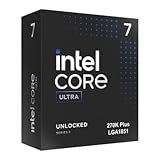
- Limited Amazon Model *Only is for products sold and shipped by Amazon.co.jp
- Supports PCIe 5.0 and 4.0 and DDR5
- Supports motherboards with Intel 800 series chipset
- 125W processor-based power
- 40MB L2 Cache
A Z890 board is relevant for unlocked CPU and memory tuning, but an expensive enthusiast board is not automatically necessary for a stock 250K Plus system. Lower-cost 800-series boards can improve total platform value, provided their BIOS supports the processor and their power delivery is appropriate for the intended workload.
Platform value matters more than CPU price
The $199 launch price makes the 250K Plus look compelling, but CPU-only comparisons can mislead. The real calculation is:
- CPU
- LGA1851 motherboard
- DDR5 memory
- CPU cooler
- Any required BIOS update or replacement-platform cost
A $199 processor paired with an unnecessarily expensive Z890 motherboard may cost more than an AMD system built around a cheaper board. Conversely, an existing Intel 800-series owner may be able to adopt a Plus processor without replacing the platform, making the upgrade more attractive.
The 270K Plus also needs to be judged against its actual price. Intel announced a $299 launch suggested price, while its current product page lists a $339–$349 recommended-price range. Retail prices can differ from both figures, so buyers should compare current CPU-plus-platform totals rather than assume either number is universal.
What’s actually slowing this PC down?
Pick the symptom - the matching free tool is one click away.
Which processor should you buy?
Buy the Core Ultra 5 250K Plus if:
- Your CPU budget is around $200.
- You want strong gaming performance plus useful rendering, encoding, compiling or streaming capability.
- The price difference to the 270K Plus would be better spent on a graphics card.
- You already own, or can obtain affordably, an LGA1851 motherboard.
- The complete Intel platform costs no more than the competing AMD build.
The 250K Plus is the value winner of the two. Its 18 cores and 18 threads give it considerably more heavily threaded capacity than the 245K while retaining the same broad platform features as the 270K Plus.
Buy the Core Ultra 7 270K Plus if:
- You regularly render, encode, compile or run other highly threaded workloads.
- You stream, multitask heavily or use the PC for both production and gaming.
- You have a high-end GPU and target CPU-limited resolutions or very high refresh rates.
- The price gap over the 250K Plus is acceptable after motherboard, memory and cooling costs.
The 270K Plus is the higher-throughput processor, not automatically the better gaming bargain. Its 24 cores, 16 E-cores, 36 MB Smart Cache and 40 MB L2 make the upgrade worthwhile when sustained multicore work is central to the build.
Prefer AMD Ryzen when:
- The PC is primarily or exclusively for gaming.
- A Ryzen X3D processor is similarly priced after motherboard and memory costs.
- You want the most consistent gaming result across a broad library without relying on Intel-specific optimization software.
- You already own an AM5 motherboard and can upgrade without replacing the platform.
Final verdict
Intel has not created a completely new desktop generation, but it has addressed the most obvious weaknesses of original Arrow Lake. The extra E-cores improve multicore capability, faster memory support broadens tuning headroom and Binary Optimization Tool can provide meaningful gains in supported games.
The Core Ultra 5 250K Plus is the recommendation for most mixed-use buyers. It offers the strongest value case when the complete LGA1851 platform is competitively priced. The Core Ultra 7 270K Plus is the better professional and enthusiast option when heavy multithreaded work matters enough to justify the higher CPU, cooling and platform cost.
For a gaming-only build, compare a Ryzen X3D processor on total system price and test results from the games you actually play. The Plus processors are now credible alternatives to AMD, but “faster” remains a condition-dependent conclusion—not a universal one.
Quick Recap
Product prices and availability are accurate as of the date/time indicated and are subject to change. Any price and availability information displayed on Amazon at the time of purchase will apply.

