PC Slower Than It Used to Be?
A free scan shows the junk files, broken settings and background clutter dragging Windows down - then fixes them in one click.Free scan · Windows 10 & 11Outdated Drivers Are Slowing You Down
One free scan finds every outdated or missing driver and matches the right update for your exact hardware.Free scan · exact hardware matchSome links on this page are affiliate links: if you buy through them we may earn a commission, at no extra cost to you.
Yes—but “install” is shorthand. The well-known Android method is an unofficial native port that you compile into an APK. You install Termux, clone the port’s source code, provide your own legally obtained Super Mario 64 ROM for asset extraction, build the project, and then install the APK. It is not an official Nintendo app or a normal download.
What happened?
In 2020, developer VDavid003 adapted the community’s reconstructed Super Mario 64 source code for Android. The work builds on the n64decomp/sm64 project, which reconstructed much of the original Nintendo 64 game. Android Headlines reported the breakthrough on September 21, 2020, describing a way to play the game without running the ROM in an N64 emulator (original report).
The important qualification is that the repository does not contain a complete, redistributable Mario game. You supply a compatible ROM, the build extracts the copyrighted assets, and the resulting program is packaged as an Android application.
Native port versus emulation
An emulator imitates Nintendo 64 hardware and runs the original ROM inside that imitation. A native port instead compiles reconstructed game code for Android and replaces platform-specific graphics, audio and input layers with Android-compatible code.
#1 Best Overall
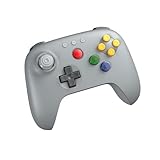
- Compatible with Analogue 3D, Switch, Switch 2, Windows, and Android. (Switch 2 compatibility requires latest firmware update)
- Bluetooth or Wired USB connection
- D-input and S-input modes
- Vibration supported on Analogue 3D and Switch 1/2 (Nintendo 64 Online only)
- Turbo function
VDavid003’s Android base uses SDL2 and OpenGL ES 2.0. That is why the finished app can run without an N64 emulation layer. “Native” does not mean official, licensed, automatically legal, or easier to install.
What you need
- An Android phone or tablet with adequate free storage, memory and build time.
- Termux, preferably the F-Droid build. The port’s current README says the Google Play version is outdated.
- Git, compiler and packaging tools.
- A compatible copy of the game. The documented U.S. build expects
baserom.us.z64. - Permission to install an APK from outside the Play Store.
- Optional: a Bluetooth or USB controller. Touch controls are supported, but a controller is usually better for a 3D platformer.
Regional ROM support can differ by branch. The decompilation project documents Japanese, U.S., European, Shindou and iQue variants, but do not assume every Android branch accepts every version.
Build the Android port in Termux
Community repositories change, so check the current README before starting. These are the documented Android-Termux commands and workflow.
Recommended Free Tools
1. Install Termux and dependencies
Install Termux from F-Droid or the project’s official distribution source, open it, then run:
Rank #2

- Please make sure to update your 8BitDo 64 Bluetooth Controller, this is critical for all of the new Analogue 3D users. Update before you get your Analogue 3D and you'll be ready to go out of the box!
- Compatible with Analogue 3D, Switch, Switch 2, Windows, and Android. (Switch 2 compatibility requires latest firmware update)
- Bluetooth or Wired USB connection
- D-input and S-input modes
- Vibration supported on Analogue 3D and Switch 1/2 (Nintendo 64 Online only)
pkg install git wget make python getconf zip apksigner clangIf package repositories fail, a general Termux recovery step is:
pkg update
pkg upgrade
That is troubleshooting guidance, not a guarantee that it fixes every repository or architecture problem.
2. Clone the port
git clone https://github.com/VDavid003/sm64-port-android
cd sm64-port-android
3. Grant storage access
termux-setup-storageAccept Android’s permission prompt if the ROM is in shared storage. Termux normally exposes shared storage through /sdcard.
Quick wins for a faster PC:
Repair Windows errors before they cause bigger problemsFix Now →Scan for outdated or missing drivers - takes under a minuteDriver Scan →Clear out junk files and repair common Windows errorsFree Scan →4. Copy your ROM into the project
Copy a lawful copy of your own game data into the project root and use the filename expected by the build:
Rank #3

- Please make sure to update your 8BitDo 64 Bluetooth Controller, this is critical for all of the new Analogue 3D users. Update before you get your Analogue 3D and you'll be ready to go out of the box!
- Compatible with Analogue 3D, Switch, Switch 2, Windows, and Android. (Switch 2 compatibility requires latest firmware update)
- Bluetooth or Wired USB connection
- D-input and S-input modes
- Vibration supported on Analogue 3D and Switch 1/2 (Nintendo 64 Online only)
cp /sdcard/Download/baserom.z64 ./baserom.us.z64Your source path may differ. Do not download a ROM from a website; this guide does not link to ROM hosts. Copyright and backup rules vary by jurisdiction, so obtain and use game data only in a manner lawful where you live.
5. Download SDL and compile
./getSDL.sh
make --jobs 4
--jobs 4 is an example. More parallel jobs can shorten a build on a powerful device but consume more memory. On a phone that runs out of RAM, try:
make --jobs 2or:
make --jobs 16. Find and install the APK
The README documents this output location:
ls -al build/us_pc/sm64.us.f3dex2e.apkBranches can change the filename or directory. Open the generated APK with a file manager, or copy it to another device, and approve Android’s “install unknown apps” permission for the app handling the file. Enable only the specific permission Android requests; do not disable device security globally.
What a successful build provides
The port’s base project documents touch input, audio, internal save storage and external keyboard/controller support (project documentation). Graphics options, widescreen changes and other enhancements depend on the branch or fork you build. Compatibility is not universal across Android versions, processors, GPUs or regional ROMs.
Rank #4

- Compatible with Analogue 3D, Switch, Switch 2, Windows, and Android.
- Bluetooth or Wired USB connection
- D-input and S-input modes
- Hall Effect joystick and wear-resistant metal joystick ring
- Vibration supported on Analogue 3D and Switch 1/2 (Nintendo 64 Online only)
Troubleshooting
baserom not found
Check the project root:
ls -alConfirm that the file is actually present, that storage permission was granted, that the regional suffix is correct, and that the ROM format matches the build. A file named baserom.z64 will not automatically satisfy a build looking for baserom.us.z64.
The build stops or the phone becomes unstable
Insufficient RAM, storage, an unsupported Android architecture, stale packages or changed repository dependencies are common causes. Free storage, update Termux packages, and reduce the job count. If the project has moved on, follow its current README and issue tracker rather than copying commands from an old tutorial.
The APK installs but will not launch
Possible causes include an incompatible CPU architecture or Android release, missing runtime assets, a graphics-driver problem, a broken branch, or an incomplete build. Use the repository’s issues and documentation. Avoid replacing the build with an APK from an unknown mirror.
The Tool Desk
Outbyte PC Repair FREEClear out junk files and repair common Windows errorsFree Scan →Outbyte Driver Updater FREEScan for outdated or missing drivers - takes under a minuteDriver Scan →Touch controls are uncomfortable
Pair a supported Bluetooth controller or connect one over USB. The project documents controller and keyboard support, but no community port can promise that every controller works with every Android device.
Best Value

- Wireless controller fully compatible with Switch 1 / Switch 2 and N64 console
- Lag-Free 2.4 GHz wireless, 10m/33ft range, no delay, plug & play
- Built-in rumble vibration for immersive gameplay. No Extra Rumble Pak Required
- Built-in rechargeable battery, 10-hour runtime
- The 3D analog stick provides nuanced control for precise movements and enhanced gameplay comfort.
Native port or emulator?
| Consideration | Native port | N64 emulator |
|---|---|---|
| Setup | Clone source, install build tools, provide ROM, compile and install APK | Install an emulator and configure your legally obtained ROM |
| Runtime | Android-compiled game code using SDL/OpenGL ES | Emulated Nintendo 64 hardware |
| Convenience | Best for technically confident users and enthusiasts | Usually faster to configure and easier to maintain |
| Customization | Depends on the branch; mods and platform features may be available | Often mature save-state, graphics and controller options |
| Game data | Still requires the original game’s ROM-derived assets | Still requires a legally obtained ROM |
| Compatibility | Varies with branch, device, Android version and GPU | Varies with emulator, ROM and device |
For many players, an emulator is the practical choice. The native port is more interesting as a reproducible technical project, and it can feel more like a conventional Android game after compilation.
A computer may be the better build machine
Compiling on a phone is possible but demanding. The Android base project also documents Linux and Windows workflows using the Android SDK, NDK and Gradle (build documentation). Building on a computer and transferring the resulting APK can provide more storage, memory and easier recovery while leaving Android as the runtime device.
Legal and security essentials
- The port is unofficial and not Nintendo-approved.
- The repositories do not grant permission to redistribute Nintendo’s copyrighted assets.
- Use game data obtained through a lawful method available in your jurisdiction. Whether making or possessing a personal backup is lawful differs by country and circumstance.
- Do not use random “Super Mario 64 APK” or ROM-download sites. A prebuilt APK hides how it was made and may contain malware.
- Compiling from the public source improves provenance and reproducibility, but it is not a guarantee that every fork or downloaded dependency is safe.
Bottom line
Super Mario 64 can run natively on Android, but the headline conceals the real work: this is a community source build, not an official one-click installation. If you enjoy Termux, compiling and troubleshooting, follow the current VDavid003 documentation with your own compatible ROM. If your goal is simply to play, a well-supported N64 emulator—or a PC-first build—will usually be the quicker, less frustrating route.
What’s actually slowing this PC down?
Pick the symptom - the matching free tool is one click away.
Quick Recap
Product prices and availability are accurate as of the date/time indicated and are subject to change. Any price and availability information displayed on Amazon at the time of purchase will apply.

