Free tools Windows power users keep installed
One-click scans. No signup required.
Some links on this page are affiliate links: if you buy through them we may earn a commission, at no extra cost to you.
The SteelSeries Arctis 9X connects directly to an Xbox Series X using built-in Xbox Wireless. You do not need a USB dongle, cable, or Bluetooth pairing for normal wireless Xbox use. Press the Xbox’s Pair button, then hold the headset’s power button for six seconds; the Xbox should show “Headset Assigned.”
Before you pair
- Turn on the Xbox Series X and make sure the Arctis 9X has charge.
- Use the Arctis 9X, not the similarly named Arctis 9, Arctis 7, or Arctis 7X. The 9X has Xbox Wireless built in; the Arctis 9 is a different product and is not designed for Xbox consoles. SteelSeries explains the model difference here.
- If the headset is still associated with an older Xbox, see the migration steps below.
SteelSeries lists the 9X as compatible with Xbox Series X|S and Xbox One. Its compatibility guidance says a firmware update is not required just to use it with a next-generation Xbox. See the Arctis 9X product page and SteelSeries’ Xbox compatibility guidance.
Pair the Arctis 9X with Xbox Series X
- Turn on the Xbox Series X.
- Press and release the console’s Pair/Connect button. On Series X, it is on the front of the console near the lower-right area.
- Wait for the Xbox logo to begin flashing, indicating that the console is pairing.
- Make sure the Arctis 9X is off.
- Hold the headset’s power button for six seconds. Keep holding through the initial power-on until it enters pairing.
- Wait for the Xbox to recognize it. The confirmation you want is “Headset Assigned.”
Now raise the headset volume, check that its microphone is unmuted, and test game audio and voice chat. SteelSeries’ setup instructions describe this console-button and six-second headset sequence.
Recommended Free Tools
Moving the headset from an older Xbox?
If the 9X was paired with an Xbox One or another Xbox console and will not connect to the Series X, clear its previous association first. Turn the headset off, then hold its power button for 15 seconds, until the LED blinks white. After that, repeat the normal pairing steps above, using a six-second hold for the new Xbox connection. SteelSeries specifies this recovery for pairing problems when moving between Xbox consoles: Arctis 9X will not pair to Xbox Series X|S.
#1 Best Overall
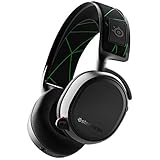
- Product works and looks like new. Backed by the 90-day Amazon Renewed Guarantee. Renewed products work and look like new. These pre-owned products have been inspected and tested by Amazon-qualified suppliers. Box and accessories may be generic.
- Bluetooth - simultaneously connect to Bluetooth and Xbox TO mix in music and take calls while gaming, or use wirelessly on the go with your mobile device
- Clearcast Microphone - the Arctis mic uses a bidirectional design, the same used by aircraft carrier deck crews, for superior noise Cancellation so that your voice sounds clear and natural
- Award-winning sound - The award-winning soundscape of Arctis emphasizes subtle, yet critical sounds to give you an Audio advantage
- Integrated Xbox wireless - connect directly to your Xbox just like a wireless controller, and start gaming in seconds with no cable or dongle required
Keep the timings straight: six seconds is the usual pairing procedure; 15 seconds is the previous-Xbox unpair/reset procedure.
Check game audio and microphone chat
- Turn up the headset volume and make sure the physical mute control is not engaged.
- Extend the microphone fully and speak into it.
- Test in an Xbox party as well as in the game. A party member’s voice indicator responding is a useful microphone check.
- If you hear game audio but cannot chat, confirm the Xbox has assigned the headset, then check party privacy and communication permissions. Game-specific voice settings can differ from Xbox party settings.
- If you cannot hear your own voice, increasing mic monitoring or sidetone may help. That setting controls what you hear locally; it does not by itself prove whether other players can hear you.
Xbox menu wording can change with system updates, so use the Settings search if a particular audio or privacy label differs on your console.
Rank #2

- REAL-TIME GAME AUDIO CONTROL — Pinpoint enemies with what GamingTrend calls “the biggest cheat code in the industry. 200+ game specific audio presets to choose from
- IMPROVED 50H+ BATTERY LIFE — Over 40% more charge than the previous generation, plus optimized USB-C Fast Charge
- SIMULTANEOUS 2.4GHZ + BLUETOOTH — Mix game and mobile audio
- PLUG-&-PLAY USB-C — Unlock 2.4GHz cross-platform gaming with the portable wireless dongle. USB-A adapter included
- NEODYMIUM MAGNETIC DRIVERS — Custom-designed high-fidelity audio drivers for clear audio. Set your sound quality to glorious with a deep and detailed soundscape and 360° Spatial Audio support.
If it pairs but there is no sound
Work through these checks in order, testing after each one:
Quick wins for a faster PC:
Repair Windows errors before they cause bigger problemsFix Now →Fix the driver behind crashes, sound loss and screen glitchesFind Drivers →- Turn the headset off and back on; check its volume and mute control.
- Restart the Xbox Series X.
- Pair again with the standard six-second procedure.
- If the headset has been used with another Xbox, perform the 15-second previous-console reset and pair again.
- If it still fails, try the headset’s hardware reset. SteelSeries locates the reset pinhole beneath the ear cushion on the side without the microphone. Press it with a small suitable object, such as a paperclip, then pair the headset again.
For the reset location and related wireless troubleshooting, see SteelSeries’ Arctis 9X interference guidance.
Rank #3

- 100+ GAME AUDIO PRESETS — Unlock tailored audio presets for top games like GTA V, FIFA, Call of Duty, and more, with the Arctis Nova 5 Companion App
- 60-HOUR BATTERY — Play longer than ever with the next-gen battery. Go 8 hours a day all week; plus with USB-C Fast Charge get 6 hours of use in just 15 minutes
- QUICK-SWITCH WIRELESS — Toggle between 2.4GHz gaming and Bluetooth 5.3 with a tap of a button to take a call or listen to media; notification beeps keep you posted on incoming calls while gaming
- NEODYMIUM MAGNETIC DRIVERS — These drivers create an ultra-detailed soundscape of crystal clear highs, pinpoint mids, and deep bass for your space journey
- NEXT-GEN MIC — Our upgraded, fully retractable ClearCast 2.X microphone has 2X the clarity with a high-bandwidth chipset supporting 32KHz/16Bit audio
If you hear static, clicks, or dropouts
Intermittent sound can come from wireless interference rather than a failed headset. Change one thing at a time so you can identify the cause:
- Move the router farther from the Xbox and headset.
- Temporarily disconnect external drives and other USB 3.0 devices near the console; test whether the dropouts stop.
- Move wireless speakers, smart-home devices, cordless phones, and other wireless equipment away from the Xbox.
- Try a shorter distance and a clear line of sight between the headset and console.
- Temporarily unplug nearby wireless equipment one device at a time to isolate a possible source.
- Keep the Xbox system software current. If SteelSeries software recognizes the headset on a compatible computer, check whether a firmware update is offered. Do not disconnect it while an update is in progress.
USB 3.0 devices and nearby radio equipment are possible sources, not guaranteed causes. Disabling a Wi-Fi band is not a routine fix; first isolate nearby devices and test the simpler changes.
Rank #4
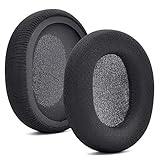
- 【Compatible with】Fit perfectly on Arctis 1/3/5/Arctis 7/7+/7P/7P+/7X/7X+/9/9X/Pro/Prime(Do Not Fit Any Arctis Nova) ' model before purchase. Before making a purchase, please make sure to confirm your headset's model to ensure compatibility.
- 【 OUR INGENUITY】defean is a factory specializing in ear pad acoustics. Buying defean products gives you a high price/performance ratio,We have excellent ear pad development engineers and skilled technical workers. Upgrade your headphones with defean Ear Pads for ultimate comfort.Experience effective noise isolation while wearing your headphones
- 【Easy to install】Just remove the old ear pads and put the new ear pads into the ear cups of the earphones, then you can easily snap the ear pads into the earphones without any auxiliary tools.
- 【Service guarantee】All defean are produced under strict quality inspection, and come with a 12-Month worry-free warranty and free
- 【 Package Includes】1 Pair of Ear Pads (Headphone no included) If you have any questions about the replacement pads, please feel free to contact us. We hope you have a good shopping experience!
Do you need Bluetooth or a USB dongle?
For Xbox Series X, use Xbox Wireless. The Arctis 9X has that connection built in, so you do not need a USB transmitter. Do not press the headset’s Bluetooth button to pair it to the console: Bluetooth is for compatible devices such as phones and tablets, not the standard direct Xbox pairing method. The 9X can use Bluetooth with another supported device, including alongside Xbox Wireless in supported scenarios.
On PC, Bluetooth or an Xbox Wireless Adapter may be connection options, but SteelSeries says ChatMix is unavailable through those PC connection methods. A USB cable is generally for charging, firmware, or wired-use scenarios, not the normal wireless Series X connection. Other SteelSeries models may rely on USB transmitters, but their transmitters are not a substitute for the 9X’s built-in Xbox Wireless.
Best Value

- PRESETS FOR CoD, FORTNITE, AND MORE – Control your audio using the mobile app to hear footsteps better in game. Unlock total audio control with 200+ game presets in the Arctis Companion.
- OPTIMIZED FAST CHARGE — Get back into action in a flash with fast charging: 15 minutes equals up to 9 hours playback. A full charge lasts up to 40 hours
- COMFORT AND DURABILITY — At only 260G with a stretchy headband for comfort and multiple adjustment points headset headache is a thing of the past. The dual-hinge design adds rugged durability.
- NEODYMIUM MAGNETIC DRIVERS — Custom-designed high-fidelity audio drivers create an ultra-detailed soundscape of clear highs, pinpoint mids, and deep bass
- USB-C PLUG & PLAY — Easily swap between Xbox, PC, PlayStation, Switch, handhelds, phones or tablets with a multi-platform USB-C Dongle
Arctis 9 and Arctis 9X are not interchangeable
| Model | Xbox Series X connection |
|---|---|
| Arctis 9X | Pairs directly with Xbox Wireless; no dongle required. |
| Arctis 9 | Not designed for Xbox consoles. Its transmitter is not interchangeable with the 9X. |
If pairing fails and you are unsure which headset you have, check the model marking on the headset, packaging, or receipt before trying another transmitter.
Should you replace the 9X?
If your 9X is working, you do not need a newer headset to connect it to Series X. If you are shopping because you want newer hardware or broader multi-platform options, compare the connection trade-off: the Arctis Nova 5X Wireless uses a USB-C wireless dongle and Bluetooth and has a claimed battery life of up to 60 hours; the Arctis Nova 7X Wireless also uses a dongle and Bluetooth, with a claimed battery life of up to 38 hours. Those stated runtimes are manufacturer claims and actual battery life varies. The 9X’s advantage for Xbox is its direct Xbox Wireless connection without an added dongle. Check official product pages for current regional availability and prices.
Quick Recap
Product prices and availability are accurate as of the date/time indicated and are subject to change. Any price and availability information displayed on Amazon at the time of purchase will apply.

