Windows Errors? Fix Them Before They Spread
Repair common Windows errors and clear accumulated junk for a smoother, more stable PC - no reinstall needed.Free scan · no reinstallCrashes, No Sound, or Screen Glitches?
Random freezes, missing sound and display glitches usually trace back to one bad driver. Find and replace yours safely.Free scan · under a minuteSome links on this page are affiliate links: if you buy through them we may earn a commission, at no extra cost to you.
The GeForce GTX 1080 Ti remains capable of 1080p and 1440p gaming when ray tracing is off, especially in older and well-optimized games. Its 11GB of VRAM helps, but it does not make the card a modern all-rounder: Pascal no longer gets regular Game Ready optimization, and the GPU lacks dedicated ray-tracing hardware, DLSS, frame generation and AV1 encoding. Keep a working card if it meets your needs; consider a used one only if it is substantially cheaper than a current GPU and passes a careful test.
What the GTX 1080 Ti was—and why it mattered
Nvidia announced the GTX 1080 Ti on February 28, 2017, with worldwide availability beginning March 10. Its Founders Edition launched at $699, positioning it below the far more expensive Titan X Pascal while bringing near-Titan-class gaming performance to a wider audience. Nvidia claimed up to 35% more performance than the GTX 1080 and faster gaming performance than the $1,200 Titan X Pascal; those were Nvidia’s launch comparisons, not a guarantee for every game or test. Nvidia’s launch announcement has the original specifications and claims.
At the time, reviewers treated it as a new performance leader, suitable for 4K with settings adjusted, high-refresh QHD gaming and VR. Tom’s Hardware’s launch review captures that context. Its long life owes much to strong conventional raster performance and an unusually generous 11GB of memory for a 2017 gaming card.
GTX 1080 Ti specifications
| Specification | Reference detail |
|---|---|
| Architecture / GPU | Pascal / GP102 |
| CUDA cores | 3,584 |
| Memory | 11GB GDDR5X at 11Gbps |
| Memory bus / bandwidth | 352-bit / about 484GB/s |
| FP32 compute | About 11.34 TFLOPS, a rated-clock estimate rather than a gaming-speed measurement |
| Board power | About 250W reference-class figure; partner cards vary |
| Reference power connectors | One 6-pin and one 8-pin PCIe connector |
| Nvidia reference PSU guidance | 600W or greater; system and PSU quality matter |
Specifications and power guidance differ among partner models. Nvidia’s Founders Edition user guide describes the reference card’s connectors and power-supply recommendation. A nominally 600W generic supply is not automatically suitable; check the exact card, CPU, PSU model and available PCIe cables.
#1 Best Overall

- Item Package Dimension- 12.9133858136L x 6.9291338512W x 3.7401574765H inches
- Item Package Quantity - 1
- Product Type - Video Card
- Accessories may not be original but will be compatible and fully functional. Product may come in generic box.
How it performs in 2026
There is no single meaningful current FPS figure for this card. Results vary with the game and patch, resolution, graphics settings, driver, CPU and test platform. Older 2017 results are useful for understanding its launch position, but they should not be treated as a direct prediction for a current game. The Tom’s Hardware GPU hierarchy provides modern comparison context; its figures should be read in light of its particular test suite and settings, not as universal performance.
| Workload | Practical assessment |
|---|---|
| 1080p, conventional raster graphics | Still generally capable. In esports and other CPU-sensitive games, the processor can limit performance before the GPU does. |
| 1440p, conventional raster graphics | Often a good fit with sensible settings. High or ultra texture settings are game-dependent. |
| 4K, conventional raster graphics | Possible in older or well-optimized titles, but demanding modern games are likely to require substantial setting compromises. |
| Ray tracing | Poor fit. It has no dedicated RT cores; some games may expose software or hybrid paths, but that does not make it a practical RT card. |
| Competitive games and VR | Can remain usable, depending on the game, headset, CPU and desired frame rate. |
| New AAA games | Expect more compromises and do not assume Pascal-specific fixes or optimization for new releases. |
| Video and creative work | CUDA and Pascal-era H.264/H.265 encode/decode support remain useful for some tasks, but the card lacks AV1 hardware encoding and newer media features. |
The 11GB VRAM capacity is still useful in some games, particularly with high-resolution textures, but capacity is only one part of performance. A title can fit in memory and still run poorly because of its rendering demands, shader workload, CPU limits or lack of modern features. The 1080 Ti’s older memory technology and architecture also matter; “11GB beats 8GB” is not a sound general comparison.
What it lacks compared with current GPUs
The GTX 1080 Ti predates Nvidia’s RTX architecture. It has CUDA support, GPU Boost and G-SYNC compatibility, plus Pascal-era media capabilities, but no dedicated RT cores or Tensor cores. It therefore does not support Nvidia DLSS Super Resolution, DLSS Ray Reconstruction, DLSS Frame Generation or Multi Frame Generation. It also cannot provide AV1 hardware encoding.
Free tools Windows power users keep installed
One-click scans. No signup required.
Rank #2

- Real Base Clock: 1556 MHz/Real Boost Clock: 1670 MHz; Memory Detail: 11264MB GDDR5X. Redesigned cooling with L-shaped contact fins to improve contact surface area for better heat dissipation
- EVGA iCX Cooling - Delivering industry-leading cooling performance to your Graphics Card. Vulkan API
- Requirements-Minimum of a 600 Watt power supply. An available 6-pin PCI-E power connector and an available 8 pin PCI-E power connector.Total Power Draw- 250 Watts
- New vented heatsink fin design and pin fins for optimized airflow. An available 6-pin PCI-E power connector and an available 8 pin PCI-E power connector. Windows 10 32/64bit ,Windows 8 32/64bit, Windows 7 32/64bit
- DX12 OSD Support with EVGA Precision XOC. Stream extreme GeForce GTX PC gaming experiences to portable device like NVIDIA SHIELD with super-smooth, low-latency performance
These differences change the experience as well as benchmark standings. Current cards can use dedicated hardware and newer rendering features to enable or accelerate effects the 1080 Ti cannot handle efficiently. Nvidia’s RTX 5060 family specifications illustrate the newer feature set. A raster-only comparison can make the old card look more competitive than an assessment that also considers ray tracing, upscaling, frame generation, media work, efficiency, warranty and support.
Driver support: security updates, not regular game optimization
The GTX 1080 Ti is not on Nvidia’s normal current-generation Game Ready optimization path. Nvidia’s 582.53 Security Update Driver, dated May 19, 2026, lists Pascal products including the GTX 1080 Ti and describes security updates for GPUs no longer supported by Game Ready Drivers. The release lists Windows 10 64-bit and Windows 11.
That distinction matters: a driver can install and the card can continue to run existing games, while new releases may not receive Pascal-specific optimization or fixes. Nvidia’s documented security support is a positive, but it does not promise future updates beyond what the company publishes. Driver availability can also vary by operating system and by desktop versus notebook implementation.
Rank #3
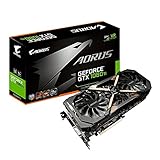
- This Certified Refurbished product is tested and certified to look and work like new. The refurbishing process includes functionality testing, basic cleaning, inspection, and repackaging. The product ships with all relevant accessories, a minimum 90-day warranty, and may arrive in a generic box. Only select sellers who maintain a high performance bar may offer Certified Refurbished products on Amazon.com
- Core Clock (MHz): 1708/1594 (Boost/Base) in OC Mode and 1683/1569 (Boost/Base) in Gaming Mode
- WINDFORCE Stack 3X 100mm Fan Cooling System with Advanced Copper Back Plate Cooling
- RGB Fusion – 16.8M customizable color lighting
- Protection Metal Back Plate
Used-card buying guide
Every GTX 1080 Ti is old hardware now, so an individual card’s condition is more important than its advertised factory clock or former retail tier. Founders Edition cards are dual-slot reference designs that exhaust some heat out of the case; they can be louder or hotter than large open-air aftermarket coolers. Triple-fan models may run more quietly or cool effectively, but need more room and generally release more heat inside the case. Compact, factory-overclocked, modified and water-cooled versions each bring their own fit, power and condition considerations. Do not assume a specific model is reliable or quiet without evidence about that exact sample.
- Confirm the identity. Check the card in GPU-Z or Nvidia’s driver panel; verify it is a GTX 1080 Ti, not a GTX 1080, a modified-BIOS card or a mislabelled listing.
- Inspect the card. Look for corrosion, PCB discoloration, damaged screws, bent brackets, missing or damaged cooler parts, and signs of repair. Check that the fans start, spin and respond normally.
- Run a sustained load. If possible, test a demanding game or repeatable 3D workload for at least 15–20 minutes. Watch temperatures, clocks and fan behavior for thermal runaway, clock collapse or abnormal noise. No single temperature threshold applies to every cooler, room and case.
- Look for errors. Watch for flashing pixels, colored blocks, corrupted textures, black screens, driver resets and crashes. Include a VRAM-heavy workload at the resolution and settings you intend to use; a light 1080p demo may not reveal intermittent memory problems.
- Test the outputs you need. Check the relevant HDMI and DisplayPort connections with your monitor, resolution and refresh rate.
- Verify power and fit. Confirm the exact board’s connector arrangement, case clearance and PSU requirements. Use suitable PCIe power cables; avoid questionable adapters.
- Prefer a return window. Brief demonstrations may miss faults that appear only after sustained heat or load. A seller who allows a meaningful test or return period reduces, but does not eliminate, the risk.
A card’s mining history cannot reliably be inferred from appearance, and mining use alone does not prove it is defective. Actual stability, cooling condition and the seller’s return terms are more useful evidence.
Independent reader supportYour contribution helps us test, update, and keep practical guides available for everyone.Should you buy it, keep it or upgrade?
| Your situation | Recommendation |
|---|---|
| You already own a working GTX 1080 Ti and play games it handles well | Keep it. Replacing it solely because of its age may not be worthwhile if performance, temperatures and noise are acceptable. |
| You want an inexpensive used card for 1080p or 1440p raster gaming | Consider it only at a substantial discount to a suitable new GPU, and only if you can verify stable operation. No reliable August 2026 used price is available here, so a specific fair-price figure would be guesswork. |
| You are building a new long-term gaming PC | Prefer a current GPU. Warranty, lower power, current game support and modern features are usually worth more than the 1080 Ti’s low used price—unless a tested card is exceptionally inexpensive. |
| You want ray tracing, DLSS, frame generation, AV1 encoding or less age-related hardware risk | Upgrade to a current card that supports the features you need. |
| The seller cannot demonstrate stability, the PSU is poor, or the card shows damage | Skip it. A bargain is not useful if it requires a replacement PSU or fails under load. |
For alternatives, compare actual local prices and the games you play rather than relying on launch MSRPs. Nvidia announced the RTX 5060 at a starting price of $299 and the RTX 5060 Ti 16GB at $429 in 2025; those are historical launch MSRPs, not verified August 2026 street prices. The standard RTX 5060 has 8GB of GDDR6, which may be limiting in some high-texture or higher-resolution workloads. The RTX 5060 Ti 16GB offers more memory and current Nvidia features; see Tom’s Hardware’s review for its test results, and account for the fact that real prices may differ substantially from MSRP.
Rank #4
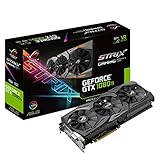
- This Certified Refurbished product is tested and certified to look and work like new. The refurbishing process includes functionality testing, basic cleaning, inspection, and repackaging. The product ships with all relevant accessories, a minimum 90-day warranty, and may arrive in a generic box. Only select sellers who maintain a high performance bar may offer Certified Refurbished products on Amazon.com
- 1632 MHz Boost Clock (OC Mode) featuring 11GB GDDR5X 352-bit memory, 3584 CUDA cores, and 11GB Frame Buffer
- ASUS Aura Sync RGB lighting with additional 4-pin RGB header provides a nearly endless spectrum of colors with the ability to synchronize effects across an ever-expanding ecosystem of ASUS Aura Sync enabled products
- MaxContact plus Auto-Extreme manufacturing technology delivers 2X more GPU to heatsink contact for increased cooling efficiency and premium quality aerospace-grade Super Alloy Power II components
- Patented wing-blade 0dB fans with FanConnect II maximizes cooling performance using three axial fans to deliver 105% more air pressure and dual 4-pin headers for referencing chassis fans to GPU temperatures
The Radeon RX 9060 XT 16GB is another current-generation option to compare if raster performance and memory capacity are priorities. Intel Arc B580 may suit some budget buyers, but game and platform compatibility can make its results less predictable. A substantially higher-tier current card is a different budget class rather than a direct replacement, but it makes sense if you want a major performance jump. The GTX 1080 Ti retrospective and current GPU hierarchy provide broader comparison context. Check current local pricing, warranties and exact model specifications before deciding.
Verdict
The GTX 1080 Ti was an exceptional 2017 flagship, and its 11GB of VRAM and conventional rendering performance still give it a role in 2026. It is best treated as a capable, aging raster card—not a future-proof GPU or a modern feature-rich replacement. Keep one that works well. Buy used only when the price is convincingly low, the card passes sustained testing and you accept the support and warranty trade-offs. For a new build or a feature-led upgrade, choose a current GPU instead.
Do these 3 things before closing this tab:
1Scan for outdated or missing drivers - takes under a minute2Repair Windows errors before they cause bigger problems3Fix the driver behind crashes, sound loss and screen glitchesQuick Recap
Product prices and availability are accurate as of the date/time indicated and are subject to change. Any price and availability information displayed on Amazon at the time of purchase will apply.

