Do these 3 things before closing this tab:
1Fix the driver behind crashes, sound loss and screen glitches2Repair Windows errors before they cause bigger problems3Scan for outdated or missing drivers - takes under a minuteSome links on this page are affiliate links: if you buy through them we may earn a commission, at no extra cost to you.
In 2026, the best GTX 970M laptop is a well-maintained used one—not a new purchase. Start with the Acer Predator 15 G9-591 for sustained workloads, the ASUS ROG Strix GL502VT for a balanced 15-inch system, or the Razer Blade 14 if portability matters more than repair cost. Favor a verified 6GB GPU, a 1080p screen, an SSD, and sound cooling. These are legacy machines: condition and total repair cost matter more than the model name.
Quick picks
| Laptop | Best for | What to look for | Main caution |
|---|---|---|---|
| Acer Predator 15 G9-591 | Sustained gaming and heavy workloads | Core i7-6700HQ, 6GB GTX 970M, 16GB RAM, 1080p | Large, heavy, and likely to need age-related maintenance |
| ASUS ROG Strix GL502VT | Balanced 15.6-inch use | Confirm whether the GPU has 3GB or 6GB VRAM | Configuration and screen can vary |
| Razer Blade 14 RZ09-01652 | Portability and premium build | Check battery condition and use reduced resolution for demanding games | Heat, battery swelling, and costly proprietary repairs |
| Gigabyte/AORUS X3 Plus v3 or v5 | Compact enthusiast laptop | Verify exact revision, CPU, RAM, and storage | QHD+ screen and small chassis are challenging for this GPU |
| MSI GE72 or GT70 | Large-screen use and sustained workloads | Check the full model number, cooling, and VRAM | MSI model names cover substantially different configurations |
| Alienware 15 or Clevo/Schenker/XMG equivalent | Buyers valuing a substantial chassis or serviceability | Confirm exact chassis, parts, charger, and configuration | Parts and support vary by model and seller |
These are used-market recommendations, not a ranking of current gaming laptops. Notebookcheck’s GTX 970M results vary across systems because CPU, clocks, cooling, memory, and laptop power limits differ; its database is useful for comparing tested configurations, not predicting every used unit’s condition. Notebookcheck’s GTX 970M database includes examples from MSI, ASUS, Razer, Alienware, AORUS, and Schenker.

1. Acer Predator 15 G9-591: best for sustained workloads
The Predator 15 is the most sensible starting point if you expect long gaming sessions or prolonged CPU/GPU work and do not need a light laptop. Its bulky chassis puts less emphasis on thinness than compact models, which is a useful design trade-off for sustained use. Contemporary testing characterized it as a solid performer in a relatively bulky chassis; that is historical context, not a guarantee about a decade-old individual machine. Ultrabookreview’s Predator 15 review discusses the original design and trade-offs.
The Tool Desk
Outbyte Driver Updater FREEFix the driver behind crashes, sound loss and screen glitchesFind Drivers →Outbyte PC Repair FREEClear out junk files and repair common Windows errorsFree Scan →Seek a configuration with a sixth-generation Core i7-6700HQ, 6GB GTX 970M, 16GB or more of RAM, an SSD, and a 1080p display. Confirm the full model number: specifications, storage, and display may differ. Inspect fans, heatsinks, hinges, battery, and charger carefully; a thick laptop can still overheat if clogged, damaged, or poorly serviced. Expect poor battery life by modern standards.
#1 Best Overall
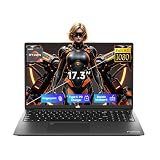
- 【2-Year Warranty & Local US Customer Support】Buy with confidence—this Windows 11 laptop comes with a 2-year manufacturer warranty and a 90-day hassle-free return policy for risk-free shopping. Our US-based support team is ready to assist with any after-sales questions promptly. Strict quality control ensures reliable daily performance for both home and business use.
- 【Radeon 660M Graphics for Everyday Visual Work】AMD Radeon 660M integrated graphics provide a more balanced visual experience for photo editing, HD media playback, design previews, online presentations, and casual gaming. It gives students, creators, and home office users more practical graphics capability for everyday tasks without requiring a separate GPU.
- 【AMD Ryzen 5 6600H – Power for Work, AI & Gaming】Equipped with a 6-core AMD Ryzen 5 6600H processor (boost up to 4.5GHz) and Radeon 660M integrated graphics, this laptop runs Windows Copilot AI tools smoothly for efficient note organization and coursework management. The GPU also supports casual gaming and seamless multimedia playback, delivering lag-free performance for study, work, and entertainment.
- 【16GB DDR5 & 1TB SSD & Expandable Storage】With 16GB of high-speed DDR5 RAM and a 1TB PCIe SSD, this portable laptop ensures fast boot-ups and instant app loading. It handles multitasking, professional design, and everyday gaming with ease. A dedicated Micro SD card slot allows for convenient storage expansion, giving you room to store more files, videos, and software.
- 【17.3" Full HD Display for a Bigger View】The 17.3 inch 1920 x 1080 Full HD display gives you a wider and more comfortable viewing space for split-screen work, spreadsheet review, design previews, online classes, and everyday entertainment. It helps reduce constant window switching while keeping text and visuals clear and easy to view.
2. ASUS ROG Strix GL502VT: best balanced 15-inch option
The GL502VT combines a 15.6-inch gaming format with a sixth-generation Intel platform in relevant configurations. It can suit someone who wants a less bulky machine than a large 17-inch laptop without going as compact as the Razer. Do not assume every GL502VT has the same GPU memory: ASUS documentation lists GTX 970M systems including 3GB configurations, while tested examples include 6GB versions. ASUS’s product guide and the Notebookcheck model database help establish the range.
Ask the seller to show the GPU and VRAM in a hardware-information utility, and confirm panel resolution, battery condition, SSD presence, and cooling history. Individual screens and thermal condition matter; the model name alone is not enough to establish either.
3. Razer Blade 14 RZ09-01652: best portable choice, with the most important caveats
The 2016 Blade 14 RZ09-01652 pairs a sixth-generation quad-core Core i7 with GTX 970M graphics, PCIe storage, Thunderbolt 3, and a 14-inch QHD+ display, according to Razer’s model support page. It is far easier to carry than the Predator 15 or MSI GT70 and has a premium aluminum design.
What’s actually slowing this PC down?
Pick the symptom - the matching free tool is one click away.
Its high-resolution panel does not mean the GPU should render demanding games at native resolution. Treat 1080p or lower, with reduced settings where needed, as the more realistic target for demanding games. The thin chassis also leaves less tolerance for dust, worn fans, dried thermal compound, or a failing battery. Check for battery swelling, heat-related instability, and repair availability before paying a premium. Buy it for portability and design, not as the fastest or lowest-risk 970M option.
4. Gigabyte/AORUS X3 Plus: compact, but not a small gaming powerhouse
The X3 Plus is unusual among 970M laptops for its compact size. Gigabyte’s official specifications for the X3 Plus v3 list a 6GB GTX 970M, a 13.9-inch 3200×1800 display, a Core i7-4710HQ, 8GB DDR3L as shipped (expandable to 16GB), multiple mSATA storage slots, and a weight of about 1.87kg. Gigabyte’s X3 Plus v3 specifications are specific to that revision; the v5 has a different configuration, so check the exact model.
Its QHD+ panel is useful for desktop space, but demanding games will often call for a lower render resolution and adjusted settings. The small chassis offers less thermal headroom than a large gaming laptop, and battery or fan repairs may be difficult. Consider it only if low weight is a priority and the system passes a sustained-load test.
5. MSI GS, GE, and GT models: compare the exact machine
MSI sold GTX 970M configurations across families including GS60, GS70, GE62, GE72, and GT70. They span different sizes and cooling approaches: GS models are more portable but thinner; GE72 offers a larger chassis; GT70 is bulky and can be more practical for servicing and long sessions. Notebookcheck’s tested-system list illustrates the range of configurations and results.
Recommended Free Tools
Do not buy on the “MSI gaming laptop” label alone. Check the complete model number and establish VRAM, CPU, screen resolution, storage bays, RAM capacity, battery state, charger wattage, and whether both fans work properly. A thin GS model with damaged cooling is a different proposition from a clean, working GT70.
Rank #2
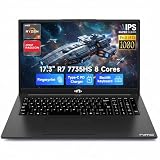
- 【High-Performance AMD Ryzen 7 & Radeon 680M】Tackle complex tasks effortlessly with the AMD Ryzen 7 7735HS processor (54W TDP) and Radeon 680M graphics (RDNA 2). Whether rendering videos, running AI algorithms, or enjoying AAA games, this laptop delivers desktop-level speeds. Eliminate system lag and experience seamless content creation and entertainment—ideal for creative freelancers and STEM students.
- 【Massive Storage & Lightning-Fast DDR5 RAM】Say goodbye to system crashes and slow load times. With support for up to 64GB of lightning-fast DDR5 5600MHz memory and dual M.2 PCIe 4.0x4 SSD slots, this laptop is engineered for heavy multi-tasking. Effortlessly run multiple virtual machines, intensive design software, or store vast libraries of high-res video assets—all without slowing down your workflow.
- 【Immersive 17.3" FHD Display Workspace】Eliminate constant window switching with a massive 17.3-inch 16:9 Full HD (1920x1080) display that delivers desktop monitor-level visual space in a portable design. Ideal for remote managers, video editors, and students, it enables comfortable viewing of extended timelines, side-by-side document comparisons, and crystal-clear media streaming.
- 【Risk-Free Purchase & 2-Year Warranty】Invest in your professional setup with total peace of mind. We confidently back our laptop's reliability with a comprehensive 2-year manufacturer’s warranty, plus a 90-day hassle-free return period. Whether equipping a home office or buying for college, test its performance in your daily routine completely risk-free.
- 【100W PD Fast Charging for Uninterrupted Mobility】Keep your workflow going strong with zero battery interruptions. The included 100W PD fast charger delivers rapid power restoration through USB-C, providing a significant battery boost in just 30 minutes. Its slim, travel-ready design eliminates the hassle of carrying bulky traditional chargers, making it ideal for remote professionals, campus students, and cross-country business travelers.
6. Alienware 15 and Clevo-based laptops: worthwhile when condition and support line up
Alienware 15 systems can appeal to buyers who prefer a substantial chassis and gaming-oriented keyboard, but common GTX 970M configurations include older fourth-generation quad-core CPUs and 3GB graphics. Weight, wear, and replacement-part costs count heavily. Inspect hinges, ports, and the interior condition, not just the exterior.
Clevo-based systems sold by Schenker, XMG, Sager, and other regional brands can be attractive to repair-minded buyers because many configurations use conventional, accessible RAM, storage, and cooling components. However, the underlying chassis and its firmware, keyboard layout, display, charger, and support depend on the exact model and seller. Notebookcheck’s historical XMG P506 review documents one particular Clevo-based system; it should not be read as a promise that every Clevo laptop performs or services the same way.
What GTX 970M performance means in 2026
The GTX 970M is a 2014-generation mobile Maxwell GPU. It can still be useful for older games, less-demanding competitive titles at reduced settings, indie games, older-console emulation, general productivity, programming, and some older creative applications. A sound 970M laptop can handle 1080p gaming when expectations and settings are appropriate, but it is not a good choice for new demanding AAA games at high settings, ray tracing, DLSS-dependent targets, or modern high-refresh gaming.
Historical benchmarks are not current-game promises. In one contemporary XMG P506 review, a GTX 970M system approached 60 frames per second in a game of its era at 1920×1080 Ultra settings. That result describes that laptop, game, and period—not a current AAA title or every used 970M machine. Read the review in its original context.
Choose 6GB if you can verify it
GTX 970M laptops came with 3GB and 6GB variants. Six gigabytes gives more room for high-resolution textures, mods, and some creative workloads, and is the better choice when prices and condition are otherwise comparable. It does not make the GPU equivalent to a modern card: architecture, compute performance, power efficiency, features, CPU, and driver support still matter. A healthy 3GB configuration can be acceptable for older games and general work if it is meaningfully cheaper.
Match the screen to the GPU
A 1080p panel is usually the most practical gaming match. QHD+, 3K, and 4K screens can be useful for productivity, but running demanding games at native resolution increases the load on an already old GPU. Lowering the game’s render resolution is often more useful than paying extra for a high-resolution panel.
Independent reader supportYour contribution helps us test, update, and keep practical guides available for everyone.Used-buying checklist
Ask for evidence before arranging a purchase. A seller who cannot identify the precise configuration—or refuses a basic test—makes the risk harder to price.
PC Slower Than It Used to Be?
A free scan shows the junk files, broken settings and background clutter dragging Windows down - then fixes them in one click.Free scan · Windows 10 & 11Outdated Drivers Are Slowing You Down
One free scan finds every outdated or missing driver and matches the right update for your exact hardware.Free scan · exact hardware match- Get the full model number, CPU model, RAM amount, screen resolution, and charger wattage.
- Request a GPU-Z or equivalent screenshot showing GTX 970M and its VRAM capacity; verify it in person where possible.
- Ask for SSD health information and battery condition or a Windows battery report.
- Request clear photographs of the hinges, display, ports, keyboard, underside, and charger label.
- Confirm that both Intel integrated graphics and NVIDIA graphics work, and that the laptop does not shut down under load.
- Prefer a seller offering a return period or a meaningful chance to test. Decade-old hardware carries substantial unit-to-unit failure uncertainty.
At inspection, start with a cold boot and check Device Manager for errors. Test the display, keyboard, touchpad, webcam, speakers, Wi-Fi, Bluetooth, USB ports, video outputs, and card reader if present. Test sleep, wake, restart, and shutdown. Check SSD SMART health and battery status, and connect an external display if available.
Rank #3
Then run a 10–15-minute CPU/GPU load test while monitoring temperatures and clocks. Reject or heavily discount a machine that throttles immediately, loses GPU clocks sharply under load, grinds or rattles, artifacts, resets its graphics driver, or shuts down. A swollen battery, liquid damage, missing heatsink screws, stripped fasteners, or an incorrect charger are serious warning signs. Do not use a generic charger unless its voltage, amperage, wattage, and connector match the laptop’s requirements.
Configuration priorities and total cost
A strong target is a verified 6GB GTX 970M, sixth-generation quad-core i7 such as the i7-6700HQ, at least 16GB RAM, a 512GB SSD, 1080p display, working cooling, and the correct charger. A 3GB card with a fourth-generation quad-core i7 can still be a budget option for older games and everyday work, especially after an SSD upgrade, but should cost substantially less than a comparable 6GB, sixth-generation system.
Account for a battery, SSD, RAM, fans, thermal service, charger, keyboard, hinges, display cable, or professional repair. These costs can erase the apparent savings. There is no single defensible used price without checking your country, the exact configuration, and current seller condition. Compare the complete cost—not just the listing price—with newer used GTX 1650, GTX 1660 Ti, RTX 2060, RTX 3050, or RTX 3060 laptops. Do not assume any specific alternative is always faster or better value without comparing the exact machines and prices.
Drivers and Windows: support is not the same as modern gaming support
NVIDIA’s January 28, 2026 security-driver listing includes the GTX 970M. NVIDIA distinguishes ongoing security updates for Maxwell hardware from Game Ready support: security eligibility does not mean new games will receive performance tuning or that the card gains modern features. See NVIDIA’s January 2026 driver listing.
Notebook drivers can be model-specific. NVIDIA notes that notebook manufacturers provide certified drivers for their designs; OEM packages may be important for Optimus graphics switching, display output, hotkeys, sleep, and power management. If a generic driver causes problems, check the laptop maker’s support page for the exact model and install its recommended chipset, Intel graphics, system-control, and NVIDIA packages as applicable. NVIDIA’s notebook-driver guidance explains the OEM caveat.
Do not infer Windows 11 support from the GPU alone: firmware, CPU, TPM, and OEM configuration all matter. Windows 10 reached general end of support on October 14, 2025, so it should not be treated as a future-proof plan for a newly purchased laptop. Confirm the complete machine’s supported operating-system path before buying.
When a newer laptop is the smarter buy
Choose a newer used GTX 1650 or GTX 1660 Ti machine, or an RTX system such as one with an RTX 2060, RTX 3050, RTX 3060, or later GPU, when current games, newer CPU performance, modern features, or a longer usable support window matter. Newer systems generally offer better performance per watt, more recent media engines and display options, and less age-related risk—but condition and configuration still matter. A 970M makes sense only when it is substantially cheaper, demonstrably healthy, and suited to the games and work you actually do.
Quick Recap
Recommendations by buyer
- Heavy workloads and long sessions: Seek a clean Predator 15, MSI GT70/GE72, Alienware, or suitable Clevo-based model, prioritizing cooling and serviceability.
- Portability: Consider the Razer Blade 14 or AORUS X3 Plus only after battery, thermal, and repair checks.
- Lowest-cost 1080p play: A verified, healthy 3GB model can work for older or lighter games if priced accordingly.
- Best all-round 970M target: Favor a 6GB configuration, sixth-generation quad-core CPU, 16GB RAM, SSD, and 1080p screen in good condition.
- Best long-term value: Compare against newer used laptops before committing; do not pay a premium for the GTX 970M badge.
Product prices and availability are accurate as of the date/time indicated and are subject to change. Any price and availability information displayed on Amazon at the time of purchase will apply.

