Free tools Windows power users keep installed
One-click scans. No signup required.
Bing Pong was a small Pong-style game embedded in Microsoft Bing search results. In July 2015, searching Bing for pong could place a playable panel above the normal results. It was a browser easter egg—not an Xbox title, Microsoft Store release, downloadable game, or confirmed permanent Bing feature. Its availability in 2026 is unverified.
What Bing Pong was
Bing Pong was the informal name used by contemporary coverage for a playable version of the classic Pong format. The game lived inside the Bing results page and loaded when users searched for pong. It showed two paddles and a square ball: you moved one paddle vertically while competing against a Bing-controlled opponent. Reports described the game as appearing above the ordinary search results rather than replacing the page. Windows Central and Search Engine Land documented the behavior in 2015.
That distinction matters. Bing Pong was not a new Atari release, an Xbox game, a Microsoft Store product, or a separate PC download. It was a lightweight search-result minigame that depended on Bing’s web experience.
How the historical easter egg was activated
- Open Microsoft Bing.
- Search for pong.
- Look above the standard results for the interactive game panel.
- Click or move the pointer into the panel to start, then move your paddle vertically to return the ball.
Contemporary reports said the feature could favor Bing’s United States English experience. A 2015 account described changing Bing’s country and language through a settings path resembling Bing settings → Settings → Country/region → United States, followed by an English-language search for pong. Bing’s interface has changed, so those labels should be treated as historical directions, not guaranteed current menu names. TecMundo also reported that the game did not appear for every country or user.
The Tool Desk
Outbyte PC Repair FREERepair Windows errors before they cause bigger problemsFix Now →Outbyte Driver Updater FREEFix the driver behind crashes, sound loss and screen glitchesFind Drivers →#1 Best Overall

- LEARN IN 60 SECONDS — FIRST TO 3 WINS: Set your distance with the King (Gorilla) cards, load a foam ball into the wooden launcher, and flick it into the cup. Whoever lands 3 shots first is King of the Jungle! Take turns or play freestyle — either way you're playing in under a minute. Prefer a longer match? Set your own target — first to 4 or 5 works great.
- EASY TO LEARN, HARD TO MASTER: Anyone can pick it up instantly, but dialing in the perfect arc takes real skill. Every shot sharpens your aim, touch, and consistency, so it stays competitive whether it's your first round or your fiftieth. Simple to start, deeply satisfying to get good at.
- BUILT FOR EVERY AGE AND EVERY GAME NIGHT: Younger players build hand-eye coordination and focus through screen-free play; teens and adults get a fast, high-energy showdown for family game night, parties, dorms, birthdays, or road trips. Play 1v1 or split into 2 teams of 2.
- PREMIUM WOODEN BUILD, PACKS SMALL & PLAYS BIG: Crafted from solid, quality wood with a sleek, durable design — a real tabletop game, not a flimsy toy. The foldable cup and compact launchers pack down with the balls, cards, and drawstring pouch into the included box, so it sets up in seconds and travels anywhere.
- WHAT'S INCLUDED: 2 Wooden Launchers · 1 Foldable Cup · 10 Foam Balls (5 per player) · 10 King Cards (5 per player) · 12 Optional Challenge Cards · 2 Wooden Ball Holders · 1 Advanced Wooden Lid · 1 Drawstring Bag
If no game panel appears
- Make sure the query was entered on Bing, not Google.
- Try Bing’s United States English experience, recognizing that regional behavior may have changed.
- Use a desktop browser if a mobile result does not show the panel.
- Temporarily disable aggressive script-blocking extensions.
- Try a private window or another browser.
- Do not assume a missing panel is user error: the easter egg may be retired, region-limited, or absent from a particular experiment.
Controls and gameplay
Reports described three input methods:
- Mouse: Move the pointer or paddle vertically.
- Keyboard: Keyboard control was reported for PC users, but surviving coverage does not consistently identify the exact keys.
- Touch: Swipe or move on a compatible touchscreen device.
The design was intentionally simple: two vertical paddles, a square ball, and a computer-controlled opponent. Some contemporary reviewers characterized it as a basic but surprisingly distracting or addictive diversion; those are publication impressions, not an independent performance test. Engadget covered that reaction.
When Bing Pong appeared
Bing Pong received public coverage between July 2 and July 8, 2015. SlashGear, Engadget, and Search Engine Land all reported it in early July, while Windows Central suggested the feature may have existed for at least two months before wider attention. The exact internal launch date is not established, so July 2 should be understood as a publication date, not a confirmed product launch date.
Rank #2

- Fast-Paced Matching Fun for All Ages: Experience non-stop excitement with Bing Bang Boom — the ultimate family card game where players race to match and launch colorful firework cards while shouting "BING! BANG! BOOM!" This fun card game for family play keeps everyone on their toes, making it perfect for game night with kids, teens, and adults.
- Great Social and Group-Friendly Gameplay: A social card game that’s as competitive as it is silly! With up to 6 players and fast 10-minute rounds, Bing Bang Boom is stands out from other card games for families looking to laugh, compete, and connect. Great for parties, gatherings, and bonding time.
- Easy to Learn, Impossible to Put Down: Simple setup and straightforward rules make this an easy card game that anyone can jump into. It's perfect for kids 7+, teens, and adults alike. Whether you're new to board and card games or a seasoned pro, this one's a blast from start to finish.
- Musical Chairs for Cards: In this fun family card game, four launch pads and five matching cards lead to one inevitable result: someone gets stuck with the Dud! Avoid the dud to win in this card game for family night that blends speed, laughter, and suspense into every round
- Ideal Gift for Various Occasions: Bing! Bang! Boom! makes a great stocking stuffer, kids birthday gift, or party favor. Its universal appeal and engaging gameplay make it a perfect choice for family gatherings, vacations, or as a thoughtful gift for game enthusiasts.
One contemporaneous report presented it as Microsoft’s first search-engine game. That description belongs to the reporting of the period rather than a definitive history of every Bing easter egg. A careful description is that Bing Pong was an early—and in some coverage, the first—interactive game placed directly in Bing results. Teknoblog used the “first” characterization.
Bing Pong and Google’s search games
The important comparison is presentation, not a claim that the games shared code or that Microsoft publicly stated a competitive motive. Google had already made interactive search experiences familiar through projects such as its Pac-Man search game and other doodle-style games. Bing Pong used the same broad idea: turn a search page into a playable experience without sending users to a separate site.
Recommended Free Tools
Rank #3
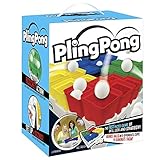
- Dynamic Team Play: Dive into Buffalo Games' PlingPong, a thrilling tabletop game with team play and speed rounds. This engaging plinko board game keeps everyone on their toes and ensures your game nights are always fresh and exciting
- Group-Friendly Fun: Welcome small groups with PlingPong, accommodating 2 to 4 players for endless fun. Ideal for family gatherings, this bounce game encourages teamwork and lively interaction among players
- Ready-To-Play Set: Enjoy immediate fun with PlingPong's complete set, including 25 cups, 9 balls, 4 game trays, and instructions. No extra shopping needed; just open the box and let the party games for adults and family begin
- Indoor & Outdoor Flexibility: Experience the versatility of PlingPong, perfect for both indoor and outdoor settings. From living rooms to backyard gatherings, this ping pong bounce game adapts to any environment, enhancing your gaming experience
- Portable and Compact: Easily transport PlingPong for fun on-the-go with its compact design. Move it effortlessly between rooms or take it to events, making it a perfect choice for games for family and sports board games enthusiasts
Search Engine Land compared Bing Pong with Google’s more ambitious Cube Slam experiment. That context makes Bing Pong look like Microsoft’s answer to a search-easter-egg trend, but “response to Google” is an interpretation based on contemporaneous commentary, not an announced Microsoft strategy.
Independent reader supportYour contribution helps us test, update, and keep practical guides available for everyone.Was it available worldwide?
Probably not consistently. Reports particularly emphasized the United States English version of Bing, while other users said the game did not appear in every country. The safest historical conclusion is that availability varied by region, language, account, device, or rollout state. It should not be described as definitively U.S.-only without a primary Microsoft announcement.
Rank #4

- MULTI-LEVEL adjustable targets can become tiered pong in seconds. By changing the targets from a flat surface to multi-level, you instantly differentiate this game from other pong games
- COMPLETE set comes with (2) multi-tier targets and (4) table tennis pong balls
- PERFECT for backyard, beach, picnics, tailgating
- EACH TARGET holds (6) plastic cups (not included). For best results, pair with your favorite 12-16oz plastic cup.
- STURDY PVC tubes ensure long term playability
Does Bing Pong still work in 2026?
Its continued availability is not confirmed. The evidence for the game is concentrated in 2015, and Microsoft’s current Bing Search documentation explains search features without documenting Bing Pong. Microsoft’s Bing web-search page does not establish that the old trigger remains active.
Therefore, Bing Pong is best treated as a historical Bing easter egg. A live check can produce a useful result, but it should record the date and time, country and language, browser, device, signed-in state, exact query, whether the panel loaded above results, and which controls worked. Search pages can change by region and experiment, so one successful or failed check would not prove universal availability.
How it differs from a standalone Pong game
| Aspect | Bing Pong | Standalone game |
|---|---|---|
| Where it ran | Inside Bing search results | Its own app, site, or game platform |
| How it launched | Historically, by searching Bing for “pong” | Through a dedicated download or URL |
| Purchase or download | No separate purchase or download was reported | Depends on the product |
| Availability | Dependent on Bing’s region and search experience | Dependent on the publisher and platform |
| Identity | Informal name for a search easter egg | A separately distributed game |
Related Bing game easter eggs
Bing’s Pong experiment was part of a wider pattern of interactive search features. A later 2015 report described a Snake easter egg that likewise favored the American version of Bing. That related experiment provides context, but it does not show that Bing Pong remained available or that Microsoft maintained a permanent catalog of games. Abondance reported the Snake example.
Quick Recap
Product prices and availability are accurate as of the date/time indicated and are subject to change. Any price and availability information displayed on Amazon at the time of purchase will apply.




