Short answer: As of August 18, 2026, eTrueSports claims to offer an iOS app, but no clearly official Apple App Store listing, publisher identity, app ID, version history, privacy label, or direct App Store URL could be verified from the available evidence. Treat it as an unverified app claim, not an established download. Do not install unofficial versions or deposit money until the developer and operating terms are clear.
What eTrueSports is—and what is established
The eTrueSports website presents itself as a broad sports and gaming information hub covering sports news, live scores, player statistics, gear reviews, fantasy advice, gaming and esports content. It also promotes an iOS app.
That public description does not establish that eTrueSports operates a large tournament network, owns proprietary esports technology, or has a widely adopted mobile application. The site’s separate technology page makes additional claims about high-speed servers, AI matchmaking, anti-cheat systems, live analytics, identity verification, secure payments and proprietary algorithms, but supplies no technical specifications, security audit, developer API or named infrastructure documentation to substantiate them.
Availability and verification status in this article were checked on August 18, 2026. App listings and regional availability can change.
#1 Best Overall

- Bluetooth Controller for iPhone & Android: Mocagen mobile gaming controller Compatible with all iPhone models (including 18/17 series) and Android devices. Pairing steps: 1. Turn on Bluetooth on your phone and go to the pairing screen. 2. Press and hold the Home button for 3 sec until LED4 flashes. 3. Find "XBOX Wireless Controller" on your phone and tap to pair. Quick reconnect: After first pairing, simply press the Home button once (with Bluetooth on) to reconnect
- Play Most Controller-Compatible Games: This iPhone game controller supports cloud gaming (e.g., Xb*x Game Pass, GeForce NOW), Xbox Remote Play, emulator games, and native mobile games (e.g., Apple Arcade). Enjoy effortless control and play Fortnite, Call of Duty, Roblox, Genshin Impact, and many more anytime, anywhere. Note: Controller only works with games that support controller input, and does not support PS Remote Play
- 5M-Cycle Lifespan & Zero Drift: MC1 mobile gaming controller features a Hall-effect joystick with a 5M cycle lifespan, 2.5x longer than standard carbon-film sticks. Its innovative electromagnetic induction technology ensures drift-free operation, enabling precise character control in intense games and significantly extending this phone game controller durability
- Ergonomic Grip Design: The handle is ergonomically shaped with a l*ser-engraved texture for anti-slip and enhanced grip, effectively reducing fatigue during long gaming sessions. The scientifically designed joystick and button layout ensures smooth operation. Whether for personal use or as a gift, it delivers a more comfortable and healthier gaming experience
- 7-Color RGB Light Ring & 600mAh Battery: The mobile game controller features a 7-color adjustable light ring on the joystick(ABXY button lights can be turned off, but their colors are not adjustable). The lighting is vibrant yet eye-friendly. The built-in 600mAh battery provides up to 6 hours of battery life in brightness mode — enough for a full day of gaming
Is there an official eTrueSports iOS app?
The key distinction is between what the website says and what an App Store listing can prove. A May 18, 2025 article on etruesports.us describes an “official” iOS application and tells readers to search the App Store for “etruesports.” However, the page does not provide a direct Apple product URL, app identifier or identifiable seller profile.
Searches reviewed for this article did not surface a clearly official App Store product page for “eTrueSports” or “etruesports.” A February 4, 2026 report at Bloghart likewise says it could not verify a listing, recognizable developer profile, release notes, screenshots or launch announcement. That report is not conclusive proof that no regional, newly released or limited-distribution app exists, but it reinforces the weak public footprint.
| Question | Status as of August 18, 2026 |
|---|---|
| Does the website claim an iOS app exists? | Yes |
| Official App Store URL or app ID | Not verified |
| Identifiable Apple seller/developer | Not verified |
| Current version, update history and ratings | Not verified |
| Privacy Nutrition Label and account-deletion process | Not verified |
| Country or state availability | Not established |
Features the site claims
The eTrueSports app article attributes these capabilities to the alleged app:
Rank #2

- Officially licensed by Xbox. Bluetooth connection. Supports Xbox Cloud Gaming.
- Officially supported by Apple. Compatible with Apple and Android devices. Stretchable design fits most phones (100–170mm in length).
- Hall Effect Joysticks and Triggers - Upgraded. Robust and long-lasting. Offering higher precision and sensitivity.
- Tactile bumpers and D-pad, 2 Pro back paddle buttons, Xbox button, and wear-resistant metal joystick rings for more ways to play.
- Support 8BitDo Ultimate Software V2 on mobile.
- Real-time matches, scores and tournament information
- Tournament registration and paid competitions
- Rankings, player statistics, match history and leaderboards
- Wallet functions for entry fees and payouts
- Push notifications and community interaction
- Cross-platform account synchronization
- Gaming news and updates
These are promotional claims, not independently verified product capabilities. No App Store listing, public API documentation, demo, or independent hands-on review in the available material confirms that a released iOS app provides them.
How to verify a listing before installing
The published installation instructions—open the App Store, search for “etruesports,” tap Get, authenticate with Face ID, Touch ID or an Apple ID password, then sign in—describe a normal iOS download but do not prove that an official result exists. Use this stricter check:
- Open the App Store on your iPhone or iPad.
- Search for
eTrueSports,etruesports, and any claimed developer name. - Open a matching result and record the seller name, app ID, developer website, support URL and privacy-policy link.
- Check the category, screenshots, version number, last update date, ratings, review history and compatibility requirement.
- Confirm that the developer website and support domain connect to
etruesports.usor a clearly identified legal entity. - Read the App Privacy section and the terms, refund policy and account-deletion instructions.
- Stop if the result is a similarly named app, generic sports app, third-party wrapper, configuration-profile request or download outside Apple’s App Store.
If no matching listing appears, use eTrueSports only as a website. A blog’s instruction to search manually is not evidence that an app is present.
Rank #3

- PLAY VIRTUALLY ANY GAME, ANYWHERE: Enjoy mobile gaming on the go. Play App Store hits like Call of Duty, Fortnite & Roblox, stream through Xbox Game Pass & GeForce NOW, or connect via Remote Play from PlayStation, Xbox, or PC.
- PRECISION CONTROLS: Crafted for accuracy and comfort, this compact phone gaming controller features ultra-wide analog triggers, high-precision thumbsticks, and a responsive D-pad/buttons. Designed for smooth, reliable gameplay across all your favorite titles.
- IN-APP EMULATOR READY FOR iOS USERS: Turn your mobile controller into a retro gaming hub! Import your own ROMs, play offline, and enjoy controller support with Backbone’s in-app emulator. Available to iOS users on version 18.4 or higher (Android version in development). A Backbone+ subscription is required, making it the ideal gift for gamers craving classic titles on the go.
- MULTI-PLATFORM READY: Compatible with iPhone and most Android phones and using USB-C. For iPhone 14 and older, see our Lightning version. Includes adapters for case support, making this a versatile mobile phone controller for USB-C enabled devices.
- BACKBONE+ TRIAL INCLUDED: Unlock enhanced features with a trial membership, including game recording, friends list, and a universal launcher. With Backbone+, enjoy free instant access to a wide variety of games, enhancing your experience by letting you play immediately without paying for extra features. This gaming controller works out of the box. A Backbone+ subscription is optional and not required to play games.
Paid competitions and wallets need more evidence
The eTrueSports page says some competitions may require entry fees and describes a wallet for fees and payouts. The available material does not establish whether this is a skill competition, fantasy contest, sweepstakes or gambling product, nor where it is legal.
Before paying, a legitimate operator should explain:
Recommended Free Tools
- Supported countries, states, age limits and identity checks
- Entry-fee pricing, refunds and tournament-cancellation rules
- Prize form—cash, credits, merchandise or points
- Withdrawal minimums, processing times and payment processor
- Taxes, disputes, responsible-spending controls and customer support
None of those legal and operational details is verified here. Do not deposit money or submit identity documents while they remain unclear.
Rank #4

- 【CONNECTION GUIDE】 ①Make sure the phone controller is NOT in charging before connected. ②Observe if the 4th LED on controller is flashing quickly (if flashing 1.2.3, it is incorrect), If not, press and hold the 'HOME' button to turn off the controller and then connect again: Open your bluetooth on mobile phone, then long press 'HOME' and the 4th light will flash quickly, then find corresponding Bluetooth name and connect.
- 【TIPS FOR IPHONE GAME CONTROLLER】 When the wireless phone controller encounters abnormal situations such as inability to connect/charge, joystick offset, you can try resetting it: poke the 'RESET' hole on the back of controller with a needle, and then restart the controller for iphone to solve most non quality problems
- 【TIPS FOR CLOUD GAMING CONTROLLER】 Please use this mobile game controller to play games on a high-speed and stable network. This is because cloud games have high network requirements and require a high-speed and low latency network environment to reduce latency caused by network congestion and enhance the gaming experience
- 【PLAY ANY CONTROLLER SUPPORTED APP GAMES】 The iphone game controller is designed to enjoy unstoppable gaming experience, work for iPhone/Android, support nearly all cloud gaming services including Xbox Game Pass, Steam Link, GeForce NOW, MFi Apple Arcade & hundreds of popular mobile games like Call of Duty, Roblox, etc. The phone controller perfects your mobile gaming experience beyond a console by making it happen anywhere, anytime, to anyone
- 【WIRELESS IPHONE GAME CONTROLLER WITH HALL JOYSTICK】 Only hold on 'HOME', you can connect controller for iphone with phone via Bluetooth. The Hall effect joystick provide ultra precise control, No drift, No deadzone! It helps you gain dominant position of games faster and the performance and game experience has been improved qualitatively
Safety: what is claimed versus what is demonstrated
The eTrueSports article calls the app “100% safe,” says it follows Apple security and privacy policies, encrypts transactions and does not store sensitive data locally. Those are first-party assertions, not independent security findings. Apple review language or encryption claims alone cannot establish who operates an app, what data it collects or how accounts and payments are handled.
Wait for an identifiable App Store listing, named developer or legal entity, privacy policy, terms of service, secure support channel, deletion procedure, payment and refund rules, and a consistent update history. Never install an enterprise-certificate build, configuration profile or sideloaded package offered outside the App Store, and do not reuse a password in an unverified service.
Independent reader supportYour contribution helps us test, update, and keep practical guides available for everyone.Choose the right kind of esports app
“Esports companion” can mean very different things:
The Tool Desk
Outbyte Driver Updater FREEFix the driver behind crashes, sound loss and screen glitchesFind Drivers →Outbyte PC Repair FREEClear out junk files and repair common Windows errorsFree Scan →Best Value
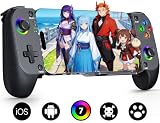
- Bluetooth Controller for iPhone & Android: Mocagen mobile gaming controller Compatible with all iPhone models (including 17/16 series) and Android devices. Pairing steps: 1. Turn on Bluetooth on your phone and go to the pairing screen. 2. Press and hold the Home button for 3 sec until LED4 flashes. 3. Find "XBOX Wireless Controller" on your phone and tap to pair. Quick reconnect: After first pairing, simply press the Home button once (with Bluetooth on) to reconnect
- Play Most Controller-Compatible Games: This iPhone game controller supports cloud gaming (e.g., Xb*x Game Pass, GeForce NOW), Xbox Remote Play, emulator games, and native mobile games (e.g., Apple Arcade). Enjoy effortless control and play Fortnite, Call of Duty, Roblox, Genshin Impact, and many more anytime, anywhere. Note: Controller only works with games that support controller input, and does not support PS Remote Play
- 5M-Cycle Lifespan & Zero Drift: MC1 mobile gaming controller features a Hall-effect joystick with a 5M cycle lifespan, 2.5x longer than standard carbon-film sticks. Its innovative electromagnetic induction technology ensures drift-free operation, enabling precise character control in intense games and significantly extending this phone game controller durability
- Ergonomic Grip Design: The handle is ergonomically shaped with a l*ser-engraved texture for anti-slip and enhanced grip, effectively reducing fatigue during long gaming sessions. The scientifically designed joystick and button layout ensures smooth operation. Whether for personal use or as a gift, it delivers a more comfortable and healthier gaming experience
- 7-Color RGB Light Ring & 600mAh Battery: The mobile game controller features a 7-color adjustable light ring on the joystick(ABXY button lights can be turned off, but their colors are not adjustable). The lighting is vibrant yet eye-friendly. The built-in 600mAh battery provides up to 6 hours of battery life in brightness mode — enough for a full day of gaming
News and schedules
Look for calendars, match alerts, results, team and player following, news and stream or VOD links.
Live statistics
Look for in-game scores, rosters, player statistics, head-to-head data and match history.
Tournament participation
You need registration, brackets, check-in, score reporting, rules, dispute handling and transparent prize terms. A score-tracking app is not automatically a tournament platform.
Casual viewing
Game discovery, community features, notifications and match viewing may be sufficient without wallets or paid competitions.
What’s actually slowing this PC down?
Pick the symptom - the matching free tool is one click away.
Established App Store alternatives
| App | Best for | What its listing establishes | Trade-off |
|---|---|---|---|
| Strafe Esports | Multi-game scores, schedules, news, alerts and fan engagement | Identifiable App Store product covering games including League of Legends, Counter-Strike, Dota 2, Rocket League, Rainbow Six Siege, Overwatch, StarCraft 2, Hearthstone and Call of Duty; listed as free in the reviewed U.S. listing | Primarily a tracking and fan tool, not evidence of cash-tournament entry |
| Escores Stats | Statistics, rosters, player and team following, head-to-head comparisons | U.S. listing reviewed August 18, 2026 says it is free and requires iOS 16.0 or later | Data-focused, with a limited visible review base |
| Riot Mobile | League of Legends, VALORANT, Wild Rift, Teamfight Tactics and other Riot titles | Riot Games is the named developer; listing describes schedules, lineups, VODs, news, notifications, chat, rewards and match history | Focused on Riot’s ecosystem rather than every esports game |
| Bracket Buddy | Brackets, upcoming matches, opponents, score reporting and tournament-run tracking | Free listing that says it reads and posts information on Start.gg and requires iOS 12.4 or later | Small visible review base and little broad esports news or statistics |
What to do now
- If you want scores, schedules or news, use an identifiable App Store alternative that matches your games.
- If you need tournament logistics, confirm that the organizer uses a supported platform such as Start.gg before installing a companion tool.
- If you are evaluating eTrueSports, monitor etruesports.us for a direct, verifiable App Store link and complete legal documentation.
- Do not treat feature lists, “100% safe” language or manual search instructions as proof of authenticity.
Final verdict
eTrueSports may be describing a planned, regional, renamed, private or web-based product, but the available evidence does not establish a currently verifiable standalone iOS app. Until Apple listing details, publisher identity, privacy terms and—especially—payment and withdrawal rules are public, the responsible position is to regard the app as unverified rather than download it or fund an account.
Quick Recap
Product prices and availability are accurate as of the date/time indicated and are subject to change. Any price and availability information displayed on Amazon at the time of purchase will apply.




