Recommended Free Tools
VirtualLink was announced on July 17, 2018, as a USB-C-based connection intended to carry a VR headset’s video, USB data and power through one cable. NVIDIA, Oculus, Valve, AMD and Microsoft backed the proposal, which specified four HBR3 DisplayPort lanes, a USB 3.1 data channel and up to 27 watts of power. It was technically real and appeared in some 2018-era hardware, but the announcement was an advance overview rather than proof of a finished, widely adopted standard. By 2020, key products and backers had dropped away.
What VirtualLink was supposed to do
Conventional tethered PC-VR headsets typically needed separate connections for display, USB data and power. Those cables handled the headset’s screens, cameras, sensors and tracking hardware, but they also increased cable bulk and setup complexity. VirtualLink’s stated goal was to combine those functions in a single connection, particularly helping headsets and thin laptops with limited ports. NVIDIA described the motivation in its technical explanation at NVIDIA Developer.
The proposal used the familiar USB Type-C plug, but VirtualLink was not simply “any USB-C.” It was a VR-specific USB-C Alternate Mode with a particular high-speed lane arrangement and cable requirements.
How the connection worked
| Function | Announced capability | Purpose |
|---|---|---|
| Display | Four HBR3 DisplayPort lanes | High-resolution headset video |
| Data | USB 3.1 channel | Cameras, sensors and other headset peripherals |
| Power | Up to 27 watts | Power delivered to the headset, according to the launch announcement |
| Physical interface | USB Type-C | One cable between host and headset |
The original specification overview is documented in NVIDIA’s July 17, 2018 announcement. Contemporary technical reporting described six high-speed lanes in the arrangement: four for DisplayPort video and two for a bidirectional USB 3.1 Gen 2 channel. That combination put greater demands on signal integrity and cable construction than an ordinary USB-C charging or display connection; see AnandTech’s analysis.
#1 Best Overall

- [Designed for Oculus Quest 3/2/Pro] Our 2023 version features a separate USB-C charging port, enabling rapid 3A power delivery for uninterrupted gameplay. Use with a PD/QC fast adapter for optimal charging speed. Please note: This is a VR link cable and DO NOT use it to charge your phone, tablet, laptop, etc.
- [SAFE Charging via SmartProtect2.0] Link cable built-in SmartProtect2.0 chip balances the electricity and data sync, controls the current for a safe battery range of around 78%, safe and sufficient power use is now in your Oculus.
- [16FT/5M for Wider Range of Motion] Reaching 16ft/5m long USB A to USB C cable, plus the anti-wear FLYWEAVE coat, never worry about your freedom of movement or if it is damaged by a stampede(Cable length slightly affects transfer speed).
- [Steady Your Game Connection] 90° USB-C hooks the VR glasses firmly, a flexible joint that is intact after 45000+ bend tests, plus a sticky buckle to secure the connection, all of these can up your game to the next level.
- [What You Get] INIU 16ft/5m USB 3.0 link cable*1, Quick Start Guide*1, user manual*1, INIU industry-leading 3-year iNiu Care and technical support.
The “up to 27 watts” figure was an official launch claim, not a guarantee that every USB-C port or cable could supply that amount. A USB-C connector’s shape cannot identify whether it supports VirtualLink, DisplayPort Alt Mode, USB Power Delivery, Thunderbolt or only basic USB functions.
Who backed VirtualLink?
The launch consortium consisted of:
- NVIDIA
- Oculus
- Valve
- AMD
- Microsoft
HTC joined later, in November 2018, as reported by Road to VR. Those endorsements showed interest from major GPU, platform and headset companies, but they did not establish that each company would ship a compatible consumer product.
Was VirtualLink a finished standard when announced?
No. The July announcement presented an advance overview and said a VirtualLink 1.0 specification would follow. In practical terms, it was a consortium-backed technical direction and an invitation for more companies to participate, not evidence of a mature standard with universal certification and broad product availability.
Rank #2

- Compatible with Meta Quest 3S/Quest3/2/Pro/Pico 4 Accessories: Syntech 2-in-1 link cable offers additional interface options for both USB A and Type C ports. It can connect your VR devices to a gaming PC, providing perfect PC VR experience. The color and design match perfectly with the headset. (Note: Quest3 VR headsets recently updated v64, If your device is identified as USB 2.0 or cannot connect, please update your Quest3 and PC Link software to the latest version, then restart them.)
- Excellent Link Performance: This cable and the USB adapter both support USB 3.0 transmission speed. Stable and fast data synchronization working with sustained and reliable current brings you a smooth VR gaming experience. The attached velcro strap fixes the cable and Oculus Quest 3S/Quest3/2/Pro/Pico4 to prevent disconnection during movement. Note: Whether you use an adapter or not, please make sure that the transmission protocol of the computer port you are connecting to is USB 3.0 or higher.
- Upgraded 2-in-1 High Speed VR Cable: Designed for seamless virtual reality experience, this USB 3.0 Type-C cable delivers data transfers up to 5Gbps (practical speeds 2-3Gbps). The included USB 3.0 adapter ensures stable data connectivity for phones, computers, tablets, and other devices. Note: This is NOT a charging cable—do not use it for charging!
- Flexible and Sturdy: Experience complete freedom of movement with this 16ft long cable that allows you to fully immerse yourself in the VR world without any restrictions. Crafted from highly durable materials, this cable offers exceptional stretch and abrasion resistance, making it a reliable option for long-term use. The upgraded L-shaped Type-C interface ensures a robust and reliable connection, while the cable is reinforced to withstand over 5000 bends without any damage.
- Quality Assurance and Customer Service: We have upgraded the Type-C interfaces on both ends of the cable, increasing the breaking force to over 15G to enhance durability. We provide a USER GUIDE tutorial to help you smoothly enable cable link and provide solutions for some of the problems you may encounter while using wired link. In addition, Syntech provides an 18-month worry-free period and Friendly Customer Service Support for this link cable.
This distinction matters because coverage often used “standardized connector” as shorthand. VirtualLink did not create a new plug shape; it proposed a specific signaling and power arrangement built around USB-C. A host, cable and headset all needed compatible implementations.
Do these 3 things before closing this tab:
1Repair Windows errors before they cause bigger problems2Fix the driver behind crashes, sound loss and screen glitches3Clear out junk files and repair common Windows errorsWhich hardware implemented it?
NVIDIA graphics cards
NVIDIA’s Turing generation implemented VirtualLink support according to the advance overview. The most visible examples were GeForce RTX 20-series Founders Edition cards, including RTX 2070, RTX 2080 and RTX 2080 Ti-era boards. Some Quadro RTX products, partner boards and specialist hardware also exposed a compatible port.
Model-level verification is essential. Not every RTX 20-series card had the port, and the presence of USB-C on a graphics card did not prove VirtualLink support. NVIDIA’s support guidance explains the add-in-card qualification at NVIDIA Support. NVIDIA’s Turing documentation is available in its Turing architecture white paper.
Rank #3

- Compatible with Meta Quest & Pico Headsets: The VR link cable is compatible with Meta Quest 3S / Quest 3 / Quest 2 / Quest Pro / Pico 4. Connect your headset to a gaming PC to unlock SteamVR and PC VR content for a stable, immersive wired experience. Note: This cable is NOT for charging—please do not use it to charge your headset!
- Designed for PC VR Gaming: Perfect for wired PC VR and room-scale VR gameplay, supporting seated, standing, or full-body movement. Keeps your VR experience stable and smooth during long gaming sessions, avoiding latency or signal issues associated with wireless streaming.
- USB 3.0 High-Speed Performance: Features a USB-A to USB-C connection with USB 3.0 support, providing up to 5Gbps data transfer (typical 2–3Gbps in real-world VR use). Ensures low latency and reliable signal. For best results, plug into a USB 3.0 / 3.1 / 3.2 port and keep your headset and PC Link software updated.
- Comfortable & Secure Design: The L-shaped USB-C connector reduces headset port strain and improves comfort during long VR sessions. Includes a Velcro strap to keep the cable in place and prevent disconnection. Flexible, tangle-free design allows smooth, unrestricted movement.
- Durable and Reliable Build: Constructed with flexible, abrasion-resistant materials and reinforced stress points for long-term use. Comes with a user guide, 18-month warranty, and dedicated Syntech customer support.
Headsets and adapters
Strong company backing did not translate into broad headset adoption. Early coverage noted that no major headset maker had announced a consumer headset with a VirtualLink port during the initial rollout. Specialist and development-oriented devices were associated with the interface, but “supported the standard,” “had a VirtualLink-capable host” and “shipped with a native VirtualLink headset port” describe different things.
Valve’s planned Index adapter illustrates the problem. The adapter was intended to combine the Index’s separate connections, but Valve canceled it and issued refunds after reported connection-reliability problems. UploadVR covered the cancellation. A reliable solution required compatible GPU routing, cable construction, power delivery and headset electronics—not merely a USB-C socket.
The Tool Desk
Outbyte Driver Updater FREEScan for outdated or missing drivers - takes under a minuteDriver Scan →Outbyte PC Repair FREEClear out junk files and repair common Windows errorsFree Scan →Why VirtualLink failed to take off
The ecosystem needed both ends
A VirtualLink host port was useful only if a headset accepted the combined video, data and power arrangement, either natively or through a dependable adapter. Mainstream headset adoption remained extremely limited, leaving GPU makers with little reason to continue adding the connector.
Rank #4

- No Data Speed Drop Even When Hard Twisted: The kink-resistant, braided exterior and internal twisted-pair structure work together to prevent performance loss, ensuring consistently stable USB 3.0 data transfer speeds up to 5Gbps through intense bending and daily wear
- Fast Charging Chip: AMVR link cable with charging features the latest max 36W charging port, with a significantly upgraded internal charging board compatible with Meta Quest 3S/3/2, enabling a seamless experience of charging while playing. For optimal charging speed, use the official or a higher-power charger adapter. Note: This VR cable is not designed for charging phones, computers, tablets, or other devices.
- 2-in-1 PC Connection: The included USB 3.0 A-to-C adapter allows this meta quest link cable to connect flexibly to both USB-A and USB-C ports on your PC, offering greater convenience. It supports a 5Gbps (SuperSpeed) data transmission rate, providing minimal latency and a stable connection for a smooth PC VR gaming experience. For best performance, please plug it into a USB 3.0 port.
- Extended Service Life and Cost Savings: This VR link cable is made of super durable nylon braided material, offering excellent flexibility and wear resistance. Bending the cable will not affect its transmission performance. The A-to-C adapter can withstand over 10,000 insertion cycles. The reinforced L-shaped USB-C connector can endure a maximum tensile force of 100 Newtons. The tough PVC sheath has withstood over 3,000 bending tests, ensuring long-lasting durability even during prolonged intense exercise.
- Compatible with Quest 3S/3/2/1/Pro accessories and Pico 4: AMVR charging link cable specifically compatible with Quest 3S/3/2/Pro/Pico4 headsets, this cable ensures a stable USB 3.0 connection. It supports fast charging while enabling smooth gameplay, and is an essential accessory for Q3S/3/2/Pro/Pico 4.
Cables and signal integrity were difficult
Combining four high-speed DisplayPort lanes, USB 3.1 and headset power in a compact cable created demanding engineering conditions. Contemporary analysis raised concerns about USB 3.1 loss over headset-length cables, shielding, strict cable construction and differences between host implementations. Those were documented engineering risks, not proof that the concept was impossible.
The VR market changed
As the initiative struggled to establish a tethered-headset ecosystem, the market increasingly emphasized standalone headsets, wireless PC-VR and conventional DisplayPort-plus-USB arrangements. Vendor-specific USB streaming links also became more common. This broader market shift reduced the opportunity for a new, specialized wired interface.
Backers stopped providing momentum
Valve canceled its adapter, and NVIDIA omitted the connector from its RTX 30-series Founders Edition cards. By September 2020, reporting described the consortium and initiative as effectively defunct. Tom’s Hardware documented the RTX 30-series omission and collapse, while Road to VR described VirtualLink as abandoned.
Best Value
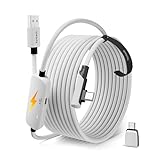
- From Syntech—Crafted for VR Enthusiasts: Join over 100 million users worldwide and elevate your PCVR experience. Syntech delivers industry-leading VR wired connection solutions with 24/7 support to maximize your gear's performance.
- Compatible with Meta Quest 3S/3/2 Accessories: The Syntech 2026 link cable is optimized for seamless compatibility with the latest VR headsets, ensuring a stable USB 3.0 PC connection while fast charging your Quest 3S/3/2. Note: This VR link cable is not designed for charging phones, computers, tablets, or other devices.
- 2-in-1 PC Link: Includes a USB 3.0 A to C adapter for flexible connection to both USB-A and USB-C ports on your PC. Achieve low latency streaming with stable data transfer of 1.9–3.2 Gbps across the full 16FT length—ideal for room-scale and seated experiences. For the best performance, plug into a USB 3.0 port.
- Next-Gen Charging Chip: Equipped with an advanced 2026 charging chip, the Syntech Link Cable delivers up to 18W PD charging power for uninterrupted gameplay. Compatible with Oculus/Meta Quest protocols, it ensures safe and efficient charging. When the VR headset battery reaches 65%, the cable automatically switches to trickle charging to minimize wear and extend battery life. For optimal performance, use with PD/QC fast charging adapters and connect to the USB-C port on the cable.
- Designed for PC VR Gaming: Our 16FT VR cable is built for durability and performance, offering the flexibility and reach needed for any VR setup. Its triple-layer protection shields against water, corrosion, and electrical leakage while maintaining flexibility. The included Velcro strap secures the cable to your headset, preventing accidental disconnection during intense gaming sessions.
VirtualLink’s timeline
| Date | Event |
|---|---|
| July 17, 2018 | NVIDIA, Oculus, Valve, AMD and Microsoft announce VirtualLink as an open industry connectivity initiative. |
| 2018 | Turing-based hardware, including selected RTX 20-series Founders Edition cards, begins implementing the interface. |
| November 2018 | HTC joins the consortium. |
| 2019 | Valve cancels its planned Index VirtualLink adapter and refunds customers after reported reliability problems. |
| 2020 | NVIDIA’s RTX 30-series Founders Edition cards omit the connector; coverage describes the initiative as effectively dead. |
What VirtualLink was not
- It was not every USB-C port on a computer or graphics card.
- It was not identical to ordinary DisplayPort over USB-C.
- It was not the same as Oculus Link or another USB-based headset streaming system.
- It was not a current universal VR standard.
- It was not, by itself, a reason to buy a used RTX 20-series card.
A normal USB-C-to-DisplayPort adapter may carry video, but it should not be treated as a full VirtualLink solution because it may lack the required USB data and headset power. Likewise, a generic USB-C hub or cable cannot be assumed to reproduce VirtualLink behavior.
Can you use VirtualLink today?
For most buyers, no. VirtualLink is relevant mainly to owners of a verified compatible legacy GPU and a rare compatible headset or adapter, or to researchers documenting historical USB-C Alternate Mode implementations. It is not a sensible buying criterion for a modern VR system.
Compatibility checklist for legacy hardware
- Identify the exact GPU model. Confirm that the board—not merely the RTX family—has a VirtualLink-capable USB-C port.
- Identify the exact headset. Check for native VirtualLink support or a documented proprietary adapter.
- Verify the cable. Do not assume a generic USB-C cable meets the required high-speed and power specifications.
- Check power delivery. Confirm that the host and cable can provide the headset’s required power.
- Check software. Verify support in the headset runtime and SteamVR or Oculus software.
- Check display routing. Make sure the GPU can drive the headset and any monitor outputs you need simultaneously.
- Confirm availability. Compatible cables and adapters may exist only on the used market.
Why the announcement still matters
VirtualLink is a useful example of the difference between a technically coherent proposal and a successful standard. The one-cable design addressed a real cable-management problem and used a connector already familiar to PC makers. But it arrived with demanding electrical requirements, depended on coordinated adoption by several product categories and never secured a large headset ecosystem.
It therefore should not be dismissed as vaporware: the interface was announced, implemented in limited hardware and tested in real products. Nor should it be described as a mainstream standard. The accurate history is that VirtualLink launched in 2018, shipped briefly, lost key ecosystem support and was effectively abandoned by 2020.
What’s actually slowing this PC down?
Pick the symptom - the matching free tool is one click away.
Quick Recap
Product prices and availability are accurate as of the date/time indicated and are subject to change. Any price and availability information displayed on Amazon at the time of purchase will apply.




