Yes—AirPods work well for gaming on iPhone, iPad, and Mac, and can be fine for casual play elsewhere. Their main drawbacks are platform-dependent Bluetooth support, possible audio delay, and less reliable voice chat. If you already own a pair, try them for relaxed gaming; if you mainly play competitively or on a console, purpose-built gaming earbuds or a headset are usually a better fit.
What “working for gaming” means
A successful Bluetooth connection does not guarantee that game audio, microphone input, and chat all work together. The device, game, AirPods model, and connection method determine which features are available. Apple says AirPods can work as Bluetooth headphones with non-Apple devices, but some functionality may be limited (Apple’s AirPods comparison).
| Platform | Game audio | Voice chat | Practical verdict |
|---|---|---|---|
| iPhone and iPad | Bluetooth; Spatial Audio may be available for supported content and models. | Generally available through the device and game, subject to app support. | Best fit for casual and everyday gaming. |
| Mac | Bluetooth; supported Apple-silicon Macs can use Spatial Audio with compatible content. | Available, though Bluetooth microphone use can affect audio quality. | Convenient, especially for casual play. |
| Windows PC | Bluetooth, subject to the computer, drivers, and game. | May require selecting a separate hands-free input or output; sound quality can fall when the mic is active. | Usable, but less predictable than a dedicated gaming connection. |
| PS5 and Xbox | Usually requires an accessory or television Bluetooth connection rather than ordinary direct pairing. | Depends on the adapter and connection path; audio-only workarounds may not carry microphone input. | Not a straightforward console headset solution. |
| Nintendo Switch | Bluetooth audio can be useful for portable or single-player play. | Do not assume the AirPods microphone will work for game chat. | Reasonable for casual play; less suitable when timing or chat matters. |
AirPods compatibility by platform
iPhone and iPad
These are the simplest hosts: pair AirPods through Bluetooth, then check that the game is sending audio to them. Spatial Audio and head tracking work only with supported AirPods, software, and content; they are not a universal setting for every game. Apple documents the feature and its controls in its AirPods Spatial Audio guide.
Mac
AirPods pair as Bluetooth headphones. Apple documents Spatial Audio on Apple-silicon Macs running macOS 12.3 or later for supported apps and content. When available, the AirPods menu-bar control lets you choose Off, Fixed, or Head Tracked. An app must support the relevant audio for the feature to have an effect.
#1 Best Overall
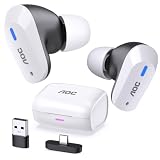
- DUAL-MODE 2.4GHZ & BLUETOOTH GAMING EARBUDS Effortlessly switch between high-performance gaming and daily use. Comes with a Type-C 2.4GHz dongle and a bonus USB-C to USB-A adapter, ensuring seamless, plug-and-play compatibility with PC, Mac, PS5, Nintendo Switch, VR headsets, and Bluetooth-enabled mobile devices.
- 20MS ULTRA-LOW LATENCY FOR COMPETITIVE GAMING Experience true immersive gameplay. When connected via the 2.4GHz dongle, these wireless gaming earbuds deliver an industry-leading 20ms ultra-low latency. Enjoy perfectly synchronized audio and video, giving you the competitive edge to hear every footstep and skill cast in real-time without delay.
- PREMIUM AUDIO WITH BUILT-IN AMPLIFIER Engineered for audiophiles and gamers alike. Featuring a dedicated hardware audio amplifier combined with large-magnet single-diaphragm drivers, these in-ear gaming headphones produce crystal-clear, transparent highs and deep, punchy bass that elevate your gaming soundtrack and favorite music. NOTE:This item does not support Xbox series consoles.
- NOISE CANCELLING MIC & CRYSTAL-CLEAR CALLS Communicate flawlessly with your teammates. Equipped with high-quality silicon noise-canceling microphones, these wireless earbuds effectively filter out distracting ambient background noise, ensuring your voice is heard loud and clear during intense gaming sessions or daily phone calls.
- 32-HOUR PLAYTIME & ERGONOMIC DESIGN Game longer and in total comfort. Enjoy up to 8 hours of continuous playback on a single charge, with the sleek charging case providing an additional 3 full charges (up to 32 hours total). Inspired by classic gaming aesthetics, the ergonomic in-ear design ensures a secure, comfortable fit for all-day wear.
Windows PC
AirPods can play PC game audio over Bluetooth, but performance depends on the PC’s Bluetooth hardware, drivers, Windows settings, and the game. If voice chat is needed, Windows or the chat app may show separate stereo and hands-free devices; select the appropriate input and output explicitly. When a Bluetooth headset microphone is active, the connection may switch to a lower-bandwidth bidirectional mode, reducing playback quality. This is a general Bluetooth limitation, not a claim about one AirPods generation.
A USB Bluetooth adapter may help with connection reliability on a PC that has weak or no built-in Bluetooth, but it does not automatically make AirPods a low-latency gaming headset. No single latency figure applies across AirPods models and PC setups.
PS5
Do not count on pairing AirPods directly to a PS5 as you would to a phone. A Bluetooth transmitter or a television’s Bluetooth output may send game sound to AirPods, but compatibility depends on the exact hardware and connection. The microphone may not be available through an audio-only transmitter or TV path, and volume or chat controls can become less convenient. The DualSense controller microphone might serve as a separate chat input in some setups, but test the complete arrangement rather than assuming it will work.
For a PlayStation-focused alternative, Sony’s PULSE Explore is designed around PlayStation Link and includes a USB adapter for PS5, PC, and Mac. Sony advertises a retractable microphone and low-latency wireless audio.
Quick wins for a faster PC:
Fix the driver behind crashes, sound loss and screen glitchesFind Drivers →Clear out junk files and repair common Windows errorsFree Scan →Scan for outdated or missing drivers - takes under a minuteDriver Scan →Rank #2

- MULTI-PLATFORM WIRELESS FOR PLAYSTATION GAMING – Switch seamlessly between PS5, PC, mobile, and Steam Deck via Bluetooth 5.3 or HyperSpeed wireless for gaming at home or on the go
- HYPERSPEED CASE WITH SMARTSWITCH – The included charging case doubles as a dedicated 2.4 GHz wireless receiver, delivering HyperSpeed gaming audio when connected directly to your PS5, PC, Steam Deck, or mobile device
- UP TO 35 HOURS BATTERY — Game longer with up to 10 hours on the earbuds plus 25 hours from the compact charging case, and keep playing while charging with USB‑C passthrough
- WATER‑RESISTANT IPX4 DESIGN — Stay unstoppable through workouts, commutes and long gaming sessions with an IPX4 water-resistant build that protects against sweat, rain and daily use
- IMMERSIVE SPATIAL AUDIO PRECISION – Hear footsteps and directional cues clearly with PS5 3D Audio and THX Spatial Audio on PC for 7.1 surround sound positioning
Xbox Series X|S and Xbox One
Xbox console audio support is not the same as ordinary Bluetooth pairing on a phone. A transmitter connected through a television or controller may provide sound, but whether it also supports microphone input and chat depends on the product and connection route. Before buying an adapter, check its manufacturer’s compatibility information for your exact Xbox model, the port you plan to use, and two-way chat—not just audio output. A secondary overview describes transmitter and TV workarounds, but does not establish compatibility for every accessory: Macworld’s AirPods and console guide.
Nintendo Switch
Bluetooth audio can make AirPods handy for portable or single-player Switch gaming. Do not assume that game chat will use the AirPods microphone: microphone support depends on the Switch setup and the game’s chat method. For rhythm games or other timing-sensitive play, Bluetooth delay may also be distracting.
How to pair AirPods and select them for game audio
iPhone or iPad
- With the AirPods in their case, open the lid near the iPhone or iPad and follow the pairing prompt. If they are already paired, connect them from the device’s Bluetooth controls.
- Start the game and confirm that AirPods are the selected audio output if the game offers an output setting.
- For supported Spatial Audio, open Control Center, touch and hold the volume control, then choose Spatial Audio and select Off, Fixed, or Head Tracked.
Mac
- Open System Settings → Bluetooth.
- Put AirPods in pairing mode and select them from the device list.
- If needed, open System Settings → Sound → Output and choose AirPods.
- In the game or chat app, set the microphone input separately. Use the AirPods menu-bar control for Spatial Audio options when supported.
Windows or another non-Apple device
- Put both earbuds in the case and open the lid.
- Hold the case’s setup button until the status light flashes white.
- Open the device’s Bluetooth settings and select AirPods.
- In Windows, choose AirPods under sound output. If using chat, select the intended microphone and check the game’s own audio settings as well.
Console, transmitter, or television
There is no universal AirPods-to-console setup. If you use a transmitter or TV Bluetooth output, follow that device’s pairing instructions and verify game sound, microphone return, chat, and volume controls separately. A connection that plays game audio may still not carry voice-chat input.
Are AirPods good for competitive gaming?
It depends on the game and how sensitive you are to delay. Turn-based games, strategy, RPGs, adventures, and ordinary mobile play are generally more forgiving. A delay is more likely to matter in rhythm games, fighting games, competitive shooters, and speedrunning, where sound and action need to line up closely.
What’s actually slowing this PC down?
Pick the symptom - the matching free tool is one click away.
Rank #3

- Dual-Mode Wireless Connectivity & Hybrid Multipoint: Unmatched versatility with Bluetooth and 2.4 GHz modes. Hybrid Multipoint lets you connect to two devices via 2.4 GHz and Bluetooth modes simultaneously, so you never miss a call while gaming
- Realistic Audio & Bone-Conduction AI Microphones: High-resolution 24-bit/96kHz audio (in 2.4 GHz mode) with lifelike details enhanced by Dirac OpteoTM technology, ensuring every in-game detail is heard. Bone-Conduction AI Microphones isolate your voice from background noise for crystal-clear communication
- Adaptive ANC with Auto Mode: Optimizes ANC based on in-ear fit and shape of ear canal, automatically adjusts to ambient noise levels for full immersion
- Long Battery Life & Quick Charging: Provides up to 46 hours of battery life in Bluetooth mode (RGB off). The charging case works wirelessly or via a USB-C connection. Fast in-case charging provides up to an hour of use with just a 5-minute charge
- Multi-Platform Compatibility: Bluetooth mode supports PC, Mac, iOS, Android, Nintendo Switch; while 2.4 GHz SpeedNova dongle mode supports PC, Mac, Android, Nintendo Switch, PlayStation 4, PlayStation 5
Perceived delay is not the same as a controlled latency measurement. It varies with the AirPods model, host device, game, Bluetooth implementation, and any transmitter in the path; some games also provide audio calibration or delay adjustment. There is no responsible universal AirPods latency number to apply to every setup. If timing matters to you, test your own game and prefer wired audio or a purpose-built low-latency wireless system if the delay is distracting.
AirPods can also be less convenient for competitive chat. On a PC, using their microphone may trigger the Bluetooth headset mode and reduce playback quality. On consoles, the bigger obstacle may be getting microphone input to the game at all. A separate USB microphone can make a useful PC hybrid: AirPods for listening, separate mic for chat.
What Spatial Audio and head tracking do in games
Apple’s controls offer three modes when supported:
- Off: Spatial Audio and head tracking are disabled.
- Fixed: Spatial Audio is on without head tracking.
- Head Tracked: Spatial Audio and head tracking are on.
Spatial Audio can make a sound field feel broader or more immersive, but it is not automatically the same as a game’s own positional-audio system. Head tracking can make the sound field seem anchored to the device as you move your head; some players may find that immersive, while others prefer the stable perspective of Fixed or Off. It does not guarantee more accurate enemy positioning. For competitive play, compare it with the game’s own headphone or 3D-audio setting and use the mode that makes cues easiest to interpret.
Windows Errors? Fix Them Before They Spread
Repair common Windows errors and clear accumulated junk for a smoother, more stable PC - no reinstall needed.Free scan · no reinstallOutdated Drivers Are Slowing You Down
One free scan finds every outdated or missing driver and matches the right update for your exact hardware.Free scan · exact hardware matchRank #4

- Box Contents: PULSE Explore wireless earbuds, PlayStation Link USB adapter, Charging case, 6 Earbud tips, USB cable, Printed Materials
- Next Generation Gaming Audio - Experience extraordinary lifelike sound in yur favorite games.
- Multi-Device Connectivity - Go where adventure takes you with the ability to wirelessly connect to a range of devices.
- Command and Control - Lead your squad to victory with crystal-clear voice capture and easy-access controls.
- Built for Adventure - Enjoy lifelike sound wherever you go with a portable design and charging case.
Microphone and multiplayer chat
AirPods microphones are suitable for calls and general voice communication, but game-chat results depend on the model, software, room noise, and host. On a Mac or PC, choose the input explicitly in the game or chat app; if the microphone degrades listening quality, use the computer’s built-in mic or a separate microphone while keeping AirPods as output.
On a console, the connection route matters more than the earbuds alone. Unless the transmitter or adapter explicitly supports a microphone return channel and your console setup, treat AirPods as audio-only. Purpose-built gaming earbuds add console-oriented connectivity and chat features; Sony, for example, advertises a retractable mic on PULSE Explore.
Which AirPods models make sense for gaming?
Features vary by model and generation. Apple’s comparison page distinguishes capabilities such as ANC, Transparency, Spatial Audio, head tracking, and USB-C audio. Do not assume every AirPods model has every feature.
- AirPods 4: A compact, straightforward choice for Apple-device gaming and everyday listening. The ANC version adds noise-control features, but neither version solves console pairing or gaming-chat limitations.
- AirPods Pro: A sensible option if you already want in-ear isolation and Apple features for daily use as well as games. Generation-specific capabilities differ; they do not remove platform restrictions.
- AirPods Max with USB-C: The over-ear option for users who prefer that fit. Apple lists lossless and ultra-low-latency audio over USB-C for the relevant USB-C model; that is a wired, model-specific capability, not a description of ordinary Bluetooth use. Check Apple’s comparison for supported configurations.
ANC can help reduce room noise, while Transparency mode lets more outside sound through. Choose based on your surroundings and whether you need to hear people nearby; neither mode changes console compatibility or guarantees better in-game positioning. Apple describes its noise-control options in its noise-control support article.
The Tool Desk
Outbyte PC Repair FREEClear out junk files and repair common Windows errorsFree Scan →Outbyte Driver Updater FREEScan for outdated or missing drivers - takes under a minuteDriver Scan →Best Value

- Active Noise Cancellation and Transparency Mode deliver immersive sound and situational awareness.
AirPods or dedicated gaming earbuds?
AirPods’ advantage is convenience, especially if they are already part of your Apple setup. Purpose-built gaming products are designed to address receiver compatibility, latency, and chat more directly. For example, Sony advertises PULSE Explore’s PlayStation Link, included USB adapter for PS5/PC/Mac, retractable microphone, simultaneous Bluetooth functionality, and up to 30 hours of battery life with quick charging. These are manufacturer-listed features, not a guarantee that every player will prefer its sound or fit.
If you are buying something specifically for gaming, compare the connection method, console support, microphone path, comfort, and battery arrangements—not just whether a product is called wireless. For an existing AirPods owner, trying them for casual play is a sensible first step; for a console-first or competitive player, a dedicated system is generally the safer choice.
Fix common AirPods gaming problems
Connected, but no game sound
- Confirm AirPods are connected to the device you intend to use.
- Check system output and the game’s own audio-output menu; audio may still be going to a monitor, TV, or controller.
- Raise system and in-game volume, and check that the AirPods are charged.
- If another nearby Apple device has taken the connection, reconnect to the gaming device.
- Disconnect and reconnect AirPods. If they remain connected but silent, remove them from the device’s Bluetooth list and pair them again.
Chat sounds poor or the microphone is missing
- On PC or Mac, select the intended input in the operating system and chat app; use a built-in or separate mic if AirPods microphone mode degrades playback.
- On a console, confirm that the transmitter supports microphone input as well as audio output. TV Bluetooth often solves only the listening side.
- Check the game’s chat settings and, where available, its audio calibration before changing hardware.
Delay or dropouts
For a PC, check the Bluetooth adapter, drivers, distance, and competing wireless connections. A different adapter may improve reliability but is not a promise of gaming-grade latency. For a TV or console workaround, each additional wireless link can change the result; test in the actual game before relying on it for timing-sensitive play.
Quick Recap
Product prices and availability are accurate as of the date/time indicated and are subject to change. Any price and availability information displayed on Amazon at the time of purchase will apply.



