For most gamers, the Razer Tartarus V2 is the better buy. It has the programmable keys, thumb controls, profiles and macros most people want from a one-handed keypad for less. Choose the Tartarus Pro if you have a specific use for its analog optical keys, adjustable actuation or two actions on one key—and have checked that your games support the input behavior.
Quick comparison
| Feature | Razer Tartarus V2 | Razer Tartarus Pro |
|---|---|---|
| US price observed August 16, 2026 | $79.99 | $129.99 |
| Switch technology | Mecha-membrane | Analog optical |
| Programmable keys | 32 | 32 |
| Analog key input | No | Yes; adjustable actuation from 1.5 to 3.6 mm |
| Dual-function keys | Not listed as a core feature | Yes; assign actions to partial and full presses |
| Thumb control | Eight-way thumbpad | Eight-way thumbpad |
| Polling rate | 1,000 Hz | 1,000 Hz |
| Dimensions | 150 × 203 × 59.6 mm | 151 × 202 × 63.5 mm |
| Weight | 340 g | 363 g |
| Software listed | Razer Synapse 4 on PC | Razer Synapse 4 |
Prices are Razer US storefront listings observed on August 16, 2026, not a guarantee of the price in other regions or on another date. The listed specifications come from Razer’s Tartarus V2 support page and Tartarus Pro support page; prices are on Razer’s US gaming keypad store.
What the Pro adds—and what it does not
The central difference is how the main keys report a press. The V2 uses mecha-membrane switches for conventional digital input: a key sends its assigned command when pressed. The Pro’s analog optical switches can detect press depth, letting a supported game receive graduated input rather than only an on/off command. Razer lists an actuation range of 1.5–3.6 mm and describes assigning one action to a partial press and another to a full press. See Razer’s explanation of Tartarus Pro analog input.
When analog keys can help
In a game that accepts controller-style analog input, press depth could make a key useful for variable movement—for example, a lighter press for walking and a deeper press for running. A dual-function key can also put a secondary command on a deeper press, which may be useful when the keypad is short on reachable controls.
#1 Best Overall

- #1 SELLING PC GAMING PERIPHERALS BRAND IN THE U.S. — Source: Circana, Retail Tracking Service, U.S., Dollar Sales, Gaming Designed Mice, Keyboards, and PC Headsets, Jan. 2019- Dec. 2023 combined
- RAPID TRIGGER — Instead of a fixed reset point, keys reset instantly with an upward motion as low as 0.1 mm. This allows for faster repeated keystrokes compared to standard keyboards, which significantly enhances in-game responsiveness
- ADJUSTABLE ACTUATION — Supporting a range of actuation from 1.5 to 3.6 mm, customize the switches to be sensitive as wanted and achieve a setting that best suits different playstyle
- 32 KEYS FOR MORE HOTKEYS AND ACTIONS — Perfect for gaming or integrating into creative workflows with fully programmable keys
- THUMBPAD FOR IMPROVED MOVEMENT CONTROLS — The 8-way directional thumbpad allows for more natural controls for console-oriented players and a more ergonomic experience
These are input options, not proof that the Pro is faster or better in every game. Adjustable actuation changes when a press registers; it does not establish lower input latency. The benefit depends on what the game accepts and how well its controls handle the setup.
What the Pro’s thumbpad is
Both models have an eight-way thumbpad. The Pro’s analog main keys do not turn that thumbpad into a full-resolution analog stick. If your goal is a true thumbstick, neither Tartarus model is specified as one.
Layout, shared features and fit
Both keypads are built around a one-handed control surface, not a conventional keyboard trimmed down to a rectangle. Each advertises 32 programmable keys, a programmable eight-way thumbpad, a programmable scroll wheel, an adjustable palm rest, per-key Chroma RGB customization, profiles and macros. Razer lists full anti-ghosting and a 1,000 Hz polling rate for the V2; neither model’s shared feature set makes the Pro a necessary upgrade for ordinary key bindings, MMO hotbars, push-to-talk or productivity shortcuts.
Rank #2

- HIGH-PERFORMANCE MECHA-MEMBRANE SWITCHES — Provides the tactile feedback of mechanical key press on a comfortable, soft-cushioned, membrane, rubber dome switch suitable for gaming
- 32 MECHA-MEMBRANE KEYS FOR MORE HOTKEYS AND ACTIONS — Perfect for gaming or integrating into creative workflows with fully programmable keys
- THUMBPAD FOR IMPROVED MOVEMENT CONTROLS — The 8-way directional thumbpad allows for more natural controls for console-oriented players and a more ergonomic experience
- FULLY PROGRAMMABLE MACROS — Razer Hypershift allows for all keys and keypress combinations to be remapped to execute complex commands
- ULTIMATE PERSONALIZATION and GAMING IMMERSION WITH RAZER CHROMA — Fully syncs with popular games, Razer hardware, Philips Hue, and gear from 30 plus partners; supports 16.8 million colors on individually backlit keys
The Pro is listed as 23 g heavier and 3.9 mm deeper than the V2; the width and height figures also differ slightly. Those are modest desk-space differences, not evidence that one will fit every hand better. If wrist position matters, treat palm-rest adjustment and the overall footprint as fit questions rather than assuming the models feel identical.
The advertised 32 programmable controls span the device’s keypad and thumb-and-scroll control surface. Check the product layout before buying if you are counting on a particular physical control for a key binding.
Will the Pro’s analog input work in your games?
Not necessarily. Razer positions analog input for games that support gamepad-style controls, but the game determines whether the feature is useful. A title built only around keyboard commands may treat a key as a normal digital input. Some games also handle keyboard and controller input together poorly: they may switch button prompts, reject one device while the other is active, or create control conflicts. These outcomes vary by game; they are compatibility risks, not guaranteed failures.
Rank #3

- MAXIMUM SPEED AND PRECISION — Dominate fast-paced FPS, MMO, and action games with Razer Analog Optical Switches Gen-2 featuring Rapid Trigger, adjustable 0.1-4.0 mm actuation, and up to 100 million keystrokes
- COMFORT FOR EXTENDED GAMING SESSIONS — Maintain natural wrist alignment with a fully adjustable ergonomic wrist rest that moves across multiple axes, creating an ideal setup for long raids, grinding sessions, and competitive play
- GREATER CONTROL WITH ANALOG INPUT — Execute precise movements, navigate radial menus, and expand your gameplay options with a full-sized anti-drift TMR thumbstick and 31 fully programmable controls via Razer Synapse
- CUSTOMIZE FOR EVERY GAME — Store and switch between up to 24 configurable keymaps across 3 profiles, making it easy to optimize controls for MMOs, RPGs, shooters, strategy games, and productivity workflows
- ULTRA-RESPONSIVE PERFORMANCE — Gain near-zero latency with true 8000 Hz HyperPolling, delivering input updates up to 8x faster than conventional gaming peripherals for quicker reactions during critical moments
Before paying extra for the Pro, check the specific game and control scheme:
- Does the game support controller or gamepad input?
- Can it accept keyboard and controller input at the same time?
- Does the action you want actually benefit from variable input depth?
- Can the game or Synapse configuration use separate actions for partial and full presses?
Racing, flight, action and movement-heavy games are plausible candidates when they accept the Pro’s analog behavior. They are not automatic wins: confirm support for the particular title rather than assuming the keypad will behave like a controller in every game.
Recommended Free Tools
Which keypad suits each use?
| Use | Better starting point | Why |
|---|---|---|
| MMO hotbars and RPG commands | Tartarus V2 | Programmable keys and macros are the main attraction; analog depth is often unnecessary. |
| MOBA commands | Tartarus V2 | Conventional bindings and shortcut capacity do not require the Pro’s analog features. |
| Productivity shortcuts or streaming controls | Tartarus V2 | The lower-priced model provides programmable controls for digital commands. |
| Racing, flight or movement-heavy games | Tartarus Pro, if the title supports it | Variable input may be useful, but compatibility must be confirmed. |
| FPS gaming | Usually V2; Pro only for a confirmed analog setup | Extra actuation features matter only if the game and desired scheme use them. |
| Mac use requiring joystick behavior | Neither for full feature parity | Razer says joystick functionality is Windows-only. |
| RGB customization | Tie | Both list Razer Chroma RGB customization. |
Synapse and operating-system requirements
Software is part of the purchase because profiles, macros and customization depend on Razer’s Synapse ecosystem. Both products list Synapse 4 support. Razer documents Synapse 4 for Windows 10 64-bit and Windows 11; it also says Synapse 4 can be used offline after a previous logged-in session. Check Razer’s Synapse 4 support and FAQ and the Synapse 4 supported-device list before purchase if your configuration depends on a particular software feature.
Rank #4
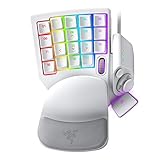
- #1 SELLING PC GAMING PERIPHERALS BRAND IN THE U.S. — Source: Circana, Retail Tracking Service, U.S., Dollar Sales, Gaming Designed Mice, Keyboards, and PC Headsets, Jan. 2019- Dec. 2023 combined
- RAPID TRIGGER — Instead of a fixed reset point, keys reset instantly with an upward motion as low as 0.1 mm. This allows for faster repeated keystrokes compared to standard keyboards, which significantly enhances in-game responsiveness
- ADJUSTABLE ACTUATION — Supporting a range of actuation from 1.5 to 3.6 mm, customize the switches to be sensitive as wanted and achieve a setting that best suits different playstyle
- 32 KEYS FOR MORE HOTKEYS AND ACTIONS — Perfect for gaming or integrating into creative workflows with fully programmable keys
- THUMBPAD FOR IMPROVED MOVEMENT CONTROLS — The 8-way directional thumbpad allows for more natural controls for console-oriented players and a more ergonomic experience
Synapse 3 cloud-service support ended February 3, 2026, according to Razer. Existing installations may remain configurable, but continued customization after removing devices requires moving to Synapse 4. Razer recommends its Profile Migration Tool rather than manually importing Synapse 3 profiles. If you have older configurations, preserve exported or local copies before changing software.
Razer explicitly says the joystick function is supported only on Windows and is not compatible with Mac systems for both devices. That limitation is distinct from basic USB key input: do not assume macOS offers Synapse customization, joystick behavior or the Pro’s analog features on par with Windows. If full keypad functionality on Mac is essential, neither is a safe choice on the available support information. See Razer’s V2 support page and Pro support page.
Independent reader supportYour contribution helps us test, update, and keep practical guides available for everyone.Price and value
At the US listings observed on August 16, 2026, the Pro costs $50 more: $129.99 versus $79.99, or about 62.5% above the V2’s listed price. That premium buys specialized input capabilities—not more programmable keys or a fundamentally different keypad layout. If your use is macros, profiles and digital bindings, the V2 offers the more direct value. If you can name a supported game or workflow that benefits from analog depth, adjustable actuation or partial/full-press commands, the Pro may justify the difference. Verify current regional pricing at Razer’s US gaming keypad listings; the observed figures may change.
Best Value

- CHOSEN BY PRO’S FOR ADVANCED FPS MOVEMENT — With Rapid Trigger, Adjustable Actuation and Razer Snap Tap, the Huntsman V3 Pro offers lightning-fast, precise movements that provides gamers an unbeatable edge especially in FPS games
- RAZER SNAP TAP — Prioritize the latest input between two selected keys without having to release the previous one, and enjoy more responsive inputs for near-instant directional changes in FPS games (latest firmware update required)
- RAPID TRIGGER — A step up from traditional mechanical or optical keyboards to achieve the most responsive and precise inputs; reset keys at the slightest lift of a finger, and experience an advantage in speed that is especially useful for movement in competitive FPS games
- ANALOG OPTICAL SWITCHES GEN-2 — Max out on precision and response with advanced switches for ultra fast repeated inputs, a 0.1–4.0 mm adjustable actuation range, and a 100 million keystroke lifespan
- QUICK ONBOARD ADJUSTMENTS — Make precise, on-the-fly adjustments to actuation height or Rapid Trigger sensitivity with the visual aid of an onboard LED array while saving the settings to the keyboard with no software required
Setup problems and checks
Macros or lighting do not work
- Confirm Synapse 4 is installed and updated, and check that the correct device profile is active.
- Connect the keypad directly to the computer instead of through a USB hub, then try another USB port.
- Restart Synapse and the computer if the device is detected but features remain unavailable. Razer includes direct connection and trying another port in its Tartarus V2 troubleshooting guidance.
An old Synapse profile no longer syncs
Synapse 3 cloud support ended February 3, 2026. Use Synapse 4 and Razer’s Profile Migration Tool for existing profiles; keep local or exported copies before uninstalling older software. Instructions and offline-use details are in Razer’s Synapse 4 FAQ.
The Pro’s analog behavior does not appear in a game
- Confirm that the game supports gamepad input and permits simultaneous keyboard and controller input.
- Test a simple variable-input action, then try a conventional digital profile. This can help distinguish game compatibility from basic device detection.
- Do not expect every game to expose a special analog setting or respond to key depth.
The thumbpad behaves like directional keys
That matches Razer’s description of an eight-way thumbpad. Analog optical sensing applies to the Pro’s main keys; it does not make the thumbpad a full analog stick.
What the specifications cannot tell you
Razer’s product specifications establish the switch technologies and listed features, but do not establish which keypad is quieter, more durable, smoother, or more consistent over time. They also do not establish comparative failure rates, key chatter, thumbpad drift or long-term analog calibration. Treat those as questions for independent hands-on or long-term testing, not as proven advantages of either switch design.
If neither layout suits you, alternatives include a thumbstick-oriented keypad such as Azeron’s products, a compact mechanical keypad or macro pad, or a full keyboard-and-mouse setup. These are different categories with different ergonomics and software trade-offs; verify their current features and availability before comparing them.
Quick Recap
Product prices and availability are accurate as of the date/time indicated and are subject to change. Any price and availability information displayed on Amazon at the time of purchase will apply.



