The OCZ Equalizer was an unusual, budget-minded wired gaming mouse from 2007: it paired a claimed 2,500-DPI dual-laser sensor with a color-coded DPI switch and a red “Triple Threat” button intended to send rapid clicks. Contemporary reviewers liked its feature set and tracking, but criticized the one-way DPI cycling and basic software. Today it makes sense mainly as a working retro peripheral; its condition and obsolete software matter more than the headline specifications.
What was the OCZ Equalizer?
OCZ’s Equalizer was a USB laser gaming mouse sold in desktop and mobile versions. “Mobile” meant a smaller physical model, not a wireless one. The desktop model is commonly identified as OCZMSEQRD and the mobile version as OCZMSEQRM; PC Perspective documented differences between them, including the lowest DPI setting. Both were wired. Contemporary coverage described a blue metallic or reflective finish, an illuminated scroll wheel, side buttons, and the extra red button beside the main mouse button. PC Perspective’s March 2007 review provides period context for the variants and features.
The Equalizer appears to belong to the A4Tech X-750F product family: Techgage described it as an adaptation or rebrand. That is useful context when looking for period information, but it does not prove that every OCZ revision used identical internals or firmware, and an A4Tech driver should not be assumed to work with every Equalizer. Techgage’s contemporary description also covers the product’s accessories.
Specifications and variant differences
| Feature | Reported specification | What to keep in mind |
|---|---|---|
| Connection | Wired USB | “Mobile” refers to the smaller model, not cordless operation. |
| Tracking | Dual-laser engine | Advertised as helping track on more surfaces, including glass; that is not a guarantee for every glass finish. |
| Maximum resolution | 2,500 DPI | A period specification, not a measure of modern sensor accuracy or latency. |
| DPI steps | Six settings: 400 or 600, then 800, 1,200, 1,600, 2,000 and 2,500 DPI | Reports differ on whether the lowest step was 400 or 600. PC Perspective distinguishes the desktop and mobile models; Hardware Secrets reviewed a unit starting at 600 DPI. See Hardware Secrets’ review. |
| Sensor/chip and frame-rate claim | Agilent 6010; 7,080 FPS claimed | Era-specific specification reported by DragonSteelMods, not a modern performance test. DragonSteelMods’ review. |
| Controls | Seven-button configuration in a retailer listing | Counting varies by source and by whether the wheel and special controls are counted as buttons. Not all controls were freely remappable. |
| Cable | About 1.8 m (6 ft) | A period reviewer liked its flexibility but questioned its durability. |
| Feet | Four standard feet, with spare or lower-friction replacements reported | Included accessories varied; inspect the individual used unit. |
| Software | Equalware | Provided button assignments and macro-related settings; it is legacy software. |
| Warranty | Six years claimed at launch | Historical coverage, not a useful current warranty. DragonSteelMods reported the claim. |
Contemporary coverage consistently placed the maximum at 2,500 DPI, but the 400-versus-600-DPI discrepancy should not be hidden: it may reflect the desktop/mobile distinction or different documentation and revisions. The period retailer listing describes the desktop mouse as a seven-button USB laser model with 400–2,500 DPI adjustment: Newegg’s archived desktop listing.
PC Slower Than It Used to Be?
A free scan shows the junk files, broken settings and background clutter dragging Windows down - then fixes them in one click.Free scan · Windows 10 & 11Outdated Drivers Are Slowing You Down
One free scan finds every outdated or missing driver and matches the right update for your exact hardware.Free scan · exact hardware match#1 Best Overall
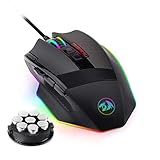
- 【Built for Gamers】M801 Gaming Mouse DPI UP to 16000, equipped with 12000 FPS, 1000 Hz polling rate, 30G acceleration, and an Avago sensor, Omron micro switches, and you can adjust the DPI(1000/2000/4000/8200/16000) by clicking the dpi button, which is ideal for gaming and working.
- 【Professional & Programmable】This wired mouse has 9 programmable buttons and 5 memory profiles, which means you can remap the buttons, edit the lighting mode of each memory file, and quickly switch to fit different needs.
- 【RGB Backlit】There are 8 Lighting Effects, 10 Brightness Levels, Breathing Modes, (Backlight can be disabled), Rapid Fire Button for your gaming. Redragon pc gaming mouse will be your loyal partner.
- 【Effecient and Durable】Specail Fire Button(1 click =3 clicks), smooth TEFLON feet pads, and contoured body for ultimate gaming control. High-end 6ft braided-fiber cable with gold-plated USB connector for greatest durability and signal accuracy. The 8-piece weight tuning set can change the weight by your needs.
- 【Wide Compabity】Supports Windows 10, 8, 7, Vista, XP, or later operating system. Package contents: Mammoth High-Precision Laser Gaming Mouse, 8-piece weight tuning set, user manual, and drivers CD
Design, comfort and controls
Period reviewers generally found the Equalizer light and comfortable, with a textured or rubberized thumb area. DragonSteelMods compared its length to a Logitech G5 but described it as lower-profile and lighter; that reviewer personally preferred a heavier mouse. The distinction matters: weight preference is individual, not a defect established for every user. Hardware Secrets also described the mouse as light and comfortable.
Descriptions of the overall shape as usable by either hand do not make its controls functionally ambidextrous. The side buttons sit where a right-handed user’s thumb can reach them, making the layout more naturally right-handed. The flexible, relatively thin cable and replaceable feet were practical period details, but on a used mouse the cable’s condition and the feet’s wear matter more than their original design.
Rank #2
![Redragon M602 Gaming Mouse, Ergonomic RGB Gaming Mouse Wired with 7200 Adjustable DPI, 9 Programmable Buttons, Professional Software for Gamer Office [Black]](https://m.media-amazon.com/images/I/4189L2UBl9L._SL160_.jpg)
- 【Classics Last Longer】Redragon Gaming Mouse - M602 was launched in 2015, It is Professional and Durable with a positive sharing of 96.8%, a quality product with historical verification.
- 【Fast & Sensitive】UP 7200 Adjustable DPI can be fit for different uses, and the high-precision sensor ensures the wired mouse movement and tracking are consistent. Responsive, and Stable for your gaming or working.
- 【Real Comfort Ergonomic】This mouse is designed with an ergonomic shape that can fit for hand size and is designed with dedicated positions for fingers, allowing you to get a comfortable experience in any grip.
- 【Programmable and Macro Edit】You can edit the light, remap the button function, adjust the speed, or input the macro edit to the pc gaming mouse by the software. DIY your mouse for different uses. (TIPS: software download on redragon.com)
- 【RGB Gaming Mouse】Truly RGB backlit 7 RGB Modes and Effects, can be a single color, RGB, or off. You can switch the light mode by clicking the button or editing the software. (TIPS: software download on redragon.com) Redragon Mouse Gaming supports PC, Windows, Laptop, Mac, etc.
DPI switching and tracking
A physical button near the scroll wheel cycled through the stored sensitivity levels, with the wheel changing color to indicate the selected setting. Period reporting associated no light or white with the lowest DPI, green with 800, yellow with 1,200, red with 1,600, alternating red/yellow with 2,000, and alternating green/yellow with 2,500. Because the lowest setting is reported as either 400 or 600 DPI, the color alone cannot settle which revision is in hand. Hardware Secrets documents the color scheme and its 600-DPI-starting review unit.
The most consistent usability complaint was that the switch moved upward through the settings only. To return to a lower DPI, the user had to cycle onward through the list rather than step down directly. That is a small but frequent friction point when moving between slow, precise aiming and faster desktop movement.
Do these 3 things before closing this tab:
1Scan for outdated or missing drivers - takes under a minute2Repair Windows errors before they cause bigger problems3Fix the driver behind crashes, sound loss and screen glitchesRank #3

- WIRELESS FOR BOUNDLESS WINNING: Redragon wireless gaming mouse with 2.4Ghz nano receiver offers you the purest mouse moving experience and hype your KDA rise again. The rechargeable wireless mouse has a battery life between 13 hours (RGB on) and 170 hours (RGB off) on a single charge
- ADJUSTABLE DPI TO 16000: The Redragon Mouse Geared with 5 onboard DPI levels (1000/2000/4000/8000/16000) which allow your mouse movements to be registered to each pinpoint location. 5 DPI levels are free to DIY with software or directly on the mouse, enabling gamers to switch swiftly in game
- E-SPORTS SENSOR: Equipped with the PAW3335 Optical Pixart sensor, the mouse consumption is further optimized with a 1000Hz Polling Rate in dual mode. A durable rechargeable battery keeps the mouse working for up to 170 hours at maximum (eco-mode)
- EASY KEYBINDING WITH MACRO: The Ergonomic Mouse all 9 programmable buttons are editable with customizable tactical key binds in whatever game or work you are engaging. 1 rapid fire + 2 side macro buttons offer you a better gaming and working experience
- COOL RGB ILLUMINATION: With Redragon Pro driver, DIY endless style like dynamic streaming, breathing, waving. The game closely linked with various lighting modes makes your room full of a competitive vibe
Reviews from 2007 generally praised tracking. Hardware Secrets described the mouse as comfortable; DragonSteelMods reported successful use on cloth, glass and plastic after adjusting DPI, and PC Perspective highlighted the dual-laser design. These are reviewer observations from the period, not standardized measurements of lift-off distance, polling stability, smoothing, acceleration or click latency. DPI describes sensitivity steps; it does not establish precision. Glass behavior can also vary with the surface’s type and finish.
What the Triple Threat button actually did
The red button beside the primary click was designed to generate three rapid clicks for compatible game actions and to act as a double-click in ordinary Windows use. Its effect was not guaranteed to be three successful shots. PC Perspective found that some weapons yielded only one or two shots, while pistols and other actions driven by discrete clicks could benefit more. Automatic weapons, reload delays, a game’s own rate limits and how it handles repeated input all affect the result.
Rank #4

- 【3-Mode Connection】Type-C Wired, Bluetooth and 2.4GHz 3 connectivity modes can easily and seamlessly connect with devices within 10 meters and easily switch between the 3 modes for efficient multitasking.
- 【Up to 8000 DPI Sensor】M725 gaming mouse comes with 5 redefinable DPI levels (default: 400/800/1600/2400/4000 DPI), making it easy to switch between different gaming needs.
- 【5 Programmable Buttons】Customize button bindings for gaming and work with multi-key macros for faster hotkey access, and switch between 5 configuration modes with a single click.
- 【Software Supported】All buttons with hotkeys, media, and DPI settings can be customized using Redragon's dedicated software to overwhelm and win the way you want to.
- 【Lightweight and Honeycomb Shell】The honeycomb hollow design significantly reduces the mouse's weight, enhances palm air circulation, keeps hands dry, and alleviates arm and wrist fatigue, making it ideal for prolonged use.
Think of Triple Threat as a hardware rapid-click function, not a universal three-shot feature. Before using it in a competitive game, check that game’s rules and tournament or anti-cheat policy; permission is game-specific, not inherent to the mouse.
Independent reader supportYour contribution helps us test, update, and keep practical guides available for everyone.Equalware: useful features, dated support
Equalware was not needed for basic USB mouse operation or hardware DPI switching. Period reviewers describe it as the configuration utility for supported button assignments, ordinary mouse behavior, double-click settings, macros or keystroke sequences, and “Equalware-Jump” assignments. Techgage also reported separate X- and Y-axis DPI configuration. PC Perspective noted that some controls—including the Triple Threat button and DPI switch—remained fixed, so the seven-button headline did not mean seven freely assignable controls. Techgage found the software basic beside Logitech’s SetPoint utility. See Techgage’s Equalware coverage.
Best Value
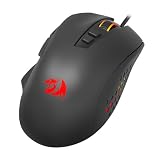
- Precision and Style: 7 programmable buttons are all editable with customizable tactical keybinds in whatever game or work you are engaging
- Personalized Controls: 12400 DPI for pixel perfect accuracy 4000FPS, 30G ACC, 2 side macro buttons offer you a better gaming and working experience.
- Precision and Customization: The ergonomic contour makes gaming mice fit in any hands.It provides long-lasting comfort for players, without fatigue even during long hours of intense gameplay
- 1.8M SUPER MESH CABLE, All-new soft microfiber mesh cable enables a lighter feel with less cable drag.
The bundled disc belongs to the Windows XP/Vista era. Current Windows 10 or 11 support for Equalware and all of its features is not established here, so do not assume the old utility will install or behave correctly. Basic pointer operation may still work through standard USB HID support even if the configuration software does not. Avoid random unsigned driver packages from unofficial archives; if the utility is unavailable from a verifiable source, use the mouse as a standard pointer rather than risking an untrusted installer.
How it compared with other mice in its era
| Mouse | Useful historical contrast |
|---|---|
| Logitech G5 | The G5 had a more established software ecosystem and a heavier design with weight-cartridge appeal. DragonSteelMods found the Equalizer lighter and personally wanted more weight. The OCZ’s distinctive extras were its rapid-click button and lower launch-price position. |
| Logitech G7 | The G7 was wireless; PC Perspective contrasted its 2,000-DPI maximum with the Equalizer’s 2,500-DPI specification. The OCZ traded wireless convenience for a cable, not for a proven modern latency advantage. |
| A4Tech X-750 family | The closest product-family connection, according to Techgage’s description of the Equalizer as an X-750F adaptation or rebrand. It is a lead for historical identification, not evidence of universal driver compatibility. |
PC Perspective reported desktop and mobile Equalizers at about $40 or less in March 2007. That is a historical price, not a present-day valuation. DragonSteelMods’ 4.5/5 score likewise belongs to a 2007 review, not a current recommendation. The Equalizer competed on features and price rather than refined software or modern profile support.
Should you buy or use one today?
Consider it if you collect OCZ hardware, want a period-correct XP/Vista setup, or specifically enjoy the unusual button and light wired design. It is a much weaker fit if you need dependable modern software, competitive consistency, current firmware support or warranty coverage. No trustworthy current price is established here; judge the particular used unit, not a presumed market value.
Inspect a used unit before buying
- Confirm the model number and whether it is the desktop or smaller mobile version.
- Check the USB plug and cable for fraying, kinks, strain near the housing, or intermittent connection.
- Test primary clicks, side buttons, the wheel’s scrolling and click, the DPI switch, and the Triple Threat button.
- Check wheel illumination if that feature matters to you.
- Move the cursor at multiple DPI settings and test tracking on the surface where you intend to use it.
- Inspect the feet for wear and confirm whether spare feet are included.
- Ask whether the original disc is included, but do not treat a disc alone as proof of compatibility with a current system.
- Look for structural damage as well as cosmetic wear to the blue finish.
If an owned mouse behaves badly
- If the pointer feels too fast or imprecise, cycle to a lower DPI and review the operating system’s pointer speed and “Enhance pointer precision” setting.
- If movement feels rough, inspect the feet and try a clean, suitable surface. DragonSteelMods reported that enabling Windows “Enhance cursor precision” corrected perceived jumping during its test; that is one reviewer’s experience, not a universal fix.
- If Equalware causes conflicts or will not run, remove it and rely on standard operating-system mouse settings for basic use.
- If special buttons fail while ordinary movement works, use the mouse as a basic USB HID device rather than depending on obsolete software.
Verdict
The OCZ Equalizer was a clever, feature-heavy budget gaming mouse for 2007. The color-coded DPI switch, dual-laser claims and Triple Threat button gave it a distinct identity, but the one-way sensitivity cycling and rudimentary software limited the experience even then. Today it is best treated as a working retro peripheral—not a modern competitive-mouse recommendation—with the exact unit’s cable, sensor, buttons and software needs deciding whether it is worth having.
Quick wins for a faster PC:
Repair Windows errors before they cause bigger problemsFix Now →Fix the driver behind crashes, sound loss and screen glitchesFind Drivers →Clear out junk files and repair common Windows errorsFree Scan →Quick Recap
Product prices and availability are accurate as of the date/time indicated and are subject to change. Any price and availability information displayed on Amazon at the time of purchase will apply.



