The Turtle Beach Stealth Pivot is a $139.99 wireless smart controller whose unusual feature is a pair of rotating input modules: turn them to switch between a conventional gamepad layout and a layout designed for fighting and retro games. It supports wireless play on Windows PC, wired play on Xbox Series X|S, and Bluetooth connections to compatible mobile devices and supported smart TVs.
How the rotating layouts work
The Stealth Pivot has two button modules that rotate after you unlock the release switches on the back of the controller. The modules then lock into the selected position. In its standard position, the controller presents a familiar dual-stick and button arrangement intended for FPS, action, and racing games. Rotated, the modules provide a D-pad and additional face buttons for fighting and retro-style games.

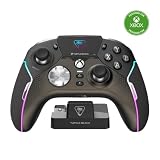
The change is physical, not just a remapping preset: the controller changes how its controls are arranged in your hands. That makes the Pivot most distinctive for players who regularly move between games that benefit from different layouts. Whether the mechanism is more useful to you than a fixed layout or interchangeable modules depends on your game library and comfort with the resulting arrangements.
Which devices does the Stealth Pivot support?
| Platform | Connection listed by Turtle Beach |
|---|---|
| Windows PC | 2.4GHz wireless transmitter or USB-C wired connection |
| Xbox Series X|S | USB-C wired connection |
| Compatible mobile devices | Bluetooth |
| Supported Bluetooth Smart TVs | Bluetooth; compatibility is limited to supported models |
Despite the word “wireless” in its name, the connection options differ by platform: Turtle Beach lists 2.4GHz wireless for Windows PC, but USB-C wired use for Xbox Series X|S. Check the product’s compatibility details for your particular mobile device or smart TV before buying.
Do these 3 things before closing this tab:
1Scan for outdated or missing drivers - takes under a minute2Repair Windows errors before they cause bigger problems3Fix the driver behind crashes, sound loss and screen glitches#1 Best Overall

- 2.4GHz Low Latency Wireless Connection to Windows PC
- Rotating Button Modules for Multi-Genre Dominance
- Connected Command Display for On-Board Social Notifications
- 20-Hour Battery Life + Play and Charge Capability
- AntiDrift Thumbsticks for Long-Lasting, Smooth Control
Features beyond the rotating modules
- Controls: AntiDrift thumbsticks, adjustable trigger stops, and four mappable quick-action buttons.
- Profiles: Up to five onboard profiles can be stored.
- Display: A connected command display provides access to controller functions.
- Battery: Turtle Beach advertises up to 20 hours of battery life and play-and-charge support. The product specification is not an independent battery test, and actual runtime can vary.
Price and where to buy
Turtle Beach lists the Stealth Pivot at $139.99 in the US. In a review published January 11, 2026, Windows Central reported the same price at Amazon, Best Buy, and Turtle Beach. Price and stock can change, so check the retailer listing before ordering.
Independent reader supportYour contribution helps us test, update, and keep practical guides available for everyone.Is the Stealth Pivot a good fit?
The central buying question is whether you will use both layouts enough to justify a premium controller price. Players who switch between FPS, action, or racing games and fighting or retro games may value being able to rotate the modules instead of keeping one arrangement for everything. If you mainly play one genre, the defining feature may matter less than the controller’s fit, wired or wireless connection on your platform, and remapping options.
Windows Central’s review described the controller as compelling for FPS and fighting games on Xbox, but less straightforward on PC. That is the reviewer’s assessment, not a universal result; consider it alongside the platform-specific connection options and your own game preferences.
Quick Recap
Rank #4

- Supported Multi-Platform: Switch/Switch 2 (NO support wake-up function)/iOS/Android/Windows PC (Notice:Not compatible with Xbox, PlayStation or GeForce Now, For game platforms not mentioned, please consult customer service before buying)
- Connection Modes: Wired/Bluetooth/Wireless Dongle(Connect to PC via Bluetooth : Select iOS mode, but it's not recommended; Dongle is more stable)
- 【Innovative Intelligent Interactive Screen】Manba One V2 wireless game controllers create a new era of controller screens; Equipped with a 2-inch display, no App & software needed, you can set the pc controller directly through the screen visualization, More convenient operation
- 【Micro Switch Button】Manba One wireless controller has Micro Switch Button and ALPS Bumper; The 6-axis gyroscope function makes switch games more immersive
- 【Customize Your Own Controller】The intelligent interactive screen allows you to easily set vibrations, buttons, joysticks,lights, etc., without the need for complex key combinations; 4 configurations can be saved to unlock your own gameplay for different games; The 4 back keys support macro definition settings, and you can activate the set character's ultimate move with one click
Product prices and availability are accurate as of the date/time indicated and are subject to change. Any price and availability information displayed on Amazon at the time of purchase will apply.
Free tools Windows power users keep installed
One-click scans. No signup required.



