You can make and publish your first YouTube Short with just a phone: record in the YouTube app, or upload a square or vertical video you already made. Review it, add a title, choose its audience and privacy settings, then publish it or save it as a draft. You don’t need special equipment to begin.
Choose how to make your first Short
| Route | Best for | What to check |
|---|---|---|
| Record in the YouTube app | Capturing and editing a short video in one place with the app’s available creative tools. | Review the clips and settings before publishing. |
| Upload an existing video | Using footage made or edited on your phone or computer. | Use a square or vertical video that meets the current length limit, and confirm you have rights to its audio and other material. |
You can complete either route on a phone. For a computer upload, use YouTube Studio.
Record and publish in the YouTube app
- Sign in to the YouTube app and tap Create → Short.
- Record a clip by holding the Capture button, or tap it to start recording and tap again to stop. The creation flow supports multiple segments and includes a duration control.
- Review your clips. Remove a previous segment if needed, or restore it. Add optional sounds, text-to-speech, text, filters, or effects using the tools available in the editor.
- Tap Next. Add a title, set privacy, and choose the correct audience designation, including whether the video is made for kids. The Android upload guide sets a 100-character maximum for the title.
- Tap Upload Short to publish, or Save draft to finish later.
Button labels and screen layouts can change; follow the current app interface if it differs from these steps. YouTube’s creator guidance describes recording, editing, and uploading on a phone as a complete way to get started. YouTube Shorts upload tips.
Upload a video you already made
From the YouTube app on Android
Start the Shorts upload flow and select a saved square or vertical video. You can trim the selected video, add optional creative elements, then set its title, privacy, and audience before uploading. See YouTube’s Android Shorts upload instructions for the current flow.
The Tool Desk
Outbyte PC Repair FREERepair Windows errors before they cause bigger problemsFix Now →Outbyte Driver Updater FREEFix the driver behind crashes, sound loss and screen glitchesFind Drivers →#1 Best Overall

- 【Zoom in & out】This remote shutter with zoom feature (Must open zoom in accessibility setting for iPhone/iPad) can help you easily zoom in and out from a distance when taking photos and videos, bringing great convenience and making your shooting more professional
- 【Front & Rear Camera Switch】There is a bluetooth button on the side of the wireless remote control that can switch the camera. Click once to switch the system camera, and double-click to switch the camera within the application. This unique feature can help you easily and quickly switch between front and rear cameras, making it perfect for content creation
- 【Video Scrolling & Page Turner】Compared to other single function remote controls, our upgraded wirless remote control not only has a shutter function, but also multiple functions such as zooming, switching between front and rear cameras, flipping pages, scrolling short videos and adjusting volume. This Versatile remote control can meet all your needs for taking photos & videos, Tiktok and reading e-books at the same time
- 【Reachageable & Portable】This camera remote control only takes 1 hour to charge and can last for 30 days of standby after being fully charged. The weight of 28 grams and compact size make it easy to store and carry, making it convenient to use both indoors and when traveling
- 【Widely Compatible】The Multi-functional wirless shutter is compatible with all iPhone, iPad, iPod and most smartphones and tablets with Android systems, compatible with most camera applications
From YouTube Studio on a computer
- Sign in to YouTube Studio.
- Select Create → Upload videos and choose your file.
- Complete the video details, including title, audience, and privacy settings.
- Review the details and publish when ready.
For a standard channel, the current eligibility guidance classifies square or vertical videos up to three minutes long as Shorts when uploaded after October 15, 2024. YouTube’s computer upload instructions also specify a square or vertical aspect ratio and a three-minute maximum. Check the current Shorts eligibility guidance if you are working with an older upload or an Official Artist Channel, which has separate historical timing details. For desktop steps, see Upload YouTube Shorts on a computer.
Check music, copyright, and audience settings
Use audio you are allowed to publish
For a standard-channel Short, YouTube says songs in the Shorts Audio Library may be available for use, but permitted duration varies: most tracks can be used for up to 90 seconds in a three-minute Short, while some are limited to 60 or 30 seconds. Royalty-free music from the YouTube Audio Library is another option. If you made the video elsewhere, use only music and other material cleared for YouTube; copyrighted material can result in a Content ID claim or, where a valid takedown is made, a copyright strike. Read the Shorts music and eligibility guidance and the upload instructions before publishing.
Rank #2

- 🎥 【4K Digital Camera for Vlogging-Made for Beginners & First-Time Content Creators】Shoot stunning 4K video and capture 75MP photos for clear, shareable content. Create eye-catching videos without complicated settings. This easy-to-use camera is perfect for YouTube, TikTok, travel vlogs, and daily recording. Fast autofocus and a wide-angle lens ensure sharp and stable footage
- 🌍【 Portable Pocket Camera for Travel & Daily Use】Compact and lightweight, this portable camera easily fits in your pocket—perfect for travel, vacations, outdoor trips, hiking, and everyday life recording. Capture high-quality moments anytime, anywhere
- 🎬【Perfect for Solo Vlogging】Film yourself with confidence using the unique 330° rotating lens. Create travel vlogs, daily videos and outdoor content with natural-looking framing and less camera adjustment. Also supports time-lapse, slow motion and interval shooting for more creative storytelling.
- 📱【WiFi Digital Camera for Content Creators】Built-in WiFi lets you wirelessly transfer photos and videos to your smartphone for quick editing and sharing. Perfect for YouTube, TikTok and social media content.
- 📦 【 Vlogging Camera Kit with Accessories & Warranty】Comes with essential accessories so you can start filming immediately—no extra setup needed. Includes a camera, 16GB TF card, mini tripod, charging cable, wrist strap, and travel carrying bag. A perfect beginner camera kit, backed by 24/7 support and a 1-year warranty
YouTube’s eligibility page describes a policy transition for active Content ID claims on Shorts over one minute scheduled to begin September 24, 2026. Because the date is still ahead as of October 3, 2026, check the live page for the current rule before publishing a longer Short with claimed material rather than assuming an older rule still applies.
Set privacy and audience deliberately
Choose public, private, or unlisted according to who should be able to watch. YouTube’s default privacy setting differs by creator age: for creators aged 13–17, the default is private; for creators aged 18 or older, the default is public. Confirm the setting each time, especially if you intend the video to be publicly available. Choose the made-for-kids designation accurately as well. Details are in YouTube’s Shorts creation guidance and Android upload guidance.
Free tools Windows power users keep installed
One-click scans. No signup required.
After publishing: check the Short and learn from it
YouTube suggests trying a test Short and using privacy settings to control who can see it. Your Short may be encountered through the Shorts feed, search, the YouTube homepage, channel pages, subscriptions, or notifications; no posting schedule or single tactic guarantees discovery. Choose a publishing rhythm you can sustain rather than chasing a universal number of posts per week.
Since March 31, 2025, YouTube counts a Shorts view when the Short starts to play or replay, with no minimum watch-time requirement. “Engaged views” remains available for the previous measure of viewers who continued watching. Keep that distinction in mind when interpreting view totals. See YouTube’s Shorts creation and view-count guidance.
Rank #4

- 【Real-time Screen Sharing & Back Camera Selfie】This mobile vlog selfie monitor uses direct Peer-to-Peer wirelessly mirrors your phone screen and allows you to use the mobile phone rear camera to easily capture sharp selfies, vlogs, and live videos—perfect for independent creators, TikTok, Instagram, YouTube Live, solo travel, or family photos. The screen mirroring up to 4K@60FPS via compatible devices ensures clear and detailed images, making framing, focusing, and adjustments easy, and you can preview your shots in real-time. Say goodbye to blurry images and awkward angles, and elevate your content quality!
- 【Long Battery life & Type-C Charging】Our back camera selfie monitor has a built-in 1800mAh battery supports up to 3 hours of continuous use. Equipped with a Type-C charging port (5V/1A, cable included) and battery indicator ensure uninterrupted live streaming or vlogging.
- 【Wireless Remote Control & Magnetic Compatibility】Our magnetic Phone vlog selfie screen is equipped with "AB Shutter3" wireless remote control works up to 33ft away, allows you to get rid of the limitation of shooting distance.Even from a distance, a simple press starts/stops recording snap photos, or adjust settings hands-free. The selfie display screen can be attached to iPhone 12-17 or other metal surfaces—tripods, fridge doors, gym bars, and more. For other phones, use the adhesive metal plate.(Don't forget to peel off the adhesive backing on the magnetic ring before applying it securely to your device. ) For MagSafe iPhones: Remove your phone case for stronger grip.
- 【400-Lumen HD screen & Flexible Adjustment】The 3.97-inch HD screen with 400 lumens supports one-click full-screen, rotate, mirror, zoom and other shooting functions. Even under strong daylight or outdoor shooting conditions, it ensures your video preview remains clearly visible. It delivers a professional visual experience for content creators who need flexible shooting for live streaming and vlogging.
- 【Lightweight, Portability & Compatibility】This phone monitor screen features a compact and portable design, measuring only 4.22*2.55*0.43 inches and weighing just 0.31 pounds, making it easy to carry around and put into a backpack or pocket when you go out. It is compatible with most iPhone and Android devices. Please Note: This device is not compatible with Google Pixel series phones. If you encounter connection problems, please contact our technical support.
Or let it run in the cloud
For a different task—keeping an uploaded video looping as a 24/7 YouTube live stream—StreamNeo runs the stream from the cloud. Upload your recording or build a playlist, add your YouTube stream key once, and go live. Nothing has to stay on at home; it streams the uploaded quality up to 4K 60fps at one flat price per slot, and automatically recovers if YouTube drops the stream. The first day is free with no card. Monthly: $9.99 per month. This is for uploaded video playback, not a live camera feed. Learn more at StreamNeo, or start your free day.
Quick Recap
Best Value
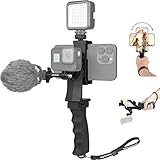
- Ergonomic finger-shaped handle stabilizer, made of high-quality ABS material, skin-like feel coating for comfortable holding, reducing hand vibration, smoothly & stablely shooting to improve the footage obvisouly & efficiently, relieving muscle fatigue convenient to long-time holding work.
- The perfect 2in1 SYN combo for turning your smartphone into a monitor and remote control via the APP convenient to control your GoPro and other action cameras, flexiblely use the professional director's perspective and low-position shooting angle to record your wonderful moment better.
- The dual hot shoe design can be extended to install a microphone and a video light to improve the shooting quality, easy- mounting thumb knob locking system making plug & play easy. Moreover, it can be separately used as a stable handle for cameras, camcorders and other digital devices.
- Universal powerful phone clip for easy installing and fixing mobile phones of wide range of 60-100mm, attached with safety wrist strap tether for easy and safe holding to avoid dropping risk, best choice for youtuber tiktoker interviewer outdoor travel photographing & vlogging.
- Compatible with all GoPro Hero 11 and other series, DJI OSMO ACTION and Sony Action camera family. 100% quality and customer satisfied guarantee.
Product prices and availability are accurate as of the date/time indicated and are subject to change. Any price and availability information displayed on Amazon at the time of purchase will apply.
Do these 3 things before closing this tab:
1Scan for outdated or missing drivers - takes under a minute2Clear out junk files and repair common Windows errors3Fix the driver behind crashes, sound loss and screen glitches



