Free tools Windows power users keep installed
One-click scans. No signup required.
Neither option always saves more. A Steam sale is often the better fit when you want one specific game; a bundle can cost less for several games or add-ons you genuinely want. Compare the checkout cost of the items you still need, in your own Steam region and currency—not a bundle’s advertised value or discount from list price.
How to compare a Steam sale with a bundle
Use the same storefront and currency for both options, and count only games or add-ons you would actually buy or play. The relevant number is what you would pay at checkout for those desired items, after discounts and any adjustment for ownership.
- Check the individual game. Note its current Steam price in your region, then look up that game’s own price history. Compare the current offer with its historical prices rather than relying on the size of the displayed discount from list price.
- Find the exact bundle. Confirm that it includes the game you want and inspect its contents. Calculate the price for the desired items you do not already own; ignore the nominal value of unwanted games.
- Compare the totals. Put the individual purchase and the relevant bundle contents side by side in the same currency. If the bundle’s remaining contents do not justify the extra cost to you, the lower headline price or larger advertised discount does not make it a better deal.
- Factor in the wait. A current sale is a known offer. A future sale or bundle is only a possibility: past discount frequency can offer context, but it cannot guarantee a particular game, price, or date.
SteamDB provides price histories for games, bundles, and packages, and says it tracks price changes as Steam updates prices. Its price-history tool warns that a displayed “low” may be the lowest price captured during its recording window, not necessarily an all-time low. Its tracked prices run through October 4, 2026. See SteamDB for histories, and treat past prices as context rather than a forecast.
How Steam bundle ownership affects the price
Steamworks documents two bundle types, and the distinction can change the amount due at checkout:
#1 Best Overall

- System: AMD Ryzen 7 8700F 4.1GHz 8 Cores | AMD B850 Chipset | 16GB DDR5 | 1TB PCIe 4.0 NVMe SSD | Windows 11 Home
- Graphics: NVIDIA GeForce RTX 5060 Ti 8GB Graphics | 1x HDMI | 2x DisplayPort
- Connectivity: 2 x USB-C 3.2 | 4 x USB-A 3.2 | 2 x USB-A 2.0 | 1 x LAN | WiFi 6 | Bluetooth 5.3 | 7.1 Channel Audio
- Tempered Side Case Panel | Custom RGB Lighting | Keyboard and Mouse
- 1 Year Parts & Labor Warranty, Free Lifetime Tech Support
- Complete The Set: you pay for and receive only the bundle products that are not already in your Steam library. The bundle discount applies to those unowned items. Valve describes it this way: “Customers that purchase this type of Bundle will pay for, and receive, just the items in that bundle that they don’t already have in their Steam library.”
- Must Purchase Together: you can buy the bundle only if you do not already own any of its included products. This format can be used for combinations such as a base game with a soundtrack or a deluxe edition.
Steamworks also says bundle prices adjust with discounts on their contents. These rules can prevent an ownership mismatch from making a set a poor deal, but they do not mean every bundle costs less than buying a game on sale. Check the listing and the actual checkout amount. Steamworks: Bundles
When buying on sale makes more sense
- You want one particular game and have no use for the bundle’s other items.
- The current individual price is acceptable compared with that game’s own price history.
- The bundle does not include the target game, or the cost of its other wanted, unowned items does not make the combined purchase worthwhile.
- You prefer a known price now to waiting for an offer that may not appear on your preferred timeline.
When waiting for a bundle can make sense
- You want several items that are actually included, not merely titles that inflate the bundle’s advertised value.
- The bundle’s ownership rules reduce the price for items you do not already own.
- The checkout total for the desired, unowned contents is lower than buying those items individually at the prices available to you.
- You are comfortable waiting without assuming that a particular bundle or discount is guaranteed.
What price history can—and cannot—tell you
A game’s or bundle’s past prices help you judge whether today’s offer looks attractive relative to recorded offers. They do not establish what an upcoming Steam sale will include or how much a publisher will discount a specific item. SteamDB explicitly says it cannot know which games, prices, or discounts will appear in a future sale; publishers set discounts. Use the history for the exact game or bundle you are considering, not as a universal sale-versus-bundle rule. SteamDB sale history
Rank #2

- Accelerated gaming pc performance: AMD Ryzen 5 5500 Up to 4.2 GHz paired with GeForce RTX 3050 6GB GDDR6 and 16GB DDR4 for smooth gameplay, plus 512GB NVMe PCIe storage for quick loads. Bundle includes two 24 inch curved 1080p monitors.
- Play fast online multiplayer games: GeForce RTX 3050 6GB GDDR6 graphics helps keep frame rates smooth in many popular titles. This gaming pc is capable of running a wide range of popular games, including Fortnite, Call of Duty Warzone, Escape from Tarkov, GTA V, World of Warcraft, LOL, Valorant, Apex Legends, Roblox, Overwatch, CSGO, Battlefield V, Elden Ring, Rocket League, The Division 2 and many more.
- Multitask desktop computer: run docs, spreadsheets, browsing, and edits while streaming and chatting; 16GB DDR4 memory and 512GB NVMe help apps load quickly and keep files organized.
- Prebuilt gaming pc for convenience: arrives with Windows 11 installed for plug and play setup; connect fast on WiFi 6 plus Bluetooth for controllers, headsets, and speakers, control RGB lighting, Black case styling, Air Cooler.
- Support and warranty you can trust: No need to buy additional warranties this prebuilt gaming pc is backed by a 1 year limited warranty and responsive customer support for setup, driver updates, and troubleshooting. We test each gaming pc against a 100-point checklist using an Advanced System Inspection (ASI) software to ensure it's reliable for gaming, school, and work. If a component fails, we'll cover the parts and labor to fix it.
The practical verdict
For one game, compare its current individual price with its own recorded price history. For multiple desired games or add-ons, compare the bundle’s adjusted checkout price for the items you still need. The cheaper choice depends on the specific listing, contents, ownership, region, and your willingness to wait; there is no established universal savings percentage that makes sales or bundles the consistent winner.
Quick Recap
Best Value

- System: AMD Ryzen 9 9900X 4.4GHz 12 Cores | AMD B850 Chipset | 32GB DDR5 | 1TB PCIe 4.0 NVMe SSD | Windows 11 Home
- Graphics: NVIDIA GeForce RTX 5070 12GB Graphics | 1x HDMI | 3x DisplayPort
- Connectivity: 2 x USB-C 3.2 | 4 x USB-A 3.2 | 2 x USB-A 2.0 | 1 x LAN | WiFi 6 | Bluetooth 5.3 | 7.1 Channel Audio
- Liquid Cool CPU | Tempered Side Case Panel | Custom RGB Lighting | Keyboard and Mouse
- 1 Year Parts & Labor Warranty, Free Lifetime Tech Support
Rank #4
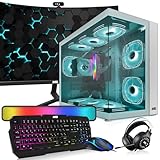
- 🖥️ Processor: Inter Core i5-8th Gen CPUs featured quad-core architecture for efficiency with Turbo Boost technology for dynamic clock speed increases can handle multitasking reasonably well. They can handle gaming along with other background tasks like web browsing, streaming, and chatting without major performance drops.
- ⚙️ Storage The 16 GB RAM configuration offers ample memory capacity for smooth multitasking, faster application load times, and improved overall system performance. The 1TB NVMe offers lightning-fast storage performance, allowing for quick data access, faster application load times, and improved overall system responsiveness.
- 🎮 Graphic Card: The GeForce RTX 2060S comes with a 256-bit 8Gb memory which has dual cooling fans designed to be compatible with any motherboard which supports PCI Express 3.0 x 16 slot. Axial-tech fan design features a smaller fan hub that facilitates longer blades and a barrier ring that increases downward air pressure. Ports 1 x Native DVI-D Output,2 x Native HDMI 2.0b,2 x Native DisplayPort 1.4.
- 🔌Connectivity and Ports: Comes with Intel AC7260 WIFI AC 2.4 GHz, 5 Ghz and Bluetooth 4.0 PCi card. Front Ports】 1 x Power button, 1 x restart button, 2 x Audio in/out, 2 x USB 2.0, 1 x USB 3.0. 【Back】 2 x PS/2, 1 x HDMI, 1 x VGA, 1 x serial, 4 x USB 2.0, 1 x Ethernet, 3 x Audio/Mic.
- 📺 ⌨️ Monitor and Accessories: 24 Inch Curve Full HD (1920x1080) Monitor: This monitor has 75hz High-Quality IPS panel, 3ms refresh rate response time with 1080p display resolution. You can enjoy gaming or a modern computing experience. Also, Also Crisp edge-to-edge visuals. Wide Viewing Angles for clarity from any viewpoint. 【RGB Keyboard Mouse】【Bluetooth RGB Soundbar】【RGB Headphones】【Webcam】
Rank #3
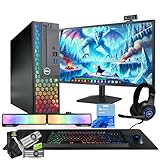
- 💻 Powerful Performance: Intel Core i5 processor with 16GB DDR4 RAM for smooth multitasking and gaming.
- ⚡ Fast Storage: 500GB SSD for rapid load times and quick system responsiveness.
- 🎮 Light Gaming Ready: NVIDIA GT 1030 2GB GPU handles light weight games and multimedia with ease.
- 🖥️ 24” Full HD Display (renewed): Crisp visuals and vivid colors for immersive gaming and work sessions.
- 🌈 RGB Accessories Included: Gaming keyboard, mouse, soundbar, headphones, webcam and deskpad for a complete, colorful setup.
Product prices and availability are accurate as of the date/time indicated and are subject to change. Any price and availability information displayed on Amazon at the time of purchase will apply.
What’s actually slowing this PC down?
Pick the symptom - the matching free tool is one click away.



