PS5 emulation on PC has made a meaningful leap: experimental projects can now run selected games, and some reported results reach playable frame rates. But a game that boots is not necessarily playable, and recent demonstrations do not mean that the PS5 library is broadly supported. The progress is real; reliable, game-ready emulation remains limited to a small number of titles.
What the latest breakthrough establishes
SharpEmu’s reported results show that some PS5 games can reach a game-ready state on PC—not that the emulator, or PS5 emulation generally, is ready for a broad library. In reporting on SharpEmu v0.0.4-release.2, released September 25, 2026, Tom’s Hardware said 12 of 55 tested titles reached a game-ready state, and six were playable at 60 FPS: Dreaming Sarah, Void Terrarium, New Joe & Mac: Caveman Ninja, Tetris Forever, Hoa, and Tomb Raider IV–VI Remastered. Those counts describe that version and reported testing; they are not a compatibility rate for every emulator or the whole PS5 catalog.
“Running,” “game-ready,” and “playable” are different milestones. An emulator may load a game or show graphics while failing to handle gameplay reliably. Even “controllable gameplay” on a compatibility list does not necessarily mean a title works from start to finish without game-breaking problems.
How the current projects differ
| Project | Approach and status | What the evidence supports |
|---|---|---|
| SharpEmu | An experimental PS5 emulator. Its maintainers describe it as intended for research and educational purposes. Documentation describes Windows x64, Linux x64, and macOS x64 support, with Vulkan graphics on Windows and Linux and MoltenVK on macOS. | Project documentation says it can load the eboot.bin executable from real games, execute native CPU instructions, and partially handle GPU functions. It warns that compatibility and performance vary with the game, operating system, and graphics driver. SharpEmu project documentation |
| KytyPS5 | A separate experimental emulator, also associated with game demonstrations and a compatibility list. | Its list and footage show progress on particular titles, but entries described as controllable gameplay should not be read as a guarantee of stable play. Ars Technica’s October 1, 2026 overview |
| AnyPS5 | A different technical approach: relinking PS5 game code into native PC executable instructions rather than emulating the full console environment. | It remains early-stage. Tom’s Hardware reported that a working public build had not yet been released at the time of its coverage, so it is not established here as a consumer option. Tom’s Hardware’s AnyPS5 report |
The projects’ results are not directly interchangeable. They use different methods, builds, and test conditions; a frame rate from one game on one project cannot be treated as a benchmark for another game or emulator.
Outdated Drivers Are Slowing You Down
One free scan finds every outdated or missing driver and matches the right update for your exact hardware.Free scan · exact hardware matchPC Slower Than It Used to Be?
A free scan shows the junk files, broken settings and background clutter dragging Windows down - then fixes them in one click.Free scan · Windows 10 & 11#1 Best Overall

- Enjoy precise, comfortable control over 10,000+ supported Steam games.
- Easily pair the controller directly to your Windows PC via Bluetooth or play as you charge with the included USB Type-C cable
- Stay paired with up to four different Bluetooth devices, making it easy to enjoy the controller across Windows PC, Mac, PS5 consoles and smartphones. Discover more connection tips and tricks at playstation.com/pair-dualsense
- Access the latest available controller firmware directly from your PC with the free-todownload PlayStation Accessories app
- Play games streamed from your PS5 or PS4 console to your PC via the PS Remote Play App
What KytyPS5’s demonstrations do—and do not—show
Ars Technica reported that KytyPS5’s compatibility list had 134 titles marked as offering “controllable gameplay.” The same overview cautioned that many entries still had persistent, game-breaking bugs and concluded that a solid majority of the PS5 library remained a long way from running well on PC. “Controllable gameplay” is therefore a useful sign of progress, not a promise of dependable play.
A separate demonstration makes the distinction especially clear. In a September 28, 2026 report, Tom’s Hardware described short footage of the PS5 Demon’s Souls remake running at 40–50 FPS in KytyPS5. The shown system used an RTX 5090 and Intel Core i9-14900K. The clip covers only a few sections, so it is evidence of a striking game-specific demonstration—not a standardized benchmark, minimum hardware guide, or proof of stability across the full game.
Rank #2

- 👉️【Usage Notes】When using the gamepad for the first time, it needs to be connected to the PS5 console via a USB-C cable(It must be the data cable included in the package or the original data cable), and then press the Home button to activate it. If your controller has any functional issues, please use this url to update the firmware: we.tl/t-yAwofXJL9YOyyq3K !!! The gamepad is only compatible with PS5 series consoles and Windows PCs, and it is not compatible with PS4.
- 👋【Quick Connection & One - click Wake - up】 You can connect to the PS5 console by pressing the HOME button on the controller. When connecting to the console for the first time, you need to use a data cable. It also supports use on computers with Windows operating systems.
- 🎮️【Controller with Sound】 The controller is capable of producing sound, providing an immersive gaming experience. Please note that the controller is only equipped with a speaker and has no microphone. If you want to use the microphone fuacnction, please use an external headset. It is equipped with a 3.5mm TRRS headphone jack(not compatible with Apple headphones.)
- 🌈【Customizable Colors】Press the Lighting button to switch colors and light effect modes with one click. It features a color memory function, ensuring that the next time you use it, it will still be the color you prefer.
- 🕹️【High - Precision Joysticks】Equipped with upgraded joysticks, these effectively reduce the joystick dead zone and extend the controller's service life.
What to check before trying a PS5 emulator
- Look for evidence about the exact game. A boot screen, a compatibility-list label, and a sustained playable result describe different levels of support.
- Match the emulator’s documented host and graphics requirements. SharpEmu’s maintainers warn that operating system and GPU driver can affect results, as well as the title itself.
- Do not buy hardware based on a single clip. The reported Demon’s Souls footage does not establish recommended or minimum specifications for that game or other titles. No standardized comparison in the cited coverage establishes hardware requirements for sustained performance across these projects.
- Check input support for your setup. SharpEmu documentation discusses controller or gamepad input, but the available evidence does not establish that a particular controller works universally across emulators, games, and host configurations.
- Use legally obtained game copies and follow applicable law. SharpEmu says its developers use legally obtained games and that users are expected to do the same. Its project page also says the software does not include copyrighted system firmware, game data, or proprietary PlayStation assets. Those are project statements, not legal advice. SharpEmu project documentation
How close is PS5 emulation to broad PC support?
Closer than before, but not close enough to treat a PS5 emulator as a dependable way to play the console’s library on PC. SharpEmu’s small set of reported 60 FPS results, KytyPS5’s game-specific demonstrations, and AnyPS5’s distinct relinking approach all indicate technical progress. They do not establish stable compatibility across most games, comparable performance between projects, or hardware that will reliably run a particular title.
For now, judge each claim by its milestone and evidence: whether a title merely loads, reaches controllable gameplay, or has been shown running well in a limited test. Compatibility, performance, and project access can change as builds and drivers evolve.
The Tool Desk
Outbyte PC Repair FREEClear out junk files and repair common Windows errorsFree Scan →Outbyte Driver Updater FREEFix the driver behind crashes, sound loss and screen glitchesFind Drivers →Quick Recap
Rank #4
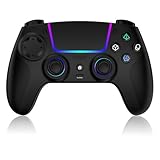
- Seamless Compatibility:This game controller is compatible with PS5, Pro, Slim, PC, and Steam Deck. Enjoy seamlesg integration with your console and all your PS5 games without any complicated setup
- Adjustable RGB Lighting: Personalize your setup with vibrant, 7-color adjustable RGB lighting. Choose from 4 distinct lighting modes (Steady, Breathing, Color Cycle, and Reactive) to match your mood, game, or gaming environment
- 3-Speed Turbo: Gain a competitive edge with the 3-speed adjustable TURBO function. Simply map any action button to turbo for rapid, continuous firing—perfect for shooting games or actions requiring high-speed input
- Programmable Back Buttons: Take command with fully programmable rear buttons M1 & M2. Map complex in-game commands or macros to these buttons, saving your configurations for instant access to advanced maneuvers and shortcuts
- Ergonomic Design: Its form-fitting shape, balanced weight, and soft-touch materials offer superior comfort. This non-slip design ensures stable control and prevents slippage, even with sweaty hands
Rank #3

- Bring gaming worlds to life - Feel your in-game actions and environment simulated through haptic feedback*. Experience varying force and tension at your fingertips with adaptive triggers*
- Find your voice, share your passion - Chat online through the built-in microphone. Connect a headset directly via the 3.5mm jack. Record and broadcast your epic gaming moments with the create button
- A gaming icon in your hands - Enjoy a comfortable, evolved design with an iconic layout and enhanced sticks. Hear higher-fidelity** sound effects through the built-in speaker in supported games
- Multi-device connectivity - Connect using a USB Type-C cable or Bluetooth technology and easily play on more devices including Windows PC and Mac computers.
- Elevate PC gaming with advanced features like haptic feedback and adaptive triggers in a range of blockbuster PC titles.
Product prices and availability are accurate as of the date/time indicated and are subject to change. Any price and availability information displayed on Amazon at the time of purchase will apply.



