PS5 connection errors, startup problems, a blank screen, overheating warnings, and disc-reading failures each call for different checks. Work through the relevant steps below before assuming the console needs repair. PlayStation does not publish comparative failure rates for these issues, so this is a practical troubleshooting guide—not a verified ranking of the most frequent faults.
Why won’t my PS5 connect to the internet?
- Check PlayStation Network status. An outage or maintenance may be the cause, so check service status before changing your home network.
- Restart the console and test its connection. Open Settings > Network > Test Internet Connection, then verify the network settings. PlayStation’s guidance for NW-102655-9 also recommends checking for system software and game updates.
- Restart your network equipment. Restart the router, and the modem if it is separate. PlayStation advises waiting five minutes before restarting network equipment.
- Isolate a wireless signal problem. Try a wired connection, or move the console closer to the router if distance or obstructions may be weakening Wi-Fi.
Connection error codes can have different causes; a failed connection does not by itself mean the console is defective. Follow the steps for the specific code if one is shown.
Why is my PS5 frozen, stuck at startup, or looping in Safe Mode?
If the console is frozen or stuck on its power light
Check the power indicator. PlayStation says a console that remains solid or blinking blue, or blinks white without transitioning normally, may be frozen. Unplug it, wait three minutes, reconnect it, and try to restart. If the issue continues, PlayStation’s power-indicator guidance directs users to reinstall console software through Safe Mode.
If Safe Mode will not appear
Check the HDMI, USB, and power cables. Where possible, change one cable at a time so you can tell whether a connection is responsible. PlayStation also provides Safe Mode troubleshooting steps.
#1 Best Overall
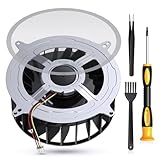
- 【PS5 Cooling Fan Replacement】Designed for optimal cooling performance, this fan features 23 blades and is compatible with both the original 23-blade and 17-blade fans found in the PS5
- 【Efficient Cooling】Upgrade your PS5's thermal performance with this high-quality cooling fan, ensuring optimal heat dissipation for smoother gameplay and extended hardware lifespan
- 【Dust Free】A specialized brush is provided to aid in removing accumulated dust, maintaining pristine airflow and preventing overheating issues
- 【Easy Installation】The kit includes all necessary tools, making fan replacement a straightforward process even for novice users
- 【High Quality】 this fan offers a perfect fit and reliable operation, restoring your PS5 to peak condition
Before reinstalling system software
Reinstallation is a last resort: PlayStation warns that it deletes all data on the console. Protect any data you need and follow the official PS5 system software instructions before proceeding.
Why is my PS5 on but showing no picture?
- Check that the HDMI cable is firmly connected to both the console and the display.
- Confirm that the TV or monitor is set to the HDMI input connected to the PS5.
- Try another HDMI port on the display. If available, test with another cable.
PlayStation recommends the included HDMI cable for the console’s features, while noting that older HDMI cables can also be used. These checks can help isolate a cable or display-input issue, but they do not establish that the cable is at fault. If there is still no image, use PlayStation’s picture and sound troubleshooting or its Hardware & Repairs Support.
Rank #2

- Perfect Fit for PS5 Standard Edition - Exclusively designed for PS5 original/standard console (NOT for Slim/Digital models), precise size matching, no modification required for direct replacement.
- Full Opening Tool Kit Included - Comes with T8 screwdriver, dust cleaning brush, pry bars, spudgers—no extra tools to buy, ideal for beginners to operate.
- 23-Blade High-Efficiency Cooling - 30% more airflow than 17-blade fans, effectively solves PS5 overheating, sudden shutdowns, and performance lag during long hours of gaming.
- Quiet & Durable Build - High-quality bearings reduce noise to ≤32dB (no distraction during use); heat-resistant ABS plastic + metal bracket ensures 5000+ hours of stable operation.
- Stable 12V Voltage Design - Optimized 12V safe voltage, avoids short circuits or overcurrent; 3-pin power connector enhances heat dissipation efficiency while protecting console hardware.
Why does my PS5 keep overheating?
If a high-temperature warning appears, turn off the console and let it cool. Do not continue playing while the warning is displayed. Then check its placement and ventilation:
- Keep the console at least 10 cm from a wall.
- Move it out of cramped or enclosed spaces and away from heat sources.
- Keep the vents uncovered and prevent dust from building up around them.
These precautions appear in PlayStation’s safety guidance for PS5 consoles, including its CFI-71XX guide and CFI-12XXA guide. If warnings return after you improve ventilation, contact PlayStation Repairs.
Recommended Free Tools
Rank #3

- Only Fit: Brand new and silent 23 blades PS5 fan for Sony Playstation 5 PS5 Console CFI-1015A CFI-1115A CFI-1118A CFI-1215A Series
- Compatible With: This 23 blades PS5 Fan compatible with Sony Playstation 5 PS5 Series Fan 12047GA-12M-WB-01 12V 2.4A 23 Blades Fan & General 17 Blades G12L12MS1AH-56J14 FAN
- Good Quality: Each Fan was tested before shipping to make sure you will get a workable fan! P/N: 12047GA-12M-WB-01 12V 2.4A. This 23 blades ps5 fan will have a better low-frequency noise to offer a better experience!
- Package Contain: 1x Replacement Sony Playstation 5 PS5 23 Blades Fan, 1x T8 Screwdriver
- Each replacement CPU coolong fan was tested before shipping.
Why won’t my PS5 read a disc?
- Check the disc’s orientation. The correct direction depends on the console’s position; use the guide for your model and setup.
- Clean and inspect the disc. Wipe visible dirt or fingerprints with a soft, clean cloth.
- Try another supported disc. If another disc works, the first disc may be damaged or faulty. PS5 consoles cannot play burned discs or audio CDs.
If ordinary checks do not work, PlayStation’s disc troubleshooting guide includes Safe Mode cache and database options. If a disc is physically stuck, follow the manual removal instructions for your exact console revision. The procedure requires the console to be fully off and unplugged and a #1 Phillips (cross-head) screwdriver. Do not force the disc. Avoid system software reinstallation as an early disc fix: it deletes console data.
What if my PS5 storage is full?
Low storage can prevent downloads or game installations, but it is not a console fault and an SSD will not fix crashes, network problems, or overheating. First open Settings > Storage and remove or move games you no longer need.
Rank #4

- Quality Assurance: The cooling fan for Sony PS5 is crafted from premium materials, boasting high airflow for efficient overall heat dissipation and low noise levels. It effectively addresses buzzing and low-frequency noise issues, ensuring smooth and stable gaming experiences while extending its lifespan.
- Compatibility: This replacement internal cooling fan is tailored for the Sony Playstation 5 (PS5). Before buying, ensure it's compatible with your console model. Featuring 23 blades, this fan works seamlessly with both the 23-blade and 17-blade configurations of the Sony Playstation 5 (PS5).
- Comaptible P/N:KSB1212HGH2M,KSB1212HGG4E,12047GA-12M-WB-01,G12L12MS1AH-56J14
- Comaptible with models:CFI-1015A/B, CFI-1115A/B, CFI-1016A/B, CFI-1116A/B, CFI-1002A/B, CFI-1102A/B, CFI-1018A/B, CFI-1118A/B
- CFI-1000, CFI-1100 Series Cable 6CM,CFI-1200 Series: Cable 9CM
If you need more room for games and apps, a compatible M.2 SSD is another option. Sony does not guarantee that every third-party drive will work, and the drive needs suitable heat dissipation. Check the requirements for your PS5 model before buying an M.2 SSD with heatsink; confirm the drive’s compatibility, capacity, and return terms using Sony’s M.2 SSD expansion guidance.
Independent reader supportYour contribution helps us test, update, and keep practical guides available for everyone.When should I contact PlayStation Repairs?
Use PlayStation Hardware & Repairs Support if the relevant troubleshooting steps do not resolve a persistent problem, or if the console continues to show an overheating warning despite adequate ventilation. Avoid escalating to a destructive software reinstall until you have protected important data and checked PlayStation’s instructions.
PC Slower Than It Used to Be?
A free scan shows the junk files, broken settings and background clutter dragging Windows down - then fixes them in one click.Free scan · Windows 10 & 11Crashes, No Sound, or Screen Glitches?
Random freezes, missing sound and display glitches usually trace back to one bad driver. Find and replace yours safely.Free scan · under a minuteQuick Recap
Best Value

- Compatibility:Internal Cooling PS5 Fan Replacement for Sony Playstation 5 Series Fan 12047GA-12M-WB-01 12V 2.4A 23 Blades Fan General 17 Blades G12L12MS1AH-56J14 Fan (Only)
- Fit for Playstation 5 Console Replace your faulty, cracked or broken Internal Cooling Fan.improve your play experience.
- Quality Item: Information-12047GA-12M-WB-01, 12V 2.4A.The balanced wind direction of the product can radiate the overall heat, no noise,To make heat dissipation faster to give a smooth and stable gaming and lengthen its service life.
- What You Get: 1* Brand New CPU Cooling Fan +1*Screwdrivers (T8)+1*Heatsink Paste
- Comes with professional tools of T8 Screwdriver. Help you to replace the ps5 internal cooling fan more convenient and easily
Product prices and availability are accurate as of the date/time indicated and are subject to change. Any price and availability information displayed on Amazon at the time of purchase will apply.



