To find a favorable matchup for your Wild Rift main, identify how the opponent wins a fight, then look for a repeatable way to interrupt that plan, exploit a cooldown or range limit, survive their damage, or punish their power curve. The advantage may apply only in lane, after a particular level or item, or in teamfights—not across the whole game. A counter pick can improve your options, but it does not guarantee a win.
Who counters my main in Wild Rift?
There is no reliable universal counter list that applies regardless of patch, player skill, build, role, and team composition. Start with the two champions’ actual tools and the phase in which they meet. Ask what the opponent needs to do to succeed and whether your pick can consistently make that harder.
Use these matchup axes to turn that question into a practical comparison:
- Access and range: Which champion can choose when to start or leave a trade? Can your main keep the opponent at a distance, or does the opponent have a reliable way to get onto you?
- Cooldown and punish window: Which important ability does the opponent need for safety, damage, or an engage? If they spend it, how long can you trade or pressure before it is available again?
- Damage and durability: Consider the opponent’s main damage pattern and whether your champion can withstand it or answer it with burst. The relevant edge can change with defensive items.
- Crowd control and mobility: Can either champion reliably interrupt the other’s key action, catch them, or escape? A tool that works only when a skill shot lands is less dependable than one you can apply consistently.
- Power curve and role: Pin down when the edge exists: early lane, after a level or item spike, in jungle skirmishes, or in teamfights. A lane advantage is not automatically a whole-game advantage.
- Draft and items: Account for both teams and their builds. An opponent who is difficult for your champion alone may be manageable with team follow-up; item choices can also change how a fight plays out.
This is a way to reason through matchups, not a Riot-published formula or a claim that any particular pairing has a proven win-rate advantage.
Quick wins for a faster PC:
Scan for outdated or missing drivers - takes under a minuteDriver Scan →Repair Windows errors before they cause bigger problemsFix Now →#1 Best Overall
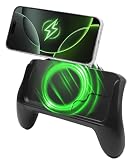
- POWER AND PLAY ALL DAY: Built-in 10,000mAh battery keeps your phone charged through extended gaming sessions for long play on Xbox Game Pass and more
- MAGSAFE COMPATIBLE MAGNETIC DESIGN: Strong magnetic attachment works seamlessly with MagSafe-compatible iPhones and wireless charging Android devices with no clamps and no hassle. Use with your phone case on or off
- ERGONOMIC PRO GAMING GRIP: Transforms your phone into a console-style handheld experience, improving control, grip, and comfort for competitive mobile gaming
- MICRO-VIBRATION COMFORT TECH: Integrated subtle vibration system designed to help reduce hand fatigue and keep your hands relaxed during long sessions
- NO LOW BATTERY INTERRUPTIONS: Stay fully focused during critical moments with no disruptive low battery warnings popping up mid-game. Keeps you locked in during intense sessions on League of Legends: Wild Rift and Roblox
How to assess a matchup before you pick
- Write down the opponent’s win condition. Is their plan to poke you out, all-in, scale safely, or reach a target in teamfights? Be specific about the action they need to take.
- Match that plan against your tools. Identify a repeatable answer: interrupt the key ability, maintain a range advantage, punish a cooldown, survive the main damage pattern, or deny an escape.
- Name the timing and location. Decide whether your answer is available in lane, after a level or item threshold, during a skirmish, or only with team support. Do not label a pick a general counter if the edge applies only in one phase.
- Check what can change the result. Consider jungle pressure, the rest of each team’s draft, and itemization. A favorable isolated lane can still lead into a difficult teamfight.
- Check the current patch. Confirm that the abilities, items, and balance conditions behind the matchup have not changed. Treat old advice as a starting hypothesis, not a permanent fact.
How do I tell a lane counter from a team or item counter?
A lane counter has a specific edge in the direct matchup, such as being able to punish a key ability during its cooldown. A team-composition answer depends on how a pick works alongside allies or against the enemy lineup; it may not win the isolated lane. An item counter is a build choice that responds to the opposing team’s composition or build, rather than evidence that your champion pick counters theirs.
Patch 7.3 introduced Wild Rift’s Battlefield Smart Counter Assistant. Riot describes it as recommending key counter items based on enemy-team composition and build traits, and explaining why. It supports item decisions; Riot does not describe it as a champion-pick tool or matchup win-rate database. See Riot’s Patch 7.3 notes.
Rank #2
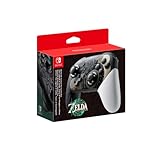
- Embark on an epic adventure across the land and skies of Hyrule with the Nintendo Switch Pro Controller - The Legend of Zelda: Tears of the Kingdom Edition.
- Includes motion controls, HD rumble, built-in amiibo functionality*, charging cable (USB-C to USB-A), and more.
Why patch notes matter for counter advice
Counter advice can go stale when a champion’s abilities or the item system changes. In Patch 7.3, Riot made broad marksman and item changes, including changes intended to distinguish crit-focused and attack-speed-focused marksmen. Patch 7.3a, published September 29, 2026, adjusted Hwei, Samira, Rammus, and Malphite; Riot said Hwei had continued to rise as players mastered his kit and that the overall meta needed time to settle. These changes are reasons to date any present-tense matchup claim and revisit it after balance updates. See the Patch 7.3 notes and Patch 7.3a notes.
Patch 7.2d offers a useful example of the kind of opening to look for, without naming a best counter. Riot said Yone had been scaling too safely in Baron Lane and reduced his base armor to give opponents more opportunities to punish him early, before his power spikes. That supports looking for an early punish window; it does not establish which champion is strongest against Yone. See Riot’s Patch 7.2d notes.
The Tool Desk
Outbyte Driver Updater FREEFix the driver behind crashes, sound loss and screen glitchesFind Drivers →Outbyte PC Repair FREEClear out junk files and repair common Windows errorsFree Scan →Rank #3
- Take your game sessions up a notch with the Pro Controller for Nintendo Switch
- Includes motion controls, HD rumble, built-in amiibo functionality, and more
How ranked draft changes the decision
Patch 7.3’s Ranked Season S23 began September 23, 2026 at 03:00 UTC. Riot expected it to end in January 2027 and advised players to check the in-game Ranked interface for the exact schedule. In Platinum through Diamond, the patch increased bans from three to five per team, giving those drafts more room to remove picks. More bans affect what is available to choose; they do not prove that a particular matchup is favorable. Current details are in the Patch 7.3 notes.
Independent reader supportYour contribution helps us test, update, and keep practical guides available for everyone.When should I trust a claim that a champion is a counter?
Look for a claim that names the relevant phase, conditions, and reason for the edge—not just a tier label. For example, “can punish this ability when it is on cooldown in early lane” is a testable explanation. “Hard counters” without a phase or mechanism does not tell you how to play the matchup.
Rank #4

- Bluetooth Wireless controller with 32 foot range
- Lightweight and ergonomic
- Accelorometer and gyroscope for full motion control
- Recharge using USB-C cable (USB-C Cable Included)
- Officially Licensed by Nintendo
Riot’s official patch materials cited here do not provide named matchup win-rate statistics. Their balance changes can explain intended counterplay, but they do not show that one champion has a statistically proven advantage over another. Third-party matchup data may exist, but it is not established by those official notes.
Quick Recap
Product prices and availability are accurate as of the date/time indicated and are subject to change. Any price and availability information displayed on Amazon at the time of purchase will apply.



