Free tools Windows power users keep installed
One-click scans. No signup required.
Yes. You can generally start and play a GameCube game without a memory card. The catch is saving: if the game relies on a memory card, you should not expect your progress to be available after you end the session or turn off the console.
What happens if you play without a memory card?
A GameCube memory card stores saved information; it is not what runs the game disc. Nintendo says the Memory Card 59 can store settings and game status, as well as data such as high scores or characters. Without storage available, a save that depends on a card will not be retained for later.
Save behavior can vary by game. A title may show a prompt or give instructions about saving, so check the game’s manual or on-screen messages rather than assuming every game handles the situation the same way.
Can you save later if you start without a card?
You can save later only if compatible memory-card storage is available when you save. If you play without a card and then stop, do not count on that session’s card-dependent progress being preserved. Nintendo notes that the game must support the Memory Card 59 for the accessory to be used. Nintendo’s Memory Card 59 support page explains its storage role and game-support requirement.
#1 Best Overall

- Essential accessory for saving game data that you worked so hard to achieve.
- Real 16344 blocks non-compress. Eight 128MB parts, pressing the button on the card to switch.
- High speed and efficient product. Easy to use.
- Only Wii consoles with model number RVL-001 and Gamecube consoles are compatible.
Which option makes sense?
| Option | What to expect | Best for |
|---|---|---|
| Play without a card | You can generally start playing, but a card-dependent save may not persist after the session. | A short session or a game you are willing to restart. |
| Use a compatible GameCube memory card | Supported game status and settings can be saved for later. | Keeping progress between sessions. |
If you need persistent saves, use a compatible GameCube memory card and follow that game’s save instructions. To confirm a specific title’s behavior, consult its manual; Nintendo’s GameCube and Game Boy Advance manuals index includes selected game manuals as well as system and accessory documentation.
Quick Recap
Best Value

- CHECK YOUR CONSOLE MODEL: This memory card works only for Wii consoles with model number RVL-001 and for GameCube consoles. It is not supported on other models for Wii or on consoles for Wii U, so check the model number on your console before you order.
- FOUR 128MB AREAS: The 512MB memory card is split into four 128MB areas, and each area saves 2043 blocks. Press the area button on the card to move to the next area, and the matching light on the card shows which of the four areas is active.
- PLUG AND PLAY: The card needs no setup and is ready to save as soon as it is inserted. Insert or remove the memory card only while the console is turned off, and if a save seems to be missing, change areas first because the console reads one area at a time.
- ROOM FOR A BIG LIBRARY: The four areas add up to 8172 usable blocks of non-compressed save space, so one memory card can hold saves from a large collection of games without deleting older files.
- TRANSLUCENT BLUE WITH AREA LIGHTS: The memory card has a translucent blue shell with the 512MB label on the front, and four small lights on the card show which 128MB area is active, so you can see the current area before you start a game.
Rank #4

- 100% Brand New & High Quality,Third party product
- This memory card is fully compatible for Wii games and save options.
- Can independent save different kind of games
- Has a large storage capacity of 128MB
- Package Includes: 1 x 128MB Memory Card
Rank #3
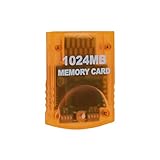
- Essential accessory for saving game data that you worked so hard to achieve.
- Real 16344 blocks non-compress. Eight 128MB parts, pressing the button on the card to switch.
- High speed and efficient product. Easy to use.
- Only Wii consoles with model number RVL001 and Gamecube consoles are compatible.
- Made by Third Party, NOT official item.
Rank #2

- ★Universal GameCube & Wii Compatibility★This high-quality Gamecube memory card seamlessly works with Nintendo GameCube (NGC) and Wii consoles (RVL-001 model). Designed as a plug-and-play third-party accessory, it replaces bulky original cards while maintaining full compatibility with classic games
- ✔16MB Massive Storage (251 Blocks)✔Never delete saves again! With a Memory card gamecube capacity of 16MB (251 blocks), store hundreds of game files from Super Smash Bros. to Zelda. Perfect for collectors needing reliable Game cube memory cards to preserve hard-earned progress
- ⚡High-Speed & Crash-Proof Design⚡Engineered for durability, this Ngc memory card features rapid data transfer to prevent lag during saves. The shock-resistant build protects your files from accidental drops or power outages—essential for marathon gaming sessions
- ✨Third-Party Reliability, First-Party Performance✨A budget-friendly Gamecube memory card for Wii/GC that outperforms aging OEM cards. The streamlined profile fits snugly in any console slot, eliminating the "card wobble" issue common in generic alternatives
- ▲Wii RVL-001 Model Exclusive Support▲Note: This Gamecube memory card for wii is ONLY compatible with Wii RVL-001 (launch edition). Verify your console’s model before purchase to ensure flawless game data transfers between NGC and legacy Wii systems
Product prices and availability are accurate as of the date/time indicated and are subject to change. Any price and availability information displayed on Amazon at the time of purchase will apply.
Independent reader supportYour contribution helps us test, update, and keep practical guides available for everyone.



