The Tool Desk
Outbyte PC Repair FREEClear out junk files and repair common Windows errorsFree Scan →Outbyte Driver Updater FREEScan for outdated or missing drivers - takes under a minuteDriver Scan →No. The original Pokémon Ruby Version is a Game Boy Advance game, and Nintendo 3DS family systems cannot use the Nintendo DS Slot 2 hardware needed for GBA games. Pokémon Omega Ruby is a separate Nintendo 3DS game—not a 3DS version of the original cartridge.
Why the original Pokémon Ruby does not work on 3DS
Pokémon Ruby Version was released for Game Boy Advance. Nintendo identifies Ruby among the GBA Pokémon games in its Pokémon Platinum manual.

The Nintendo DS used Slot 2 for Game Boy Advance games, but Nintendo says that “Nintendo 3DS family systems cannot access any features or use any accessories that access Slot 2 on the Nintendo DS (Game Boy Advance game slot.)” As a result, the Ruby GBA cartridge cannot be inserted and played on a 3DS. See Nintendo Support’s compatibility explanation.
Pokémon Ruby and Pokémon Omega Ruby are different games
Pokémon Omega Ruby is a separate Nintendo 3DS title. Nintendo includes it on the Pokémon Bank-compatible games list; that listing applies to Omega Ruby, not to the original Game Boy Advance Pokémon Ruby Version.
Recommended Free Tools
#1 Best Overall
![Pokemon Sapphire Version - Game Boy Advance [video game]](https://m.media-amazon.com/images/I/51cL8nokKOL._SL160_.jpg)
- Start out with just 3 Pokemon, and travel across Hoenn to earn badges in 8 different gyms
- Over 350 new Pokemon are here to battle with, collect and trade
- New battle system allows trainers to take two Pok mon into battle instead of just one at a time
- As you play you'll open up fun and exciting mini-games that advance the storyline
- You'll have to become a hero by helping Team Magma stop Team Aqua from flooding the world for control of the water Pokemon!
| Game | Platform | Can you play it on a 3DS? |
|---|---|---|
| Pokémon Ruby Version | Game Boy Advance | No. Nintendo 3DS systems cannot use the DS Slot 2 GBA game slot. |
| Pokémon Omega Ruby | Nintendo 3DS | Yes. It is a separate 3DS game. |
What hardware can play the original GBA cartridge?
The original cartridge is useful with compatible older hardware, not with a 3DS. Nintendo’s manuals describe using GBA Pokémon cartridges with a Nintendo DS system that has the required Slot 2 hardware. Check the specific console model and its compatibility before buying or using a cartridge; a 3DS does not gain GBA support through an accessory or transfer service.
Independent reader supportYour contribution helps us test, update, and keep practical guides available for everyone.Can Pokémon Bank or Poké Transporter make Ruby playable on 3DS?
No. Pokémon Bank and Poké Transporter move Pokémon between supported games; they do not launch the original GBA game or make its cartridge compatible with a 3DS. Nintendo’s published Bank compatibility list includes Omega Ruby as a 3DS game. The Poké Transporter list covers selected DS games and Game Boy or Game Boy Color Virtual Console games, but does not list the original GBA Pokémon Ruby.
Rank #2
![Pokemon Ruby Version - Game Boy Advance [video game]](https://m.media-amazon.com/images/I/51+uRB9fsQL._SL160_.jpg)
- Authentic Nintendo Pokemon Ruby Version Game
- New save Battery Professionally Installed
Nintendo says Pokémon Bank service will end Thursday, February 25, 2027, at 7:00 p.m. PST. Nintendo also says the Bank application is not currently available for download and Bank-to-Pokémon HOME transfers will no longer be possible after service ends. Check Nintendo’s end-of-service notice for current availability and details.
Quick Recap
Best Value
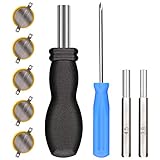
- ✅CR1616 Battery Sets perfect for GameBoy, GameBoy Color, GameBoy Advance, Nintendo NES, Super Nintendo, Sega Genesis game console, also applicable to Pokémon Emerald, Ruby, Sapphire games, perfect save battery replacement
- ✅CR1616 3v 16mm Lithium Batteries with solder tabs, free of mercury and cadmium, environmentally friendly, high volts and high energy density provide a good continuous discharge performance
- ✅CR1616 Coin Battery Size: 16 *1.6mm, perfect to replace old save battery in Game Boy Color and Game Boy Advance cartridges, come with 5 pcs, there are enough amount for use
- ✅3.8mm, 4.5mm and Triwing screwdrivers help you perfectly open the game cartridge, easily disassembly and installation
- ✅Easy Install: Open your GameBoy cartridge, carefully desolder the old battery, put in these new CR1616 solder labeled button cell batteries in the correct direction, solder the wiring, then your gaming console will back to life!
Rank #4
Rank #3

- Used Book in Good Condition
Product prices and availability are accurate as of the date/time indicated and are subject to change. Any price and availability information displayed on Amazon at the time of purchase will apply.



