Free tools Windows power users keep installed
One-click scans. No signup required.
You generally can’t import a save file from a PC, USB drive, or microSD card to a Nintendo Switch using a Nintendo-supported process. To bring a save onto another console, use a nearby-console save transfer, download an eligible Save Data Cloud backup, or transfer the whole user profile. Which option works depends on whether you still have the original Switch and whether the game supports cloud saves.
Which Switch save-transfer method should you use?
| Your situation | Supported method | Important limit |
|---|---|---|
| You have both consoles and want to move a game save | System Settings → Data Management → Transfer Your Save Data | Requires both consoles nearby and online, with the same Nintendo Account linked to the source and target users. The save is deleted from the source after transfer; Nintendo Switch Online is not required. Nintendo Support |
| You no longer have the original console, but an eligible cloud backup exists | Download the backup through the game’s software menu or System Settings → Data Management → Save Data Cloud | Requires Nintendo Switch Online and a game that supports cloud saves. Downloading replaces the destination save. Nintendo Support |
| You want to move a profile, purchases, and associated saves | System Settings → Users → Transfer Your User Data | This moves the user and associated data off the source console. It has account, system, internet, proximity, and storage requirements. Nintendo Support |
| You want to move an Animal Crossing: New Horizons island | Use Nintendo’s dedicated island/save transfer process | The ordinary user-transfer process does not move the shared island save. Nintendo Support |
| You have a save file on a PC, USB drive, or microSD card | No general Nintendo-supported import workflow is documented | Copying a save file onto a microSD card is not the documented import method. Use a supported console transfer or cloud backup instead. |
For the individual-save and cloud-download instructions, see Nintendo Support’s nearby save transfer, cloud download, and cloud eligibility guides. Nintendo also documents the whole-user transfer and a separate Animal Crossing: New Horizons transfer process.
How do I transfer one game’s save to a nearby Switch?
This is the direct built-in option when you can use both consoles. It moves the selected save rather than making a copy, and it does not require Nintendo Switch Online.
- Update both consoles, connect them to the internet, and place them near each other.
- Make sure the user on each console is linked to the same Nintendo Account.
- On both consoles, open System Settings → Data Management → Transfer Your Save Data. Choose the send option on the source and the receive option on the target when prompted.
- Select the user and game save, confirm the destination, and complete the transfer. Nintendo says the save file is deleted from the source after it is sent.
See Nintendo’s How to Transfer Your Save Data To a Nearby Console instructions for the current on-screen prompts.
#1 Best Overall

- UNIVERSAL SWITCH CASE: Keep your Nintendo Switch and essential accessories safe, organized, and travel-ready in one durable case; fits Switch OLED and Switch 2 (remove tray insert for Switch 2; insert for Switch/Switch OLED)
- ALL-IN-ONE STORAGE: Dedicated compartments for safe, secure placement of console, cables, and accessories. Come with 12 game card slots, allowing to carry and change your favorite games anytime to anywhere
- PADDED INTERIOR LINING: Soft microfiber with screen-protecting padding keeps your device safe from scratches and bumps
- MESH POCKET STORAGE: Zipped mesh pocket holds extra accessories, cables, and small items securely
- DURABLE DESIGN: Minimal black Switch case built with quality materials for long-lasting usability and dependable protection
How do I download a Switch save from the cloud?
Cloud restore works only if the game supports Save Data Cloud and a backup exists for the user you intend to use. Check cloud eligibility in the game’s eShop Software Details, Nintendo Store item details, or the software menu; support varies by game. Nintendo Support explains how to identify cloud support.
- Confirm the intended game and user have a cloud backup, and make sure Nintendo Switch Online is active.
- On the destination console, open the game’s software menu and choose Save Data Cloud, or open System Settings → Data Management → Save Data Cloud.
- Choose the intended backup. Check its timestamp against the save currently on the console before downloading.
- Download only if you want that backup to replace the destination console’s current save. Nintendo warns that overwritten data cannot be recovered.
Nintendo says that if a Nintendo Switch Online membership expires, the user can begin a new membership within 180 days to regain access to cloud backups. See Nintendo’s cloud-backup download instructions.
Rank #2
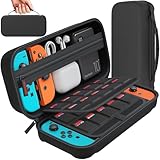
- Designed by DAYDAYUP – Premium Nintendo Switch Carrying Case. This DAYDAYUP Nintendo Switch carrying case is specifically engineered for gamers who need reliable daily protection and organized storage. Unlike generic switch case designs, it features a structured layout tailored for real use.
- Exclusive Interior Layout – Not a Generic Switch Case. This nintendo switch case features a custom-designed interior with dedicated game card slots, mesh pocket, and precise compartment spacing optimized for real usage.
- Scratch-Free Nylon Zipper – Protects Your Console. Unlike standard cases with metal zipper pulls, this nintendo switch carrying case features a specially designed nylon zipper head that prevents contact with the console and reduces scratch risk.
- Hard Shell Protection for Nintendo Switch. Built with durable EVA material, this switch case protects your console from drops, pressure, and scratches during travel and daily carry.
- Authentic DAYDAYUP Design – Avoid Low-Quality Copies. This nintendo switch case is an original DAYDAYUP design. Unauthorized sellers may offer similar-looking products with lower quality materials. Choose authentic products for best performance.
When should you transfer the whole user?
Use System Settings → Users → Transfer Your User Data when the goal is to move a user profile and its associated data, not just one game’s save. Nintendo’s process also moves that user’s eShop purchases. The source user must be linked to a Nintendo Account that is not already linked to a user on the target console.
- Both consoles must be updated to system menu version 4.0.0 or higher, connected to the internet, and near each other.
- The target console must have room for another user and enough internal storage.
- The user and associated save data are removed from the source when transferred.
- Shared save data, including the Animal Crossing: New Horizons island, is not handled by the ordinary user transfer.
Consult Nintendo’s user and save data transfer guide for the full procedure and requirements.
Rank #3

- Travel case
- Protection Library holds 12 game cards and offers full screen and analog stick protection
- microSD Card Case 2pcs, each holds 2 microSD Cards
- Comfortable carrying handle and soft cleaning cloth
What if the game has no cloud backup?
If cloud support is absent, cloud restore is unavailable for that game. A nearby-console transfer may still be an option for compatible software if you have both consoles. Check the game’s cloud eligibility individually rather than assuming all Switch games use cloud saves.
If your destination is a Nintendo Switch 2, Nintendo publishes specific Switch-to-Switch 2 transfer instructions covering compatible saves and system-transfer consequences for saves without cloud backup. Follow those instructions for that console pairing.
Rank #4

- Elegant ballistic nylon case protects your Nintendo Switch OLED Console or Switch Console making it more portable and travel friendly
- Adjustable viewing stand allows you to play and view on the go, while providing max protection for the screen and thumb sticks when storing the Switch OLED or Switch Console
- Bonus Game Cases allow you to hold up to 8 games, secured in a recessed area underneath the Switch OLED Console making for a great travel case and storage case
- Perfect Switch OLED carry case with a comfort handle, soft satin inner top lining and sure glide zipper making it the nicest Nintendo Switch case
- Tested and approved under license by Nintendo of America, compatible with the Nintendo Switch OLED, Nintendo Switch and Nintendo Switch Lite, see all Game Traveler Switch cases in our Amazon store
Can I import a save from microSD, USB, or a computer?
Nintendo’s documented save-transfer methods use the console transfer settings or Save Data Cloud; its support instructions do not provide a general workflow for importing arbitrary save files from a computer, USB drive, or microSD card. A microSD card is therefore not the supported route for restoring a save. Use a nearby-console transfer, an eligible cloud backup, or a whole-user transfer as appropriate.
Quick Recap
Best Value

- NINTENDO CASE - SWITCH 2 COMPATIBLE: Our premium Nintendo Switch case is custom fit for your Switch 2, shielding your console with anti scratch velvet lining and shock absorbing materials—perfect for daily storage, commutes, or long travel days
- TRAVEL READY DESIGN: This compact portable Nintendo Switch 2 carrying case fits easily in a backpack or carry-on or can simply be carried by itself with a wristlet handle for secure handling without risk of drops—great for on-the-go everyday players
- CONVENIENT GAME & AIRTAG STORAGE: Whether at school, traveling or on the go, you can organize up to 12 game cards in a dedicated slot system and track your Case for Nintendo Switch 2 accessories using a hidden AirTag compartment, so it's never lost
- DURABLE & STYLISH: Crafted with an abrasion- and water-resistant polyester exterior and brushed velvet interior lining, plus hidden, no-snag zippers, this Nintendo Switch 2 travel case protector resists wear and tear for lasting device protection
- SUSTAINABLY MADE + 2-YEAR COVERAGE: This durable Belkin Switch 2 Case comes in 100% plastic-free packaging. Plus, you can purchase the Nintendo Switch carrying case with peace of mind knowing that it comes with 2-year coverage
Product prices and availability are accurate as of the date/time indicated and are subject to change. Any price and availability information displayed on Amazon at the time of purchase will apply.
Do these 3 things before closing this tab:
1Clear out junk files and repair common Windows errors2Fix the driver behind crashes, sound loss and screen glitches3Repair Windows errors before they cause bigger problems



