The way to put games on a PSP depends on whether you have digital games or a physical UMD, and which PSP model you own. For digital games, use the console’s compatible storage and a legitimate download route; for a disc game, insert its UMD. PSPgo stores downloads on the console or compatible Memory Stick Micro media, while other PSP models with a Memory Stick PRO Duo slot use Memory Stick Duo media.
Check your PSP model and storage first
Do not buy a memory card until you know which PSP you have. PSP models with a Memory Stick PRO Duo slot use Memory Stick Duo media. PSPgo has built-in system storage and supports Memory Stick Micro media for removable storage. Sony’s PSP-E1002/E1003 User’s Guide and PSP-N1004 (PSPgo) Instruction Manual give model-specific storage instructions.
- PSP with a Memory Stick PRO Duo slot: insert Memory Stick Duo media if you need removable storage for downloads.
- PSPgo: games downloaded to the console are saved to system storage; the manual also describes copying them to Memory Stick Micro media.
Transfer or download digital games
Sony documents a PC-and-USB workflow for downloading games on the PSP-E1002/E1003: insert Memory Stick Duo media in the Memory Stick PRO Duo slot, connect the console to a PC with a USB cable, and use the PSP’s USB connection mode. The exact instructions may differ on other PSP models.
- Insert compatible storage if your model needs it for the game.
- Connect the PSP to your computer with a USB cable.
- If USB mode does not start automatically, open Settings → USB Connection on the PSP.
- Use a legitimate source for a game you own or a purchase route available to your account and region. Follow the console or source’s transfer instructions, and do not disconnect the cable while a transfer is in progress.
Sony’s manual describes the initial storage and USB steps; it does not establish that every PSP model, computer, or game uses an identical transfer process.
#1 Best Overall
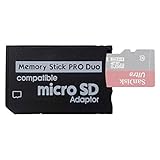
- 2026 Latest Version - Funturbo Micro SD to MS Pro Duo Adapter
- Replace your Memory Stick PRO Duo with any microSD card (MicroSD Card NOT included)
- Up to 128GB Micro SD/SDHC/SDXC Card Compatible
- Compatibility Tested – Fully compatible with MagicGate Memory Stick DUO and Memory Stick PRO Duo, all known issues fixed
- Works perfectly on PSP 1000/2000/3000, Sony camera and handycam, format your card in your device for first time use
Can you still buy or redownload PSP games?
Sony says previously purchased PSP content can be downloaded again by opening the device’s Download List. Sony also states that PSP in-game searches and purchases ended on July 6, 2021. Its notice said some PSP content remained available for purchase through PS3 and PS Vita stores, but availability depends on the title, region, account, and current service status. Check Sony’s service notice rather than assuming a particular game can still be bought.
Put a physical game in the PSP
Physical PSP games use UMD discs: open the disc compartment, place the game’s UMD in the drive, and close it. Check that the specific game and console are compatible. A complete compatibility list for every PSP model and UMD is not established here, so do not assume every title works on every model.
Quick Recap
Rank #4

- Perfect Compatibility: This PSP memory stick adapter is fully compatible with MagicGate Memory Stick DUO and Memory Stick PRO Duo, ensuring reliable and high-speed data transfer
- Latest Upgraded Adapter: Convert your Memory Stick PRO Duo to any Micro SD/SDHC/SDXC card up to 128GB, allowing you to expand your storage based on your needs. (32GB Micro SD card included. Note: The 128GB memory card is only supported on PSP systems 6.60 and above. The maximum capacity supported by the adapter may vary depending on the device model.)
- Wide Device Compatibility: Works seamlessly with PSP 1000, 2000, 3000 and PSP E1000 models, as well as Sony Cybershot cameras and Handycam, offering excellent versatility for various devices
- Cost-Effective Storage Expansion: The included 32GB Micro SD card provides ample space for games, media, and more. It’s compatible with smartphones, tablets, cameras, GoPro/action cameras, laptops, desktop PCs, DSLR cameras, drones, Nintendo Switch, PlayStation Vita, and other portable gaming consoles. Say goodbye to expensive Memory Stick PRO Duo cards. Use affordable Micro SD cards for an efficient and budget-friendly storage solution
- Easy Setup: Simply insert a Micro SD/SDHC/SDXC card into the adapter, then insert it into your device. First-time use? Format your card directly in your PSP or camera for optimal performance
Rank #3

- Upgraded Adapter: The capacity of memory stick pro duo adapter can be up to 512GB. You can insert one Micro SD card or one Micro SDHC card or one Micro SDXC card to adjust the capacity according to your personal needs
- Perfect Compatibility: This psp sd card adapter is compatible with MagicGate Memory Stick DUO and Memory Stick PRO Duo
- 2025 Latest Version:The memory stick adapter with one slot is micro SD to MS PRO Duo adapter. (Micro SD Card NOT included)
- Reliable Performance: A high-quality memory stick duo adapter transporter will determine the output speed of the adapter based on the speed of the inserted memory card. Please format your card in your device for first time use
- Perfect Fit: The pro duo memory card adapter is perfectly compatible with Sony camera, handycam and some cell phones & PSP 1000 / 2000 / 3000
Rank #2

- 2025 Latest Version - Funturbo Micro SD to MS Pro Duo Adapter
- Replace your Memory Stick PRO Duo with any microSD card (MicroSD Card NOT included)
- Up to 128GB Micro SD/SDHC/SDXC Card Compatible
- Compatibility Tested – Fully compatible with MagicGate Memory Stick DUO and Memory Stick PRO Duo, all known issues fixed
- Works perfectly on PSP 1000/2000/3000, Sony camera and handycam, format your card in your device for first time use
Choose the right route
| What you have or want | How to proceed | Important qualification |
|---|---|---|
| A PSP digital game you bought previously | Open the PSP’s Download List and download the content. | Sony says previous purchases remain downloadable; account, region, and service status can affect access. |
| A digital game you want to buy now | Check an official purchase route still offered for your account and region. | PSP in-game purchases ended July 6, 2021. Some content remained on PS3 or PS Vita stores per Sony’s notice, but title availability is not guaranteed. |
| A PSP with Memory Stick PRO Duo slot | Use Memory Stick Duo media and the documented USB workflow where applicable. | Confirm the console’s model and follow its manual. |
| PSPgo | Use its system storage or Memory Stick Micro media. | Do not use the Memory Stick Duo guidance as if it applied to PSPgo. |
| A physical PSP game | Insert the game’s UMD. | Verify compatibility for the particular console and title. |
Product prices and availability are accurate as of the date/time indicated and are subject to change. Any price and availability information displayed on Amazon at the time of purchase will apply.



