On PC, open Skyrim’s console and enter setstage MQ103 190 to move the Bleak Falls Barrow quest directly to its documented completion stage. Save first: changing quest stages can cause bugs or leave related progression in an unexpected state.
Complete the quest in one command
Bleak Falls Barrow is quest MQ103. Its specific stage listing identifies stage 190 as complete, so enter:
setstage MQ103 190Use the quest editor ID MQ103, not its numeric form ID, 000D0800. The setstage syntax is setstage <quest ID> <stage ID>. See the console-command reference and the quest command reference.
Advance through the documented stages instead
If you want to move the quest in smaller steps rather than jump straight to completion, set the relevant stages one at a time:
PC Slower Than It Used to Be?
A free scan shows the junk files, broken settings and background clutter dragging Windows down - then fixes them in one click.Free scan · Windows 10 & 11Crashes, No Sound, or Screen Glitches?
Random freezes, missing sound and display glitches usually trace back to one bad driver. Find and replace yours safely.Free scan · under a minute#1 Best Overall

- Winner of more than 200 Game of the Year Awards, Skyrim Special Edition brings the epic fantasy to life in stunning detail.
- The Special Edition includes the critically acclaimed game and add-ons with all-new features.
- All-new features include remastered art and effects, volumetric god rays, dynamic depth of field, screen-space reflections, and more.
- Entertainment Software Rating Board (ESRB) Content Description: Blood and gore, intense violence, sexual themes, use of alcohol
setstage MQ103 10— talk to Farengar Secret-Fire.setstage MQ103 50— retrieve the Dragonstone.setstage MQ103 180— deliver the Dragonstone to Farengar.setstage MQ103 190— mark the quest complete.
These are the documented stage meanings for MQ103; a general suggestion that quests often finish at stage 200 does not apply to this quest’s specific listing. Check the Bleak Falls Barrow quest listing and quest tracker for stage details.
Open the console and check stages
- Make a save you can return to if the quest behaves unexpectedly.
- On PC, open Skyrim’s in-game console. The key varies with keyboard layout; use the key that opens the console on your setup.
- Enter
ShowQuestStages MQ103to inspect the available stages, or enter the appropriatesetstagecommand. - Close the console and check your journal and quest progression before continuing.
Console commands are a PC method; the cited sources do not establish an equivalent command-console workflow for Xbox, PlayStation, or Switch. The console key reference notes that the key can differ by keyboard layout.
Rank #2

- ANNIVERSARY EDITION CONTENT — Includes the base game, Dawnguard, Hearthfire, Dragonborn, and hundreds of Creation Club items such as quests, weapons, armor, spells, and dungeons.
- SWITCH 2 ENHANCEMENTS — Explore Skyrim with updated visuals, improved load times, and optimized performance for Nintendo Switch 2.
- SHAPE YOUR ADVENTURE — Choose your character and decide how to play in an open world that responds to your actions.
- BUILD YOUR CHARACTER — Choose from hundreds of weapons, spells, and abilities to define your play style.
- BATTLE DRAGONS — Face ancient dragons as the Dragonborn, learn their secrets, and harness their power.
What the command skips—and what to do if something goes wrong
Bleak Falls Barrow follows “Before the Storm” and leads into “Dragon Rising.” Its objectives are to speak to Farengar, retrieve the Dragonstone from the barrow, and deliver it to him in Dragonsreach. A direct jump to stage 190 skips those intermediate objective steps; the documented stages do not guarantee that every downstream script or modded setup will react identically.
If you only need to repair a stuck objective, use the smallest relevant documented next stage rather than guessing a stage or jumping over unrelated progression. If the result causes problems, reload the save made before using commands. A broader Skyrim cheats reference likewise advises saving before completing quests with commands because bugs can occur.
Quick wins for a faster PC:
Repair Windows errors before they cause bigger problemsFix Now →Scan for outdated or missing drivers - takes under a minuteDriver Scan →Clear out junk files and repair common Windows errorsFree Scan →Rank #3

- Live Another Life, In Another World: Play any type of character you can imagine, and do whatever you want; the freedom of choice, storytelling, and adventure of The Elder Scrolls comes to life in one legendary experience from all three official add-ons.
- Dawnguard: The Vampire Lord Harkon has returned to power. By using the Elder Scrolls, he seeks to do the unthinkable - to end the sun itself. Will you join the ancient order of the Dawnguard and stop him? Or will you become a Vampire Lord?
- Hearthfire: Purchase land and build your own home from the ground up - from a simple one-room cottage to a sprawling compound complete with an armory, alchemy laboratory, and more.
- Dragonborn: Journey off the coast of Morrowind, to the vast island of Solstheim. Traverse the ash wastes and glacial valleys of this new land as you become more powerful with shouts that bend the will of your enemies and even tame dragons.
Prefer to finish the dungeon normally?
Work through Bleak Falls Barrow to retrieve the Dragonstone, then return it to Farengar in Dragonsreach. At the first pillar-and-lever puzzle, set the pillars to snake, snake, swordfish. At the circular door, set the rings from top to bottom to bear, moth, owl. After the word wall, defeat the Draugr Overlord and take the Dragonstone from its body before returning to Farengar. See the quest walkthrough for the route.
Quick Recap
Best Value
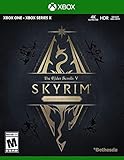
- EPIC FANTASY REBORN - Skyrim reimagines and revolutionizes the open-world fantasy epic, bringing to life a complete virtual world open for you to explore any way you choose.
- LIVE ANOTHER LIFE, IN ANOTHER WORLD - Play any type of character you can imagine, and do whatever you want; the legendary freedom of choice, storytelling, and adventure of The Elder Scrolls is realized like never before.
- YOU ARE WHAT YOU PLAY - Choose from hundreds of weapons, spells, and abilities. The new character system allows you to play any way you want and define yourself through your actions.
- BATTLE DRAGONS - Battle ancient dragons like you’ve never seen. As Dragonborn, learn their secrets and harness their power for yourself.
- INCLUDED CONTENT - The Anniversary Edition includes the core game, pre-existing and new Creation Club content, plus all three official add-ons: Dawnguard, Hearthfire, and Dragonborn.
Rank #4

- Winner of more than 200 game of the year awards, Skyrim special edition brings the epic fantasy to life in stunning detail
- The special edition includes the critically acclaimed game and add-ons with all-new features
- All-new features include remastered art and effects, volumetric god rays, dynamic depth of field, screen-space reflections, and more
- Entertainment Software Rating Board (ESRB) Content Description: Blood and gore, intense violence, sexual themes, use of alcohol
Product prices and availability are accurate as of the date/time indicated and are subject to change. Any price and availability information displayed on Amazon at the time of purchase will apply.



