Turn the console off and let it cool before using it again. Then move it into an open, well-ventilated space, clear anything blocking its vents, and remove only accessible dust using the manufacturer’s recommended method. If overheating warnings or heat-related shutdowns continue, follow the support or repair route for your exact console model and country.
1. Turn it off and let it cool
If you see a temperature warning or the console shuts down because of heat, stop playing and power it off. Wait until it has cooled before restarting. PlayStation’s PS4 overheating guidance recommends turning the console off, letting it cool, moving it to a well-ventilated place, and checking for blocked vents. For Nintendo Switch 2, allow the system to cool sufficiently before waking it from its protective sleep state.
2. Improve airflow around the console
Check that air can move freely around every intake and exhaust vent. Move objects, fabric, or other obstructions away from the console, and avoid placing it in a cramped cabinet or against a surface that blocks ventilation. Dust buildup around vents can also restrict airflow.
For PS5, PlayStation recommends leaving at least 10 cm of free space around the console and avoiding narrow or cramped spaces and long-fiber carpets. That clearance is specific to PlayStation’s guidance; do not assume the same measurement applies to other consoles. See PlayStation Australia’s PS5 ventilation and noise guidance.
Windows Errors? Fix Them Before They Spread
Repair common Windows errors and clear accumulated junk for a smoother, more stable PC - no reinstall needed.Free scan · no reinstallCrashes, No Sound, or Screen Glitches?
Random freezes, missing sound and display glitches usually trace back to one bad driver. Find and replace yours safely.Free scan · under a minute#1 Best Overall

- Ultra-Portable: Slim, portable, and light weight allowing you to protect your investment wherever you go
- Ergonomic Comfort: Doubles as an ergonomic stand with two adjustable height settings
- Optimized for Laptop Carrying: The metal mesh provides your laptop with a stable laptop carrying surface
- Ultra-Quiet Fans: Three ultra-quiet fans create a noise-free environment for you
- Extra Usb Ports: Extra USB port and power switch design allows for connecting more USB devices. Warm Tips: The packaged cable is USB to USB connection. Type C connection devices need to prepare an Type C to USB adapter
3. Clean accessible dust safely
- Check the manufacturer’s instructions for your specific model before cleaning.
- For PS5, turn it off and disconnect the AC power cable from the back of the console before cleaning.
- Use a low-powered vacuum to remove dust in and around the vents, as PlayStation recommends. Nintendo’s Switch 2 guidance also advises vacuuming dust or foreign substances from intakes and vents.
- Do not treat this as a reason to open the console or clean internal components. The cited guidance covers accessible vents, not universal internal-disassembly instructions.
Sources: PlayStation PS5 guidance and Nintendo’s Nintendo Switch 2 Health and Safety document.
4. Check the warning and your console model
PS5
A PS5 high-temperature notification means you should stop and let the console cool. If you installed an M.2 SSD, PlayStation’s safety guide also says to check that its heat-dissipation parts have not detached. This check is specific to that PS5 guidance, not a general instruction for every console or SSD. Read the CFI-71XX PS5 Safety Guide.
Rank #2

- Whisper-Quiet Operation: Enjoy a noise-free and interference-free environment with super quiet fans, allowing you to focus on your work or entertainment without distractions.
- Enhanced Cooling Performance: The laptop cooling pad features 5 built-in fans (big fan: 4.72-inch, small fans: 2.76-inch), all with blue LEDs. 2 On/Off switches enable simultaneous control of all 5 fans and LEDs. Simply press the switch to select 1 fan working, 4 fans working, or all 5 working together.
- Dual USB Hub: With a built-in dual USB hub, the laptop fan enables you to connect additional USB devices to your laptop, providing extra connectivity options for your peripherals. Warm tips: The packaged cable is a USB-to-USB connection. Type C connection devices require a Type C to USB adapter.
- Ergonomic Design: The laptop cooling stand also serves as an ergonomic stand, offering 6 adjustable height settings that enable you to customize the angle for optimal comfort during gaming, movie watching, or working for extended periods. Ideal gift for both the back-to-school season and Father's Day.
- Secure and Universal Compatibility: Designed with 2 stoppers on the front surface, this laptop cooler prevents laptops from slipping and keeps 12-17 inch laptops—including Apple Macbook Pro Air, HP, Alienware, Dell, ASUS, and more—cool and secure during use.
Nintendo Switch 2
Switch 2 may automatically enter sleep to prevent additional heating. Nintendo identifies blocked intake or exhaust vents and heat-trapping surroundings as possible contributors; let the system cool before waking it. Nintendo’s health and safety document gives an operating range of 5°C to 35°C for Switch 2. The document does not state a publication year, and this range should not be applied to other consoles. See Nintendo’s Switch 2 support guidance and health and safety document.
5. Tell normal fan noise from a heat problem
A PS5 fan may temporarily run faster and louder during some games or apps while it cools the system. That sound alone does not necessarily indicate a fault. A temperature notification, repeated heat-related shutdown, or overheating that returns after you improve airflow is more concerning. PlayStation explains this distinction in its PS5 noise guidance and PS5 safety guide.
Free tools Windows power users keep installed
One-click scans. No signup required.
Rank #3

- 9 Super Cooling Fans: The 9-core laptop cooling pad can efficiently cool your laptop down, this laptop cooler has the air vent in the top and bottom of the case, you can set different modes for the cooling fans.
- Ergonomic comfort: The gaming laptop cooling pad provides 8 heights adjustment to choose.You can adjust the suitable angle by your needs to relieve the fatigue of the back and neck effectively.
- LCD Display: The LCD of cooler pad readout shows your current fan speed.simple and intuitive.you can easily control the RGB lights and fan speed by touching the buttons.
- 10 RGB Light Modes: The RGB lights of the cooling laptop pad are pretty and it has many lighting options which can get you cool game atmosphere.you can press the botton 2-3 seconds to turn on/off the light.
- Whisper Quiet: The 9 fans of the laptop cooling stand are all added with capacitor components to reduce working noise. the gaming laptop cooler is almost quiet enough not to notice even on max setting.
6. Get help if it keeps overheating
If the console continues to overheat after cooling, clearing external airflow, and correcting its placement, stop relying on repeated restarts and use the manufacturer’s support or repair process for your exact model and country. PlayStation directs users with persistent PS4 overheating symptoms to PlayStation Repairs. Nintendo advises stopping use and contacting an authorized local service center if the Switch 2 makes unusual noise or emits smoke or an unusual smell; see its health and safety document. Service options and eligibility vary by country.
Quick Recap
Best Value

- PS5/SLIM/PRO COOLING STATION:This ps5 cooling station is specifically designed for the PS5, PS5 Slim, and PS5 Pro. The PS5 cooling base features concealed built-in cables and sturdy security screws, ensuring a stable and secure connection with the PS5 console for safety and balance. Its aesthetically pleasing design harmonizes beautifully with the PS5. for PlayStation 4 Chargers
- MULTIPLE POWER SUPPLY DEVICES:This multifunctional ps5 cooling stand can not only seamlessly connect to the USB port on the back of the PS5 console for power but is also compatible with various power sources, such as personal computers, USB hubs, wall sockets, and AC adapters. Simply place the PS5 Slim console securely on the PS5 cooling stand, then retrieve the screws and cables from the bottom to effortlessly complete the installation. for PlayStation 4 Chargers
- PS5 ORIGINAL & EDGE CONTROLLERS: With moveable USB charging port on the ps5 controller charger, effortlessly charge your PS5 original or Edge controller by adjusting the port up or down. Achieve a full charge for the PS5 original controller in just about 3.5 hours, and for the PS5 edge controller in approximately 2.5 hours. The controller's LED icon illuminates RED during charging and switches to GREEN upon reaching a full charge or entering standby mode. for PlayStation 4 Chargers
- MULTIFUNCTIONAL INTEGRATION:Featuring 3 integrated USB HUBs on the side, PS5 docking station effortlessly charges 3 other devices. Beyond charging, ps5 base stand facilitates data transfer, screenshot capture, and PS5 controller updates. What's more, ps5 stand has a dedicated media remote slot for easy storage, effortlessly attaching to the PS5 slim console. for PlayStation 4 Chargers
- INTELLIGENT SAFETY & COOLING SYSTEM:Built with high-efficiency cooling fans and intelligent multi-protection chips, this PS5 cooling station delivers powerful heat dissipation without distracting loud noise, effectively lowering the console’s operating temperature during long-hour gaming sessions and preventing overheating, lagging and shutdown issues. It supports intelligent over-charging, over-current and over-temperature protection to safeguard your console and controllers. for PlayStation 4 Chargers
Rank #4
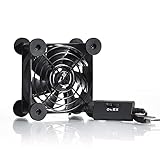
- High Quality: The double ball bearing has a service life of 65,000 hours, and the 7 blades generate strong airflow to keep the cabinet cool.
- Three Speeds: Silent fan features a multi-speed controller to set the fan’s speed to optimal noise and airflow levels. Low gear (L), middle gear (M) and high gear (H), the noise is only 21dB in low gear.
- Full Protection: Iron grill on both sides can protect your hands or prevent damage to the power cord during operation.
- Convenient USB Fan: The USB plug can supply power to the fan through the USB port on the back of popular audio-visual electronic equipment and game consoles.
- Dimension: 3.64” X 3.64” X 1.81”. Shockproof foot pads can make the fan lay flat or upright.
Product prices and availability are accurate as of the date/time indicated and are subject to change. Any price and availability information displayed on Amazon at the time of purchase will apply.



