Open the Friends panel from the Mobile Legends lobby, choose Add Friends (or the add-person control), and search for your friend’s exact player ID. Check the result against details they gave you before tapping the action beside their account; the label may be Follow, Add, or similar, depending on the game build. Then check the Friends list to confirm the account appears.
What to get from your friend first
- Ask for their exact player ID. If their profile displays a server or zone, ask for that too.
- Use their player name and avatar as additional checks. A name by itself may not identify the right account.
How to add a friend
- In the lobby, open the Friends panel.
- Choose Add Friends or tap the add-person control.
- Search the exact player ID. If you do not have it, search the complete player name instead.
- Compare the result with the player ID and other details your friend supplied. When you have the right account, tap the action beside it—such as Follow or Add.
- Reopen the Friends list and look for the intended player. If your build requires mutual following, ask them to follow you back.
A current third-party tutorial describes this flow, but notes that labels can vary by regional build. If your screen uses different wording, look for the equivalent action beside the verified account. Read the tutorial.
If the player does not appear
- Check the search details: Reconfirm the ID and, where available, server or zone with your friend.
- Check the action and list: The game’s wording may differ by build. Reopen Friends to see whether the account was added, and ask the other player to follow back if mutual following is required.
- Read any in-game message: It may explain that the list is full or that an action is restricted. No authoritative current friend-list capacity or pending-request limit is established, so do not rely on a specific cap.
- Check build compatibility: The third-party tutorial recommends confirming that both players use currently supported regional builds. It does not establish a universal cross-server rule; a server or zone is useful for checking identity, not proof that adding across servers is supported.
If you still cannot resolve an account-specific restriction, the official Google Play listing says customer service is available through the in-game Contact Us button. See the Google Play listing.
Confirm the connection in a lobby
If the account appears in the friend picker when you create or join a lobby, inviting that player is a practical way to check that you can play together. The exact availability of this option can depend on the current interface and account restrictions.
Recommended Free Tools
Quick Recap
Best Value

- Multi-Platform Compatibility - The Bcofo gaming controller features a mode switch button specially designed for diverse devices. With the switch button on the back of the game controller, you can easily and quickly switch to the corresponding mode (iOS/Android/Switch/PC), allowing the wireless game control to be compatible with various platforms such as iPhone, ipad, mac, Apple Acrade MFi Games, Android mobile smart phones, Android HID Games, tablet, Switch/Lite/OLED, laptop, and other devices via Bluetooth. Furthermore, the gamepad is also stable and convenient for wired connection via the included USB cable to connect a computer/PC Windows 7/8/10/11/Steam Deck
- Hall Effect Triggers - The wireless mobile game controller for phone has 2 advanced Hall Effect sensors that provide smoother and more accurate gameplay, giving you a competitive edge in fast-paced action games and improving overall gaming performance
- 2 Programmable Buttons - Our PC gaming controllers has simplify complex skill operations with N1/N2 key. With the 2 marco back buttons on the back of controller, players can customise a combination up to 30 seconds with N1/N2 to program the 21 buttons ( A/B/X/Y... button) of the controllers
- Cool RGB Lighting - The game controller features RGB LED lighting effects, allowing gamers to customise the lighting to their personal preference, creating a more immersive gaming experience. The gaming control is equipped with 8 lights and 1 colorful gradient. It offers 4 lighting modes: colour, wave, breathing, and static. Press the 'RGB' button on the back of the gamepad to switch the light and choose from 9 different RGB colors. The RGB light can also be toggled on or off by pressing and holding the "RGB" button for a few seconds, according to your preference
- Six Gyro Sensor, Dual Vibration, 3 Turbo Speed - The wireless controller with 6-Axis motion control functions allows the professional Switch controller to detect movements rapidly and helps you make quick responses. The dual vibration provides realistic, immersive gaming experiences like the feeling of the impact, explosions, and collisions that extend beyond the scope of audio and visuals. The 3 turbo speeds: 5/12/20 shots per second, greatly enhancing your experience in action and arcade games
Rank #4

- CONSOLE DESIGN: You game on a console with a console controller so why switch to a miniaturized controller? This iPhone game controller is designed for extended gameplay without compromise. That’s worry-free and stress-free gaming in your hands.
- GOODBYE TO LATENCY: As gamers, we do not want to add unnecessary latency caused by Bluetooth connections hence, our controller is direct connected. Our gamepad controller for iPhone has an ergonomic design with removable mobile support post for tactical comfort & agility so that you can show your competitors who is boss!
- TRANSFORM YOUR iPhone: Turn your mobile into a console and play wherever, whenever. Compatible with thousands of games and services like Xbox Cloud Gaming, Stadia, PS Remote Play, Steam Link, Amazon Luna and more. Everything you need is included, simply plug in and play. Play online or offline and share gameplay instantly with our dedicated share button, bringing your mobile as close as ever to your console.
- LIMITED LIFETIME WARRANTY: Our controller is compatible with any iPhone (iOS 7 or later) and case. With our replaceable cable, you are future proofed if Apple ever change the Lightning connection to USB-C. We’re that confident, we offer a limited lifetime warranty with all our Xbox gaming controllers!
- CHARGE AS YOU PLAY: This cloud gaming controller features an improved version of our pass-through charging technology that charges as you play for unlimited gaming without draining your device. Just plug in the controller and play endlessly without the frustration of drained batteries and unfinished battles. Plus, it comes with an Audio DAC and headphone socket.
Rank #3

- Adapter for Gamecube Controller - The gamecube adapter works with nintendo switch and wii u and pc and new nintendo switch 2. Support 4 gamecube wired controller or wavebird controller.
- Super Smash Bros Choice - The gamecube adapter support super smash bros game on switch or wii u. Note: Enter game by remote control for wii u console and only support super smash bros.
- Four Player Support - Come with four ngc input ports for your gamecube controller. You can play with your friends at same time. Most support connecting up to four ngc controllers.
- Plug and Play - Built in a stable IC chip,No lag and no drive install need. Change the adapter button on WII U to play on WII U and Switch mode, Change the adapter button on PC to play on PC mode.
- Turbo Feature Support - What turbo actually does is replicates the same button pushed by the user over and over again at an extremely fast rate. Free your hands from some complex games.
Rank #2

- WIDE SCREEN COMPATIBILITY — PHONE TO TABLET: X5 Lite is a versatile phone controller that stretches up to 213mm to fit iPhone 15/16, most Android phones, iPad mini 6/7, and compatible Android tablets. Secure Type-C connection keeps gameplay stable and responsive.
- MOBILE, CLOUD & REMOTE GAMING: Play supported mobile games like Zenless Zone Zero, or stream console and PC games through Xbox Game Pass, Steam Link, Moonlight, and remote play. Enjoy physical controls wherever you play.
- HALL EFFECT STICKS — PRECISE CONTROL: GameSir Hall Effect sensing sticks deliver smooth 360° control for accurate aiming, movement, and camera adjustments. Built for fast-paced mobile games and streamed console or PC titles.
- LIGHTWEIGHT & ERGONOMIC — 135.4G: At just 135.4g, X5 Lite stays lightweight during extended gaming. Ergonomic, laser-engraved textured grips provide a secure, comfortable hold at home or on the go.
- CUSHIONED MEMBRANE CONTROLS — COMFORTABLE & QUIETER: Cushioned membrane buttons and triggers provide comfortable feedback for repeated inputs while keeping operation quieter. Ideal for extended sessions or gaming in shared spaces.
#1 Best Overall
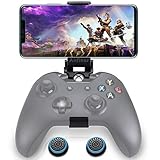
- ▶ Note:Controller and phone not included, Anfiner Supply life time service-platinum quality controller holder+ thumb grips caps
- 10 IN 1: Compatible with Xbox / Xbox one / Xbox Series X / S / Xbox Elite 1 /Series 2 SteelSeries Nimbus /SteelSeries Stratus XL(Android & IOS)/SteelSeries Stratus Duo/Steam Controllers
- Width size range in 1.56- 3.55 inch,can support most of mobile phones(such as: iphone 5/5S/6/6S/7//7plus/8/8plus/X Samsung S7/S8/S9/note7/8/9 Sony LG Huawei Google pixel XiaoMi and so on ) easy to install and remove
- Fully customizable viewing angle and exquisite workmanship.Does not interfere with the ergonomics of the controller
- Easy to attach to your smartphone, no tools or modification necessary.
Product prices and availability are accurate as of the date/time indicated and are subject to change. Any price and availability information displayed on Amazon at the time of purchase will apply.
Independent reader supportYour contribution helps us test, update, and keep practical guides available for everyone.



