Recommended Free Tools
For Pixelmon client play, start with the official minimum: 2 GB of RAM available and assignable to Minecraft. That is a documented floor, not a guarantee of smooth play for every pack. It is also different from the total RAM installed in your computer. Your Pixelmon pack’s Minecraft version and launcher determine which allocation setting applies.
Client RAM and computer RAM are different
Pixelmon’s installation guidance lists “At least 2 GB of available and assignable RAM,” and its troubleshooting guide recommends allocating at least 2 GB to Minecraft. Pixelmon notes that a modded setup may need more. These are official minimum recommendations, not results from a performance test. Pixelmon installation guidance · Pixelmon troubleshooting guide
- Installed RAM is the computer’s physical memory, shared by the operating system, Minecraft, the launcher, and other open applications.
- Allocated RAM is the maximum heap memory the game’s Java process may use. Set it in the launcher profile or instance settings.
- Available RAM is what remains for Minecraft after the system and other applications are using memory.
Do not assign all of a computer’s installed RAM to Minecraft: the operating system and other programs also need memory.
How much total RAM should your computer have?
Minecraft’s current Java Edition requirements are whole-computer targets, not Pixelmon-specific allocation recommendations. Minecraft lists a minimum target of 8 GB total RAM with a discrete GPU or 12 GB with integrated graphics, and a recommended target of 16 GB total RAM. The minimum target is for 1080p at 30 FPS on Fast settings; the recommended target is for 1080p at 60 FPS on Fancy settings. Minecraft says performance and visual quality are not guaranteed below the minimum. Minecraft Java Edition system requirements
Outdated Drivers Are Slowing You Down
One free scan finds every outdated or missing driver and matches the right update for your exact hardware.Free scan · exact hardware matchWindows Errors? Fix Them Before They Spread
Repair common Windows errors and clear accumulated junk for a smoother, more stable PC - no reinstall needed.Free scan · no reinstall#1 Best Overall

- Disclaimer: Maximum Speed requires overclocking/PC BIOS adjustments. Maximum speed and performance depend on system components, including motherboard and CPU
- Hand-sorted memory chips ensure high performance with generous overclocking headroom
- VENGEANCE LPX is optimized for wide compatibility with the latest Intel and AMD DDR4 motherboards
- A low-profile height of just 34mm ensures that VENGEANCE LPX even fits in most small-form-factor builds
- A solid aluminum heatspreader efficiently dissipates heat from each module so that they consistently run at high clock speeds
Those figures describe current Minecraft Java Edition, not a benchmark for every Pixelmon pack. Pixelmon versions can require older Minecraft releases, so check the pack’s own supported game version, mod loader, and Java requirements before applying current requirements to it.
Check the Minecraft version and launcher setting
Minecraft Java Edition 26.1 changed its default memory allocation from 2 GB to 4 GB. Minecraft says third-party launchers may not support the change, and older versions or custom profiles may use another value. Check the allocation for the profile you actually launch rather than assuming it matches the current default. Minecraft Java Edition 26.1 release notes
Rank #2

- Disclaimer: Maximum Speed requires overclocking/PC BIOS adjustments. Maximum speed and performance depend on system components, including motherboard and CPU
- Hand-sorted memory chips ensure high performance with generous overclocking headroom
- VENGEANCE LPX is optimized for wide compatibility with the latest Intel and AMD DDR4 motherboards
- A low-profile height of just 34mm ensures that VENGEANCE LPX even fits in most small-form-factor builds
- A solid aluminum heatspreader efficiently dissipates heat from each module so that they consistently run at high clock speeds
Pixelmon’s published client compatibility table includes Minecraft 1.20.2 with Pixelmon 9.2.10, Minecraft 1.20.1 with 9.2.3, and Minecraft 1.16.5 with 9.1.13, among older pairings. The official server guide lists different version coverage, including Minecraft 1.21.1 with Pixelmon 9.3.0–9.3.13, and states that Pixelmon 9.3.0 and later requires Java 21. These version listings do not establish compatibility for every pack; follow the release page for your specific pack. Pixelmon client installation and compatibility information · Pixelmon server guide
Adjust the allocation if needed
If your pack supports the documented 2 GB floor, use at least that much for client play. If you use Minecraft 26.1, check whether your launcher already gives the profile 4 GB. No universal optimum is established for all Pixelmon versions and systems; increase allocation only when needed, while leaving memory for the rest of the computer.
Quick wins for a faster PC:
Clear out junk files and repair common Windows errorsFree Scan →Scan for outdated or missing drivers - takes under a minuteDriver Scan →Rank #3

- Supports Intel Coffee Lake Processors and Intel Extreme Memory Profile (Intel XMP) Standards.
- Aluminum heat sink
- Speeds up to 3200 MT/s / Timing 16-18-18-38 / Voltage 1.35V / Unbuffered / 8GB based
- Backed by a lifetime warranty to promise complete services and technical support.
- Advertised speeds are reached via XMP or the equivalent profile (such as DOCP or A-XMP) in your BIOS profiles. Actual performance varies by system configuration (Motherboard/CPU compatibility). Plug-and-play speeds follow JEDEC standards.
- Vanilla launcher: Open Launch options, enable Advanced settings, select the Forge profile, and find the JVM Arguments field. Adjust the
-Xmxvalue, which sets the maximum heap allocation. Launcher labels may change; use the profile’s current settings if they differ. - Technic or ATLauncher: Open the relevant instance or Java settings and adjust its memory allocation. Pixelmon’s troubleshooting guide documents these launchers; the exact control may vary by version.
- Launch the same profile again: Confirm that the setting was applied to the Pixelmon instance, not another Minecraft profile.
If Pixelmon freezes or crashes
Freezes while loading models or textures, periodic freezes, and a Java heap-space error can indicate insufficient allocated memory, according to Pixelmon’s troubleshooting guide. Memory is only one possible cause: inspect the crash report and check for version or mod conflicts as well.
- The launcher will not allow more than roughly 1 GB: Check whether the profile is using 32-bit Java. Pixelmon says 32-bit Java limits allocations to roughly 1 GB and recommends 64-bit Java for higher allocations.
- Your computer has 2 GB or less installed: Pixelmon’s troubleshooting guide says that is not enough to run Pixelmon; current Minecraft’s system targets are higher. Check your computer’s supported memory type, available slots, and maximum capacity before buying an upgrade.
- There is no heap-space error: Do not assume RAM is the cause. Review the crash report and verify the pack’s Minecraft, loader, mod, and Java versions.
Pixelmon troubleshooting guidance
Independent reader supportYour contribution helps us test, update, and keep practical guides available for everyone.Hosting a server requires a separate allocation
The client’s 2 GB guidance does not apply to running a local Pixelmon server. The Pixelmon server guide specifies at least 4 GB allocated memory, preferably more; actual needs depend on player count and the mods or plugins in use. The guide also contains a -Xmx3G example for an older server setup, but that sample is not the client setting and does not replace the guide’s stated server recommendation. Pixelmon server installation guide
Quick Recap
Best Value

- A-Tech 16GB RAM Module, DDR4 SO-DIMM 260-Pin, 3200MHz PC4-25600 (PC4-3200AA)
- Non-ECC Unbuffered, JEDEC DDR4 Standard 1.2V Operating Voltage
- Compatible with select Laptop, Notebook, Mini PC, and All-in-One (AIO) systems. Please verify your system's memory type, form factor, and maximum supported capacity before purchasing
- Not compatible with desktop DIMM, non DDR4 memory, or ECC memory types such as RDIMM, LRDIMM, and ECC UDIMM
- Increases available memory capacity to enhance system responsiveness, application performance, and multitasking capabilities.
Rank #4
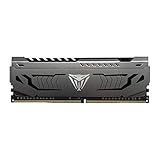
- Capacity: 16GB (1 x 16GB) DDR4 Module
- Aluminum heat spreader with unique and specific design element
- Feature Overclock: XMP 2.0 Support for Automatic Overclocking
- Compatibility: Tested across the latest Intel and AMD platforms for reliable and fast performance
- Tested Timings: 16-20-40
Product prices and availability are accurate as of the date/time indicated and are subject to change. Any price and availability information displayed on Amazon at the time of purchase will apply.



