To use a bipod in Battlefield 6, equip a compatible weapon with a bipod attachment, aim down sights near a supported surface or while prone, then activate the mount prompt on screen. A third-party guide updated October 14, 2025, reports the default as F on PC and pressing the right stick on PS5 and Xbox Series X|S; if that does not match your setup, follow the prompt and check the game’s control mapping.
Equip a compatible weapon and bipod
- From the main menu, open Loadouts and customize the relevant class loadout. EA’s loadout guide says each class has its own loadouts and weapons accept attachments subject to an attachment-point threshold.
- Choose a weapon that supports a bipod and equip the bipod attachment. If no mount prompt appears in a suitable position, first confirm that the weapon is compatible and the attachment is actually equipped. All Things How’s bipod guide covers compatibility and deployment.
Deploy the bipod
- Move to a hard edge or cover, or try a supported prone position. Examples in the guide include window sills, barricades, railings and sandbags; not every ledge or prop can be used.
- Aim down sights and remain mostly still. Watch for the on-screen mount or deploy prompt.
- Activate the control shown by the game. The October 14, 2025 guide reports F as the PC default and the right stick (R3 on PlayStation) on PS5 and Xbox Series X|S. These are secondary-source defaults, not button mappings confirmed on the official EA pages cited here; custom bindings may differ.
If the mount prompt does not appear
- Shift along the edge or try a different hard surface; support is not available on every piece of cover.
- Try a prone position and make sure you are aiming down sights.
- Recheck the weapon and attachment in your loadout.
- Use the live on-screen prompt and current in-game control mapping if the reported default input does not work. A second All Things How guide also discusses bipod setup and troubleshooting.
When mounting is useful
Mounting is best suited to holding an angle, watching a lane or taking longer shots from cover. The secondary guide describes a steadier weapon with less sway and more manageable recoil while mounted, in exchange for reduced mobility; it provides no quantified performance figures, and these are not EA performance measurements. Choose a position by whether it triggers a mount prompt, how much cover it gives, what lane or objective it overlooks, and how readily you can leave if flanked.
Use Deployable Cover as a mounting point
EA’s Support class guide says Deployable Cover can provide a portable mounting point for suppressive fire with a Light Machine Gun or a bipod-equipped weapon. EA recommends placing it where enemies commonly fire, such as tight hallways or exposed objectives.
Why a bipod may behave differently after updates
EA’s Game Update 1.2.2.0 notes, dated March 13, 2026, document changes to M250 bipod behavior in third person and consistency for the bipod recoil animation, as well as fixes related to recoil-state carryover and incorrect M250 third-person behavior. This confirms that bipod behavior has received patches, but does not establish that no later changes or issues exist.
What’s actually slowing this PC down?
Pick the symptom - the matching free tool is one click away.
#1 Best Overall

- Aluminum Bipod monopod for Leveling staff and Prism Poles
- Bipod surveying Fits 1 to 1.25-inch diameter poles from the side or 1.5-inch poles through the top
- surveying Bipod Legs extend up to 6 feet and collapses to 3.5 feet
- surveying Bipod Quick and easy set up Easy to carry
- surveying Bipod Open thumb screw head, Aluminum frame
For practice, EA’s loadout guide says the Loadout Firing Range lets players test primary and secondary weapons against targets at varying distances. The guide covers attachments and loadouts but does not specify bipod controls or quantify a bipod’s performance.
Quick Recap
Best Value

- Aluminum Bipod monopod for Leveling staff and Prism Poles
- Bipod surveying Fits 1 to 1.25-inch diameter poles from the side or 1.5-inch poles through the top
- surveying Bipod Legs extend up to 6 feet and collapses to 3.5 feet
- surveying Bipod Quick and easy set up Easy to carry
- surveying Bipod Open thumb screw head, Aluminum frame
Rank #4

- NEW - Now Available in Carbon Fiber - 3-n-1 Shooting Stick: Tripod, Bi-pod and Monopod (removable leg allows you to use as a monopod or bipod)
- Removable U-shaped yoke with 360-degree swivel action. Soft rubber fins help secure your weapon
- Quick flip lever leg locks
- Foam hand grips. Anti-slip rubber feet
- Light weight carbon fiber construction. Weight: 1.9 lbs, Folded height: 27.5", Extended height: 62"
Rank #3

- 3-in-1 Design & Adjustable Height & Level-Lock:Convertible between tripod (22.8″-61″), monopod (17.3″-62.6″), and bipod modes for versatile shooting scenarios. Thick aluminum alloy tubes ensure stability even with heavy rifles, while Level-Lock enable rapid height adjustments
- Ultra-Lightweight & Portable:Weighing only 2.6 lbs, this shooting stick is designed for hunters and outdoor enthusiasts. The compact folding design and included a carrying bag make it easy to transport during long expeditions
- Premium Durability & Anti-Slip Handle:Reinforced with aluminum alloy and anti-corrosion coating, the tripod withstands harsh outdoor conditions. The ergonomic rubberized handles provide a secure handle, even in wet environments
- Unique Aesthetic & Scratch-Resistant Finish:Features a black pattern with scratch-resistant paint, ensuring long-lasting appearance. The sleek design blends into natural surroundings while maintaining a professional look
- Complete Kit with Custom Accessories:Includes a Portable carrying bag, removable rubber feet for uneven terrain, and a 360° rotating V Yake for Stable targeting
Rank #2
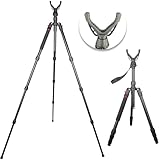
- 3-in-1 Design & Adjustable Height:Convertible between tripod (22.8″-61″), monopod (17.3″-62.6″), and bipod modes for versatile shooting scenarios. Thick aluminum alloy tubes ensure stability even with heavy rifles, while twist locks enable rapid height adjustments
- Ultra-Lightweight & Portable:Weighing only 2.62 lbs, this shooting stick is designed for hunters and outdoor enthusiasts. The compact folding design and included a carrying bag make it easy to transport during long expeditions
- Premium Durability & Anti-Slip Handle:Reinforced with aluminum alloy and anti-corrosion coating, the tripod withstands harsh outdoor conditions. The ergonomic rubberized handles provide a secure handle, even in wet environments
- Unique Aesthetic & Scratch-Resistant Finish:Features a black pattern with scratch-resistant paint, ensuring long-lasting appearance. The sleek design blends into natural surroundings while maintaining a professional look
- Complete Kit with Custom Accessories:Includes a Portable carrying bag, removable rubber feet for uneven terrain, and a 360° rotating V Yake for Stable targeting
Product prices and availability are accurate as of the date/time indicated and are subject to change. Any price and availability information displayed on Amazon at the time of purchase will apply.
Independent reader supportYour contribution helps us test, update, and keep practical guides available for everyone.



