Poosh XL is a neon-styled, one-button arcade game about timing each launch, avoiding hazards and trying to beat your high score. Its rising floor keeps the pressure on, while Survival and Challenges offer two ways to play.
How do you play Poosh XL?
Press the Poosh button when the launch power and angle are right. The timing matters: wait too long and the rising floor catches up; launch into an obstacle and the run can end. Powerups can help you keep going. The loop is quick to understand, but surviving longer means reacting to increasingly difficult conditions.
The control idea is intentionally simple. The Apple listing describes one-button controls, while Steam lists keyboard, mouse and controller input. A controller is optional, not required.
What modes are in Poosh XL?
Survival
Survival is an endless score-chasing mode. The difficulty increases as you last longer, giving each run a straightforward goal: stay ahead of the rising floor and survive for as long as you can.
The Tool Desk
Outbyte PC Repair FREERepair Windows errors before they cause bigger problemsFix Now →Outbyte Driver Updater FREEFix the driver behind crashes, sound loss and screen glitchesFind Drivers →#1 Best Overall

- Quality Components: Excellent Control USB Encoder with high quality 8 way joystick and LED buttons featuring good lighting effects for enhanced gaming experience
- Advanced Functionality: DC 5V Arcade Illuminated Pushbutton with 8 ways joystick using microswitch with gilded contact leg, excellent electronic performance, long life, reliability tested to 1,000,000 cycles
- Mounting Specifications: Joystick requires 24mm mounting hole while large buttons require 30mm mounting holes for proper installation
- Package Details: Compact package dimensions of 175 x 95 x 115mm with each button and joystick individually packaged and includes 1 year warranty for quality assurance
- Wide Compatibility: LED Kit supports Windows Arcade Games, PC Games, DIY Projects, Arcade Raspberry Pi for RetroPie system and MAME applications
Challenges
Challenges presents levels to complete. Finishing them unlocks cosmetic skins, giving players goals beyond extending a Survival run.
Which platforms and features are listed?
Steam lists Poosh XL for Windows, macOS and Linux. Apple lists an iPhone and iPad app. The listed features differ by storefront, so do not assume the desktop and mobile versions have identical options.
Rank #2

- Ideal for use within 3/4" wood control panels. Mounts into wood or metal control panels.
- Microswitch reliability tested to 1,000,000 cycles.
- Vertical attached microswitch with 3/16 (4. 8mm) terminal.
- Classis concave plunger design,mounts in 28mm hole.
| Platform listing | Controls and listed features | Language information |
|---|---|---|
| Steam (Windows, macOS, Linux) | Keyboard, mouse and controller input; single-player; Steam achievements, Cloud and leaderboards; Remote Play on TV, Remote Play Together and Family Sharing. | 11 interface languages: English, French, German, Spanish (Spain), Japanese, Korean, Portuguese (Brazil), Russian, Simplified Chinese, Traditional Chinese and Italian. |
| Apple (iPhone, iPad) | One-button controls; achievements and leaderboards. | The App Store description says the game is available in 11 languages; it does not enumerate them in the cited listing information. |
What are the PC requirements?
Steam lists these minimum Windows requirements: Windows 7, a dual-core processor, 2 GB RAM, 1 GB graphics and 500 MB storage. The same page notes that the Steam client has required Windows 10 or later since January 1, 2024. Because operating-system and storefront policies can change, check the live Steam listing and your device’s compatibility before installing.
Who makes Poosh XL?
Steam credits Adamvision Studios as both developer and publisher and lists May 8, 2023 as the release date. Apple lists Adamvision as the app developer.
Do these 3 things before closing this tab:
1Scan for outdated or missing drivers - takes under a minute2Repair Windows errors before they cause bigger problems3Fix the driver behind crashes, sound loss and screen glitchesRank #3

- Push button with 3 pin micro switch, great to use within 3/4".
- Long life-cycle: micro switch's reliability is tested and up to 10,000,000 cycles.
- The attached micro switch with 4.8mm(0.189in) terminal, can better match the push button.
- Mounts in 28mm hole and made of durable nylon.
- Come with red, green, blue, yellow, white push button, great replacement for Arcade video games push button.
Where to check current availability
For current price, compatibility, ratings and availability, consult the relevant live storefront: Poosh XL on Steam or Poosh XL on the App Store. These details can change over time.
Quick Recap
Best Value

- Mounts in 28mm hole
- Adjustable shaft length for metal or wood mounting
- Ideal for use within 3/4" wood control panels
- Microswitch reliability tested to 10,000,000 cycles
- Horizontal attached microswitch with .187" (4.8mm) terminal
Rank #4
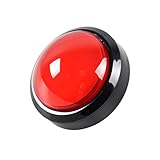
- 100mm Large Dome Diameter (About 4 Inch)
- Led Arcade Buttons 88mm or 24mm Mounting Hole Diameter
- Used In Video Hand DJ Games Music Consoles DIY Parts.
- Packet: 130*85*90mm Ecah Buttons of 6 months warranty
Product prices and availability are accurate as of the date/time indicated and are subject to change. Any price and availability information displayed on Amazon at the time of purchase will apply.



