Quick wins for a faster PC:
Repair Windows errors before they cause bigger problemsFix Now →Fix the driver behind crashes, sound loss and screen glitchesFind Drivers →Clear out junk files and repair common Windows errorsFree Scan →If Ready or Not crashes on Xbox Series X|S, first install any available game update and try a full console restart. VOID Interactive documented one Xbox-specific fix: its September 11, 2025 version 1.3.5 patch fixed a rare crash when resuming the game from the home screen. That fix applies to that specific situation; it does not establish that every Xbox crash has been resolved.
What Xbox crash did the developer fix?
VOID Interactive’s September 11, 2025 Los Sueños Stories Patch #3 notes say version 1.3.5 fixed a “rare crash when resuming game from the home screen” on Xbox. If your crash happens immediately after returning to the game from the Xbox home screen, make sure the game is updated and test whether the same resume action still triggers it.
The patch note identifies that scenario only. It does not say that all crashes on Series X or Series S were fixed, and the available official information does not establish the current Xbox-specific known-issue list.
Try these general Xbox troubleshooting steps
The steps below come from a general Xbox Series X|S crash guide by KOEI TECMO GAMES, not from a Ready or Not-specific support article. They are reasonable checks to try, but are not confirmed cures for this game. Start with the least disruptive option:
Do these 3 things before closing this tab:
1Repair Windows errors before they cause bigger problems2Scan for outdated or missing drivers - takes under a minute3Clear out junk files and repair common Windows errors#1 Best Overall

- 【Necessary for Xbox Series X】---- This product integrates many functions, such as top cooling fan, dust-proof, light strip, USB interface for data transmission and USB port for charging. It helps to prevent for Xbox Series X console from over-heating and dust to extend the life of your console. (NOTE:When the console is working, the dust cover of the fan can be removed to speed up the heat dissipation effect. Alige the two holes under the dust cover first, then cover the dust cover.)
- 【Efficient Fan System】---- A high-speed large fan are built in the colorful dust-proof cooling fan,which can accelerate the hot air exhausted from the top of the console and reduce the temperature for Xbox series X console. The cooling fan stand with 3 gears and is a touch switch. The low gear is orange, the second gear is blue, and the high gear is green.The heat dissipation effect is more obvious, and the noise is very low, which you can hardly feel.
- 【Colorful Light Strip】---- The cooling bracket for Xbox seris X supports colorful lights and can change the light color with an independent touch switch. The light strip contains 6 monochromes and 1 mixed color. You can use the independent touch switch to change your favorite colors and own a more atmosphere in the process of the game. (NOTE: pressing the light switch for the 7th time will turn light off.)
- 【3.0 USB & USB Charge Port】---- There are 2 USB interfaces in total, one blue 3.0 USB interface supports 3.0 data transmission, another white 2.0 sub interfaces ONLY can charge more products, such as controller, mobile phones, small desk lamps, etc.It is convenient to provide USB interface in the process of your game.
- 【Dust Cover Filter】---- The cooling top bracket for Xbox seris X supports top dust proof,At the same time, the product contains 2 sets * dust cover compatible with Xbox Series X, 1 set * silicone dust plugs,which have accurate size and easy to install and replace without additional tools. Prevent dust from entering the USB and HDMI ports for Xbox Series X, extend the life of your console.
- Test the network connection. Use the Xbox network settings to check the console’s connection, then try the game again.
- Fully power-cycle the console. Hold the console’s power button for more than 10 seconds to turn it off, then turn it back on and relaunch the game.
- Reinstall Ready or Not. This takes longer than a restart. The KOEI TECMO support guide says reinstalling will not delete save data; it is general guidance, not a Ready or Not-specific guarantee.
When the crash continues
Check for a game update and note what you were doing when the crash occurred—for example, resuming from the home screen or playing normally. Then report the issue through VOID Interactive’s official Ready or Not bug-report channels. In its September 2025 patch notes, VOID wrote, “We are continuously monitoring your bug reports.” That statement does not promise a response time or a fix.
VOID’s May 19, 2026 v1.4.3a changelog describes a targeted update for recent audio and crashing issues specific to PS5. It is not evidence of an Xbox fix, so do not treat that PlayStation patch as confirmation that an Xbox crash has been addressed.
Rank #2
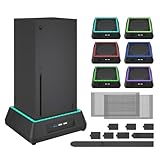
- 【🎃All-in-One Xbox Series X Fan Cooling System🎃】The Mviioe xbox cooling fan for xbox series x integrates heat dissipation, noise reduction, and RGB lighting. It's a must - have for gamers, improving gaming and prolonging device life.
- 【🌀Efficient Adjustable Cooling System🌀】Equipped with a large fan, the Mviioe xbox series x cooling stand offers 3 - speed settings (1800, 1900, 2000 RPM) and 3 - color indicators for different performance levels.
- 【🎊Fancy Color LED Gaming Light🎊】Featuring an intelligent chip, the Mviioe xbox x cooling station has a unique RGB light design with 6 solid colors and 1 mixed color. Customize your gaming mood with an independent touch switch.
- 【🎇Low Noise for Enhanced Gaming Experience🎇】The Mviioe xbox series x cooler uses a powerful yet silent fan, generating minimal noise during gaming. Note that higher speeds result in louder noise.
- 【🎄Charging Support with Dust Filters🎄】The Mviioe xbox series x stand with fan comes with 3 USB ports for accessory charging and a dust filter. Ensure not to connect to power over 5V 1A.
What player reports can—and cannot—tell you
Individual Reddit posts titled “Crashing on Xbox Series X?” and “Ready or Not Keeps Crashing” show that players have raised the issue. Those posts are anecdotes, not representative data: they cannot establish how often crashes happen, what causes them, or whether one Xbox model is more affected. No attributable crash rate or success rate for a fix is established by the cited official material.
Quick Recap
Best Value

- 【Accessories for Xbox Series X Gaming Lover】This multifunctional cooling fan for xbox series x will become a must-have accessory for xbox series x owners. Featuring a cooling fan, dust prevention, charging, and lighting effects, it not only provides cooling for your xbox series x console, but also offers various cool lighting effects, creating a richer atmosphere for your gaming desktop.Batteries & Chargers Compatible with Xbox
- 【11 LED Light Modes for Customization】The top of the Xbox series X cooling fan has 11 adjustable lighting modes: 7 solid colors (red, green, deep blue, yellow, purple, light blue, white).Long press the light button to turn off all lights, short press to switch colors. Built in intelligent chip, which can improve security even after long-term use
- 【Temperature Detector & Anti Touch Device】Built in temperature detector, when you select automatic mode, our cooling system series x can automatically adjust the fan speed according to the temperature of the host, constantly reducing the internal temperature of the host. Even during long-term gaming, you don't have to worry about the host overheating and affecting the gaming experience. The anti touch device can prevent your hands from being scratched by the rotating fan
- 【Efficient Cooling System for Series X with 3 Level Fan】Equipped with a high-speed 3-level adjustable fan, it can quickly exhaust hot air according to the temperature of the series x console, keeping the Xbox series x console cool. The 1 level speed is 1600rpm, the 2 level speed is 2000rpm, and the 3 level speed is 2400rpm. The 9 blades have a more obvious heat dissipation effect, avoiding console overheating .Helps extend the lifespan of the console
- 【LED Temperature Display】The LED display screen can clearly see the temperature of your Xbox Series X console and the current fan level at all times. There are also two touch buttons on the LED screen, one can control the lighting effect and the other can adjust the fan gear
Rank #4

- SMART TEMPERATURE CONTROL & LED DISPLAY: Built-in smart temperature sensing monitors your Xbox Series X in real time. In Auto Mode, the cooling fan automatically adjusts its speed based on console temperature, while the LED display keeps you informed at a glance. Enjoy hassle-free cooling without constant manual adjustments.
- 3-SPEED HIGH-PERFORMANCE COOLING: The high-speed axial fan offers 3 adjustable speeds—Low, Medium, and High—to quickly move hot air away from your Xbox Series X. Designed to help manage heat during extended gaming sessions and maintain stable performance for smoother gameplay.
- DETACHABLE 2-IN-1 COOLING DESIGN: The removable top cover gives you two flexible modes for different gaming needs. Remove the cover for increased airflow during intensive gaming, or install it for added protection when your console is not in use. One design, two practical ways to protect your console.
- ALL-AROUND DUST PROTECTION: Includes a custom-fit dust filter and silicone port plugs for USB, HDMI, and LAN ports. This comprehensive protection helps keep dust, pet hair, and debris away from your console's vents and ports, helping maintain a cleaner setup and extend the life of your Xbox Series X.
- QUIET OPERATION WITH DYNAMIC RGB LIGHTING: Add a stylish touch to your gaming setup with dynamic RGB lighting modes. With operating noise as low as ≤40dB, the cooling fan delivers effective airflow without becoming a distraction during gameplay, allowing you to stay focused on the action.
Rank #3
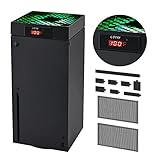
- 🍃LED Temperature Display-You can always know the temperature of your Xbox Series X console. It helps to prevent your Xbox Series X console from over-heating to extend the life of your Xbox Series X.
- 🍃Intelligent Control & Custom fan speed-[Automatic Mode]: The chip of G-STORY Xbox Series X cooling fan can automatically sense the temperature to adjust the fan speed, you can just enjoy the game and leave the heat to our cooling fan. (when the temperature is <35℃/95℉, it will stop working.) [Manual Mode]:Press the button to select the 3 speed you need, the LED will change color with the speed. (Note: Press down the button for 3s to switch between manual and automatic mode.)
- 🍃Three Level Fan Speed: Depends on the temperature of your xbox console, the Xbox Series X fan cooling system has 3 levels of fan speed(1500/1750/2000RPM) with RGB LED (Green light: 35~43℃/95~109℉; Blue light: 44~48℃/110~118℉; Red light: >48℃/119℉), it can cool your console at the most appropriate speed to protect your console.
- 🍃Low Noise & Light Weight: The Xbox Series X cooling fan is low noise and light-weight, it's powered by your xbox console, it's super portable and won't take too much space.
- 🍃Easy to Install: Just simply place the cooling fan on your console, and connect the cable to your xbox console, it will start to work. If you have any questions about using our product, please feel free to contact us. G-STORY is always here for you.
Product prices and availability are accurate as of the date/time indicated and are subject to change. Any price and availability information displayed on Amazon at the time of purchase will apply.




