To change your Roblox face or head, find a wearable item in the Avatar Marketplace, then equip it from your inventory. To create and sell a face-related avatar item, model a mesh in a 3D program such as Blender and bring it into Roblox Studio—but you must meet Roblox’s current creator requirements and Marketplace rules. The steps and eligibility depend on the item type, and not every design is eligible for upload.
How to find a face or head in the Avatar Marketplace
Use Roblox’s Avatar Marketplace to look for wearable items. Search by a keyword or title, browse the available categories, and use the filters Roblox provides to narrow results by factors such as price, creator, sales type, sorting, or availability. Category layouts and controls may vary by device or interface rollout, so use the options displayed in your Marketplace.
On a phone, open the Roblox app’s menu, choose More, then Marketplace. Open an item page to review its details and use the Buy control if you want it and it is available.
Choose for style, price, and compatibility
- Compare the item’s appearance with your avatar and the style you want.
- Check its listed price and availability in the Marketplace rather than relying on an old listing or third-party description.
- If facial animation matters to you, look for the winking-face icon. Roblox says it marks heads compatible with facial animation; not every head supports it.
How to wear or remove an owned item on a phone
Roblox’s mobile customization instructions use the inventory item’s Wear This setting to equip or remove it. Depending on the navigation rollout in your region, the avatar area may be labeled Avatar or Me.
Recommended Free Tools
#1 Best Overall
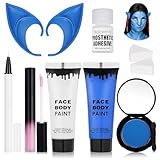
- Complete Avatar Transformation --- All-in-one avatar makeup kit includes blue & white face paint (30ml each), 2 sponges to apply the water base face paint,pastel pink lip gloss, white UV eyeliner to make the dots, blue elf ears, and blue eyeshadow to recreate your favorite fantasy character.
- High-Pigment Blue & White Face Paint --- Smooth, blendable formula with strong color payoff. The blue face paint and white face paint provide full coverage for cosplay, Halloween, festivals, and SFX makeup.
- Comfortable & Easy to Wear --- Lightweight 10cm blue elf ears made of soft material fit comfortably and complete the Na’vi-inspired look. The pastel pink liquid lip gloss adds the perfect finishing touch.
- Long-Lasting & Photo-Ready --- Designed for cosplay and stage makeup, this set resists smudging, cracking, and fading. The white UV eyeliner glows under blacklight, making your look stand out at parties or performances.
- Safe, Versatile & Fun --- Suitable for adults and teens, safe ingredients for skin application. Perfect for Halloween costumes, cosplay events, parties, festivals, or creative photo shoots.
- Open the Roblox app and go to the avatar area, labeled Avatar or Me.
- Open your inventory and select the face or head item you own.
- Set Wear This to Yes to equip it, or No to remove it.
These are Roblox’s documented phone steps. The available browser editor controls can differ, and Roblox’s cited instructions do not establish a universal set of face-specific browser steps.
How to create and sell a face-related avatar item
Roblox describes a general workflow for avatar items: most start as a mesh, or 3D shape, made in an art program, then move into Roblox Studio to become an avatar item. Roblox names Blender as one example of a modeling program. That general workflow does not guarantee that a particular face or head design qualifies for upload.
Rank #2

- 【What You Get】You will get 1 pair latex ears and 1 feather tassel beads necklace. Pair with Avatar cosplay costume, venture onto Pandora and become a true Na'vi warrior! Increase your charm, make you more different in the crowd!
- 【Cute Ears】12 cm/4.7 inch. Our dress up ears are made of good quality latex materials, super soft, can be folded and reusable. Does not put pressure on the ears when worn. Easy to wear and fit for almost all ears.
- 【Feather Tassel Beads Necklace】43 cm/16.9 inch long, with 5 cm/1.9 inch extension chain. Beads, tassels, feathers and metal pendants. The blue design is very suitable for our Avatar themed cosplay costume.
- 【Boho Feather Necklace】Each piece comes with a small comb clip at the top, can be secured with additional hair clips. Works great with any hair styles for women of all ages, suitable for any colors of hair style.
- 【Wide Occasions】You can use them in animation expo, masquerade, Halloween cosplay parties, theme events, stage performances and other occasions. Bohemian necklaces are even suitable for beach vacations.
1. Model the mesh
Create the 3D shape in a suitable art program. Roblox’s overview mentions Blender as an example, not as a required or exclusive choice.
2. Prepare it in Roblox Studio
Bring the mesh into Roblox Studio and use the relevant avatar-item workflow there. The exact submission requirements depend on the asset type; check Roblox’s current item-specific instructions rather than assuming every mesh can be published as a wearable face or head.
Rank #3
![Roblox Avatar Shop Series Collection - Social Medusa Influencer with Selfie Stick Figure Pack [Includes Exclusive Virtual Item]](https://m.media-amazon.com/images/I/51NTOqw7n5L._SL160_.jpg)
- The Avatar Shop Series includes an action figure and interchangeable accessories inspired by some of the most popular items on Roblox
- Mix and match parts to build your own unique Roblox character
- Deck out your figures with the included accessories
- Each package comes with a redeemable code to unlock an exclusive virtual item on Roblox
3. Check creator eligibility and permission
Before preparing a sale, review Roblox’s current creator requirements and Marketplace policy. Roblox’s overview gives examples of requirements such as verifying an account or linking a parent’s account, and notes that some steps may cost Robux; it does not provide a complete, fixed checklist. Sell only work you made or have permission to sell, and follow the Marketplace policy and Community Standards.
4. Confirm mesh rules, fees, and submission details
For mesh sellers, Roblox says participation in the UGC program is required and the item must meet Marketplace Policy. Roblox also says uploading and selling a mesh incur a fee, but the exact current fee and full technical specifications are not established here. Check the current Creator Hub guidance and submission flow before committing to a design or budget.
Rank #4

- Cosplay Accessories:Designed to be worn with Halloween cosplay costumes, this tassel necklace with feathers lets you step into the world of Cosplay mysterious and transform into a true warrior of the Na'vi. Perfect for conventions, parties or Halloween events,Intricate detailing and vibrant feather colors add a touch of elegance to any look.
- You will receive: A cosplay bohemian tassel necklace, a pair cosplay elf ears and a set beaded cosplay bracelets.
- Versatile Cosplay Piece:Our cosplay elf ears are crafted with a realistic design that allows you to effortlessly transform into the mysterious creature. Made of high quality latex material, these elf ears will enhance your Halloween or cosplay costume.
- Styling Options: This tassel necklace can be easily paired with both casual and formal outfits, adding a touch of sophistication to any ensemble. Whether you're going for a boho-chic look or a more polished style, this necklace is a must-have accessory.
- Perfect Gift: Looking for a unique and memorable gift? Look no further! Our long tassel necklaces for women is an ideal choice for friends, family, or cosplay enthusiasts. It is a statement piece that will leave a lasting impression.
Avatar Marketplace versus Creator Store
The two stores serve different purposes. The Avatar Marketplace is for wearable avatar items. Roblox says Creator Store assets are for use in Roblox Studio and cannot be worn on an avatar. If your goal is a face or head your character can wear, look for the Avatar Marketplace workflow rather than treating a Creator Store asset as wearable.
Quick Recap
Best Value

- 【Avatar Cosplay Accessories】You will get 1 pair blue Avatar elf ears and 1 feather tassel beads necklace. Increase your charm, make you more different in the crowd!
- 【Size】Avatar ears size is 11 cm/4.3 inch. Necklace size is 45 cm/17.7 inch long, with 5 cm/1.9 inch adjustable chain.
- 【High Quality Material】Necklace crafted from acrylic, feather, and metal while the ears are made of soft, non toxic latex. Easy to wear and fit for almost people.
- 【Wide Occasions】 You can use them in animation expo, masquerade, Halloween cosplay parties, theme events, stage performances even beach vacations.
- 【Charming Addition】With Avatar cosplay costume, enhancing your overall cosplay experience. Venture onto Pandora and become a true Na'vi warrior!
What to verify before you buy or publish
- Buying: Check the item’s current Marketplace listing for its price and availability.
- Equipping: On a phone, use the inventory item’s Wear This setting; the avatar navigation label may read Avatar or Me.
- Animation: Look for the winking-face icon when facial-animation support is important.
- Selling: Confirm current creator eligibility, UGC participation requirements for meshes, fees, and item-specific submission rules in Roblox’s Creator Hub before uploading.
- Rights and store: Publish only work you own or are authorized to sell, and use the Avatar Marketplace for wearable items.
Product prices and availability are accurate as of the date/time indicated and are subject to change. Any price and availability information displayed on Amazon at the time of purchase will apply.



