Crashes, No Sound, or Screen Glitches?
Random freezes, missing sound and display glitches usually trace back to one bad driver. Find and replace yours safely.Free scan · under a minuteWindows Errors? Fix Them Before They Spread
Repair common Windows errors and clear accumulated junk for a smoother, more stable PC - no reinstall needed.Free scan · no reinstallIf Call of Duty: Black Ops 7 crashes or freezes on PS5, start by closing and reopening the game, checking for game and system updates, and making sure the console has room to ventilate. If the problem continues, use PlayStation’s troubleshooting steps, including checking the installation, Safe Mode maintenance, and reinstalling. No single step is guaranteed to fix every crash: Activision says crashes can happen for a variety of reasons.
Check whether the problem is specific to Black Ops 7
Activision’s known-issues list, dated September 25, 2026, does not list a PS5-specific crash issue. That describes what is on the public list, not proof that no players are experiencing crashes; the list can change, so check it again if the problem persists: Activision’s Black Ops 7 known issues.
Pay attention to whether other games also crash. If only Black Ops 7 is affected, report it to Activision and check for a game-specific issue. If multiple games are affected, PlayStation says a console issue may be involved, so contact PlayStation Support.
Try the low-risk fixes first
- Close and relaunch the game. If it is frozen, close the application and start it again. Restart the PS5 if the game remains unresponsive. Activision’s guidance for crashes and freezes is available in its Black Ops 7 crash and freeze troubleshooting article.
- Check the game installation and update. Confirm the game has finished installing and install any available game update. For a digital game, PlayStation recommends confirming the download or installation completed.
- Update PS5 system software. Install any available system software update, then try the game again.
- Improve ventilation. Make sure the console is in a cool, well-ventilated location. Do not block its vents.
These first steps are reversible and do not require deleting saved data.
Recommended Free Tools
#1 Best Overall

- 100+ classic games lovingly presented with best-in-class emulation and modern quality-of-life enhancements – and the ability to play classic games that have not been available for ages
- Discover the brand that launched the modern video game industry and the creative individuals behind it through interviews, archival images, special source material and behind-the-scenes content within an interactive timeline
- Emulation of games created for seven hardware platforms: Arcade, Atari 800, Atari 2600, Atari 5200, Atari 7800, Atari Jaguar, Atari Lynx
- Over 60 minutes of exclusive interviews with key players in the games industry – from early Atari designers and engineers and other luminaries of the gaming world -- as they discuss Atari’s enduring impact on the video entertainment landscape
- A retrospective on gaming history that is a must-own for collectors and fans of video games
Use PlayStation’s troubleshooting steps if crashes continue
If the game will not start
- Restore licenses. PlayStation includes this in its launch troubleshooting sequence for games that will not start.
- Check the installation location. If the game is installed on USB extended storage and will not start, move it to the PS5’s internal storage.
- Clear the cache or rebuild the database in Safe Mode. Follow PlayStation’s game launch troubleshooting steps for entering Safe Mode and selecting the relevant maintenance option.
- Delete and redownload the game. Reinstalling can take time and require a large download, so use it after the quicker checks.
If the game starts but keeps crashing
PlayStation recommends testing the game from the beginning without the existing save to check whether the save may be corrupted, then reinstalling if needed. This is a troubleshooting test, not a guarantee that the save is at fault. See PlayStation’s game crash and freeze guidance.
Treat resetting the console as a last resort. PlayStation warns that resetting erases data saved on console storage; back up your data before resetting.
Rank #2

- Bakker & Elkhuizen
- Mouse
- Colour: Black
- Package Dimensions: 14.8 L x 9.2 H x 10.2 W (cm)
- Model number: BNEEVR4S
Give support useful details
Before reporting the crash, note whether the game freezes, closes to the dashboard, or displays an error code. Also record the game mode, what you were doing immediately before the crash, whether it happens consistently, and whether other games are affected. PlayStation asks users contacting support to provide error codes, a detailed description and reproduction steps, plus a screenshot or video if possible. If only Black Ops 7 is affected, contact Activision or use its bug-report route for issues not listed on its known-issues page. For crashes across multiple games, contact PlayStation Support.
Quick Recap
Rank #3
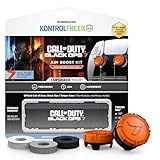
- MADE FOR CALL OF DUTY - Officially-licensed Black Ops 7 design
- EXCLUSIVE SINPER CASE - Holds Performance thumbsticks and Precision Rings
- INCLUDES IN-GAME ITEM - Comes with in-game weapon charm for Call of Duty Black Ops 7
- PERFECT FOR FPS GAMES - Mixed-rise thumbsticks upgrade your aim and control
- GET MORE CONTROL - Mid-rise left stick upgrades grip and movement
Product prices and availability are accurate as of the date/time indicated and are subject to change. Any price and availability information displayed on Amazon at the time of purchase will apply.




