If your Xbox 360 has no sound, first check that its audio cable is fully connected and that your TV or receiver is set to the correct input. Then make sure the console’s audio output matches what that equipment supports. If you hear sound from only one speaker, check the audio leads at both ends. These checks cover the common connection and format issues; they cannot rule out a faulty port or console.
Start with the audio route and input
Identify how your Xbox 360 is connected: HDMI to the TV, analog left/right audio leads to a TV or receiver, or a digital connection to a receiver. The steps depend on that route.
- HDMI to a TV: Make sure the HDMI cable is seated at the console and TV, and select the TV input for that HDMI port.
- Analog audio: Check that the red and white audio leads are firmly connected to the intended audio input group. Select that input on the TV or receiver.
- Digital audio to a receiver: Check the digital connection, turn on the receiver, and select the input receiving the console’s signal.
Microsoft’s Xbox 360 console manual recommends checking the AV connection when there is no sound. A TV or receiver on the wrong input can make a working console appear silent.
Match the console’s audio output to your equipment
A TV, speaker system, or receiver must support the audio format selected on the Xbox 360. If the output format is unsupported, sound may be absent or play poorly. For digital audio, Microsoft advises: “If you’re using digital audio, make sure the receiver is turned on and the output in your Xbox 360 console’s audio settings is set correctly.” See the console manual.
#1 Best Overall

- AV cable is compatible with XBOX360 console, not applicable to XBOX360 E/Xbox360Kinect sensor console
- XBOX360 cable is made of high-quality PVC material, with soft wire body, strong toughness, tensile resistance and wear resistance
- The audio and video cable uses analog signals to support up to 480i standard resolution, and high-end connectors provide you with safe, interference free and distortion free connections
- 3RCA cables can be connected to your HD TV or EDTV to provide the clearest video and sound for your Xbox 360 system and enjoy the game
- The length of RCA cable is 1.8m (about 6FT), which is enough to enjoy games at home
An archived copy of Microsoft Knowledge Base article 906660 describes a historical settings path: start the console without a disc, then open System > Console Settings > Audio in the Xbox Dashboard. It lists analog choices including Mono and Dolby Pro Logic II, and digital choices including Digital Stereo and Dolby Digital 5.1. It also describes WMA Pro pass-through when supported by the receiver and states that Xbox 360 does not support DTS. Treat those labels and options as legacy guidance: dashboard versions and console or cable revisions may differ. The article is available in an archived mirror.
If HDMI picture works but there is no sound
Check the TV’s selected HDMI input and the audio-output setting, then confirm that the TV supports the selected format. If your setup needs audio routed separately while HDMI carries the picture, Microsoft’s HDMI AV troubleshooting guide describes using an optional audio adapter.
Rank #2

- Connect to your HDTV (High-Definition TV) or EDTV (Enhanced-Definition TV)
- Compatible for Xbox 360.Designed to provide video and sound for your game system.Not compatible for Xbox 360 E/Xbox 360 Kinect sensor console and not compatible for XBOX
- Cable Length: Approx.1.8M/5.9 ft
- Third Party Product, Not original
The same guide warns against connecting an HDMI AV cable and another AV cable to the console simultaneously. Follow the instructions for the specific cable arrangement and console revision rather than adding a second AV cable as a workaround.
If sound comes from only one speaker or sounds poor
For one-sided sound, check that all audio cables are connected correctly and that the left and right leads are attached to the intended inputs. For distorted or poor-quality sound, check whether the selected output format is supported by the connected equipment. Microsoft’s manual mentions cleaning a disc in its discussion of poor playback quality; that is relevant to disc playback, not a general fix for missing system audio.
Rank #3
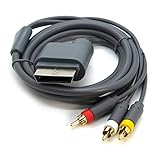
- AV Cable compatible for Xbox 360 Console. Not compatible for Xbox.Not for Xbox 360 E/Xbox 360 Kinect Sensor console
- Designed to provide video and sound
- Length: Approx.1.8M/5.9ft
- Third Party Products, Not original
Isolate the failing part before buying a cable
If the connections and settings look right, try a direct audio connection to the TV if your setup allows it, or test with another known-working, compatible input or cable. This is a way to narrow down the connection path, not a guaranteed repair. A failed TV or receiver input, cable, console port, or internal console component can still be responsible.
Consider an Xbox 360 AV cable only if the existing cable is damaged, missing, or incompatible with the input you need. An HDMI audio adapter is relevant only to a setup that requires separate audio while using HDMI. Check the console revision and the available TV or receiver inputs before choosing either accessory; neither is a universal fix.
Quick Recap
Best Value

- COMPATIBLE WITH XBOX 360 – Designed for Xbox 360 consoles, this AV cable connects your console directly to TVs, monitors, or displays with standard composite RCA inputs.
- AUDIO & VIDEO OUTPUT – Supports clear composite video and stereo audio through yellow, red, and white RCA connectors for stable everyday gaming and media playback.
- PLUG AND PLAY – Simple AV/TV out connection makes setup quick and easy. No drivers or extra adapters required.
- 6FT FLEXIBLE LENGTH – The 6-foot cable provides convenient reach from your Xbox 360 to your TV without pulling or cluttering your setup.
- REPLACEMENT AV CABLE – A practical replacement for lost, worn, or damaged original Xbox 360 AV cables. Ideal for home entertainment setups and older TVs with RCA input.
Rank #4
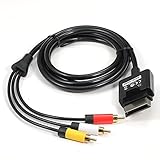
- Play your game as for Xbox 360 Slim on the highest quality imaginable.
- Length: Approx. 6 FT / 1.8 M
- Compatible : For Xbox 360 Slim,Not for Xbox360 E/Xbox362 Kinect Sensor console
- Third Party Products, not Original
Product prices and availability are accurate as of the date/time indicated and are subject to change. Any price and availability information displayed on Amazon at the time of purchase will apply.



