Quick wins for a faster PC:
Clear out junk files and repair common Windows errorsFree Scan →Scan for outdated or missing drivers - takes under a minuteDriver Scan →Repair Windows errors before they cause bigger problemsFix Now →Valve made Steam Families available to all Steam users on September 11, 2024, after its beta. The unified feature replaces Steam Family Sharing and Steam Family View, combining eligible game sharing, parental controls and child purchase requests in one place. It is not a transfer of game ownership: family members use their own accounts, and the number of copies owned determines how many people can play the same game at once.
What changed when Steam Families left beta?
Steam Families brings the older Steam Family Sharing and Family View systems together. Valve describes it as one place to manage which games family members can access and when they can play. The feature also includes controls for children’s access to games and Steam features, along with requests for extra playtime, access or purchases. Valve announced general availability on September 11, 2024; this is the date it exited beta, not a new 2026 launch.


How many people can join a Steam Family?
A Steam Family can have up to six members in total: the creator and as many as five invitees. Valve says the feature is intended for a household of close family members, and notes that participation requirements may change as it monitors usage. See the current Steam Families User Guide and FAQ for the rules in effect for your account.
How do I share my Steam games with family?
Create or join a Steam Family through Steam, then invite eligible family members. Once they join, eligible games in members’ libraries become available to the family. Each person plays from their own Steam account and retains their own saves, achievements and Workshop files. A game purchased after joining remains owned by the account that bought it; sharing grants access, not ownership.
Free tools Windows power users keep installed
One-click scans. No signup required.
#1 Best Overall

- Brighter colours, blacker blacks: Steam Deck's HDR OLED display is designed to play from scratch with stunning contrast, bright clarity and a larger image. With more colors, pure blacks and incredible interpretations of movement, you'll see your games in a new light.
- 【More time to play】 Steam Deck OLED has 30-50% more battery life. We insert a larger battery in the case and the OLED display draws less power. Add an updated, more efficient AMD APU and you have more time to play your favorites.
- Lighter, cooler: Thanks to a larger fan and updated thermals, the Steam Deck OLED runs cooler. 30g or ~5% lighter than the LCD model due to the display.
- 【COMFORTABLE CONTROLLE】 The Steam Deck is built for long gaming sessions with perfectly placed full-size controls within reach whether you are using pins or trackpad. The back of the device is shaped to fit a wide range of hand sizes comfortably.
- 【In Box】Valve Steam Deck OLED Handheld Games Console - Black; Charger; Quick Start Guide; Carry Case.
Valve says a shared game can be played offline when that particular game supports Family Sharing. Offline access and other behavior depend on the title, so check its eligibility rather than assuming every game works the same way.
Can we play the same game at the same time?
Yes, if the family owns enough copies of that game. Each copy supports one person playing it at a time. For example, if one member owns Portal 2, one family member can play that copy at once; if another member buys a second copy, two people can play simultaneously. Family members can also play different eligible games from the shared library at the same time.
Why can’t I share every game?
Sharing eligibility is set title by title, and some games or content cannot be shared. Developers can opt out; Valve’s announcement gives games requiring an additional third-party key, account or subscription as examples. The Steam Support FAQ also lists restrictions that can apply to games or DLC:
- Free-to-play games and their purchased DLC.
- Games or DLC restricted in either member’s region.
- Games that do not support the other member’s operating system.
- Titles a publisher has marked unavailable for sharing.
- Games the owner has marked private.
Account or technical limitations can affect access as well. Check a specific game’s current sharing eligibility in Steam; the fact that a title appears in a family library does not guarantee it can be played by every member in every situation.
Recommended Free Tools
Can my child ask me to buy a game on Steam?
Yes. A child in the family can ask an adult to pay for a shopping cart. An adult can approve and pay through a mobile device or email, and approved games are added to the child’s account.
Steam Families also gives adults tools to manage children’s access. Adults can select accessible games, restrict the Steam Store, Community or Friends Chat, set hourly or daily playtime limits, review playtime reports, and approve or deny requests for more time or access to features. Adults can manage invitations and restrictions; children cannot manage family settings. Valve says adults may be able to recover a child’s account in some circumstances.
Rank #4

- The SD Face Clicky kit is exclusively designed for the Steam Deck LCD (2022) handheld console, NOT fit for Steam Deck OLED console
- This custom tact switches Face Clicky Kit is specially designed for the Steam Deck console. It significantly enhances the responsiveness of Dpad, ABXY, View, and Menu buttons by reducing their distance, resulting in react faster during gameplay
- Easy to install, requires disassemble the console with no soldering required. Get the installation video guide on YouTube by searching "eXtremeRate Face Clicky Kit for Steam Deck" or "1k4oK_TYOP4"
- The package includes 1* customized FPC board for the D-pad and view buttons, 1* customized FPC board for the ABXY and menu buttons, 4* conductive pads, screwdrivers, and spare screws springs. (Please note: WITHOUT console, buttons, and other parts.)
- Compatible with both eXtremeRate replacement buttons and official buttons for Steam Deck
What happens if someone leaves a Steam Family?
Adults can leave, but Valve’s current support FAQ says an adult must wait one year from joining their previous family before joining or creating another. A vacated family slot also has a one-year cooldown before it can be filled again. Children cannot remove themselves; an adult or Steam Support must remove them. Because these rules can affect the whole household, check the current FAQ before changing membership.
Valve’s launch FAQ also says that if a family member cheats while playing another member’s copy, the owner of that copy will be banned in that game too; other family members are not affected. This is a game-specific account risk, not a transfer of the owner’s Steam account or library.
Best Value
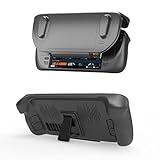
- [Comprehensive Protection]This protective case is specifically designed for Steam Deck/OLED and fits perfectly to the steam deck console. Don't worry about the steam deck case being damaged, the steam deck cover is made of shock-absorbing, oil-proof, and scratch-resistant TPU material.Protect your device from daily bumps, scratches, falls and dust.
- [Perfect Match]The Ultra-thin TPU case together with a precisely cutted slide cover to fully protect your Steam Deck all around from 360’degree.Designed with specially placed cut-outs every port or button will not be blocked by the case, so all Steam Deck features are accessible without interference.
- [High Quality Material]This cover protector made with shock-absorbent and anti-scratch flexible TPU material, protects your device from everyday bumps, drops, falls, scratches, dust. Comfortable touch allows you to enjoy the game easily.
- [Ergonomics Design]The protective case is ergonomically designed.Let the Steam Deck fit better in your hand, making it more comfortable and easy to play games.Built-in kickstand work as table stand and provides you easy great viewing.
- [Easy to Use] This protective case is soft and can be installed or removed quickly. The high-quality, washable TPU material steam deck case is reusable, lightweight and durable. Remove the front cover in a snap when playing the games, slide and play.
How Steam Families differs from the old systems
| Area | Steam Families |
|---|---|
| Family management | One feature combines game sharing and family controls, replacing Steam Family Sharing and Family View. |
| Game ownership and progress | The purchaser keeps ownership; each member uses their own account, saves and achievements. |
| Playing the same title | Simultaneous play depends on how many copies the family owns. |
| Child safety and purchases | Adults can manage game and feature access, playtime and purchase requests. |
| Availability | Sharing depends on title eligibility, platform and region restrictions, and other limits. |
For developer-facing details on how the feature works, Valve maintains Steam Families documentation for Steamworks partners.
Quick Recap
Product prices and availability are accurate as of the date/time indicated and are subject to change. Any price and availability information displayed on Amazon at the time of purchase will apply.



