Do these 3 things before closing this tab:
1Repair Windows errors before they cause bigger problems2Fix the driver behind crashes, sound loss and screen glitches3Clear out junk files and repair common Windows errorsIf THE FINALS says “Failed to join Party” when you invite or join a friend, the message alone does not reveal the cause. Work through the checks in order: restart the game and send a fresh invite, match updates, compare crossplay and matchmaking-region settings, then check connection stability. If several players are affected despite those checks, look for current official notices rather than assuming a particular fix will work.
What the error tells you—and what it doesn’t
The phrase “Failed to join Party” describes the failed action, not a confirmed diagnosis. Possible explanations include a temporary service-side problem, mismatched settings, different client versions, connection fluctuations, or security software, but the message itself cannot tell you which applies. A troubleshooting article from Dot Esports lists these as possibilities, not verified causes for an individual player: Dot Esports’ troubleshooting guide.
Use the pattern of who is affected to narrow your checks, not as proof: note whether one player or everyone is unable to join, whether the party spans platforms, whether game versions match, and whether anyone’s connection is unstable. Then follow the steps below.
Try these fixes in order
-
Restart the game and send a new invite
Have each player fully close and restart THE FINALS. Then create a new party and send a fresh invite. This is a basic workaround suggested by Dot Esports, not a guaranteed fix.
Special offer. See more information about Outbyte and uninstall instructions. Please review EULA and Privacy policy.#1 Best Overall
Sale Razer BlackShark V2 X Gaming Headset: 7.1 Surround Sound - 50mm Drivers - Memory Foam Cushion - For PC, PS4, PS5, Switch - 3.5mm Audio Jack - Black
- ADVANCED PASSIVE NOISE CANCELLATION — sturdy closed earcups fully cover ears to prevent noise from leaking into the headset, with its cushions providing a closer seal for more sound isolation.
- 7.1 SURROUND SOUND FOR POSITIONAL AUDIO — Outfitted with custom-tuned 50 mm drivers, capable of software-enabled surround sound. *Only available on Windows 10 64-bit
- TRIFORCE TITANIUM 50MM HIGH-END SOUND DRIVERS — With titanium-coated diaphragms for added clarity, our new, cutting-edge proprietary design divides the driver into 3 parts for the individual tuning of highs, mids, and lowsproducing brighter, clearer audio with richer highs and more powerful lows
- LIGHTWEIGHT DESIGN WITH BREATHABLE FOAM EAR CUSHIONS — At just 240g, the BlackShark V2X is engineered from the ground up for maximum comfort
- RAZER HYPERCLEAR CARDIOID MIC — Improved pickup pattern ensures more voice and less noise as it tapers off towards the mic’s back and sides
-
Make sure everyone has the same current update
Check for and install any available game update on every platform in the party. A dated official Steam discussion gives useful, but patch-specific, guidance: on February 8, 2024, an Embark community manager account, EMBARKCM, replied, “Try to verify the game files, and also ensure that everyone in the party has their client updated after today’s patch.” That comment concerned that day’s patch; it does not indicate a current outage or current patch problem. Read the official THE FINALS Steam discussion.
On PC, verify the game’s local files if the problem remains. In Steam, open your Library, right-click THE FINALS, choose Properties, select Installed Files, and choose Verify integrity of game files. The wording or location may differ in other launchers; use that platform’s file-repair option if available.
Rank #2
Sale Logitech G432 Wired Gaming Headset - Black
- Enjoy expansive cinematic sound. Big 50 mm audio drivers deliver an incredible sound experience
- Hear Enemies From All Sides. DTS Headphone:X 2.0 surround sound(1) lets you hear enemies sneaking behind you, special ability cues, and immersive environments. It’s positional clarity that can make the difference between victory and defeat. Experience three-dimensional audio that goes beyond 7.1 channels to make you feel like you’re right in the middle of the action. (1) DTS Headphone:X 2.0 requires Logitech G HUB Software.
- Be Heard Loud and Clear. The big 6 mm boom mic makes sure you’re heard by gaming partners and mutes when flipped up.
- Use One Headset For Most Game Platforms. Your headphones work with your PC or Mac via USB DAC or 3.5 mm cable, mobile devices with 3.5 mm cable or with gaming consoles including PlayStationⓇ 5 and PlayStationⓇ 4 (USB wireless stereo sound only), Nintendo Switch (wireless stereo sound when docked)
- Game for Hours in Comfort. Everything about these headphones is about comfort: The deluxe lightweight leatherette ear cups and headband are made to keep pressure off your ears. Ear cups rotate up to 90 degrees for convenience.
-
Compare crossplay and matchmaking-region settings
If the party includes players on different platforms, check that crossplay is enabled and compatible for everyone. Compare the matchmaking-region setting across the party too; the secondary guidance suggests using Automatic consistently. Menu names and options can change between updates and platforms, so confirm the current choices in the game rather than relying on an old menu path. These recommendations come from Dot Esports’ November 30, 2023 article and may not reflect current menus.
-
Check for an unstable connection
If a player’s connection is fluctuating, test it and try again. Restarting existing router or modem equipment may clear a temporary hiccup, according to Dot Esports. This is a troubleshooting step, not evidence that new networking equipment or accessories are needed.
Recommended Free Tools
Special offer. See more information about Outbyte and uninstall instructions. Please review EULA and Privacy policy.Rank #3
Sale BENGOO G9000 Stereo Gaming Headset for PS4 PC Xbox One PS5 Controller, Noise Cancelling Over Ear Headphones with Mic, LED Light, 7.1 Surround Sound, Soft Memory Earmuffs for Nintendo Xbox Series X|S
- 【Multi-Platform Compatible】Support PlayStation 4, PlayStation 5, Xbox, Xbox Series X|S, Xbox One, PC, Nintendo 3DS, Laptop, PSP, Tablet, iPad, Computer, Mobile Phone. Please note you need an extra Microsoft Adapter (Not Included) when connect with an old version Xbox One controller.
- 【7.1 Surround Sound】Clear sound operating strong brass, splendid ambient noise isolation and high precision 40mm magnetic neodymium driver, acoustic positioning precision enhance the sensitivity of the speaker unit, bringing you vivid sound field, sound clarity, shock feeling sound. Perfect for various games like Halo 5 Guardians, Metal Gear Solid, Call of Duty, Star Wars Battlefront, Overwatch, World of Warcraft Legion, etc.
- 【Noise Isolating Microphone】Headset integrated onmi-directional microphone can transmits high quality communication with its premium noise-concellng feature, can pick up sounds with great sensitivity and remove the noise, which enables you clearly deliver or receive messages while you are in a game. Long flexible mic design very convenient to adjust angle of the microphone.
- 【Great Humanized Design】Superior comfortable and good air permeability protein over-ear pads, muti-points headbeam, acord with human body engineering specification can reduce hearing impairment and heat sweat.Skin friendly leather material for a longer period of wearing. Glaring LED lights desigend on the earcups to highlight game atmosphere.
- 【Effortlessly Volume Control】High tensile strength, anti-winding braided USB cable with rotary volume controller and key microphone mute effectively prevents the 49-inches long cable from twining and allows you to control the volume easily and mute the mic as effortless volume control one key mute.
-
Check for an official service notice if it still fails
If the party still cannot connect, check current official THE FINALS notices or contact official support through its current channel. The sources cited here do not establish live service status or a current support escalation process, so do not treat the error alone as confirmation that servers are down. A February 5, 2024 Prima Games article also suggests checking service availability, verifying files, and reinstalling, but those are secondary suggestions; prioritize current official guidance before considering a reinstall: Prima Games’ troubleshooting article.
How to narrow down where the problem lies
- Only one player cannot join: Start with that player’s update, local files on PC, settings, and connection. This is a way to organize checks, not a validated diagnostic rule.
- The party uses different platforms: Compare crossplay compatibility and make sure each player has installed the current update.
- Everyone is affected: Restart and check versions and settings, then look for official notices. A group-wide failure can suggest checking for a shared or service-side issue, but does not establish one.
- The issue comes and goes: Check whether a player’s connection is fluctuating and retry after restarting existing network equipment.
When to stop troubleshooting locally
If everyone is updated, the settings are compatible, connections appear stable, and a fresh party still fails, further local changes may not help. Check official notices and use the current official support route if the error continues. Reinstalling is mentioned by secondary coverage, but the evidence here does not establish it as a reliable or necessary fix; consider it only if official support recommends it or platform-specific repair steps point to damaged local files.
Quick Recap
Best Value
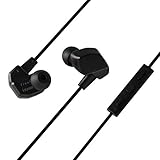
- SPATIAL GAMING SOUND: VR3000 gaming earphones provide an immersive and open sound experience - ideal for exploring large open-world adventure games, and virtual reality environments with a concentrated sense of direction, perfect for wide open and engrossing gaming environments.
- HIGH PRECISION DYNAMIC DRIVERS: To ensure all sounds created by game developers can be delivered clearly, accurately and defined, final have designed a 6mm fast responding high fidelity dynamic driver with new materials for VR3000.
- IN-LINE MICROPHONE: VR3000 is equipped with a built-in microphone for phone calls or in-game voice communication, and three button controls for volume control and answering calls or playing and pausing music and videos.
- LOCKING EAR HOOKS: Clever designed earhooks with locking mechanism that eliminate microphonic touch noise from cable friction provide a better gaming experience to the listener.
- PROPRIETARY EARTIPS: VR3000 are supplied with five pairs of silicone eartips that utilize two different types of silicone material, each with a distinct hardness for the sound conduit and the part that touches the ear. For the part that touches the ear, a softer silicone ensures a comfortable fit and superior noise isolation.
Rank #4

- TRIFORCE TITANIUM 50 MM DRIVERS — Our cutting-edge proprietary design divides the driver into 3 parts for the individual tuning of highs, mids, and lows—producing brighter, clearer audio with richer highs and more powerful lows
- HYPERCLEAR CARDIOID MIC — An improved pickup pattern ensures more voice and less noise as it tapers off towards the mic’s back and sides, with the sweet spot easily placed at the mouth because of the mic’s bendable design
- ADVANCED PASSIVE NOISE CANCELLATION — Sturdy closed earcups fully cover the ears to prevent noise from leaking into the headset, with its cushions providing a closer seal for more sound isolation
- LIGHTWEIGHT DESIGN WITH MEMORY FOAM EAR CUSHIONS — At just 240 g, the headset features thicker headband padding and memory foam ear cushions with leatherette to keep gaming in peak form during grueling tournaments and training sessions
- WORKS WITH WINDOWS SONIC — Make the most of the headset’s powerful drivers by pairing it with lifelike surround sound that places audio with pinpoint accuracy, heightening in-game awareness and immersion
Product prices and availability are accurate as of the date/time indicated and are subject to change. Any price and availability information displayed on Amazon at the time of purchase will apply.



