Do these 3 things before closing this tab:
1Fix the driver behind crashes, sound loss and screen glitches2Clear out junk files and repair common Windows errors3Scan for outdated or missing drivers - takes under a minuteMost PlayStation 2 consoles support PlayStation-format CD-ROM games, but Sony warns that some titles may not perform properly on a particular console. If a PS1 game will not work, check the disc and the PS2’s ability to read other discs first; then identify the exact console model, game, and point of failure. A supported format does not guarantee that every title will work correctly.
Can a PS2 play PS1 games?
Yes, PS2 consoles support PlayStation-format CD-ROM software in general. However, Sony’s manual for the SCPH-90004 states: “Some PlayStation® format software may not perform properly on this console.” That warning is about some titles, not a lack of PS1 support overall. Sony’s manuals are model-specific, so the SCPH-90004 caveat should not be treated as a title-by-title verdict for every PS2 revision. Sony’s PS2 manuals are organized by model.
What to check when a PS1 game will not work
-
Confirm the disc and the symptom
Check that the game is an original PlayStation CD-ROM and note exactly what happens: the PS2 does not recognize it, it fails during startup, it freezes or develops audio or graphical problems during play, or it runs but has a controls or save-data issue. Those symptoms point to different parts of the problem.
-
Inspect the disc
Sony advises checking that a disc is a type the console can play and is clean and in good condition. Dust, scratches, or recording problems can prevent some discs from playing. If the disc is dirty, gently wipe it with a soft cloth. Trying another known-good supported disc can help you distinguish a problem with one disc from a broader disc-reading issue; this comparison is a diagnostic step, not a guarantee of what is wrong.
The Tool Desk
Outbyte Driver Updater FREEFix the driver behind crashes, sound loss and screen glitchesFind Drivers →Outbyte PC Repair FREERepair Windows errors before they cause bigger problemsFix Now →Special offer. See more information about Outbyte and uninstall instructions. Please review EULA and Privacy policy.#1 Best Overall
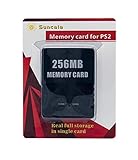 Suncala 256MB Memory Card for PlayStation 2, High Speed Memory Card for Sony PS2-1 Pack
- Upgrade innovation chip that process and save the games faster by 15% than older version, smooth and steady without interruption.
- Fully compatible with Sony Playstation 2 and playstation 2 Slim.
- Improved storage system now compatible with more game than ever.
- Newly design package, fresh and elegant look. Sleek package allows you to easily slip the memory card in and out.
- 60 months worry free warranty. Friendly and supportive customer service is there to answer all your questions within hours.
-
Check whether other discs work
Try another supported disc that you know is in good condition. If that plays, the original game disc or its title-specific behavior becomes more likely; if several discs fail, the issue may be with the console’s ability to read discs. This check narrows the possibilities but does not establish a repair diagnosis.
-
Record the exact console and game
Find the SCPH model number on the console label, and note the game title and market or region. Sony’s compatibility warning is documented for the SCPH-90004; a general format listing cannot establish whether a specific game works on every model. Sony’s manual index can help you locate the guide for your model.
Rank #2
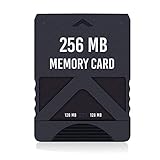 RGEEK 256MB High Speed Game Memory Card Compatible with PlayStation 2 PS2
- Never lose saved data again or have to constantly switch between smaller memory cards | 256MB (2043 Block) memory card is perfect even for the most demanding PlayStation 2 games
- Durable, compact design mimics look and feel of original memory cards and is compatible with all PS2 games and systems | Memory card features two switchable data banks to achieve 256 megabyte capacity
- Please Note: To reach full capacity of memory card dual 128 megabyte banks must be switched between | Front facing switch on card must be set to apropriate memory bank prior to turning on console
- Compatible with: PS2 (Playstation 2) consoles only | Will not work with backwards compatible fat PS3 consoles or PSONE (PSX) systems
- Package Contents: 1x PS2 memory card | Works on all models of PS2 including launch, fat and slim console variants
-
Separate startup problems from controls or saves
If the game starts but controls behave unexpectedly, check the game’s instructions and the controller mode. The SCPH-90002/SCPH-90003 guide says that in analog mode, only the left and right analog sticks can be used with PlayStation-format software, and an individual game may impose further limits. If the game plays but cannot load PS1 saved data, use a PlayStation-format Memory Card (SCPH-1020); the PS2 8 MB memory card is a different format for PS2 game data. Neither a controller adjustment nor a memory card addresses a disc that will not boot.
Can the PS2’s PlayStation Driver settings fix it?
The SCPH-90002/SCPH-90003 guide describes PlayStation Driver options intended to optimize PS1 software. These are model-specific options, not a universal compatibility fix. If an optimization does not help or causes display problems, that guide recommends returning the setting to Standard. Sony’s documented options do not guarantee that a title that fails on a given console will become compatible.
Rank #3

- TWO SEPARATE 128 MB BANKS, NOT ONE POOL OF 256 MB: The selector on the front of the card chooses which bank the console talks to, and each bank is its own storage area with its own save list. Nothing spans the two, so a file written on one side is invisible from the other. Set the selector first and then turn the console on, because the console reads the position once at start-up and does not look again.
- BUILT FOR PS2 AND FOR THE SLIM, AND FOR NOTHING ELSE: It drops into the memory card slot made for PS2, on every revision from the first SCPH-10000 through to the 90000 series, fat or slim. It is not for the PS One, not for the PSX, and not for a fat PS3 running a disc in backward compatible mode. Those machines use a different card and will not read this one.
- IT IS A STORAGE CARD, AND IT WILL NOT RUN FREEMCBOOT: If the plan is to install a homebrew launcher, this is the wrong card and no amount of formatting will change that. What it does do is hold save files, and a lot of them, which is the job most people actually need a second card for.
- NO BOOT DISC, NO DRIVERS, NOTHING TO INSTALL: Push it into the slot and the console lists it straight away. Save sizes vary by title, and the back of a game case usually prints how many kilobytes a save needs, so you can work out how far one bank will go before you fill it.
- WHAT ARRIVES IS ONE BLACK CARD, 5.6 BY 4.1 BY 0.6 CM: Two habits keep a save file intact on any card of this kind: leave the console powered down while the card goes in or comes out, and do not cut the power while a title is writing.
What information helps narrow down the cause?
If the checks do not resolve the problem, gather these details before seeking a game- or console-specific answer:
- The PS2’s exact SCPH model number.
- The PS1 game title and its market or region.
- Whether other known-good discs play on the same console.
- The failure stage: recognition, startup, gameplay, controls, or save loading.
- Whether the disc is visibly dirty or scratched.
Sony’s published materials cited here establish broad support for PS1-format CD-ROMs and warn that some software may not perform properly. They do not provide an exhaustive compatibility list or a verified verdict for every game-and-model combination, so those details are needed to assess a particular case.
Quick Recap
Best Value

- Can create virtual memory cards (128KiB) for game saving, compatible with both PS1 / PS/PS2 and and arcade systems.
- For PS1/PS one: Supports launching FreePSXBoot using Unirom or Tonyhax.
- For PS2: Supports launching FreeMCBoot, OpenTuna, and other exploits.
- Tips:Supports setting PS2 Virtual Memory Card sizes: 1MB, 2MB, 4MB, 8MB, 16MB, 32MB, or 64MB.
- Save at any time: It can automatically detect running games and create dedicated virtual memory cards, so players can save game at any time, keep their gaming experience.
Rank #4

- Upgrade innovation chip that process and save the games faster by 15% than older version, smooth and steady without interruption.
- Fully compatible with Sony Playstation 2 and playstation 2 Slim.
- Improved storage system now compatible with more game than ever.
- Newly design package, fresh and elegant look. Sleek package allows you to easily slip the memory card in and out.
- 60 months worry free warranty. Friendly and supportive customer service is there to answer all your questions within hours.
Product prices and availability are accurate as of the date/time indicated and are subject to change. Any price and availability information displayed on Amazon at the time of purchase will apply.



